Page 437 of 563

Menu Item, Actions and Description
Menu Item
Touch this button to adjust settings for:
Sound Settings
Bass
Midrange
Treble
Set Balance and Fade
DSP
Occupancy Mode
Speed Compensated Volume
This allows you to select a category of music you would like to search for. You can then choose to either
seek or scan for the stations playing that category.
Set Category for Seek/Scan
This allows you to lock and unlock channels, change or reset your PIN or\
unlock all channels. To use this
feature, you need your initial PIN, which is 1234.
Parental Lockout
This feature allows you turn alerts on and off.
Artist / Title / Team Alerts
SIRIUS requires this number when communicating with you about your accou\
nt.
Electronic Serial Number (ESN)
Touch this button to manually enter the desired satellite channel number. Touch Enter when you are done
Direct Tune
Note: Your vehicle may not have all these sound settings.
434
MKX (CD9) Canada/United States of America, enUSA, ASO/OGC Review MyLincoln Touch™
Page 438 of 563

SIRIUS Satellite Radio Information
Note:
SIRIUS reserves the unrestricted right
to change, rearrange, add or delete
programming including canceling, moving
or adding particular channels, and its prices,
at any time, with or without notice to you.
Ford Motor Company shall not be
responsible for any such programming
changes. SIRIUS satellite radio is a subscription-based
satellite radio service that broadcasts a
variety of music, sports, news, weather, traffic
and entertainment programming. Your
factory-installed SIRIUS satellite radio system
includes hardware and a limited subscription
term that begins on the date of sale or lease
of your vehicle. See an authorized dealer for
availability.
For more information on extended
subscription terms (a service fee is required),
the online media player and a list of SIRIUS
satellite radio channels, and other features,
please visit www.siriusxm.com in the United
States, www.sirius.ca in Canada, or call
SIRIUS at 1-888-539-7474.
Note:
This receiver includes the eCos
real-time operating system. eCos is
published under the eCos License.
Satellite Radio Electronic Serial Number
(ESN)
You need your ESN to activate, modify or
track your satellite radio account. The ESN
is on the System Information Screen (SR
ESN:XXXXXXXXXXXX).
To access your ESN, touch the bottom left
corner of the touchscreen, then select: Menu Item
SIRIUS
Options
435
MKX (CD9) Canada/United States of America, enUSA, ASO/OGC Review MyLincoln Touch™E142593
Page 439 of 563
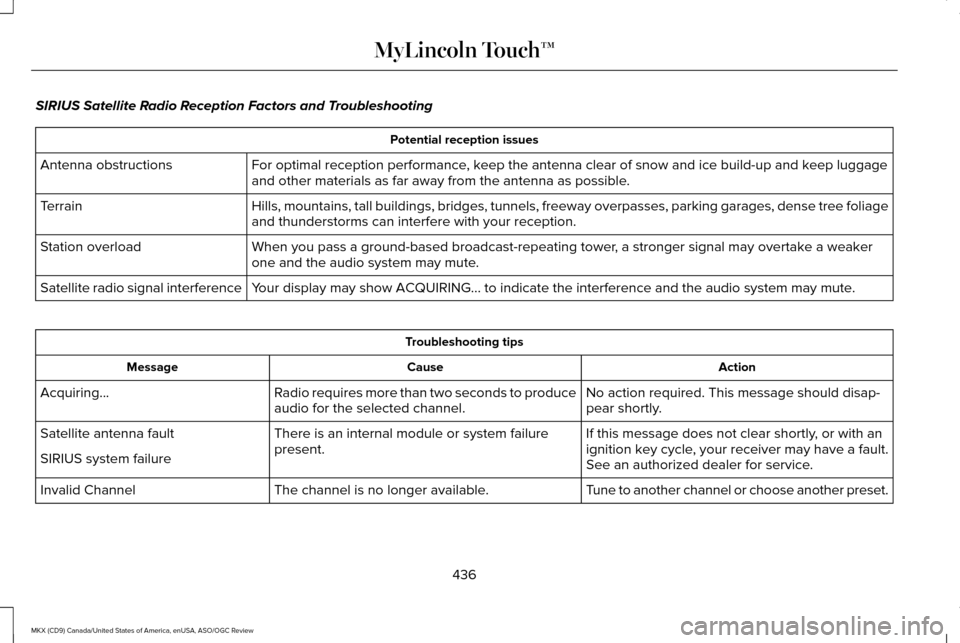
SIRIUS Satellite Radio Reception Factors and Troubleshooting
Potential reception issues
For optimal reception performance, keep the antenna clear of snow and ice build-up and keep luggage
and other materials as far away from the antenna as possible.
Antenna obstructions
Hills, mountains, tall buildings, bridges, tunnels, freeway overpasses, \
parking garages, dense tree foliage
and thunderstorms can interfere with your reception.
Terrain
When you pass a ground-based broadcast-repeating tower, a stronger signal may overtake a weaker
one and the audio system may mute.
Station overload
Your display may show ACQUIRING... to indicate the interference and the a\
udio system may mute.
Satellite radio signal interference Troubleshooting tips
Action
Cause
Message
No action required. This message should disap-
pear shortly.
Radio requires more than two seconds to produce
audio for the selected channel.
Acquiring…
If this message does not clear shortly, or with an
ignition key cycle, your receiver may have a fault.
See an authorized dealer for service.
There is an internal module or system failure
present.
Satellite antenna fault
SIRIUS system failure
Tune to another channel or choose another preset.
The channel is no longer available.
Invalid Channel
436
MKX (CD9) Canada/United States of America, enUSA, ASO/OGC Review MyLincoln Touch™
Page 442 of 563

Insert your CD then select:
Action and Description
Menu Item
Touch this button to repeat the currently playing track, all tracks on th\
e disc or switch the feature off if
already on.
Repeat
Touch this button to play the tracks or entire albums in random order, or switch the feature off if already
on.
Shuffle
Touch this button to hear a brief sampling of all available tracks.
Scan
Touch this button to see disc information.
More Info
Touch this button to look through all available CD tracks.
Browse
To adjust the Sound Settings, select: Menu Item
Options
Sound Settings
Then any of the following:
Bass
Midrange Menu Item
Treble
Set Balance and Fade
Occupancy Mode
EQ Mode
Speed Compensated Volume
Note: Your vehicle may not have all these
sound settings. CD Voice Commands If you are listening to a CD, press
the voice button on the steering
wheel controls. When prompted,
say any of the following commands.
439
MKX (CD9) Canada/United States of America, enUSA, ASO/OGC Review MyLincoln Touch™E142599
Page 445 of 563
Sound
You can adjust the settings for:
Action and Description
Menu Item
Bass
Sound Settings
Midrange
Treble
Set Balance and Fade
DSP
EQ Mode
Speed Compensated Volume
Allows you to select more settings, which is under Media Player. See Settings (page 403).
Media Player Settings
Displays software and firmware information about the currently connected\
media device.
Device Information
Indexes your device when you connect it for the first time and each time the \
content changes (for example
adding or removing tracks) to make sure you have the latest voice commands available for all media on
the device.
Update Media Index
Note: Your vehicle may not have all these sound settings.
442
MKX (CD9) Canada/United States of America, enUSA, ASO/OGC Review MyLincoln Touch™
Page 460 of 563

Note:
When you connect, the service uses
GPS technology and advanced vehicle
sensors to collect your vehicle's current
location, travel direction and speed to help
provide you with the directions, traffic
reports, or business searches you request.
Further, to provide the services you request,
for continuous improvement, the service may
collect and record call details and voice
communications. For more information, see
SYNC Services Terms and Conditions at
www.SYNCMyRide.com. If you do not want
Ford or its service providers to collect your
vehicle travel information or other
information identified in the Terms and
Conditions, do not subscribe or use the
service. SYNC Services uses advanced vehicle
sensors, integrated GPS technology and
comprehensive map and traffic data, to give
you personalized traffic reports, precise
turn-by-turn directions, business search,
news, sports, weather and more. For a
complete list of services, or to learn more,
please visit www.SYNCMyRide.com.
Connecting to SYNC Services
You can connect to SYNC Services using
voice commands or by selecting a menu item
on the touchscreen.
457
MKX (CD9) Canada/United States of America, enUSA, ASO/OGC Review MyLincoln Touch™
Page 462 of 563
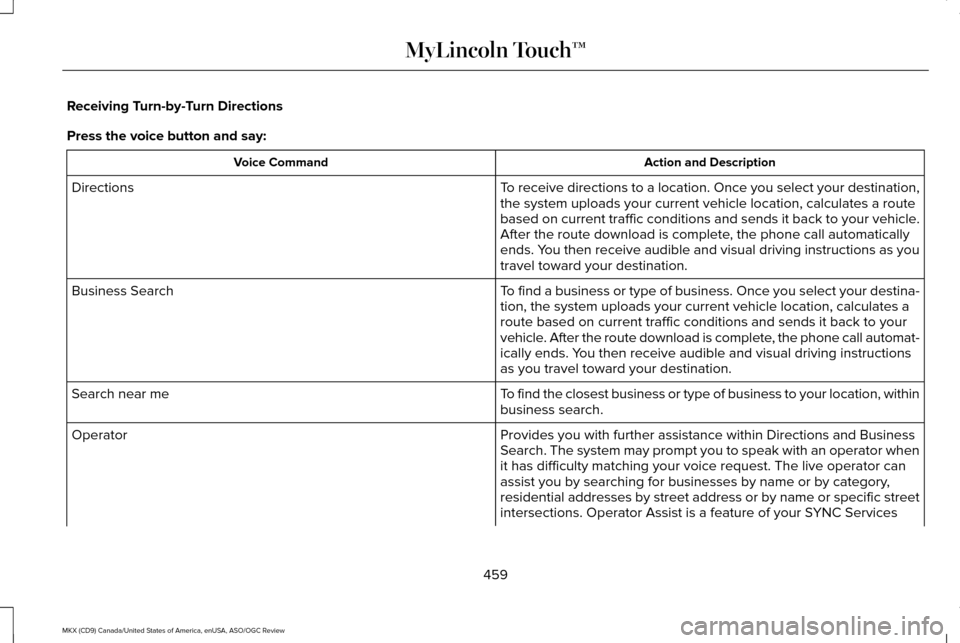
Receiving Turn-by-Turn Directions
Press the voice button and say:
Action and Description
Voice Command
To receive directions to a location. Once you select your destination,
the system uploads your current vehicle location, calculates a route
based on current traffic conditions and sends it back to your vehicle.
After the route download is complete, the phone call automatically
ends. You then receive audible and visual driving instructions as you
travel toward your destination.
Directions
To find a business or type of business. Once you select your destina-
tion, the system uploads your current vehicle location, calculates a
route based on current traffic conditions and sends it back to your
vehicle. After the route download is complete, the phone call automat-
ically ends. You then receive audible and visual driving instructions
as you travel toward your destination.
Business Search
To find the closest business or type of business to your location, within\
business search.
Search near me
Provides you with further assistance within Directions and Business
Search. The system may prompt you to speak with an operator when
it has difficulty matching your voice request. The live operator can
assist you by searching for businesses by name or by category,
residential addresses by street address or by name or specific street
intersections. Operator Assist is a feature of your SYNC Services
Operator
459
MKX (CD9) Canada/United States of America, enUSA, ASO/OGC Review MyLincoln Touch™
Page 464 of 563
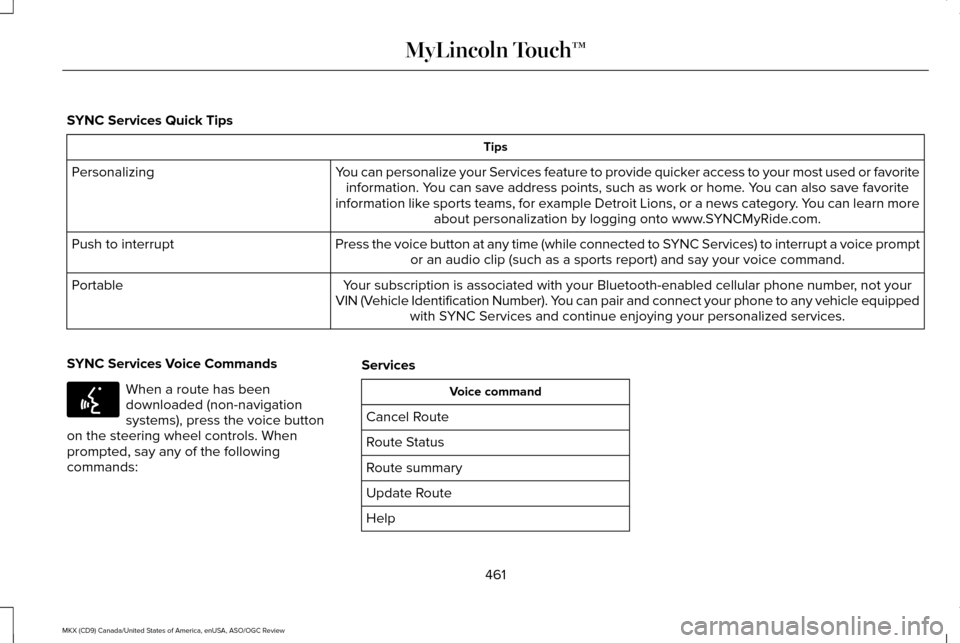
SYNC Services Quick Tips
Tips
You can personalize your Services feature to provide quicker access to your most used or favorite information. You can save address points, such as work or home. You can also save favorite
information like sports teams, for example Detroit Lions, or a news category. You can learn more about personalization by logging onto www.SYNCMyRide.com.
Personalizing
Press the voice button at any time (while connected to SYNC Services) to interrupt a voice promptor an audio clip (such as a sports report) and say your voice command.\
Push to interrupt
Your subscription is associated with your Bluetooth-enabled cellular phon\
e number, not your
VIN (Vehicle Identification Number). You can pair and connect your phone to any vehicle equipped with SYNC Services and continue enjoying your personalized services.
Portable
SYNC Services Voice Commands When a route has been
downloaded (non-navigation
systems), press the voice button
on the steering wheel controls. When
prompted, say any of the following
commands: Services Voice command
Cancel Route
Route Status
Route summary
Update Route
Help
461
MKX (CD9) Canada/United States of America, enUSA, ASO/OGC Review MyLincoln Touch™E142599
