2016 LINCOLN MKX instrument panel
[x] Cancel search: instrument panelPage 166 of 563

12 Volt DC Power Point
WARNINGS
Do not plug optional electrical
accessories into the cigar lighter
socket. Incorrect use of the cigar lighter can
cause damage not covered by the vehicle
warranty, and can result in fire or serious
injury. Do not use a power point for operating
a cigar lighter. Incorrect use of the
power points can cause damage not covered
by the vehicle warranty, and can result in fire
or serious injury. Note:
When you switch the ignition on, you
can use the socket to power 12 volt
appliances with a maximum current rating
of 15 amps.
If the power supply does not work after you
switch the ignition off, switch the ignition on.
Note: Do not hang any accessory from the
accessory plug.
Note: Do not use the power point over the
vehicle capacity of 12 volt DC 180 watts or
a fuse may blow. Note:
Always keep the power point caps
closed when not in use.
Do not insert objects other than an accessory
plug into the power point. This will damage
the power point and blow the fuse.
Run the vehicle for full capacity use of the
power point.
To prevent the battery from running out of
charge:
• Do not use the power point longer than
necessary when the vehicle is not
running.
• Do not leave devices plugged in
overnight or when you park your vehicle
for extended periods.
Locations
Power points may be in the following
locations:
• On the lower instrument panel.
• Inside the center console.
• On the rear of the center console.
• In the rear cargo area. 110 Volt AC Power Point (If Equipped) WARNING
Do not keep electrical devices plugged
in the power point whenever the
device is not in use. Do not use any
extension cord with the 110 volt AC power
point, since it will defeat the safety protection
design. Doing so may cause the power point
to overload due to powering multiple devices
that can reach beyond the 150 watt load limit
and could result in fire or serious injury. Note:
The power point will turn off when the
ignition is switched off or the battery voltage
drops below 11 volts.
Use the power point for powering electric
devices that require up to 150 watts. It is on
the rear of the center console.
163
MKX (CD9) Canada/United States of America, enUSA, ASO/OGC Review Auxiliary Power Points
Page 168 of 563

GLOVE BOX
You can open the glove box by pressing the
button located on the instrument panel.
Note:
The electronic glove box will not
function if the vehicle battery is dead, or if
you switch the ignition off and lock the
vehicle. Manual Entry
1. Open passenger door.
2. Remove end cap of instrument panel.3. Insert a pen or pencil into the latch
device to release glove box.
CENTER CONSOLE
Stow items in the cupholder carefully as
items may become loose during hard
braking, acceleration or crashes, including
hot drinks which may spill.
Available console features include: Front storage compartment.
A
USB port.
B
Center storage compartment.
C
165
MKX (CD9) Canada/United States of America, enUSA, ASO/OGC Review Storage CompartmentsE199447 E206107 E196998
Page 185 of 563

AUTOMATIC TRANSMISSION
WARNINGS
Always set the parking brake fully and
make sure your vehicle is in park (P).
Turn the ignition off and remove the key
whenever you leave your vehicle. Do not apply the brake pedal and
accelerator pedal simultaneously.
Applying both pedals simultaneously for
more than three seconds will limit engine
rpm, which may result in difficulty maintaining
speed in traffic and could lead to serious
injury. Push Button Shift Transmission
Your vehicle is equipped with an electronic
transmission. The shift buttons are located
on the instrument panel next to the
MyLincoln Touch
™ system. The gears are
selected by pressing and releasing the
PRNDS buttons. Every time a gear is selected, the selected
button will light up. You will also see the gear
selected appear in the instrument cluster. Understanding the Positions of your
Electronic Transmission
Note:
Always come to a complete stop
before putting your vehicle into and out of
park (P).
Putting your vehicle in gear:
1. Fully press down the brake pedal.
2. Press and release the button on the instrument panel of the gear you want to
select.
3. The gearshift button you select will illuminate and the selected gear will
appear in the instrument cluster.
4. Release the brake pedal and your transmission will remain in the selected
gear.
Note: If you attempt to leave your vehicle
while it is in gear, your vehicle will
automatically shift into park (P). Safety belt
and door monitors determine your intent and
make the shift for you. During this time, a
message will appear in the information
display screen prompting you to make the
shift to park (P).
182
MKX (CD9) Canada/United States of America, enUSA, ASO/OGC Review TransmissionE146223 E155989
Page 189 of 563
WARNINGS
When doing this procedure, you will
be taking the vehicle out of park which
means the vehicle can roll freely. To avoid
unwanted vehicle movement, always fully
set the parking brake prior to doing this
procedure. Use wheel chocks if appropriate. If the parking brake is fully released,
but the brake warning lamp remains
illuminated, the brakes may not be working
properly. See your authorized dealer. Note:
See your authorized dealer as soon
as possible if this procedure is used.
Note: For some markets this feature is
disabled.
Note: This feature will only function if your
12-volt battery has power.
Use the brake-shift interlock override to
move your transmission from the park
position in the event of an electrical
malfunction or if your vehicle has a dead
battery. 1. Apply the parking brake and turn your
ignition off before performing this
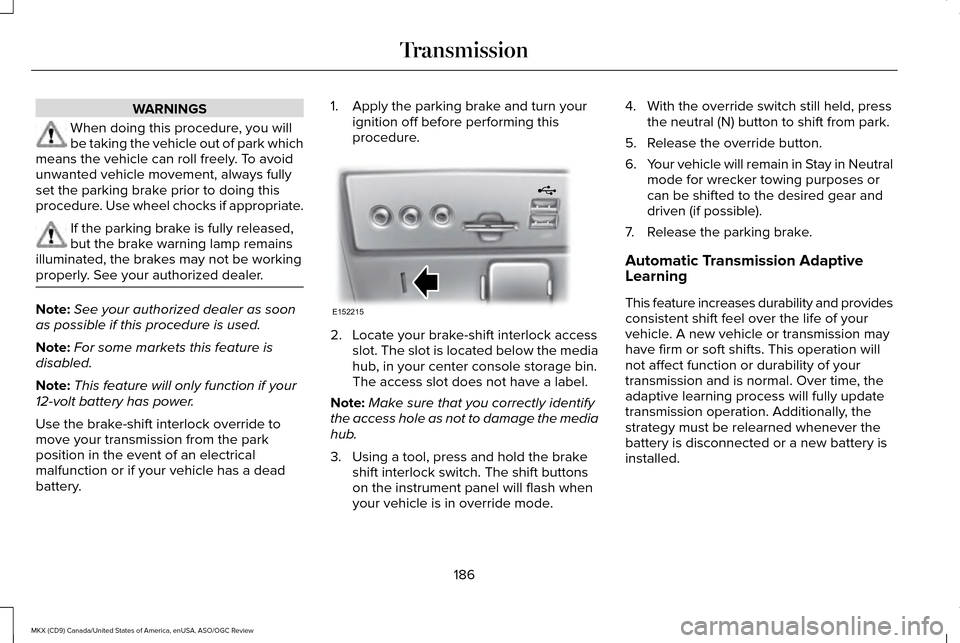
procedure. 2. Locate your brake-shift interlock access
slot. The slot is located below the media
hub, in your center console storage bin.
The access slot does not have a label.
Note: Make sure that you correctly identify
the access hole as not to damage the media
hub.
3. Using a tool, press and hold the brake shift interlock switch. The shift buttons
on the instrument panel will flash when
your vehicle is in override mode. 4. With the override switch still held, press
the neutral (N) button to shift from park.
5. Release the override button.
6. Your vehicle will remain in Stay in Neutral
mode for wrecker towing purposes or
can be shifted to the desired gear and
driven (if possible).
7. Release the parking brake.
Automatic Transmission Adaptive
Learning
This feature increases durability and provides
consistent shift feel over the life of your
vehicle. A new vehicle or transmission may
have firm or soft shifts. This operation will
not affect function or durability of your
transmission and is normal. Over time, the
adaptive learning process will fully update
transmission operation. Additionally, the
strategy must be relearned whenever the
battery is disconnected or a new battery is
installed.
186
MKX (CD9) Canada/United States of America, enUSA, ASO/OGC Review TransmissionE152215
Page 198 of 563

The anti-lock braking system will not
eliminate the risks when:
•
You drive too closely to the vehicle in
front of you.
• Your vehicle is hydroplaning.
• You take corners too fast.
• The road surface is poor.
ELECTRIC PARKING BRAKE
The electric parking brake replaces the
conventional handbrake. The operating
switch is located in the instrument panel. WARNING
Always set the parking brake and leave
your vehicle with the transmission in
park (P). Failure to set the parking brake and
placing the transmission in park (P) could
result in vehicle roll-away, property damage
or bodily injury. Note:
When you apply the electric parking
brake in certain conditions, for example, on
a steep hill, the electric parking brake may
reapply the brakes within three to ten
minutes.
Note: You may notice various noises when
you apply and release the electric parking
brake. This is normal and no cause for
concern.
Note: After a determined period of time, the
parking brake will automatically re-calibrate.
This process is short and only performed
when the vehicle is turned off.
Applying the Electric Parking brake WARNING
The brake system warning lamp will
flash during an electric parking brake
apply. If the brake system warning lamp
continues to flash there could be a problem
with your electric parking brake. Note:
The brake system warning lamp will
illuminate for ten seconds, if the ignition is
turned off after the electric parking brake
has been applied, or the electric parking
brake has been applied after the ignition
has been turned off.
Note: The electric parking brake will not
automatically apply when you park the
vehicle. You must apply the electric parking
brake using the electric parking brake
switch. Pull the switch up to apply the electric
parking brake.
195
MKX (CD9) Canada/United States of America, enUSA, ASO/OGC Review BrakesE169085
Page 203 of 563

PRINCIPLE OF OPERATION
The traction control system helps avoid drive
wheel spin and loss of traction.
If your vehicle begins to slide, the system
applies the brakes to individual wheels and,
when needed, reduces engine power at the
same time. If the wheels spin when
accelerating on slippery or loose surfaces,
the system reduces engine power in order
to increase traction.
USING TRACTION CONTROL WARNING
The stability and traction control light
illuminates steadily if a failure is
detected in the system. Verify that the
traction control system was not manually
disabled using the information display
controls or the switch. If the stability control
and traction control light is still illuminating
steadily, have the system serviced by an
authorized dealer immediately. Operating
your vehicle with the traction control disabled
could lead to an increased risk of loss of
vehicle control, vehicle rollover, personal
injury and death. The system automatically turns on each time
you switch the ignition on.
If your vehicle is stuck in mud or snow,
switching traction control off may be
beneficial as this allows the wheels to spin.
Note:
When you switch traction control off,
stability control remains fully active. Switching the System Off
When you switch the system off or on, a
message appears in the information display
showing system status.
You can switch the system off by either using
the information display controls or the switch.
Using the Information Display Controls
You can switch this feature off or on in the
information display. See General Information
(page 114).
Using a Switch
(If Equipped)
The switch for the stability control system
and traction control system is located on the
instrument panel.
Use the switch to turn the system off or on.
System Indicator Lights and Messages The stability and traction control
light temporarily illuminates on
engine start-up and flashes when
a driving condition activates either of the
systems.
200
MKX (CD9) Canada/United States of America, enUSA, ASO/OGC Review Traction ControlE138639
Page 223 of 563

The default setting for the rear camera delay
is OFF.
When shifting the transmission out of reverse
(R) and into any gear other than park (P), the
camera image remains in the display until:
•
Your vehicle speed sufficiently increases.
• You shift your vehicle into park (P).
360 DEGREE PARKING AID
CAMERA (If Equipped) WARNINGS
The 360 degree camera system is a
supplement system that still requires
the driver to use it in conjunction with looking
out the windows, and checking the interior
and exterior mirrors for maximum coverage. You may not see objects that are close
to either corner of the bumper or under
the bumper due to the limited coverage of
the camera system. Use caution when turning camera
features ON or OFF while out of park
(P). Make sure your vehicle is not moving. WARNINGS
Failure to take care may result in the
loss of control of your vehicle, serious
personal injury or death. The 360 degree camera system consists of
front, side and rear cameras. The system:
•
Allows you to see what is directly in front
or behind your vehicle.
• Provides cross traffic view in front and
behind your vehicle.
• Allows you to see a top-down view of the
area outside your vehicle, including the
blind spots.
• Provides visibility around your vehicle to
you in parking maneuvers such as:
•Centering in a parking space.
• Obstacles near vehicle.
• Parallel parking. The 360 degree camera system
button is located on the instrument
panel and allows you to toggle
through different camera views. The front and rear cameras have multiple
screens which consist of: Normal view with
360, Normal view, and split view. When in
park (P), neutral (N) or drive (D), only the front
images will be displayed when the button is
pressed. When in reverse (R), only the rear
images will be displayed when the button is
pressed.
Note:
The 360 degree camera system will
turn OFF when your vehicle is in motion at
low speed, except when in reverse (R).
Camera Views
The small vehicle icon displayed on the top
left corner of the image illustrates the camera
view being displayed. Camera views are laid
out in the order the screens will appear once
the button is pressed.
Note: The front video image will be disabled
when your vehicle is in motion at low speed,
except when in reverse (R).
220
MKX (CD9) Canada/United States of America, enUSA, ASO/OGC Review Parking AidsE205884
Page 276 of 563

Vehicles Sold In Canada: Getting
Roadside Assistance
Canadian clients who require roadside
assistance, call 1-800-387-9333.
Sykes Assistance Services Corporation
administers the Roadside Assistance
program. You must receive covered services
in Canada or the continental United States.
Coverage extends to vehicles that use public,
non-seasonal, annually traveled roadways.
Roadside Assistance coverage does not
extend to vehicles involved in cross-country
driving, logging, autocross and any other
form of off-road use. Well maintained roads
and surfaces help ensure safe travel for the
Supplier, and allow their representatives to
perform service as per the standard
operating procedures.
In Remote Locations
If our supplier cannot take your vehicle by
road to the nearest authorized dealership,
transportation by rail or water may be
necessary. The program covers a tow to the
dock or rail terminal and also to the
dealership at the end of the trip.
For rail or water transportation, however,
contact your authorized dealer to confirm if
you are eligible for additional coverage
before you authorize or pay for the service.
Call the Lincoln Roadside Assistance at
1-800-387-9333 for additional information.
Vehicles Sold In Canada: Using
Roadside Assistance
Canadian Roadside coverage and benefits
may differ from the United States coverage.
Please refer to your warranty information or
visit our website at www.lincolncanada.com
for information on Canadian services and
benefits.
Canadian clients who need to obtain
roadside information, call 1-800-387-9333 or
visit our website at www.lincolncanada.com.
HAZARD WARNING FLASHERS
Note:
If used when the vehicle is not running,
the battery will lose charge. There may be
insufficient power to restart your vehicle. The hazard warning button is
located on the instrument panel.
Use it when your vehicle is
creating a safety hazard for other motorists.
• Press the button to turn on the hazard
warning function, and the front and rear
direction indicators will flash.
• Press the button again to turn them off.
FUEL SHUTOFF WARNING
Failure to inspect and, if necessary,
repair fuel leaks after a collision may
increase the risk of fire and serious injury.
Ford Motor Company recommends that the
fuel system be inspected by an authorized
dealer after any collision. In the event of a moderate to severe
collision, this vehicle includes a fuel pump
shutoff feature that stops the flow of fuel to
the engine. Not every impact will cause a
shutoff.
273
MKX (CD9) Canada/United States of America, enUSA, ASO/OGC Review Roadside Emergencies