Page 111 of 563

Speedometer
C
Fuel gauge
D
Engine coolant temperature gauge
E
Information Display
Odometer
Located in the bottom of the information
display. Registers the accumulated distance
your vehicle has traveled.
Trip Computer
See General Information (page 114).
Vehicle Settings and Personalization
See
General Information (page 114).
Fuel Gauge
Note: The fuel gauge may vary slightly when
your vehicle is moving or on a gradient. Switch the ignition on. The fuel gauge will
indicate approximately how much fuel is left
in the fuel tank. The arrow adjacent to the
fuel pump symbol indicates on which side of
your vehicle the fuel filler door is located.
The needle should move toward F when you
refuel your vehicle. If the needle points to E
after adding fuel, this indicates your vehicle
needs service soon.
After refueling some variability in needle
position is normal:
•
It may take a short time for the needle to
reach full after leaving the gas station.
This is normal and depends upon the
slope of pavement at the gas station.
• The fuel amount dispensed into the tank
is a little less or more than the gauge
indicated. This is normal and depends
upon the slope of pavement at the gas
station. •
If the gas station nozzle shuts off before
the tank is full, try a different gas pump
nozzle.
• There is a small reserve left in the tank
when the fuel gauge reaches empty.
Low Fuel Reminder
A low fuel reminder triggers when the
distance to empty reaches 50 miles (80 km),
25 miles (40 km) and 10 miles (16 km) to
empty.
Variations:
Note: The low fuel reminder can appear at
different fuel gauge positions depending on
fuel economy conditions. This variation is
normal.
108
MKX (CD9) Canada/United States of America, enUSA, ASO/OGC Review Instrument Cluster
Page 114 of 563

Engine Oil
If it illuminates with the engine
running or when you are driving,
this indicates a malfunction. Stop
your vehicle as soon as it is safe to do so
and switch the engine off. Check the engine
oil level. See Engine Oil Check (page 308).
Note: Do not resume your journey if it
illuminates despite the level being correct.
Have the system checked by an authorized
dealer immediately.
Fasten Safety Belt It illuminates and a chime sounds
to remind you to fasten your safety
belt. See Safety Belt Minder
(page 40).
Front Airbag If it fails to illuminate when you
start your vehicle, continues to
flash or remains on, it indicates a
malfunction. Have the system checked by
an authorized dealer. Heads Up Display
(If Equipped) A red beam of lights illuminates on
the windshield in certain instances
when using adaptive cruise control
and/or the collision warning system. It also
illuminates momentarily when you start your
vehicle to make sure the display works.
High Beam It illuminates when you switch the
high beam headlamps on. It flashes
when you use the headlamp
flasher.
Hood Ajar Displays when the ignition is on
and the hood is not completely
closed.
Liftgate Ajar Illuminates when the liftgate is not
completely closed.Low Beam Malfunction Warning It will illuminate when there is a
malfunction with the low beam
headlamp bulb.
Low Fuel Level It illuminates when the fuel level is
low or the fuel tank is nearly
empty. Refuel as soon as possible.
Low Tire Pressure Warning It illuminates when your tire
pressure is low. If the lamp remains
on with the engine running or
when driving, check your tire pressure as
soon as possible.
It also illuminates momentarily when you
switch the ignition on to confirm the lamp is
functional. If it does not illuminate when you
switch the ignition on, or begins to flash at
any time, have the system checked by an
authorized dealer.
111
MKX (CD9) Canada/United States of America, enUSA, ASO/OGC Review Instrument Cluster E156133 E159324 E162453 E181350
Page 115 of 563

Low Washer Fluid
It illuminates when the windshield
washer fluid is low.
Parking Lamps It illuminates when you switch the
parking lamps on.
Powertrain Fault Illuminates when the system
detects a powertrain or an AWD
fault. Contact an authorized dealer
as soon as possible. Service Engine Soon If the service engine soon indicator
light stays illuminated after you
start the engine, it indicates that
the On Board Diagnostics system (OBD) has
detected a malfunction of the vehicle
emissions control system. Refer to On board
diagnostics (OBD) in the Fuel and Refueling
chapter for more information about having
your vehicle serviced. See Emission Control
System (page 179).
If the light is blinking, engine misfire is
occurring which could damage your catalytic
converter. Drive in a moderate fashion (avoid
heavy acceleration and deceleration) and
have your vehicle serviced immediately. WARNING
Under engine misfire conditions,
excessive exhaust temperatures could
damage the catalytic converter, the fuel
system, interior floor coverings or other
vehicle components, possibly causing a fire.
Have your vehicle serviced immediately. The service engine soon indicator light
illuminates when you first switch the ignition
on before engine start to check the bulb and
to indicate whether the vehicle is ready for
Inspection/Maintenance (I/M) testing.
Normally, the service engine soon light stays
on until you crank the engine, then turns
itself off if no malfunctions are present.
However, if after 15 seconds the service
engine soon light blinks eight times, it means
that the vehicle is not ready for I/M testing.
See Emission Control System (page 179).
Stability Control It flashes when the system is
active. If it remains illuminated or
does not illuminate when you
switch the ignition on, this indicates a
malfunction. During a malfunction the system
switches off. Have the system checked by
an authorized dealer immediately.
See
Using Stability Control (page 204).
112
MKX (CD9) Canada/United States of America, enUSA, ASO/OGC Review Instrument ClusterE132353 E138639
Page 117 of 563

GENERAL INFORMATION
WARNING
Driving while distracted can result in
loss of vehicle control, crash and injury.
We strongly recommend that you use
extreme caution when using any device that
may take your focus off the road. Your
primary responsibility is the safe operation
of your vehicle. We recommend against the
use of any hand-held device while driving
and encourage the use of voice-operated
systems when possible. Make sure you are
aware of all applicable local laws that may
affect the use of electronic devices while
driving. You can control various systems on your
vehicle using the information display controls
on the steering wheel. Corresponding
information appears in the information
display. Information Display Controls
•
Press the up and down arrow buttons to
scroll through and highlight the options
within a menu.
• Press the right arrow button to enter a
sub-menu.
• Press the left arrow button to exit a menu. •
Press and hold the left arrow button at
any time to return to the main menu
display (escape button).
• Press the OK button to choose and
confirm settings or messages.
Main menu
From the main menu bar on the left side of
the information display, you can choose from
the following categories:
• Trip 1 & 2
• Fuel Economy
• Driver Assist
• Settings
Scroll up or down to highlight one of the
categories and then press the right arrow
key or OK to enter into that category. Press
the left arrow key as needed to exit back to
the main menu.
Trip 1 & 2
You can access the menu using the
information display control.
114
MKX (CD9) Canada/United States of America, enUSA, ASO/OGC Review Information DisplaysE152750
Page 118 of 563
Trip 1 & 2
Trip Timer
Trip Odometer
Average Fuel Economy
Digital Speedometer
Press and hold OK to reset the currently displayed trip information.
• Trip Timer— Timer stops when you switch off the vehicle and restarts when you resta\
rt the vehicle.
• Trip odometer — Shows the accumulated trip distance.
• Average fuel economy — Shows the average fuel economy for a given trip.
• Digital speedometer — Shows the current vehicle speed. Appears in the center of the speedomet\
er gauge.
Fuel Economy
Use the left or right arrow buttons to choose
the desired fuel economy display.
115
MKX (CD9) Canada/United States of America, enUSA, ASO/OGC Review Information Displays
Page 119 of 563
Fuel Economy
Instant Fuel Economy
Fuel History
Average Speed
• Instant Fuel Economy - Shows a visual graph of your instantaneous fuel e\
conomy since the function was last reset.
• Fuel History - Shows a bar chart of your fuel history.
• Average Speed - Displays the average speed you have driven.
Driver Assist
In this mode, you can configure different
driver setting choices. Note:
Some items are optional and may not
appear. Driver Assist
Traction Control - check enabled or uncheck disabled Sport or Normal
Steering in "D"
Adaptive Steering
Sport or Normal
Steering in "S"
Blind Spot - check enabled or uncheck disabled
Cross Traffic Alert - check enabled or uncheck disabled
116
MKX (CD9) Canada/United States of America, enUSA, ASO/OGC Review Information Displays
Page 127 of 563

Automatic Engine Shutdown
Action
Message
Displays when the engine is getting ready to shut off.
Engine Shuts Off in XX Seconds
Displays when the engine has shut off to help increase fuel economy.
Engine Shut Off for Fuel Economy
Displays when the engine is getting ready to shut off. You can press OK on the left steeringwheel button to override the shut down.
Engine Shuts Off in XX Seconds Press Ok
to Override
AWD Action
Message
Displayed when the AWD system has been temporarily disabled to protect i\
tself from overheating.
AWD Temporarily Disabled
Displayed when the AWD system has been automatically disabled to protect\
itself. This is causedby operating the vehicle with the compact spare tire installed or if the\
system is overheating.
AWD Off
The AWD system resumes normal function and clears this message after dri\
ving a short distancewith the road tire re-installed or after the system is allowed to cool.
AWD Restored
Displayed in conjunction with the Throttle Control/Transmission/AWD light when the AWD system
is not operating properly. If the warning stays on or continues to come on, contact an authorized\
dealer as soon as possible.
AWD Malfunction Service Required
124
MKX (CD9) Canada/United States of America, enUSA, ASO/OGC Review Information Displays
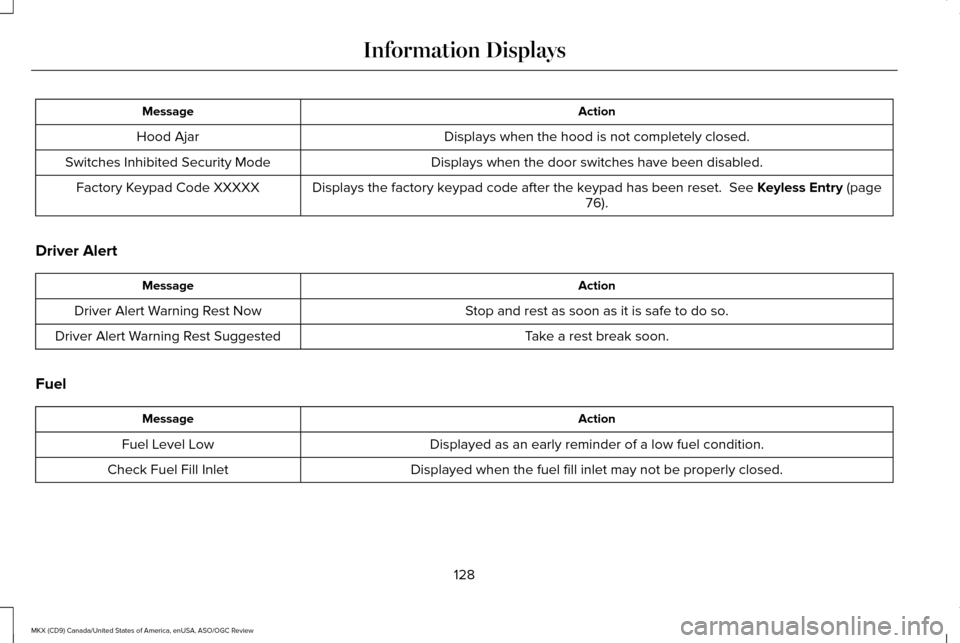
Page 131 of 563
Action
Message
Displays when the hood is not completely closed.
Hood Ajar
Displays when the door switches have been disabled.
Switches Inhibited Security Mode
Displays the factory keypad code after the keypad has been reset. See Keyless Entry (page
76).
Factory Keypad Code XXXXX
Driver Alert Action
Message
Stop and rest as soon as it is safe to do so.
Driver Alert Warning Rest Now
Take a rest break soon.
Driver Alert Warning Rest Suggested
Fuel Action
Message
Displayed as an early reminder of a low fuel condition.
Fuel Level Low
Displayed when the fuel fill inlet may not be properly closed.
Check Fuel Fill Inlet
128
MKX (CD9) Canada/United States of America, enUSA, ASO/OGC Review Information Displays