2016 LINCOLN MKX Lift gate
[x] Cancel search: Lift gatePage 78 of 563

Stopping the Liftgate Movement
You can stop the liftgate movement by doing
any of the following:
•
Pressing the liftgate control button.
• Pressing the liftgate button on the remote
control twice.
• Pressing the liftgate button on the
instrument panel.
• Activating the obstacle detection feature.
• Moving your foot under and away from
the center rear bumper in a single-kick
motion. *
* This method only works for vehicles with the
hands-free liftgate feature.
Setting the Liftgate Open Height
1. Open the liftgate.
2. Stop the liftgate movement by pressing the control button on the liftgate when it
reaches the desired height.
Note: Once the liftgate has stopped moving,
you can also manually move it to the desired
height. 3.
Press and hold the liftgate control button
on the liftgate until you hear a chime,
indicating programming is complete.
Note: You can only use the liftgate control
button to program the height.
Note: You cannot program the height if the
liftgate position is too low.
The new open liftgate height is recalled
when the power liftgate is opened. To
change the programmed height, repeat the
above procedure. Once you open the power
liftgate, you can manually move it to a
different height.
Note: The system recalls the new
programmed height, even if you disconnect
the battery.
When operating the power liftgate after you
have programmed a lower height than fully
open, you can fully open the liftgate by
manually pushing it upward to the maximum
open position. Obstacle Detection
When Closing
The system stops when it detects an
obstacle. Three chimes sound and the
system reverses to open. Once you remove
the obstacle, you can power close the
liftgate.
Note:
Entering your vehicle while the liftgate
is closing can cause your vehicle to bounce
and activate obstacle detection. To prevent
this, let the power liftgate close completely
before you enter your vehicle. Before driving
off, check the instrument cluster for a liftgate
or door ajar message or warning indicator.
Failure to do this could result in
unintentionally leaving the liftgate open
while driving.
When Opening
The system stops when it detects an
obstacle and two short tones sound. Once
you remove the obstacle, you can continue
to operate the liftgate.
75
MKX (CD9) Canada/United States of America, enUSA, ASO/OGC Review Locks
Page 79 of 563

Hands-Free Feature (If Equipped)
Make sure you have an intelligent access
transmitter within
3 ft (1 m) of the liftgate. 1.
Move your foot under and away from the
rear bumper detection area in a
single-kick motion. Do not move your
foot sideways or the sensors may not
detect the motion.
2. The liftgate powers open or close. Note:
Allow the power system to open the
liftgate. Manually pushing or pulling the
liftgate may activate the system’ s obstacle
detection feature and stop the power
operation or reverse its direction. Manually
interfering with the liftgate motion may also
replicate a gas strut failure.
Note: Splashing water may cause the
hands-free liftgate to open. Keep the
intelligent access key away from the rear
bumper detection area when washing your
vehicle.
KEYLESS ENTRY
SECURICODE™ Keyless Entry Keypad
The keypad is near the driver window. It
illuminates when touched.
Note: If you enter your entry code too fast
on the keypad, the unlock function may not
work. Enter your entry code again more
slowly. You can use the keypad to do the following:
•
Lock or unlock the doors.
• Release the liftgate.
• Recall memory seat and mirror positions.
• Program and erase user codes.
• Arm and disarm the anti-theft alarm.
76
MKX (CD9) Canada/United States of America, enUSA, ASO/OGC Review LocksE201983
2
1 E138637
Page 81 of 563

Locking and Unlocking the Doors
Locking All Doors
Press and hold 7·8 and 9·0 simultaneously
with the driver door closed. You do not need
to enter the keypad code first.
Unlocking the Driver Door
Enter the factory-set or your personal
five-digit code. You must press each number
within five seconds of each other. The
interior lamps illuminate.
Note: All doors unlock if you switch on the
all-door unlocking mode.
See Locking and
Unlocking (page 67).
Unlocking All Doors
Enter the factory-set or your personal
five-digit code, then press
3·4 within five
seconds.
To Release the Liftgate
Enter the factory-set or your personal
five-digit code, then press
5·6 within five
seconds. Displaying the Factory-Set Code
Note:
You need to have two programmed
intelligent access keys for this procedure. 1. Open the floor console storage
compartment lid. 2. With the buttons facing the rear of your
vehicle and the key ring up, place the
first intelligent access key into the
backup slot inside the center console.
3. Press the push button ignition switch once and wait a few seconds.
4. Press the push button ignition switch again and remove the key.
5. Insert the second programmed key into the backup slot, then press the push
button ignition switch.
78
MKX (CD9) Canada/United States of America, enUSA, ASO/OGC Review LocksE203693
1 E203694
2
Page 114 of 563

Engine Oil
If it illuminates with the engine
running or when you are driving,
this indicates a malfunction. Stop
your vehicle as soon as it is safe to do so
and switch the engine off. Check the engine
oil level. See Engine Oil Check (page 308).
Note: Do not resume your journey if it
illuminates despite the level being correct.
Have the system checked by an authorized
dealer immediately.
Fasten Safety Belt It illuminates and a chime sounds
to remind you to fasten your safety
belt. See Safety Belt Minder
(page 40).
Front Airbag If it fails to illuminate when you
start your vehicle, continues to
flash or remains on, it indicates a
malfunction. Have the system checked by
an authorized dealer. Heads Up Display
(If Equipped) A red beam of lights illuminates on
the windshield in certain instances
when using adaptive cruise control
and/or the collision warning system. It also
illuminates momentarily when you start your
vehicle to make sure the display works.
High Beam It illuminates when you switch the
high beam headlamps on. It flashes
when you use the headlamp
flasher.
Hood Ajar Displays when the ignition is on
and the hood is not completely
closed.
Liftgate Ajar Illuminates when the liftgate is not
completely closed.Low Beam Malfunction Warning It will illuminate when there is a
malfunction with the low beam
headlamp bulb.
Low Fuel Level It illuminates when the fuel level is
low or the fuel tank is nearly
empty. Refuel as soon as possible.
Low Tire Pressure Warning It illuminates when your tire
pressure is low. If the lamp remains
on with the engine running or
when driving, check your tire pressure as
soon as possible.
It also illuminates momentarily when you
switch the ignition on to confirm the lamp is
functional. If it does not illuminate when you
switch the ignition on, or begins to flash at
any time, have the system checked by an
authorized dealer.
111
MKX (CD9) Canada/United States of America, enUSA, ASO/OGC Review Instrument Cluster E156133 E159324 E162453 E181350
Page 122 of 563
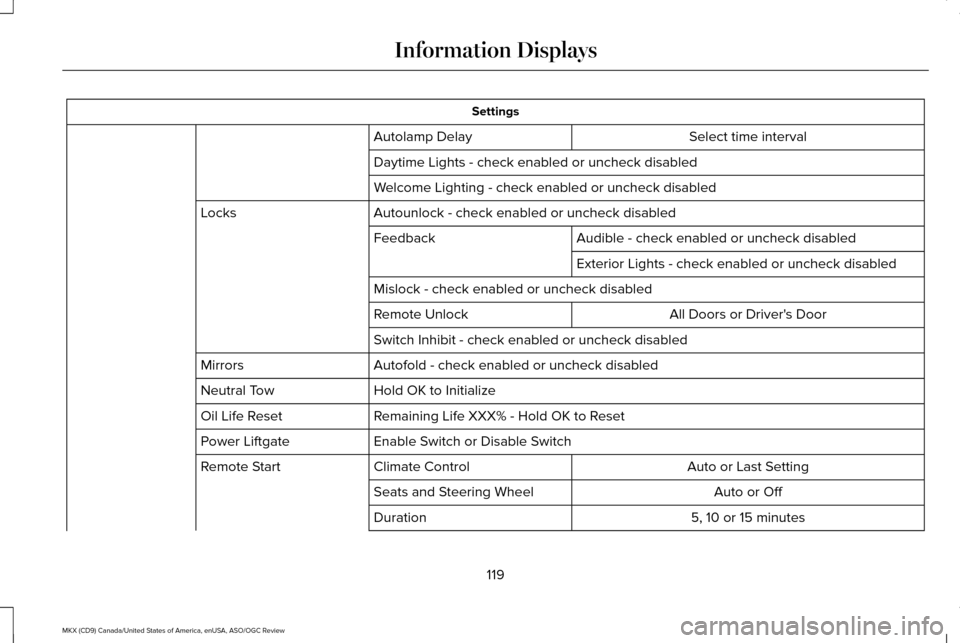
Settings
Select time interval
Autolamp Delay
Daytime Lights - check enabled or uncheck disabled
Welcome Lighting - check enabled or uncheck disabled
Autounlock - check enabled or uncheck disabled
Locks
Audible - check enabled or uncheck disabled
Feedback
Exterior Lights - check enabled or uncheck disabled
Mislock - check enabled or uncheck disabled All Doors or Driver's Door
Remote Unlock
Switch Inhibit - check enabled or uncheck disabled
Autofold - check enabled or uncheck disabled
Mirrors
Hold OK to Initialize
Neutral Tow
Remaining Life XXX% - Hold OK to Reset
Oil Life Reset
Enable Switch or Disable Switch
Power Liftgate
Auto or Last Setting
Climate Control
Remote Start
Auto or Off
Seats and Steering Wheel
5, 10 or 15 minutes
Duration
119
MKX (CD9) Canada/United States of America, enUSA, ASO/OGC Review Information Displays
Page 130 of 563

Collision Warning System
Action
Message
Displayed when there is a system malfunction with the collision warning \
system. The system isdisabled. Contact an authorized dealer as soon as possible.
Collision Warning Malfunction
Displayed when the collision warning system radar is blocked because of poor radar visibility
due to bad weather or ice/mud/water in front of the radar. You can typically clean the sensor to resolve. If the concern persists, contact an authorized dealer as soon as possi\
ble.
Collision Warning Not Available Sensor
Blocked See Manual
Displayed when there is a system malfunction with the collision warning \
system. The system isdisabled. Contact an authorized dealer as soon as possible.
Collision Warning Not Available
Doors and Locks Action
Message
Displays when the door(s) listed is not completely closed and the vehi\
cle is moving.
X Door Ajar
Displays when the door(s) listed is not completely closed.Displays when the liftgate is not completely closed.
Liftgate Ajar
127
MKX (CD9) Canada/United States of America, enUSA, ASO/OGC Review Information Displays
Page 156 of 563

1. With the ignition on, move the memory
positions to the desired positions.
2. Press and hold the desired preset button
for about five seconds. A tone will sound
after about two seconds. Continue
holding until a second tone is heard.
3. Within three seconds, press the lock button on the remote control you are
linking.
To unlink a remote control, follow the same
procedure – except in step 3, press the
unlock button on the remote control.
Note: If more than one linked remote control
or intelligent access key is in range, the
memory function moves to the settings of
the first key to initiate a memory recall.
Easy Entry and Exit Feature
If you enable the easy entry and exit feature,
it automatically moves the driver seat
position rearward up to two inches (five
centimeters) when you switch the ignition
off.
The driver seat will return to its previous
position when you switch the ignition on. You can enable or disable this feature in the
information display. See Information
Displays (page 114).
REAR SEATS
Adjusting the Rear Seats WARNING
To prevent possible damage to the
seat or safety belts, make sure that the
safety belts are not buckled when folding
the seatback. Folding the Seatback
With the seat empty, pull the lever up to fold
the seatback forward.
Unfolding the Seatback
Rotate the seatback upward until the
seatback latches in the upright position. The
seatback will click when it is locked into
position.
Reclining the Seatback
With the seat occupied, pull the lever up to
recline the seatback.
Easy Fold™ Folding Seat
WARNING
Make sure that the seat is unoccupied
when folding it down. Folding the seat
while occupied could result in damage to the
seat or injury. Note:
The power feature is operational when
the vehicle is in park (P) and the liftgate has
been open for less than 10 minutes.
153
MKX (CD9) Canada/United States of America, enUSA, ASO/OGC Review SeatsE186789
Page 157 of 563

The controls are located on the left-hand rear
quarter trim panel (accessible from the
liftgate area).
Folding the Seatback
Press and hold the left control to lower the
left seatback. Press and hold the right control
to lower the right seatback.
Unfolding the Seatback
Rotate the seatback up until the seatback
latches in the upright position. The seatback
will click when it is locked into position. HEATED SEATS
Front Seats WARNING
People who are unable to feel pain to
their skin because of advanced age,
chronic illness, diabetes, spinal cord injury,
medication, alcohol use, exhaustion or other
physical conditions, must exercise care when
using the heated seat. The heated seat may
cause burns even at low temperatures,
especially if used for long periods of time.
Do not place anything on the seat that
insulates against heat, such as a blanket or
cushion. This may cause the heated seat to
overheat. Do not puncture the seat with pins,
needles or other pointed objects. This may
damage the heating element which may
cause the heated seat to overheat. An
overheated seat may cause serious personal
injury. Do not do the following:
•
Place heavy objects on the seat.
• Operate the heated seat if water or any
other liquid spills on the seat. Allow the
seat to dry thoroughly.
• Operate the heated seats unless the
engine is running. Doing so can cause
the battery to lose charge. Press the heated seat symbol to cycle
through the various heat settings and off.
More indicator lights indicate warmer
settings.
154
MKX (CD9) Canada/United States of America, enUSA, ASO/OGC Review SeatsE187106 E146322