Page 247 of 563

WARNINGS
System performance may reduce in
situations where the camera's
detection capability is limited. These
situations include but are not limited to direct
or low sunlight, vehicles at night without tail
lights, unconventional vehicle types,
pedestrians with complex backgrounds,
running pedestrians, partly obscured
pedestrians, or pedestrians which cannot be
distinguished from a group. Failure to take
care may result in the loss of control of your
vehicle, serious personal injury or death. The system cannot help prevent all
collisions. Do not rely on this system
to replace driver judgment and the need to
maintain distance and speed. The pre-collision assist system's brake
support can only help reduce the
speed at which a collision occurs if the driver
applies the vehicle's brakes. The brake pedal
must be pressed just like any typical braking
situation. Using the Pre-Collision Assist System
The Pre-Collision Assist system is active at
speeds above approximately 3 mph (5 km/h)
and pedestrian detection is active at speeds
up to 50 mph (80 km/h).
If your vehicle is rapidly approaching another
stationary vehicle, a vehicle traveling in the
same direction as yours, or a pedestrian
within your driving path, the system is design
to provide three levels of functionality:
1. Alert
2. Brake Support
3. Active Braking Alert
: When activated, a red warning light
flashes, an audible warning chime sounds
and a warning message shows in the
information display.
Brake Support
: The brake support system
assists the driver in reducing the collision
speed by lightly applying the brakes. If the
risk of collision further increases after the
warning light illuminates, the brake support
prepares the brake system for rapid braking.
This may be apparent to the driver. The
system does not automatically activate the
brakes, but if you press the brake pedal, the
system may apply full force, even if the brake
pedal is lightly pressed.
Active Braking
: Active braking may activate
if the system determines that a collision is
imminent. The system may help the driver
reduce impact damage or avoid the crash
completely.
244
MKX (CD9) Canada/United States of America, enUSA, ASO/OGC Review Driving AidsE156130 E156131
Page 248 of 563

Note:
If you perceive Pre-Collision Assist
alerts as being too frequent or disturbing,
then you can reduce the alert sensitivity,
though the manufacturer recommends using
the highest sensitivity setting where possible.
Setting lower sensitivity would lead to fewer
and later system warnings. Blocked Sensors If a message regarding a blocked sensor or
camera appears in the information display,
the radar signals or camera images are
obstructed. The radar sensor is located
behind a fascia cover near the driver side of
the lower grille. With an obstructed radar,
the Pre-Collision Assist system does not
function and cannot detect a vehicle ahead.
With the front camera obstructed, the
Pre-Collision Assist system does not respond
to pedestrians or stationary vehicles and the
system performance on moving vehicles
reduces. The following table lists possible
causes and actions for when this message
displays.
Action
Cause
Clean the grille surface in front of the radar or remove the objectcausing the obstruction.
The surface of the radar in the grille is dirty or obstructed in some
way.
Wait a short time. It may take several minutes for the radar to detectthat there is no obstruction.
The surface of the radar in the grille is clean but the message remains
in the display.
The Pre-Collision Assist system is temporarily disabled. Pre-CollisionAssist should automatically reactivate a short time after the weather conditions improve.
Heavy rain, spray, snow, or fog is interfering with the radar signals.
245
MKX (CD9) Canada/United States of America, enUSA, ASO/OGC Review Driving AidsE145632
Page 252 of 563
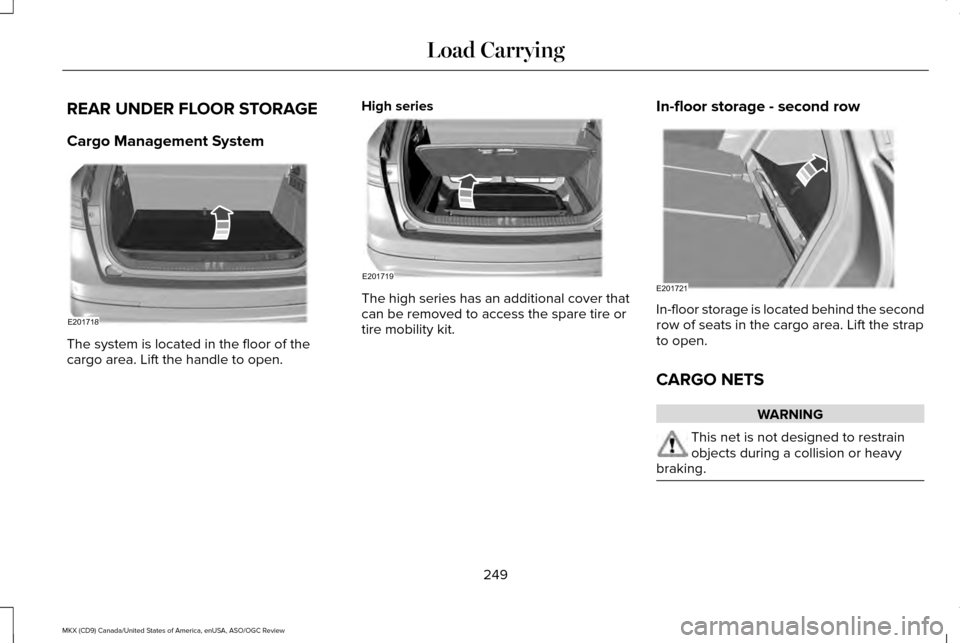
REAR UNDER FLOOR STORAGE
Cargo Management System
The system is located in the floor of the
cargo area. Lift the handle to open.
High series The high series has an additional cover that
can be removed to access the spare tire or
tire mobility kit.
In-floor storage - second row In-floor storage is located behind the second
row of seats in the cargo area. Lift the strap
to open.
CARGO NETS
WARNING
This net is not designed to restrain
objects during a collision or heavy
braking. 249
MKX (CD9) Canada/United States of America, enUSA, ASO/OGC Review Load CarryingE201718 E201719 E201721
Page 253 of 563
The cargo net secures lightweight objects
in the cargo area. Attach the net to the
anchors provided. Repeat the attachment on
both sides of the vehicle.
LUGGAGE COVERS (If Equipped)
WARNINGS
Make sure that the posts are correctly
latched in mounting features. The
cover may cause injury in a sudden stop or
crash if it is not securely installed. Do not place any objects on the cargo
shade. They may obstruct your vision
or strike occupants of your vehicle in a
sudden stop or crash. Use the cargo shade to cover items in the
cargo area of your vehicle.
Insert the ends of the cargo shade into the
mounting features located behind the rear
seat on the rear trim panels to install the
shade.
To operate the cargo shade:
1. Pull the rear edge of the cargo shade
rearward until it clicks into place.
2. To close the cargo shade, tap on the rear
edge and it will slide forward.
250
MKX (CD9) Canada/United States of America, enUSA, ASO/OGC Review Load CarryingE199571 E159183
Page 254 of 563

ROOF RACKS AND LOAD
CARRIERS (If Equipped)
WARNING
When loading the roof racks, we
recommend you evenly distribute the
load, as well as maintain a low center of
gravity. Loaded vehicles, with higher centers
of gravity, may handle differently than
unloaded vehicles. Take extra precautions,
such as slower speeds and increased
stopping distance, when driving a heavily
loaded vehicle. The maximum recommended load, evenly
distributed on the roof rack, is 100 lb (45 kg).
Note:
Never place loads directly on the roof
panel. The roof panel is not designed to
directly carry a load. You must place loads directly on the
crossbars fitted to the roof rack side rails.
When using the roof rack system, we
recommend that you use genuine Ford
accessory crossbars specifically designed
for your vehicle.
Make sure that you securely fasten the load.
Check the tightness of the load before
driving and at each fuel stop.
LOAD LIMIT
Vehicle Loading - with and without a
Trailer
This section will guide you in the proper
loading of your vehicle, trailer or both,
to keep your loaded vehicle weight
within its design rating capability, with
or without a trailer. Properly loading your
vehicle will provide maximum return ofvehicle design performance. Before
loading your vehicle, familiarize yourself
with the following terms for determining
your vehicle
’s weight ratings, with or
without a trailer, from the vehicle ’s Tire
Label or Safety Compliance Certification
Label:
Base Curb Weight - is the weight of the
vehicle including a full tank of fuel and
all standard equipment. It does not
include passengers, cargo, or optional
equipment.
Vehicle Curb Weight -
is the weight of
your new vehicle when you picked it up
from your authorized dealer plus any
aftermarket equipment.
251
MKX (CD9) Canada/United States of America, enUSA, ASO/OGC Review Load Carrying
Page 255 of 563

Payload - is the combined weight of
cargo and passengers that the vehicle
is carrying. The maximum payload for
your vehicle can be found on the Tire
Label on the B-Pillar or the edge of the
driver door (vehicles exported outside
the US and Canada may not have a Tire
Label). Look for
“THE COMBINED
WEIGHT OF OCCUPANTS AND CARGO
SHOULD NEVER EXCEED XXX kg OR
XXX lb. ”
for maximum payload. The
payload listed on the Tire Label is the
maximum payload for the vehicle as built by the assembly plant. If you install any
aftermarket or authorized-dealer
installed equipment on the vehicle, you
must subtract the weight of the
equipment from the payload listed on
the Tire Label in order to determine the
new payload. WARNING
The appropriate loading capacity
of your vehicle can be limited
either by volume capacity (how much
space is available) or by payload
capacity (how much weight the vehicle
should carry). Once you have reached
the maximum payload of your vehicle,
do not add more cargo, even if there is
space available. Overloading or
improperly loading your vehicle can
contribute to loss of vehicle control and
vehicle rollover. 252
MKX (CD9) Canada/United States of America, enUSA, ASO/OGC Review Load CarryingE143816PAYLOAD
Page 260 of 563
WARNING
Exceeding the Safety Compliance
Certification Label vehicle weight
rating limits could result in substandard
vehicle handling or performance, engine,
transmission and/or structural damage,
serious damage to the vehicle, loss of
control and personal injury. 257
MKX (CD9) Canada/United States of America, enUSA, ASO/OGC Review Load CarryingE142524
Page 262 of 563

WARNINGS
Do not exceed the GVWR or the
GAWR specified on the Safety
Compliance Certification Label. Do not use replacement tires with
lower load carrying capacities than
the original tires because they may
lower the vehicle ’s GVWR and GAWR
limitations. Replacement tires with a
higher limit than the original tires do not
increase the GVWR and GAWR
limitations. Exceeding any vehicle weight
rating limitation could result in
serious damage to the vehicle and/or
personal injury. Steps for determining the correct load
limit:
1.
Locate the statement "The combined
weight of occupants and cargo
should never exceed XXX kg or XXX
lb." on your vehicle ’s placard. 2.
Determine the combined weight of
the driver and passengers that will
be riding in your vehicle.
3. Subtract the combined weight of the
driver and passengers from XXX kg
or XXX lb.
4. The resulting figure equals the available amount of cargo and
luggage load capacity. For example,
if the “XXX” amount equals 1,400 lb.
and there will be five 150 lb.
passengers in your vehicle, the
amount of available cargo and
luggage load capacity is 650 lb.
(1400-750 (5 x 150) = 650 lb.)
5. Determine the combined weight of
luggage and cargo being loaded on
the vehicle. That weight may not
safely exceed the available cargo
and luggage load capacity calculated
in Step 4. 6.
If your vehicle will be towing a trailer,
load from your trailer will be
transferred to your vehicle. Consult
this manual to determine how this
reduces the available cargo and
luggage load capacity of your
vehicle.
The following gives you a few examples
on how to calculate the available amount
of cargo and luggage load capacity:
*Suppose your vehicle has a 1400-pound
(635-kilogram) cargo and luggage
capacity. You decide to go golfing. Is
there enough load capacity to carry you,
four of your friends and all the golf bags?
You and four friends average 220
pounds (99 kilograms) each and the golf
bags weigh approximately 30 pounds
(13.5 kilograms) each. The calculation
would be: 1400 - (5 x 220) - (5 x 30) =
1400 - 1100 - 150 = 150 pounds. Yes, you
have enough load capacity in your
vehicle to transport four friends and your
golf bags. In metric units, the calculation
would be: 635 kilograms - (5 x 99
kilograms) - (5 x 13.5 kilograms) = 635 -
495 - 67.5 = 72.5 kilograms.
259
MKX (CD9) Canada/United States of America, enUSA, ASO/OGC Review Load Carrying