Page 447 of 563

Voice command
Pause Say the name of what you would like to listen to such as a band, song, album or playlist.
Play
*
Play Artist ___
*
Play Song ___
Similar Music
Help
* ___ is a dynamic listing, meaning that it could be the name of anything\
, such as a group, artist or song. For example you could say "Play
artist The Beatles" or "Play song Penny Lane".
Supported Media Players, Formats and
Metadata Information
SYNC is capable of hosting nearly any digital
media player, including iPod, Zune ™, plays
from device players, and most USB drives.
Supported audio formats include MP3, WMA,
WAV and AAC. It is also able to organize your indexed media
from your playing device by metadata tags.
Metadata tags, which are descriptive
software identifiers embedded in the media
files, provide information about the file.
If your indexed media files contain no
information embedded in these metadata
tags, SYNC may classify the empty metadata
tags as unknown.Bluetooth Audio The system allows you to stream
audio over your vehicle's speakers
from your connected,
Bluetooth-enabled cell phone.
444
MKX (CD9) Canada/United States of America, enUSA, ASO/OGC Review MyLincoln Touch™E142611
Page 453 of 563

Action and Description
Menu Item
Privacy
Join Calls
End
Select to call stored contacts.
Quick Dial
Touch this button to access and call any contacts in your previously down\
loaded phonebook. The
system places the entries in alphabetical categories summarized at the t\
op of the screen
Phonebook
To turn on contact picture settings, if your device supports this feature\
, select:
Phone
Settings
Manage Phonebook
Display Photos from Phonebook
Certain smartphones may support transferring street addresses when liste\
d with phonebook contact
information. If your cell phone supports this feature, you can select and use these addresses as
destinations and save them as favorites.
Note: This is a cell phone-dependent feature. If your cell phone does not support downloading call
history using Bluetooth, SYNC keeps track of calls made with the SYNC system.
Call History
After you connect your Bluetooth-enabled cell phone to SYNC, you can access any previously
dialed, received or missed calls. You can also choose to save these to:
450
MKX (CD9) Canada/United States of America, enUSA, ASO/OGC Review MyLincoln Touch™
Page 457 of 563

Action and Description
Message
Select the ring tone you want to hear when you receive a call. Choose fr\
om possible system ring
tones, your currently paired cell phone ’s ring tone, a beep, text-to-speech or a silent notification.
Phone Ringer
Select a text message notification, if supported by your cell phone. Choose from possible system
alert tones, text-to-speech or silent.
Text Message Notification
If your cell phone is compatible, use this screen to adjust your internet data connection. Select to
make your connection profile with the personal area network or to turn off \
your connection. You
can also choose to adjust your settings or have the system always connec\
t, never connect when
roaming or query on connect. Press ? for more information.
Internet Data Connection
To access features such as automatic phonebook download, re-download your\
phonebook, add
contacts from your cell phone as well as delete or upload your phonebook\
.
Manage Phonebook
To have the system alert you when your cell phone is in roaming mode.
Roaming Warning
Phone Voice Commands 454
MKX (CD9) Canada/United States of America, enUSA, ASO/OGC Review MyLincoln Touch™E142599
Page 459 of 563
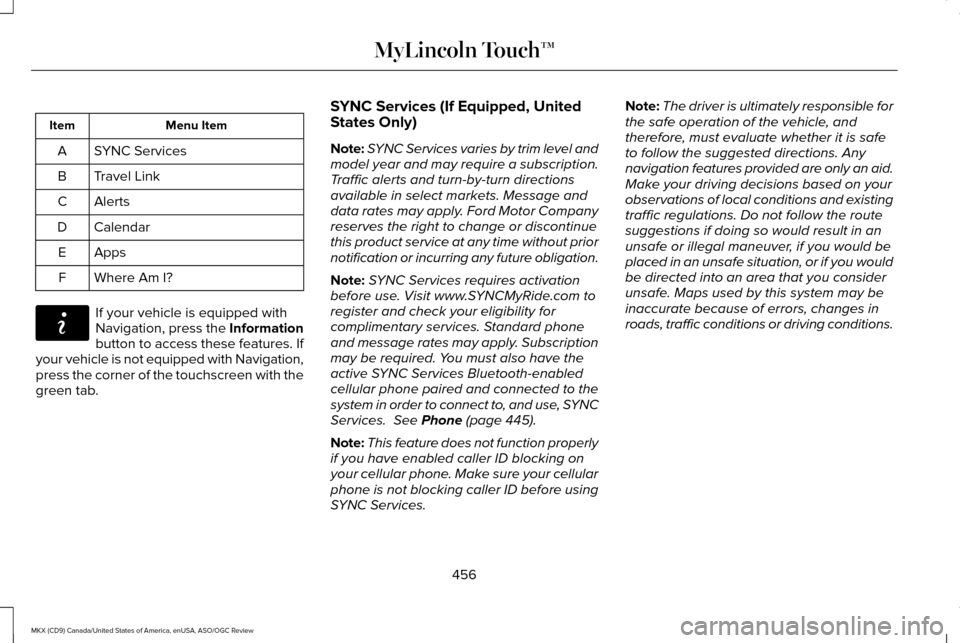
Menu Item
Item
SYNC Services
A
Travel Link
B
Alerts
C
Calendar
D
AppsE
Where Am I?
F If your vehicle is equipped with
Navigation, press the Information
button to access these features. If
your vehicle is not equipped with Navigation,
press the corner of the touchscreen with the
green tab. SYNC Services (If Equipped, United
States Only)
Note:
SYNC Services varies by trim level and
model year and may require a subscription.
Traffic alerts and turn-by-turn directions
available in select markets. Message and
data rates may apply. Ford Motor Company
reserves the right to change or discontinue
this product service at any time without prior
notification or incurring any future obligation.
Note: SYNC Services requires activation
before use. Visit www.SYNCMyRide.com to
register and check your eligibility for
complimentary services. Standard phone
and message rates may apply. Subscription
may be required. You must also have the
active SYNC Services Bluetooth-enabled
cellular phone paired and connected to the
system in order to connect to, and use, SYNC
Services. See Phone (page 445).
Note: This feature does not function properly
if you have enabled caller ID blocking on
your cellular phone. Make sure your cellular
phone is not blocking caller ID before using
SYNC Services. Note:
The driver is ultimately responsible for
the safe operation of the vehicle, and
therefore, must evaluate whether it is safe
to follow the suggested directions. Any
navigation features provided are only an aid.
Make your driving decisions based on your
observations of local conditions and existing
traffic regulations. Do not follow the route
suggestions if doing so would result in an
unsafe or illegal maneuver, if you would be
placed in an unsafe situation, or if you would
be directed into an area that you consider
unsafe. Maps used by this system may be
inaccurate because of errors, changes in
roads, traffic conditions or driving conditions.
456
MKX (CD9) Canada/United States of America, enUSA, ASO/OGC Review MyLincoln Touch™E142608
Page 461 of 563

To use voice commands, press the voice button and say:
Action and Description
Voice Command
This initiates an outgoing call to SYNC Services using your paired and connected Bluetooth-
enabled cellular phone. Once you connect to the service, follow the voice prompts to request
the desired service, for example traffic or directions.
Services
Once connected to SYNC Services, you can also say the following:
Receive a list of available services from which to choose.
What Can I Say
To return to the Services main menu.
Services
Receive system help.
Help
If your vehicle is equipped with Navigation,
press the I (Information) button. If your
vehicle is not equipped with Navigation,
press the green tab on your touchscreen. To use the touchscreen select: Menu Item
Connect to Services
This command initiates an outgoing call to
SYNC Services using your paired and
connected Bluetooth-enabled cellular phone.
Once you connect to the service, follow the
voice prompts to request the desired service.
458
MKX (CD9) Canada/United States of America, enUSA, ASO/OGC Review MyLincoln Touch™
Page 463 of 563
Action and Description
Voice Command
subscription. For more information on Operator Assist, visit
www.SYNCMyRide.com/support.
If you miss a turn, SYNC automatically asks if you want the route
updated. Say yes when prompted and the system sends a new route
to your vehicle.
Yes [During an active route]
Disconnecting from SYNC Services
Press and hold the hang-up phone button
on the steering wheel. From the SYNC Services main menu say: Voice Command
Good-bye
460
MKX (CD9) Canada/United States of America, enUSA, ASO/OGC Review MyLincoln Touch™
Page 464 of 563
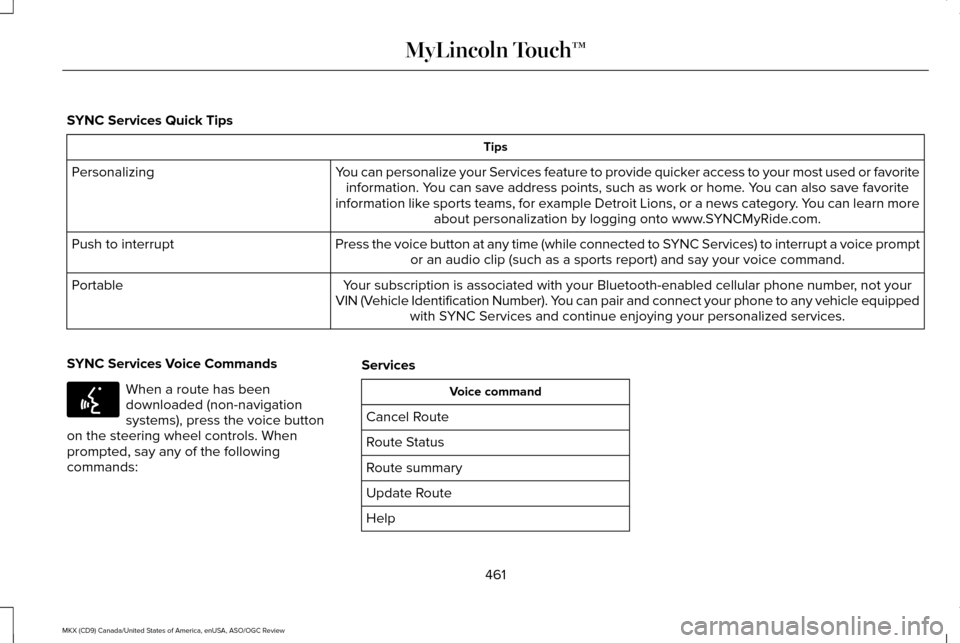
SYNC Services Quick Tips
Tips
You can personalize your Services feature to provide quicker access to your most used or favorite information. You can save address points, such as work or home. You can also save favorite
information like sports teams, for example Detroit Lions, or a news category. You can learn more about personalization by logging onto www.SYNCMyRide.com.
Personalizing
Press the voice button at any time (while connected to SYNC Services) to interrupt a voice promptor an audio clip (such as a sports report) and say your voice command.\
Push to interrupt
Your subscription is associated with your Bluetooth-enabled cellular phon\
e number, not your
VIN (Vehicle Identification Number). You can pair and connect your phone to any vehicle equipped with SYNC Services and continue enjoying your personalized services.
Portable
SYNC Services Voice Commands When a route has been
downloaded (non-navigation
systems), press the voice button
on the steering wheel controls. When
prompted, say any of the following
commands: Services Voice command
Cancel Route
Route Status
Route summary
Update Route
Help
461
MKX (CD9) Canada/United States of America, enUSA, ASO/OGC Review MyLincoln Touch™E142599
Page 465 of 563

Sirius Travel Link (If Equipped)
WARNING
Driving while distracted can result in
loss of vehicle control, crash and injury.
We strongly recommend that you use
extreme caution when using any device that
may take your focus off the road. Your
primary responsibility is the safe operation
of your vehicle. We recommend against the
use of any handheld device while driving and
encourage the use of voice-operated
systems when possible. Make sure you are
aware of all applicable local laws that may
affect the use of electronic devices while
driving. Note:
In order to use Sirius Travel Link, your
vehicle must be equipped with navigation
and your navigation SD card must be in the
SD card slot.
Note: A paid subscription is required to
access and use these features. Go to
www.siriusxm.com/travellink for more
information.
Note: Visit www.siriusxm.com/traffic and click
on Coverage map and details for a complete
listing of all traffic areas covered by Sirius
Travel Link.
Note: Neither Sirius nor Ford is responsible
for any errors or inaccuracies in the Sirius
Travel Link services or its use in vehicles. When you subscribe to Sirius Travel Link, it
can help you locate the best gas prices, find
movie listings, get current traffic alerts, view
the current weather map, get accurate ski
conditions and see scores to current sports
games. If your vehicle is equipped with
Navigation, touch the I
(Information) button to access
these features. If your vehicle is not
equipped with Navigation, touch the corner
of the touchscreen with the green tab. Action and Description
Menu Item
Touch these buttons to identify traffic incidents on your route, nearby your vehicle ’s current location
or near any of your favorite places, if programmed.
Traffic on Route
Traffic Nearby
Touch this button to view fuel prices at stations close to your vehicle ’s location or on an active
navigation route
Fuel Prices
Touch this button to view nearby movie theaters and their show times, if \
available.
Movie Listings
462
MKX (CD9) Canada/United States of America, enUSA, ASO/OGC Review MyLincoln Touch™E142608
