2016 LINCOLN MKS mirror
[x] Cancel search: mirrorPage 178 of 382

The current assessment of your alertness
indicates that you should rest as soon as
safely possible.
The status bar will travel from left to right as
the calculated alertness level decreases. As
the rest icon is approached the color turns
from green to yellow to red. The yellow
position indicates the first warning is active
and the red position indicates the second
warning is active.
Note:
If you have recently received a warning;
you should consider resting, even if the current
assessment is within the typical range.
Note: If the camera sensor cannot track the
road lane markings or if your vehicle speed
drops below approximately 40 mph
(64 km/h), the alertness level will change to
grey for a short time and the information
display will inform you that the system is
unavailable.
Resetting the System
You can reset the system by either:
• Switching the ignition off and on.
• Stopping the vehicle and then opening
and closing the driver ’s door. LANE KEEPING SYSTEM (If Equipped) WARNING
The system is designed to aid the driver.
It is not intended to replace your
attention and judgment. You are still
responsible to drive with due care and
attention. Note:
The system works above
40 mph
(64 km/h).
Note: The system works as long as the
camera can detect one lane marking.
Note: The system may not function if the
camera is blocked or there is damage to the
windshield.
Note: When Aid mode is on and the system
detects no steering activity for a short period,
the system will alert you to put your hands on
the steering wheel. The system may detect a
light grip or touch on the steering wheel as
hands off driving. The system notifies you to stay in your lane
through the steering system and the
instrument cluster display when the front
camera detects an unintentional drift out of
your lane is likely to occur. The system
automatically detects and tracks the road
lane markings using a camera mounted
behind the interior rear view mirror.
Switching the System On and Off
Note:
The system on or off setting is stored
until it is manually changed, unless a MyKey®
is detected. If the system detects a MyKey®,
it defaults to on and the mode is set to alert.
Note: If a MyKey® is detected, pressing the
button will not affect the on or off status of
the system. You can only change the mode
and intensity settings. Press the button located on the
center console to switch the
system on or off.
175
MKS (CLE) Canada/United States of America, enUSA, First Printing Driving AidsE173233
Page 182 of 382

Why does the vehicle not come back into the middle of the lane always, as expected, in the Aid or Aid + Alert mode?
High cross winds
Large road crown
Rough roads, grooves, shoulder drop-offs
Heavy uneven loading of the vehicle or improper tire inflation pressure
If the tires have been exchanged (including snow tires), or the suspension has been modified
Vehicle accessories such as snow plows or trailers
BLIND SPOT INFORMATION
SYSTEM WARNING
To help avoid injuries, NEVER use the
Blind Spot Information System as a
replacement for using the interior and
exterior mirrors or looking over your shoulder
before changing lanes. The Blind Spot
Information System is not a replacement for
careful driving. The Blind Spot Information System is
designed to aid you in detecting vehicles that
may have entered the blind spot zone (A).
The detection area is on both sides of your
vehicle, extending rearward from the exterior
mirrors to approximately 13 ft (4 m) beyond
the bumper. The system is designed to alert
you if certain vehicles enter the blind spot
zone while driving.
Note: The Blind Spot Information System
does not prevent contact with other vehicles
or objects; nor detect parked vehicles, people,
animals or infrastructure (fences, guardrails,
trees). It’ s only designed to alert you to
vehicles in the blind spot zones.
179
MKS (CLE) Canada/United States of America, enUSA, First Printing Driving AidsA
A
E124788
Page 183 of 382

Note:
When a vehicle passes quickly through
the blind spot zone, typically fewer than two
seconds, the system does not trigger.
Using the System
The Blind Spot Information System turns on
when you start the engine and you drive your
vehicle forward above 5 mph (8 km/h).
For automatic transmissions, the Blind Spot
Information System remains on while the
transmission is in drive (D). If shifted into
reverse (R) or park (P) the Blind Spot
Information System turns off. Once shifted
back into drive (D), the Blind Spot
Information System turns back on when you
drive your vehicle above
5 mph (8 km/h).
For manual transmissions, the Blind Spot
Information System is on for all gears except
the reverse (R).
Note: The Blind Spot Information System
does not function in reverse (R) or park (P). System Lights and Messages
The Blind Spot Information System
illuminates an amber alert indicator in the
outside mirror on the side of your vehicle the
approaching vehicle is coming from.
The alert indicator dims when the system
detects nighttime darkness.
System Sensor Blockage WARNING
To help avoid injuries, NEVER use the
Blind Spot Information System as a
replacement for using the interior and
exterior mirrors or looking over your shoulder
before changing lanes. The Blind Spot
Information System is not a replacement for
careful driving. 180
MKS (CLE) Canada/United States of America, enUSA, First Printing Driving AidsE142442
Page 185 of 382

You can also have the Blind Spot Information
System switched off permanently at an
authorized dealer. Once switched off
permanently, the system can only be
switched back on at an authorized dealer.
CROSS TRAFFIC ALERT WARNING
To help avoid personal injury, NEVER
use the Cross Traffic Alert system as a
replacement for using the interior and
exterior mirrors and looking over your
shoulder before backing out of a parking
space. Cross Traffic Alert is not a
replacement for careful driving. Cross Traffic Alert is designed to warn you of
vehicles approaching from the sides when
the transmission is in reverse (R).
Using the System
Cross Traffic Alert turns on when you start
the engine and you shift into reverse (R).
Once shifted out of reverse (R), Cross Traffic
Alert turns off.
Note:
Cross Traffic Alert only functions while
your transmission is in reverse (R).
Cross Traffic Alert is designed to alert the
driver of certain collision risks. Coverage
decreases when the sensors are partially,
mostly or fully obstructed. Reversing slowly
helps increase the coverage area and
effectiveness.
182
MKS (CLE) Canada/United States of America, enUSA, First Printing Driving Aids
Page 188 of 382
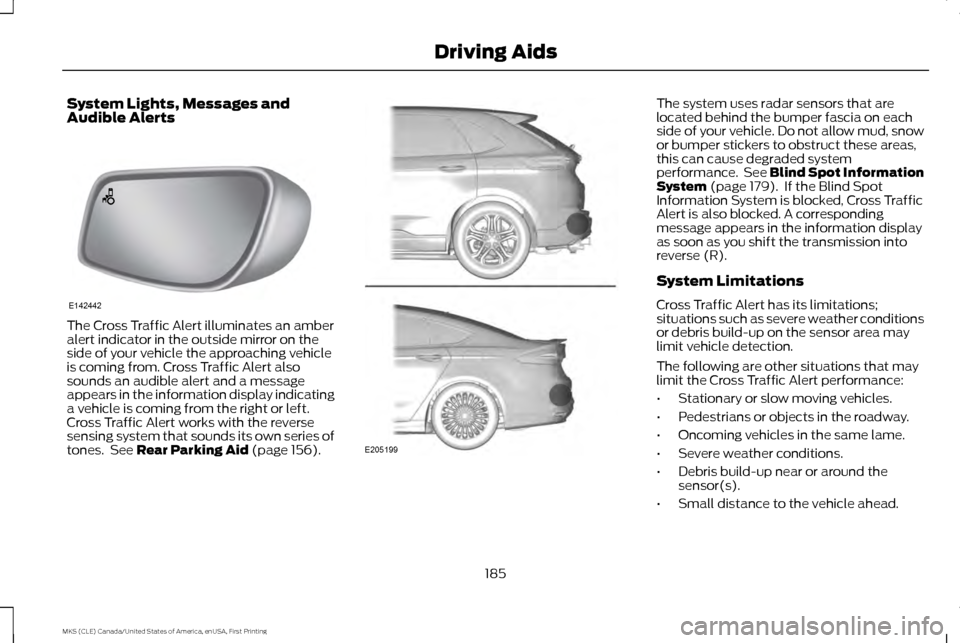
System Lights, Messages and
Audible Alerts
The Cross Traffic Alert illuminates an amber
alert indicator in the outside mirror on the
side of your vehicle the approaching vehicle
is coming from. Cross Traffic Alert also
sounds an audible alert and a message
appears in the information display indicating
a vehicle is coming from the right or left.
Cross Traffic Alert works with the reverse
sensing system that sounds its own series of
tones. See Rear Parking Aid (page 156). The system uses radar sensors that are
located behind the bumper fascia on each
side of your vehicle. Do not allow mud, snow
or bumper stickers to obstruct these areas,
this can cause degraded system
performance. See Blind Spot Information
System
(page 179). If the Blind Spot
Information System is blocked, Cross Traffic
Alert is also blocked. A corresponding
message appears in the information display
as soon as you shift the transmission into
reverse (R).
System Limitations
Cross Traffic Alert has its limitations;
situations such as severe weather conditions
or debris build-up on the sensor area may
limit vehicle detection.
The following are other situations that may
limit the Cross Traffic Alert performance:
• Stationary or slow moving vehicles.
• Pedestrians or objects in the roadway.
• Oncoming vehicles in the same lame.
• Severe weather conditions.
• Debris build-up near or around the
sensor(s).
• Small distance to the vehicle ahead.
185
MKS (CLE) Canada/United States of America, enUSA, First Printing Driving AidsE142442 E205199
Page 230 of 382
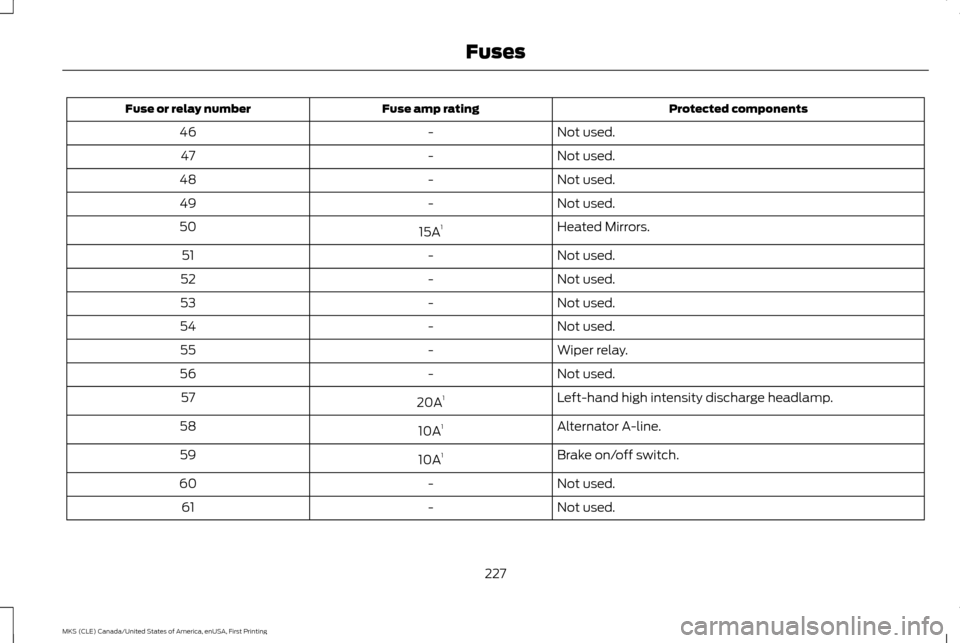
Protected components
Fuse amp rating
Fuse or relay number
Not used.
-
46
Not used.
-
47
Not used.
-
48
Not used.
-
49
Heated Mirrors.
15A 1
50
Not used.
-
51
Not used.
-
52
Not used.
-
53
Not used.
-
54
Wiper relay.
-
55
Not used.
-
56
Left-hand high intensity discharge headlamp.
20A 1
57
Alternator A-line.
10A 1
58
Brake on/off switch.
10A 1
59
Not used.
-
60
Not used.
-
61
227
MKS (CLE) Canada/United States of America, enUSA, First Printing Fuses
Page 238 of 382

Protected components
Fuse amp rating
Fuse or relay number
Decklid release.
15A
25
Push button ignition switch.
5A
26
Intelligent access module power.
20A
27
Not used (spare).
15A
28
Radio.
20A
29
Global positioning system module
Front park lamps.
15A
30
Not used (spare).
5A
31
Smart window motors.
15A
32
Master window and mirror switch.
Rear window power sunshade module.
Lock switch illumination.
Suspension module.
10A
33
Reverse park aid module.
10A
34
Automatic high beam and lane departure module.
Rear heated seat module.
Blind spot monitor module.
Rear video camera.
Motorized humidity sensor.
5A
35
Heads-up display.
Heated steering wheel.
10A
36
235
MKS (CLE) Canada/United States of America, enUSA, First Printing Fuses
Page 259 of 382

Because your vehicle
’s engine is electronically
controlled by a computer, some control
conditions are maintained by power from the
battery. When the battery is disconnected or
a new battery is installed, the engine must
relearn its idle and fuel trim strategy for
optimum driveability and performance.
Flexible fuel vehicles (FFV) must also relearn
the ethanol content of the fuel for optimum
driveability and performance.
To restore the settings, do the following:
1. Apply the parking brake.
2. Shift into park (P) or neutral (N).
3. Switch off all accessories.
4. Press the brake pedal and start your vehicle.
5. Run the engine until it reaches normal operating temperature. While the engine
is warming up, complete the following:
Reset the clock. See Audio System
(page 313). Reset the power windows
bounce-back feature. See Windows and
Mirrors
(page 78). Reset the radio
station presets. See Audio System
(page 313).
6. Allow the engine to idle for at least one minute. 7.
Drive the vehicle at least 10 mi (16 km) to
completely relearn the idle trim and fuel
trim strategy.
Note: If you do not allow the engine to relearn
the idle and fuel trim strategy, the idle quality
of your vehicle may be adversely affected until
the engine computer eventually relearns the
idle trim and fuel trim strategy.
Note: For flexible fuel vehicles, if you are
operating on E85, you may experience poor
starts or an inability to start the engine and
driveability problems until the fuel trim and
ethanol content have been relearned.
Make sure that you dispose of old batteries
in an environmentally friendly way. Seek
advice from your local authority about
recycling old batteries.
If storing your vehicle for more than 30 days
without recharging the battery, we
recommend that you disconnect the battery
cables to maintain battery charge for quick
starting. Battery Management System
(If
Equipped)
The battery management system monitors
battery conditions and takes actions to
extend battery life. If excessive battery drain
is detected, the system temporarily disables
some electrical systems to protect the
battery.
Systems included are:
• Heated rear window.
• Heated seats.
• Climate control.
• Heated steering wheel.
• Audio unit.
• Navigation system.
A message may appear in the information
displays to alert you that battery protection
actions are active. These messages are only
for notification that an action is taking place,
and not intended to indicate an electrical
problem or that the battery requires
replacement.
256
MKS (CLE) Canada/United States of America, enUSA, First Printing Maintenance