2016 LINCOLN MKS air filter
[x] Cancel search: air filterPage 253 of 382

At this time, you may notice your engine
coolant temperature gauge needle move
toward the H and the POWER REDUCED
TO LOWER TEMP message may appear in
the information display.
You may notice a reduction in vehicle speed
caused by reduced engine power. In order to
manage the engine fluid temperatures, your
vehicle may enter this mode if certain
high-temperature and high-load conditions
take place. The amount of speed reduction
depends on many factors such as vehicle
loading, towing, grade and ambient
temperature. If this occurs, there is no need
to pull off the road. You can continue to drive
your vehicle while this message is active.
The air conditioning may also cycle on and
off during severe operating conditions to
protect overheating of the engine. When the
engine coolant temperature decreases to a
normal operating temperature, the air
conditioning will turn on once again.
If the engine coolant temperature gauge
moves fully into the red (hot) area, or if the
coolant temperature warning or service
engine soon messages appear in your
information display:
1. Pull off the road as soon as safely possible and shift the transmission into
P
. 2.
Leave the engine running until the coolant
temperature gauge needle moves away
from the red (hot) area. After several
minutes, if the temperature does not
drop, follow the remaining steps.
3. Switch the engine off and wait for it to cool before checking the coolant level.
4. If the coolant level is normal, restart your
engine and continue.
5. If the coolant is low, add coolant, and restart the engine. See
Adding Engine
Coolant or How Fail-Safe Cooling
Works in this chapter for more
information.
AUTOMATIC TRANSMISSION
FLUID CHECK
6F50/6F55 Transmission
(If Equipped) WARNINGS
The dipstick cap and surrounding
components may be hot, use gloves.
Use gloves when moving the air filter
assembly. Components will be hot. Note:
Automatic transmission fluid expands
when warmed. To obtain an accurate fluid
check, drive your vehicle until you warm it up,
approximately
20 mi (30 km). If you operate
your vehicle for an extended period at high
speeds, in city traffic during hot weather or
pulling a trailer, switch your vehicle off until it
reaches normal operating temperatures to
allow the fluid to cool before checking.
Depending on vehicle use, cooling times could
take up to 30 minutes or longer.
Refer to your scheduled maintenance
information for scheduled intervals for fluid
checks and changes. Your transmission does
not consume fluid. However, you should
check the fluid level if the transmission is not
working properly. For example, if the
transmission slips or shifts slowly or if you
notice some sign of a fluid leak.
1. Drive your vehicle 20 mi (30 km) or until it reaches normal operating temperature.
2. Park your vehicle on a level surface and engage the parking brake.
3. With the parking brake engaged and your
foot on the brake pedal, start the engine
and move the gearshift lever through all
of the gear ranges. Allow a minimum of
10 seconds for each gear to engage.
4. Put the gearshift lever in park (P) and leave the engine running.
250
MKS (CLE) Canada/United States of America, enUSA, First Printing Maintenance
Page 254 of 382

Note:
For vehicles with the EcoBoost engine,
move the air filter assembly aside to access
the transmission dipstick. See Moving the Air
Filter Assembly for more information.
5. Remove the dipstick and wipe it clean with a dry, lint free clean rag. If necessary,
refer to the Under hood overview in this
chapter for the location of the dipstick.
6. Install the dipstick making sure you fully seat it in the filler tube by turning it to the
locked position.
7. Remove the dipstick and inspect the fluid
level. The fluid should be in the
designated areas for normal operating
temperature.
Moving the Air Filter Assembly
(Accessing the Dipstick) WARNING
Do not run engine with the air filter
disconnected.
1. Switch the engine off. 2. Clean the area around the clamp that
connects the air filter assembly to the
rubber hose and then loosen it.
3. Remove the bolt cover. 4.
Remove two bolts that attach the air filter
assembly to the front of the vehicle.
5. Remove the harness retaining clip by pulling up.
251
MKS (CLE) Canada/United States of America, enUSA, First Printing MaintenanceE173335
2
3 E173334
654
Page 255 of 382

6. Do not disconnect the sensor.
7. Pull the air filter assembly up to
disconnect it from the seated grommets
located under the air filter assembly.
8. Rotate the air filter assembly 90 degrees
counterclockwise. Make sure the rubber
hose is still connected to the air filter
assembly.
9. Tighten the clamp.
You can now access the transmission fluid
level indicator. Checking the fluid level
Low fluid level
If the fluid level is below the MIN range of the
dipstick, add fluid to reach the hash mark
level.
Note:
If the fluid level is below the MIN level,
do not drive the vehicle. An underfill condition
may cause shift or engagement concerns or
possible damage. Correct fluid level Check the transmission fluid at the normal
operating temperatures between 180°F
(82°C) and 200°F (93°C) on a level surface.
Drive your vehicle until you warm it up to the
normal operating temperature after
approximately 20 mi (30 km).
Target the transmission fluid level within the
cross-hatch area if at the normal operating
temperature between 180°F (82°C) and
200°F (93°C).
252
MKS (CLE) Canada/United States of America, enUSA, First Printing MaintenanceE173400 E158842 E158843
Page 256 of 382
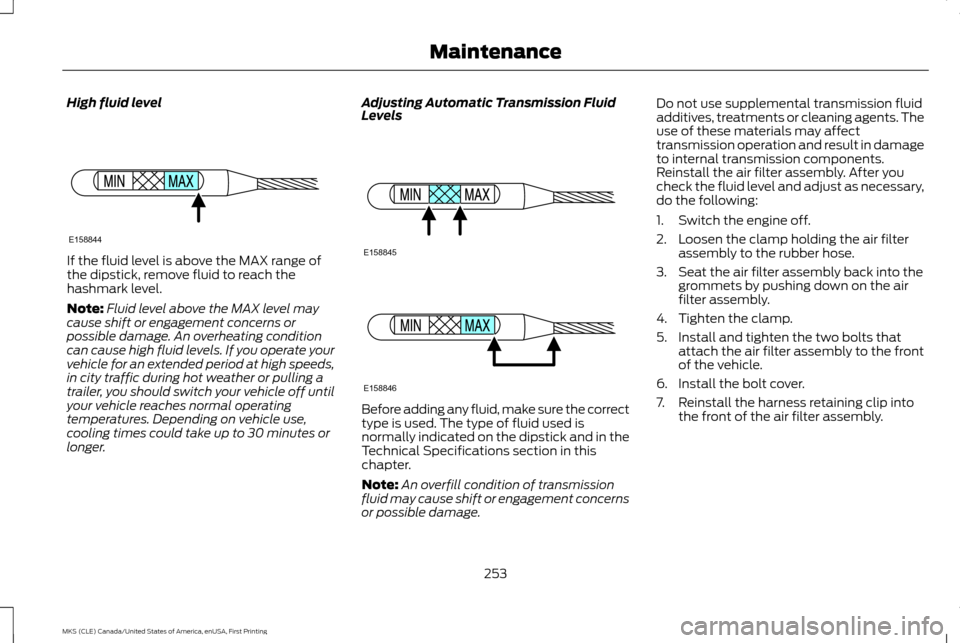
High fluid level
If the fluid level is above the MAX range of
the dipstick, remove fluid to reach the
hashmark level.
Note:
Fluid level above the MAX level may
cause shift or engagement concerns or
possible damage. An overheating condition
can cause high fluid levels. If you operate your
vehicle for an extended period at high speeds,
in city traffic during hot weather or pulling a
trailer, you should switch your vehicle off until
your vehicle reaches normal operating
temperatures. Depending on vehicle use,
cooling times could take up to 30 minutes or
longer. Adjusting Automatic Transmission Fluid
Levels
Before adding any fluid, make sure the correct
type is used. The type of fluid used is
normally indicated on the dipstick and in the
Technical Specifications section in this
chapter.
Note:
An overfill condition of transmission
fluid may cause shift or engagement concerns
or possible damage. Do not use supplemental transmission fluid
additives, treatments or cleaning agents. The
use of these materials may affect
transmission operation and result in damage
to internal transmission components.
Reinstall the air filter assembly. After you
check the fluid level and adjust as necessary,
do the following:
1. Switch the engine off.
2. Loosen the clamp holding the air filter
assembly to the rubber hose.
3. Seat the air filter assembly back into the grommets by pushing down on the air
filter assembly.
4. Tighten the clamp.
5. Install and tighten the two bolts that attach the air filter assembly to the front
of the vehicle.
6. Install the bolt cover.
7. Reinstall the harness retaining clip into the front of the air filter assembly.
253
MKS (CLE) Canada/United States of America, enUSA, First Printing MaintenanceE158844 E158845 E158846
Page 265 of 382

CHANGING THE ENGINE AIR
FILTER
WARNING
Do not start the engine with the air
cleaner removed. This can cause
damage not covered by the vehicle
Warranty and can result in serious injury. When changing the air filter element, use only
the air filter element listed. See Capacities
and Specifications (page 296).
For vehicles with EcoBoost engines, when
servicing the air cleaner, it is important that
no foreign material enters the air induction
system. The engine and turbocharger are
susceptible to damage from even small
particles.
Change the air filter element at the correct
interval. See
Scheduled Maintenance
(page 321).
Note: Failure to use the correct air filter
element may result in severe engine damage.
Resulting component damage may not be
covered by the vehicle Warranty.
To replace the air filter element do the
following:
1. Switch the ignition off. 2.
Remove the clips that secure the air filter
housing cover.
3. Carefully lift the air filter housing cover.
4. Remove the air filter element from the air
filter housing.
5. Wipe any dirt or debris from the air filter housing and cover to make sure no dirt
gets in the engine and that you have a
good seal.
6. Install a new air filter element.
7. Install the air filter housing cover. Be careful not to crimp the filter element
edges between the air filter housing and
cover. This could cause filter damage
and allow unfiltered air to enter the
engine if it is not properly seated. 8. Engage the clips to secure the air filter
housing cover to the air filter housing.
262
MKS (CLE) Canada/United States of America, enUSA, First Printing MaintenanceE173520
Page 268 of 382

WAXING
Regular waxing is necessary to protect your
car's paint from the elements. We
recommend that you wash and wax the
painted surface once or twice a year.
When washing and waxing, park your vehicle
in a shaded area out of direct sunlight. Always
wash your vehicle before applying wax.
•
Use a quality wax that does not contain
abrasives.
• Follow the manufacturer ’s instructions
to apply and remove the wax.
• Apply a small amount of wax in a
back-and-forth motion, not in circles.
• Do not allow wax to come in contact with
any non-body (low-gloss black) colored
trim. The wax will discolor or stain the
parts over time.
•Roof racks.
• Bumpers.
• Grained door handles.
• Side moldings.
• Mirror housings.
• Windshield cowl area. •
Do not apply wax to glass areas.
• After waxing, your car's paint should feel
smooth, and be free of streaks and
smudges.
CLEANING THE ENGINE
Engines are more efficient when they are
clean because grease and dirt buildup keep
the engine warmer than normal.
When washing:
• Take care when using a power washer to
clean the engine. The high-pressure fluid
could penetrate the sealed parts and
cause damage.
• Do not spray a hot engine with cold water
to avoid cracking the engine block or
other engine components.
• Spray Motorcraft Engine Shampoo and
Degreaser on all parts that require
cleaning and pressure rinse clean. In
Canada, use Motorcraft Engine Shampoo.
• Never wash or rinse the engine while it is
hot or running; water in the running engine
may cause internal damage. •
Never wash or rinse any ignition coil, spark
plug wire or spark plug well, or the area
in and around these locations.
• Cover the battery, power distribution box,
and air filter assembly to prevent water
damage when cleaning the engine.
CLEANING THE WINDOWS AND
WIPER BLADES
Car wash chemicals and environmental
fallout can result in windshield and wiper
blade contamination. Dirty windshield and
wipers will result in poor windshield wiper
operation. Keep the windshield and wiper
blades clean to maintain windshield wiper
performance.
265
MKS (CLE) Canada/United States of America, enUSA, First Printing Vehicle Care
Page 272 of 382

Engine
•
Change the engine oil and filter prior to
storage because used engine oil contains
contaminates which may cause engine
damage.
• Start the engine every 15 days for a
minimum of 15 minutes. Run at fast idle
with the climate controls set to defrost
until the engine reaches normal operating
temperature.
• With your foot on the brake, shift through
all the gears while the engine is running.
• We recommend that you change the
engine oil before you use your vehicle
again.
Fuel system
• Fill the fuel tank with high-quality fuel
until the first automatic shutoff of the fuel
pump nozzle.
Cooling system
• Protect against freezing temperatures.
• When removing your vehicle from
storage, check coolant fluid level. Confirm
that there are no cooling system leaks
and that fluid is at the recommended
level. Battery
•
Check and recharge as necessary. Keep
connections clean.
• If storing your vehicle for more than 30
days without recharging the battery, we
recommend that you disconnect the
battery cables to maintain battery charge
for quick starting.
Note: It is necessary to reset memory features
if battery cables are disconnected.
Brakes
• Make sure the brakes and parking brake
release fully.
Tires
• Maintain recommended air pressure.
Miscellaneous
• Make sure all linkages, cables, levers and
pins under your vehicle are covered with
grease to prevent rust.
• Move vehicles at least 25 ft (7.5 m) every
15 days to lubricate working parts and
prevent corrosion. Removing Vehicle From Storage
When your vehicle is ready to come out of
storage, do the following:
•
Wash your vehicle to remove any dirt or
grease film build-up on window surfaces.
• Check windshield wipers for any
deterioration.
• Check under the hood for any foreign
material that may have collected during
storage such as mice or squirrel nests.
• Check the exhaust for any foreign
material that may have collected during
storage.
• Check tire pressures and set tire inflation
per the Tire Label.
• Check brake pedal operation. Drive your
vehicle 15 ft (4.5 m) back and forth to
remove rust build-up.
• Check fluid levels (including coolant, oil
and gas) to make sure there are no leaks,
and fluids are at recommended levels.
• If you remove the battery, clean the
battery cable ends and check for damage.
Contact an authorized dealer if you have any
concerns or issues.
269
MKS (CLE) Canada/United States of America, enUSA, First Printing Vehicle Care
Page 301 of 382

MOTORCRAFT PARTS - 3.5L ECOBOOST™
Part Number
Component
FA-1884
Air filter.
BXT-65-650
Battery.
FP-68
Cabin air filter.
FL-500-S
Oil filter.
SP-534
Spark plugs.
WW-2501 (driver side)
Windshield wipers.
WW-2043 (passenger side)
We recommend Motorcraft replacement
parts available at your Ford dealer or at
fordparts.com for scheduled maintenance.
These parts meet or exceed Ford Motor
Company ’s specifications and are engineered
for your vehicle. The use of other parts may
impact vehicle performance, emissions and
durability. Your warranty may be void for any
damage related to the use of other parts. If a Motorcraft oil filter is not available, use
an oil filter that meets industry performance
specification SAE/USCAR-36.
For spark plug replacement, contact an
authorized dealer. Replace the spark plugs
at the appropriate intervals. See Scheduled
Maintenance (page 321).
298
MKS (CLE) Canada/United States of America, enUSA, First Printing Capacities and Specifications