Page 352 of 660
3524-5. Using the driving support systems
RX450h_U_OM0E013U
Once the vehicle width guide lines and the parking space lines are parallel,
straighten the steering wheel and back up slowly until the vehicle has com-
pletely entered the parking space.
Stop the vehicle in an approp riate place, and finish parking.
■Screen description
Vehicle width guide lines
These lines indicate a guide path when the vehicle is being backed straight
up. The displayed width is wider than the actual vehicle width.
Parking assist guide lines
These lines indicate the path of the sm allest turn possible behind the vehi-
cle.
These lines also indicate the approx imate position of the steering wheel
when parking.
Distance guide line
This line (red) indicates points approxim ately 1.5 ft. (0.5 m) behind the rear
bumper of your vehicle.
Vehicle center guide line
The line indicates the estimated vehicle center on the ground.
Parking assist guide line display mode
4
5
1
2
3
4
Page 353 of 660
3534-5. Using the driving support systems
4
Driving
RX450h_U_OM0E013U
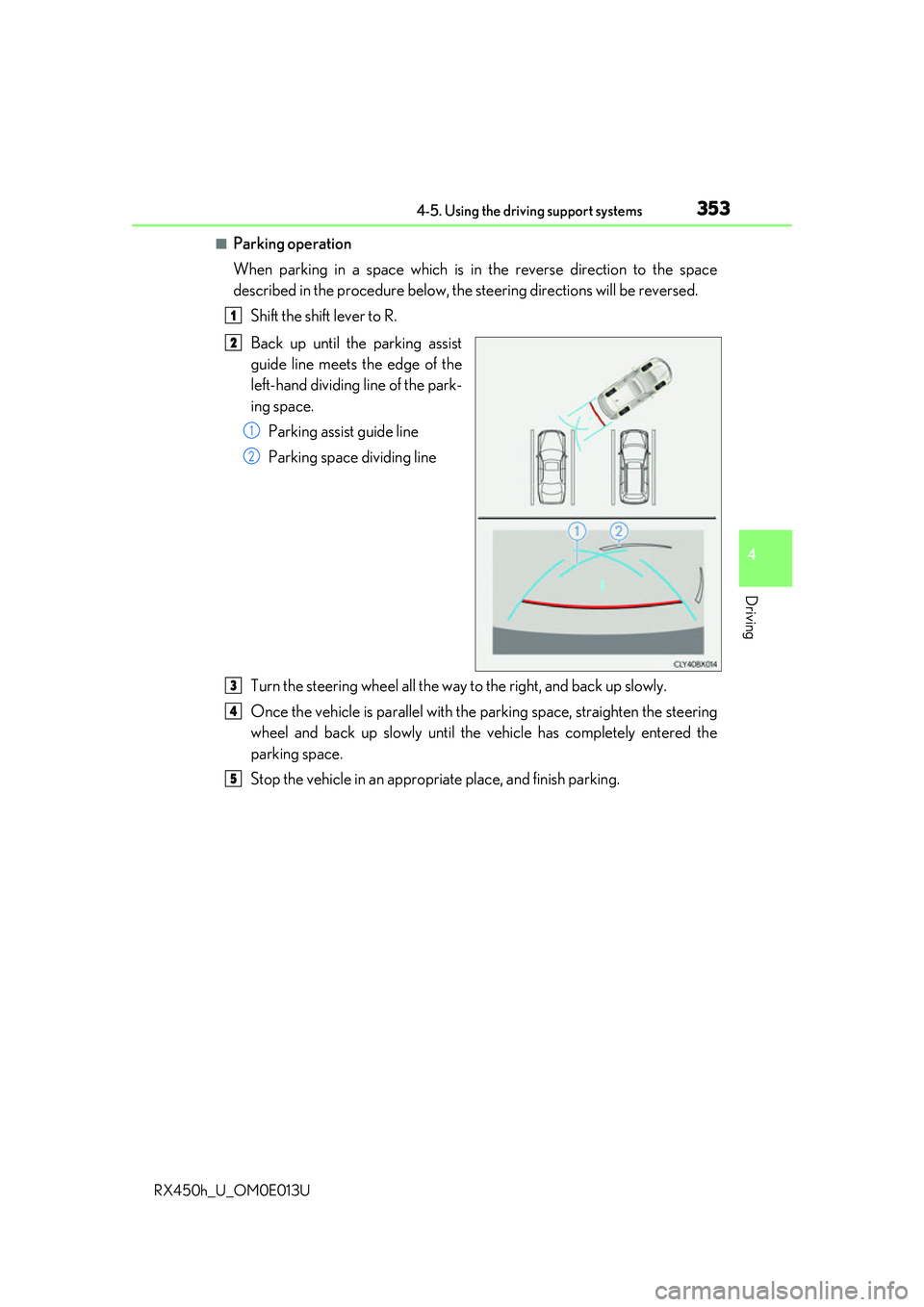
■Parking operation
When parking in a space which is in the reverse direction to the space
described in the procedure below, the steering directions will be reversed.
Shift the shift lever to R.
Back up until the parking assist
guide line meets the edge of the
left-hand dividing line of the park-
ing space. Parking assist guide line
Parking space dividing line
Turn the steering wheel all the way to the right, and back up slowly.
Once the vehicle is parallel with the parking space, straighten the steering
wheel and back up slowly until the vehicle has completely entered the
parking space.
Stop the vehicle in an approp riate place, and finish parking.
1
2
1
2
3
4
5
Page 360 of 660
3604-5. Using the driving support systems
RX450h_U_OM0E013U
The estimated course lines move even though the steering wheel is straight
There is a malfunction in the signals being
output by the steering sensor.Have the vehicle inspected by your Lexus
dealer.
Guide lines are not displayed
The back door is open.
Close the back door.
If this does not resolve the symptom, have
the vehicle inspected by your Lexus
dealer.
The estimated course lines are not displayed
• The steering wheel has been moved
while the 12-volt battery was being
reinstalled.
• 12-volt battery power is low.
• The steering sensor has been rein-
stalled.
• There is a malfunction in the signals
being output by the steering sensor.
Stop the vehicle, and turn the steering
wheel as far as it will go to the left and
right.
If this does not resolve the symptom, have
the vehicle inspected by your Lexus
dealer.
Likely causeSolution
Page 361 of 660

3614-5. Using the driving support systems
4
Driving
RX450h_U_OM0E013U
WARNING
■When using the Lexus parking assist monitor system
The parking assist monitor is a supplemental device intended to assist the driver when
backing up. When backing up, be sure to check visually behind and all around the vehi-
cle before proceeding.
Observe the following precautions to avoid an accident that could result in death or
serious injuries.
●Never depend on the parking assist monitor entirely when backing up. The image
and the position of the guide lines displayed on the screen may differ from the actual
state.
Use caution, just as you would when backing up any vehicle.
●Be sure to back up slowly, depressing the brake pedal to control vehicle speed.
●If you seem likely to hit nearby vehicles, obstacles, people or mount the shoulder,
depress the brake pedal to stop the vehicle.
●The instructions given are only guidelines.
When and how much to turn the steering wheel will vary according to traffic condi-
tions, road surface conditions, vehicle condit ion, etc. when parking. It is necessary to
be fully aware of this before using the parking assist system.
●When parking, be sure to check that the parking space will accommodate your vehi-
cle before maneuvering into it.
●Do not use the parking assist monitor in the following cases:
• On icy or slick road surfaces, or in snow
• When using tire chains or emergency tires
• When the back door is not closed completely
• On roads that are not flat or stra ight, such as curves or slopes.
●In low temperatures, the screen may darken or the image may become faint. The
image could distort when the vehicle is movi ng, or you may become unable to see the
image on the screen. Be sure to check dire ct visually and with the mirrors all around
the vehicle before proceeding.
●If the tire sizes are changed, the position of the guide lines displayed on the screen
may change.
●The camera uses a special lens. The distances between objects and pedestrians that
appear in the image displayed on the screen will differ from the actual distances.
( P. 355)
●Estimated course line display mode: If the st eering wheel is straight and the vehicle
width guide lines and the estimated course lines are not in alignment, have the vehicle
inspected by your Lexus dealer.
Page 381 of 660

3814-5. Using the driving support systems
4
Driving
RX450h_U_OM0E013U
◆ECB (Electronically Controlled Brake System)
The electronically controlled system generates braking force corresponding
to the brake operation
◆ABS (Anti-lock Brake System)
Helps to prevent wheel lock when the br akes are applied suddenly, or if the
brakes are applied while drivin g on a slippery road surface
◆Brake assist
Generates an increased level of br aking force after the brake pedal is
depressed when the system detects a panic stop situation
◆VSC (Vehicle Stability Control)
Helps the driver to contro l skidding when swerving suddenly or turning on
slippery road surfaces
◆Enhanced VSC (Enhanced Vehicle Stability Control)
Provides cooperative control of the ABS, TRAC, VSC and EPS.
Helps to maintain directional stability when swerving on slippery road sur-
faces by controlling steering performance.
◆TRAC (Traction Control)
Helps to maintain drive power and pr event the drive wheels from spinning
when starting the vehicle or accelerating on slippery roads
◆Hill-start assist control
Prevents the vehicle from rolling backward when starting on an incline or slip-
pery slope
◆EPS (Electric Power Steering)
Employs an electric motor to reduce the amount of effort needed to turn the
steering wheel
Driving assist systems
To help enhance driving safety and perf ormance, the following systems oper-
ate automatically in response to variou s driving situations. Be aware, however,
that these systems are supplementary and should not be relied upon too heav-
ily when operating the vehicle.
Page 382 of 660

3824-5. Using the driving support systems
RX450h_U_OM0E013U
◆E-Four (AWD models)
Electronic On-Demand AWD system. Automatically switches from front-
wheel drive to all-wheel drive (AWD) according to the driving conditions,
helping to ensure reliable handling and st ability. Examples of conditions where
the system will switch to AWD are when cornering, going uphill, starting off or
accelerating, and when the road surface is slippery due to snow, rain, etc.
◆Adaptive Variable Suspension System (if equipped)
Controls the damping force of the shock absorber of each wheel according to
the road and driving conditions, helpin g achieve a comfortable ride, excellent
driveability and a high level of stability.
If SPORT S+ mode is selected using the driving mode select switch, the
damping force will become more su itable for sporty driving. (P. 378)
◆VDIM (Vehicle Dynamics Integrated Management)
Provides integrated control of the ABS, brake assist, TRAC, VSC, hill-start
assist control, and EPS systems
Helps to maintain vehicle stability when swerving on slippery road surfaces by
controlling the brakes and hybrid system output
◆Trailer Sway Control
Helps the driver to control trailer sway by selectively applying brake pressure
for individual wheels and reducing dr iving torque when trailer sway is
detected.
Trailer Sway Control is part of the VSC system and will not operate if VSC
turned off or experiences a malfunction.
Page 383 of 660
3834-5. Using the driving support systems
4
Driving
RX450h_U_OM0E013U
The slip indicator light will flash while
the TRAC/VSC/Trailer Sway Control/
ABS systems are operating.
If the vehicle gets stuck in mud, dirt or snow, the TRAC system may reduce
power from the hybrid system to the wheels. Pressing to turn the system
off may make it easier for you to rock the vehicle in order to free it.To turn the TRAC system off, quickly
press and release .
The “Traction Control Turned Off”
will be shown on the multi-informa-
tion display. Press again to
turn the system back on.
When the TRAC/VSC/Tra iler Sway Control/ABS systems are operat-
ing
Disabling the TRAC system
Page 384 of 660

3844-5. Using the driving support systems
RX450h_U_OM0E013U
■Turning off TRAC, VSC and Tr ailer Sway Control systems
To turn the TRAC, VSC and Trailer Sway Co ntrol systems off, press and hold for
more than 3 seconds whil e the vehicle is stopped.
The VSC OFF indicator light will come on an d the “Traction Control Turned Off” will be
shown on the multi-information display.
*
Press again to turn the systems back on.
*: On vehicles with PCS (Pre-Collision Sy stem), pre-collision brake assist and pre-
collision braking will also be disabled. ( P. 291)
■When the message is displayed on the mu lti-information display showing that TRAC
has been disabled even if has not been pressed
TRAC and hill-start assist control cannot be operated. Contact your Lexus dealer.
■Sounds and vibrations caused by the ABS, brake assist, TRAC, VSC, Trailer Sway Con-
trol and hill-start assist control systems
Any of the following conditions may occur when the above systems are operating. None
of these indicates that a malfunction has occurred.
●Vibrations may be felt through the vehicle body and steering.
●A motor sound may be heard after the vehicle comes to a stop.
■ECB operating sound
ECB operating sound may be heard in the followi ng cases, but it does not indicate that a
malfunction has occurred.
●Operating sound heard from the engine compartment when the brake pedal is oper-
ated.
●Motor sound of the brake system heard from the front part of the vehicle when the
driver’s door is opened.
●Operating sound heard from the engine compartment when 1 or 2 minutes passed
after the stop of the hybrid system.
■EPS operation sound
When the steering wheel is operated, a motor sound (whirring sound) may be heard.
This does not indicate a malfunction.
■Automatic reactivation of TRAC, VS C and Trailer Sway Control systems
After turning the TRAC, VSC and Trailer Sway Control systems off, the systems will be
automatically re-enabled in the following situations:
●When the power switch is turned off
●If only the TRAC system is turned off, the TRAC will turn on when vehicle speed
increases
If the TRAC, VSC and Trailer Sway Control systems are turned off, automatic re-
enabling will not occur when vehicle speed increases.