2016 LEXUS RX450H check
[x] Cancel search: checkPage 436 of 660
4365-5. Using the other interior features
RX450h_U_OM0E013U
■If a cover or accessory is attached to the portable device
Do not charge a portable device if a cover or accessory which is not Qi compatible is
attached. Depending on the type of cover an d/or accessory attached, it may not be pos-
sible to charge the portable device. If the po rtable device is placed on the charging area
and does not charge, remove the cover and/or accessories.
■If interference is heard in AM radio broadcasts while charging
Turn off the wireless charger and check if the noise is reduced. If noise is reduced, press
and hold the power supply switch of the wireless charger for 2 seconds. The frequency of
the wireless charger is changed and noise may be reduced. When the frequency is
changed, the operation indicator lig ht will blink (orange) 2 times.
■Charging precautions
●If the electronic key cannot be detected in the cabin, charging cannot be performed.
When a door is opened and closed, ch arging may be temporarily suspended.
●While charging, the wireless charger and the po rtable device will become warm. This is
not a malfunction.
If a portable device become s warm while charging and ch arging stops due to the pro-
tection function of the portable device, wait until the portable device cools down and
charge it again.
■Sound generated during operation
When the power supply switch is turned on or while a portable device is being identified,
operation sounds may be heard. This is not a malfunction.
■Cleaning the wireless charger
P. 463
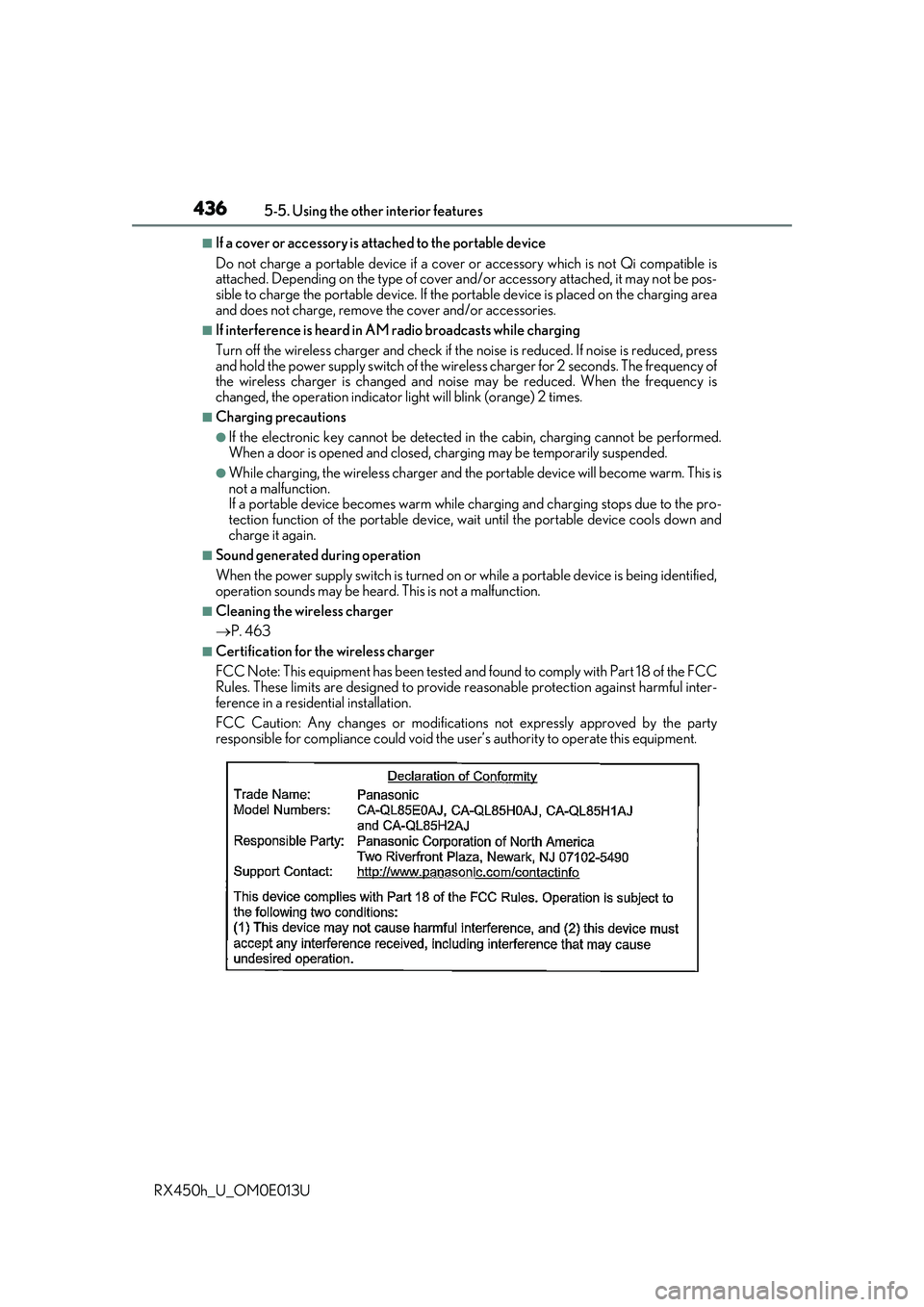
■Certification for the wireless charger
FCC Note: This equipment has been tested and found to comply with Part 18 of the FCC
Rules. These limits are designed to provide re asonable protection against harmful inter-
ference in a reside ntial installation.
FCC Caution: Any changes or modification s not expressly approved by the party
responsible for compliance could void the user’s authority to operate this equipment.
Page 446 of 660
4465-5. Using the other interior features
RX450h_U_OM0E013U
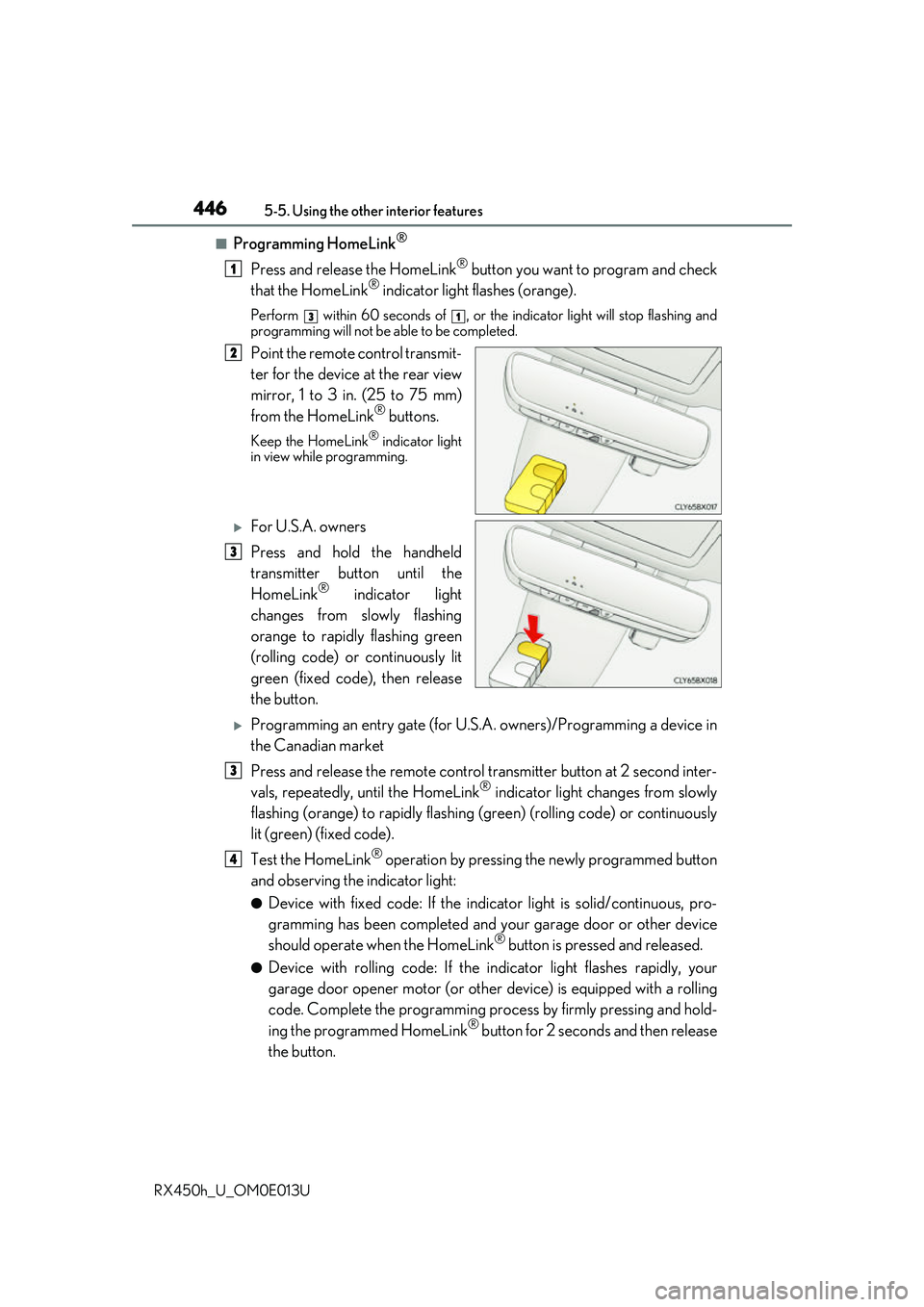
■Programming HomeLink®
Press and release the HomeLink® button you want to program and check
that the HomeLink® indicator light flashes (orange).
Perform within 60 seconds of , or the indicator light will stop flashing and
programming will not be able to be completed.
Point the remote control transmit-
ter for the device at the rear view
mirror, 1 to 3 in. (25 to 75 mm)
from the HomeLink
® buttons.
Keep the HomeLink® indicator light
in view while programming.
For U.S.A. owners
Press and hold the handheld
transmitter button until the
HomeLink
® indicator light
changes from slowly flashing
orange to rapidly flashing green
(rolling code) or continuously lit
green (fixed code), then release
the button.
Programming an entry gate (for U.S. A. owners)/Programming a device in
the Canadian market
Press and release the remote control transm itter button at 2 second inter-
vals, repeatedly, until the HomeLink
® indicator light changes from slowly
flashing (orange) to rapidly flashing (green) (rolling code) or continuously
lit (green) (fixed code).
Test the HomeLink
® operation by pressing the newly programmed button
and observing the indicator light:
●Device with fixed code: If the indicator light is solid/continuous, pro-
gramming has been completed and your garage door or other device
should operate when the HomeLink
® button is pressed and released.
●Device with rolling code: If the in dicator light flashes rapidly, your
garage door opener motor (or other device) is equipped with a rolling
code. Complete the programming process by firmly pressing and hold-
ing the programmed HomeLink
® button for 2 seconds and then release
the button.
1
31
2
3
3
4
Page 448 of 660

4485-5. Using the other interior features
RX450h_U_OM0E013U
■Enabling 2-way communication with a garage door (only available for com-
patible devices)
When enabled, 2-way communication allo ws you to check the status of the
opening and closing of a garage door through indicators in your vehicle.
2-way communication is only available if the garage door opener motor used
is a compatible device. (To check devi ce compatibility, refer to www.Home-
Link.com.)
Within 5 seconds after programming the garage door opener has been
completed, if the garage door op ener motor is trained to HomeLink
®,
both garage door operation indicator s will flash rapidly (green) and the
light on the garage door opener moto r will blink twice, indicating that 2-
way communication is enabled.
If the indicators do not flash, perform and within the first 10 presses of
the HomeLink
® button after programming has been completed.
Press a programmed HomeLink
® button to operate a garage door.
Within 1 minute of pressing the HomeLink
® button, after the garage door
operation has stopped, press the “Learn” or “Smart” button on the garage
door opener motor. Within 5 seconds of the establishment of 2-way com-
munication with the garage door opener, both garage door operation indi-
cators in the vehicle will flash rapidly (green) and the light on the garage
door opener motor will blink twice, indicating that 2-way communication is
enabled.
■Reprogramming a single HomeLink® button
When the following procedure is performed, buttons which already have
devices registered to them can be overwritten: With one hand, press and hold the desired HomeLink
® button.
When the HomeLink
® indicator starts flashing (orange), continue to hold
the HomeLink® button and perform “Programming HomeLink®” (it
takes 20 seconds for the HomeLink® indicator to start flashing).
Press the appropriate HomeLink
® button. The HomeLink® indicator light
should turn on.
Operating HomeLink®
1
23
2
3
1
2
1
Page 449 of 660
4495-5. Using the other interior features
5
Interior features
RX450h_U_OM0E013U
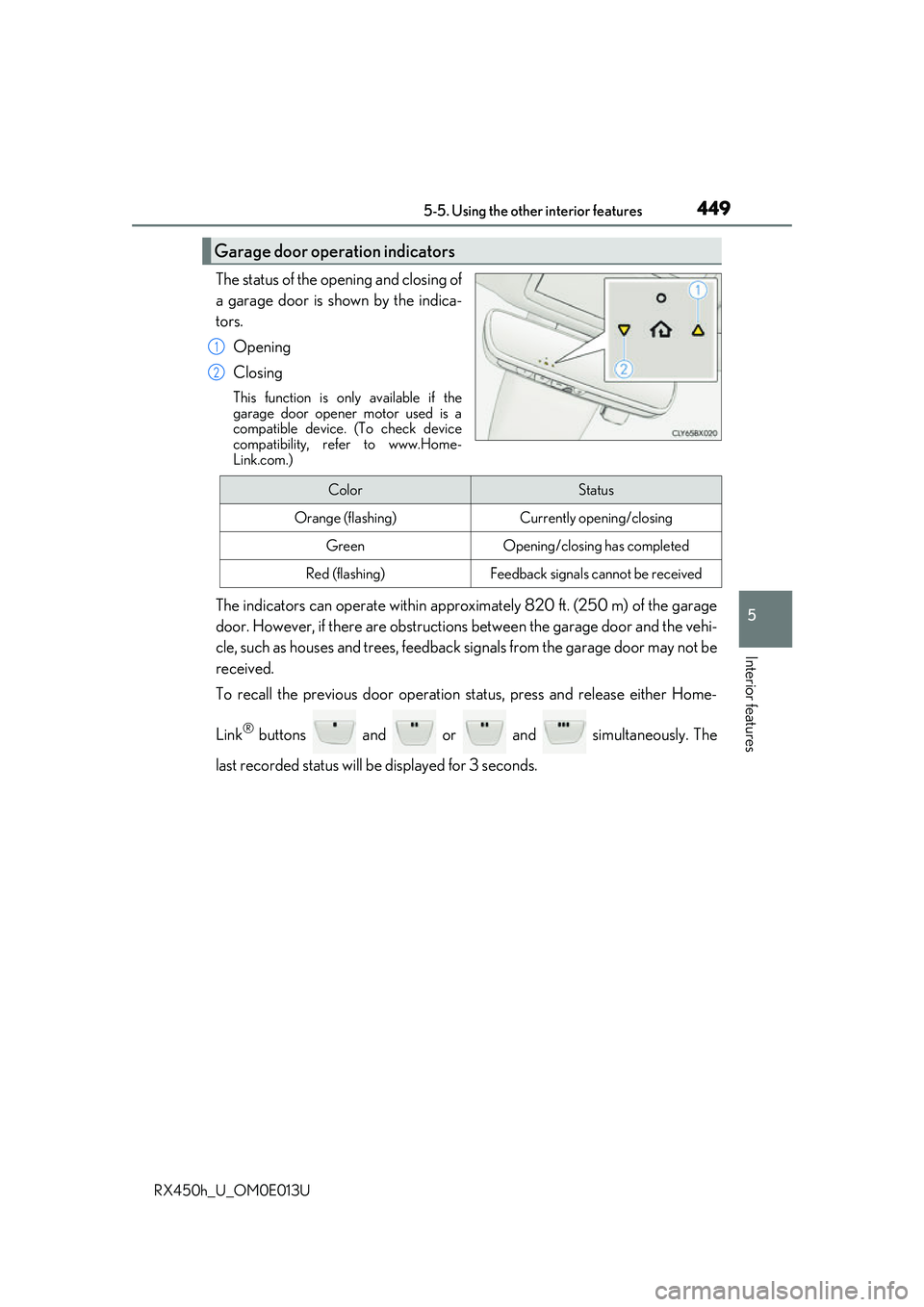
The status of the opening and closing of
a garage door is shown by the indica-
tors.Opening
Closing
This function is only available if the
garage door opener motor used is a
compatible device. (To check device
compatibility, refer to www.Home-
Link.com.)
The indicators can operate wi thin approximately 820 ft. (250 m) of the garage
door. However, if there are obstructions between the garage door and the vehi-
cle, such as houses and trees, feedback signals from the garage door may not be
received.
To recall the previous door operation status, press and release either Home-
Link
® buttons and or and simultaneously. The
last recorded status will be displayed for 3 seconds.
Garage door operation indicators
1
2
ColorStatus
Orange (flashing)Currently opening/closing
GreenOpening/closing has completed
Red (flashing)Feedback signals cannot be received
Page 457 of 660

457
6Maintenance and care
RX450h_U_OM0E013U
6-1. Maintenance and careCleaning and protecting the vehicle exterior................ 458
Cleaning and protecting the vehicle interior ..................462
6-2. Maintenance Maintenance requirements.............................465
General maintenance .............. 467
Emission inspection and maintenance (I/M)
programs ....................................470 6-3. Do-it-yourself
maintenance
Do-it-yourself service precautions..................................471
Hood ............................................... 473
Positioning a floor jack ............ 474
Engine compartment ............... 475
12-volt battery .............................483
Tires ................................................. 487
Tire inflation pressure............... 496
Wheels ........................................... 499
Air conditioning filter ................ 501
Windshield wiper inserts ........504
Electronic key battery ..............506
Checking and replacing fuses ............................................. 508
Headlight aim ................................. 511
Light bulbs...................................... 513
Page 458 of 660

458
RX450h_U_OM0E013U6-1. Maintenance and care
●Working from top to bott
om, liberally apply water to the vehicle body, wheel
wells and underside of the vehicl e to remove any dirt and dust.
●Wash the vehicle body using a sponge or soft cloth, such as a chamois.
●For hard-to-remove marks, use car wa sh soap and rinse thoroughly with
water.
●Wipe away any water.
●Wax the vehicle when the waterproof coating deteriorates.
If water does not bead on a clean surface, apply wax when the vehicle body is cool.
■Self-restoring coat
The vehicle body has a self-restoring coating that is resistant to small surface scratches
caused in a car wash etc.
●The coating lasts for 5 to 8 years from when the vehicle is delivered from the plant.
●The restoration time differs depending on the depth of the scratch and outside tem-
perature. The restoration ti me may become shorter when the coating is warmed by
applying warm water.
●Deep scratches caused by keys, coins, etc. cannot be restored.
●Do not use wax that contain abrasives.
■Automatic car washes
●Before washing the vehicle:
• Fold the mirrors
• Turn off the power back door
Start washing from the front of the vehicle. Extend the mirrors before driving.
●Brushes used in automatic car washes may scratch the vehicle surface and harm your
vehicle’s paint.
●Rear spoiler may not be wash able in some automatic car washes. There may also be an
increased risk of damage to vehicle.
■High pressure car washes
●Do not allow the nozzles of the car wash to come within close proximity of the windows.
●Before using the car wash, check that the fuel filler door on your vehicle is closed prop-
erly.
Cleaning and protecting the vehicle exterior
Perform the following to protect the ve hicle and maintain it in prime condi-
tion:
Page 463 of 660
4636-1. Maintenance and care
6
Maintenance and care
RX450h_U_OM0E013U
■Caring for leather areas
Lexus recommends cleaning the interior of the vehicle at least twice a year to maintain
the quality of the vehicle’s interior.
■Shampooing the carpets
There are several commercial foaming-type cleaners available. Use a sponge or brush to
apply the foam. Rub in overlapping circles. Do not use water. Wipe dirty surfaces and let
them dry. Excellent results are obtained by keeping the carpet as dry as possible.
■Seat belts
Clean with mild soap and lukewarm water using a cloth or sponge. Also check the belts
periodically for excessive wear, fraying or cuts.
WARNING
■Water in the vehicle
●Do not splash or spill liquid in the vehicle, su ch as on the floor, in the hybrid battery
(traction battery) air vents, and in the luggage compartment.
Doing so may cause the hybrid battery, elec trical components, etc. to malfunction or
catch fire.
●Do not get any of the SRS components or wiring in the vehicle interior wet. (P. 40)
An electrical malfunction may cause the airbags to deploy or not function properly,
resulting in death or serious injury.
●Vehicles with wireless charger:
Do not let the wireless charger ( P. 434) get wet. Failure to do so may cause the
charger to become hot and cause burns or could cause electric shock resulting in
death or serious injury.
■Cleaning the interior (especially instrument panel)
Do not use polish wax or polish cleaner. Th e instrument panel may reflect off the wind-
shield, obstructing the driver’s view and leading to an accident, resulting in death or
serious injury.
Page 465 of 660
465
RX450h_U_OM0E013U
6
Maintenance and care
6-2. Maintenance
General maintenance should be performed on a daily basis. This can be done by
yourself or by a Lexus dealer.
Scheduled maintenance should be perfor med at specified intervals according to
the maintenance schedule.
For details about maintenance items and sc hedules, refer to the “Warranty and Ser-
vice Guide”, “Owner’s Manual Supplement” or “Scheduled Maintenance”.
You can perform some maintena nce procedures by yourself.
Please be aware that do-it-yourself maintenance may affect warranty coverage.
The use of Lexus repair manuals is recommended.
For details about warranty co verage, refer to the separate “Owner’s Guide”, “War-
ranty and Service Guide”, “Owner’s Manu al Supplement” or “Warranty Booklet”.
Maintenance requirements
To ensure safe and economical driving, day-to-day care and regular mainte-
nance are essential. It is the owner’s re sponsibility to perform regular checks.
Lexus recommends the following maintenance:
General maintenance
Scheduled maintenance
Do-it-yourself maintenance