2016 LEXUS RX450H load
[x] Cancel search: loadPage 321 of 660

3214-5. Using the driving support systems
4
Driving
RX450h_U_OM0E013U
■Automatic cancelation of constant speed control mode
Constant speed control mode is automatica lly canceled in the following situations:
●Actual vehicle speed is more than approxim ately 10 mph (16 km/h) below the set vehi-
cle speed.
●Actual vehicle speed falls below approximately 25 mph (40 km/h).
●VSC is activated.
●TRAC is activated for a period of time.
●When the VSC or TRAC system is turned off by pressing the VSC OFF switch.
●Pre-collision braking is activated.
If constant speed control mode is automati cally canceled for any other reason, there may
be a malfunction in the system . Contact your Lexus dealer.
■Warning messages and buzzers for dynamic radar cruise control with full-speed range
Warning messages and buzzers are used to indicate a system malfunction or to inform
the driver of the need for ca ution while driving. If a warning message is shown on the
multi-information display, read the message and follow the instructions.
■When the sensor may not be correctly detecting the vehicle ahead
In the case of the following and depending on the conditions, operate the brake pedal
when deceleration of the system is insuff icient or operate the accelerator pedal when
acceleration is required.
As the sensor may not be able to correctly detect these types of vehicles, the approach
warning ( P. 318) may not be activated.
●Vehicles that cut in suddenly
●Vehicles traveling at low speeds
●Vehicles that are not moving in the same lane
●Vehicles with small rear ends (traile rs with no load on board, etc.)
Page 322 of 660

3224-5. Using the driving support systems
RX450h_U_OM0E013U
●Motorcycles travelin g in the same lane
●When water or snow thrown up by the surrounding vehicles hinders the detecting of
the sensor
■Conditions under which the ve hicle-to-vehicle distance control mode may not function
correctly
In the case of the following conditions, o perate the brake pedal (or accelerator pedal,
depending on the situ ation) as necessary.
As the sensor may not be able to correctly detect vehicles ahead, the system may not
operate properly.
●When the vehicle ahead of you decelerates suddenly
●When your vehicle is pointing upwards
(caused by a heavy load in the luggage com-
partment, etc.)
●Preceding vehicle has an extremely high
ground clearance
●When the road curves or when the lanes are
narrow
●When steering wheel operation or your posi-
tion in the lane is unstable
Page 333 of 660

3334-5. Using the driving support systems
4
Driving
RX450h_U_OM0E013U
■When the sensor may not be correctly detecting the vehicle ahead
In the case of the following and depending on the conditions, operate the brake pedal
when deceleration of the system is insufficient or operate the accelerator pedal when
acceleration is required.
As the sensor may not be able to correctly detect these types of vehicles, the approach
warning ( P. 330) may not be activated.
●Vehicles that cut in suddenly
●Vehicles traveling at low speeds
●Vehicles that are not moving in the same lane
●Vehicles with small rear ends (traile rs with no load on board, etc.)
●Motorcycles traveling in the same lane
●When water or snow thrown up by the surrounding vehicles hinders the detecting of
the sensor
●When your vehicle is pointing upwards
(caused by a heavy load in the luggage com-
partment, etc.)
●Preceding vehicle has an extremely high
ground clearance
Page 356 of 660
3564-5. Using the driving support systems
RX450h_U_OM0E013U
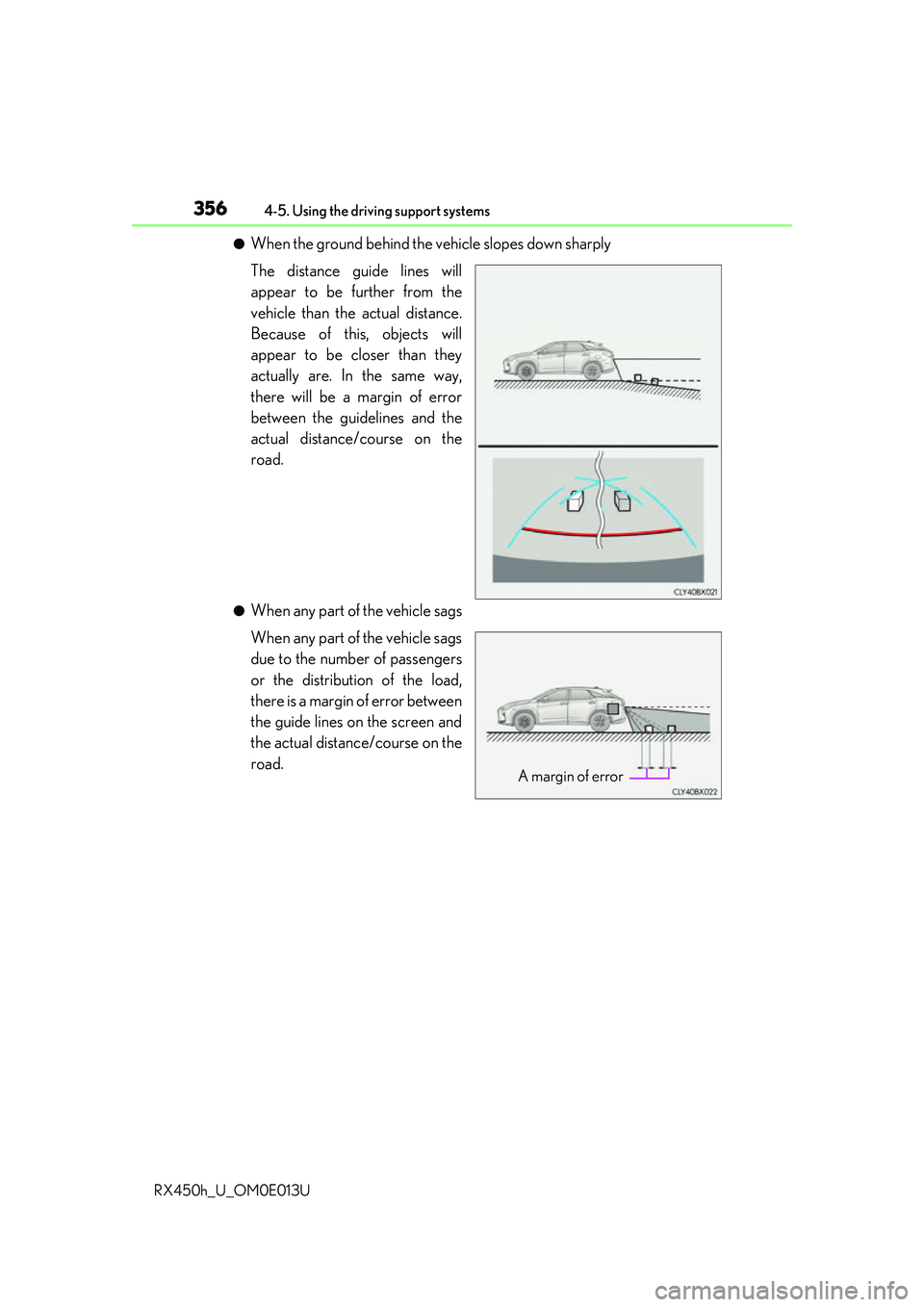
●When the ground behind the vehicle slopes down sharply
The distance guide lines will
appear to be further from the
vehicle than the actual distance.
Because of this, objects will
appear to be closer than they
actually are. In the same way,
there will be a margin of error
between the guidelines and the
actual distance/course on the
road.
●When any part of the vehicle sags
When any part of the vehicle sags
due to the number of passengers
or the distribution of the load,
there is a margin of error between
the guide lines on the screen and
the actual distance/course on the
road.
A margin of error
Page 359 of 660
3594-5. Using the driving support systems
4
Driving
RX450h_U_OM0E013U
■If you notice any symptoms
If you notice any of the following symptoms, refer to the likely cause and the
solution, and re-check.
If the symptom is not resolved by the solution, have the vehicle inspected by
your Lexus dealer.
Things you should know
Likely causeSolution
The image is difficult to see
• The vehicle is in a dark area
• The temperature around the lens is
either high or low
• The outside temperature is low
• There are water droplets on the cam- era
• It is raining or humid
• Foreign matter (mud, etc.) is adhering to the camera
• There are scratches on the camera
• Sunlight or headlights are shining directly into the camera
•The vehicle is unde r fluorescent lights,
sodium lights, mercury lights etc.
If this happens due to these causes, it
does not indicate a malfunction.
Back up while visually checking the vehi-
cle’s surroundings. (Use the monitor
again once conditions have been
improved.)
The image on the Lexus parking assist
monitor system screen can be adjusted.
For details, refer to the “NAVIGATION
SYSTEM OWNER’S MANUAL”.
The image is blurry
Dirt or foreign matter (such as water
droplets, snow, mud, etc.) is adhering to
the camera.Flush the camera with a large quantity of
water and wipe the camera lens clean
with a soft and wet cloth.
The image is out of alignment
The camera or surrounding area has
received a strong impact.Have the vehicle inspected by your Lexus
dealer.
The guide lines are very far out of alignment
The camera position is out of alignment.Have the vehicle inspected by your Lexus
dealer.
• The vehicle is tilted (there is a heavy
load on the vehicle, tire pressure is low
due to a tire puncture, etc.)
• The vehicle is used on an incline.If this happens due to these causes, it
does not indicate a malfunction.
Back up while visually checking the vehi-
cle’s surroundings.
Page 386 of 660

3864-5. Using the driving support systems
RX450h_U_OM0E013U
WARNING
■Hill-start assist control does not operate effectively when
●Do not overly rely on the hill-start assist control. The hill-start assist control may not
operate effectively on steep inclines and roads covered with ice.
●Unlike the parking brake, hill-start assist control is not intended to hold the vehicle
stationary for an exte nded period of time. Do not atte mpt to use hill-start assist con-
trol to hold the vehicle on an incline, as doing so may lead to an accident.
■When the VSC/Trailer Sway Control is activated
The slip indicator light flashes. Always drive carefully. Reckless driving may cause an
accident. Exercise particular care when the indicator light flashes.
■When the TRAC/VSC/Trailer Sway Control systems are turned off
Be especially careful and drive at a speed appropriate to the road conditions. As these
are the systems to help ensure vehicle stability and driving force, do not turn the
TRAC/VSC/Trailer Sway Control systems off unless necessary.
■Replacing tires
Make sure that all tires are of the specified size, brand, tread pattern and total load
capacity. In addition, make sure that the tire s are inflated to the recommended tire infla-
tion pressure level.
The ABS, TRAC, VSC and Trailer Sway Contro l systems will not function correctly if
different tires are installed on the vehicle.
Contact your Lexus dealer for further information when replacing tires or wheels.
■Handling of tires and the suspension
Using tires with any kind of problem or modi fying the suspension will affect the driving
assist systems, and may cause a system to malfunction.
■Trailer Sway Control precaution
The Trailer Sway Control system is not able to reduce trailer sway in all situations.
Depending on many factors such as the condit ions of the vehicle, trailer, road surface,
and driving environment, the Trailer Sway Control system may not be effective. Refer to
your trailer owner’s manual for information on how to tow your trailer properly.
■If trailer sway occurs
Observe the following precautions.
Failing to do so may cause death or serious injury.
●Firmly grip the steering wh eel. Steer straight ahead.
Do not try to control trailer sway ing by turning the steering wheel.
●Begin releasing the accelerator pedal immediately but very gradually to reduce
speed.
Do not increase speed. Do not apply vehicle brakes.
If you make no extreme correction with the steering or brakes, your vehicle and trailer
should stabilize. ( P. 227)
Page 394 of 660

3944-6. Driving tips
RX450h_U_OM0E013U
●Specific design characteristics give it a higher center of gravity than ordinary
passenger cars. This vehicle design feature causes this type of vehicle to be
more likely to rollover. And, utility vehicles have a significantly higher rollover
rate than other types of vehicles.
●An advantage of the higher ground cl earance is a better view of the road
allowing you to anticipate problems.
●It is not designed for cornering at the same speeds as ordinary passenger cars
any more than low-slung sports cars are designed to perform satisfactorily
under off-road conditions. Therefore, sharp turns at excessive speeds may
cause the vehicle to rollover.
Utility vehicle precautions
This vehicle belongs to the utility vehicle class, which has higher ground clear-
ance and narrower tread in relation to the height of its center of gravity.
Utility vehicle feature
WARNING
■Utility vehicle precautions
Always observe the following precautions to minimize the risk of death, serious injury
or damage to your vehicle:
●In a rollover crash, an unbelted person is significantly more likely to die than a person
wearing a seat belt. Therefore, the driver and all passengers should always fasten
their seat belts.
●Avoid sharp turns or abrupt maneuvers, if at all possible.
Failure to operate this vehicle correctly may result in loss of control or vehicle rollover
causing death or serious injury.
●Loading cargo on the roof luggage carrier will make the center of the vehicle gravity
higher. Avoid high speeds, sudden starts, sharp turns, sudden braking or abrupt
maneuvers, otherwise it may re sult in loss of control or vehicle rollover due to failure
to operate this vehicle correctly.
●Always slow down in gusty crosswinds. Be cause of its profile and higher center of
gravity, your vehicle is more sensitive to side winds than an ordinary passenger car.
Slowing down will allow you to have better control.
●Do not drive horizontally across steep slopes. Driving straight up or straight down is
preferred. Your vehicle (or any similar off- road vehicle) can tip over sideways much
more easily than forward or backward.
Page 443 of 660
4435-5. Using the other interior features
5
Interior features
RX450h_U_OM0E013U
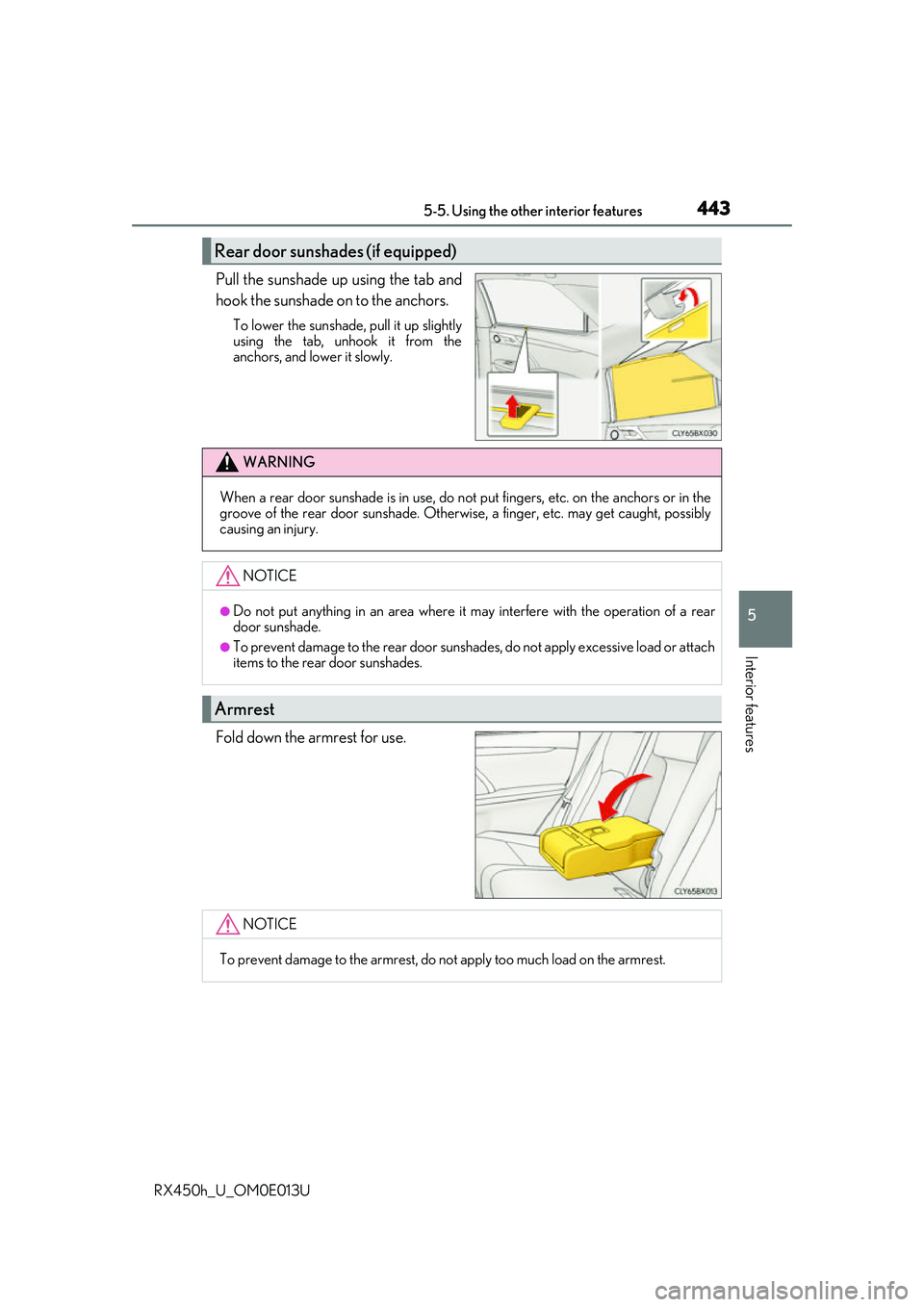
Pull the sunshade up using the tab and
hook the sunshade on to the anchors.
To lower the sunshade, pull it up slightly
using the tab, unhook it from the
anchors, and lower it slowly.
Fold down the armrest for use.
Rear door sunshades (if equipped)
WARNING
When a rear door sunshade is in use, do not put fingers, etc. on the anchors or in the
groove of the rear door suns hade. Otherwise, a finger, etc. may get caught, possibly
causing an injury.
NOTICE
●Do not put anything in an area where it may interfere with the operation of a rear
door sunshade.
●To prevent damage to the rear door sunshades, do not apply excessive load or attach
items to the rear door sunshades.
Armrest
NOTICE
To prevent damage to the armrest, do not apply too much load on the armrest.