Page 108 of 660

1082. Instrument cluster
RX450h_U_OM0E013U
■G-force (if equipped)
Displays lateral G-forces on the vehicle.
Also displays, around the periphery of the G-force display, the left and right
steering amount, accelerator pedal input, and brake fluid pressure.
Acceleration G-force on the
vehicle
Current G-force value (analyzed
value of front/rear and left/right
G-forces)
Record of the maximum G-forces
Accelerator pedal input
Brake fluid pressure
Steering amount
This display is intended for use as a guideline. Depending on factors such as the
road surface condition, temperature and vehicle speed, the display may not show
the actual condition of the vehicle.
●Resetting the record of maximum G-forces
Press and hold to reset the record.
●Peak hold function
If lateral G-forces of 0.5 G or grea ter are generated, the G-force value
display will turn yellow and be held for 2 seconds.
■Tire pressure
P. 488
■Units (if equipped)
The units of measure used can be changed while driving.
Unlike the units setting performed on , the units setting performed on can
be changed while driving.
■Blank (No items)
Displays no drive information contents.
1
2
3
4
5
6
Page 109 of 660

1092. Instrument cluster
2
Instrument cluster
RX450h_U_OM0E013U
◆Changing settings
Use the meter control switches on the steering wheel to change settings.
Press or to select .
Operate the switches to select a desired item.
Change the setting by referring to the message displayed on the screen.
◆Setting items
■ LDA (Lane Departure Alert with steering control)/LKA (Lane-Keep-
ing Assist) (if equipped) ( P. 292, 302)
The following LDA system/LKA system settings can be changed:
*1: If the lane centering function is enabled/ disabled, steering wheel assistance will also
be enabled/disabled accordingly.
*
2: If the steering wheel assistance is disabled, lane cent ering function will also be dis-
abled automatically.
Settings display ( )
1
2
3
ItemSettingsDetails
Lane center tracing
(LKA only) On
Select to enable/disable the lane cen-
tering function.
*1Off
Steering assistOnSelect to enable/disable steering
wheel assistance.
*2Off
Alert
Select to set a vibrator or buzzer as
the notification method used to warn
the driver.
Alert sensitivityHighSelect to set the warning sensitivity.Normal
Sway warningOnSelect to enable/disable the vehicle
sway warning.
Off
Sway sensitivity
High
Select to set the vehicle sway warning
sensitivity.Medium
Low
Page 110 of 660
1102. Instrument cluster
RX450h_U_OM0E013U
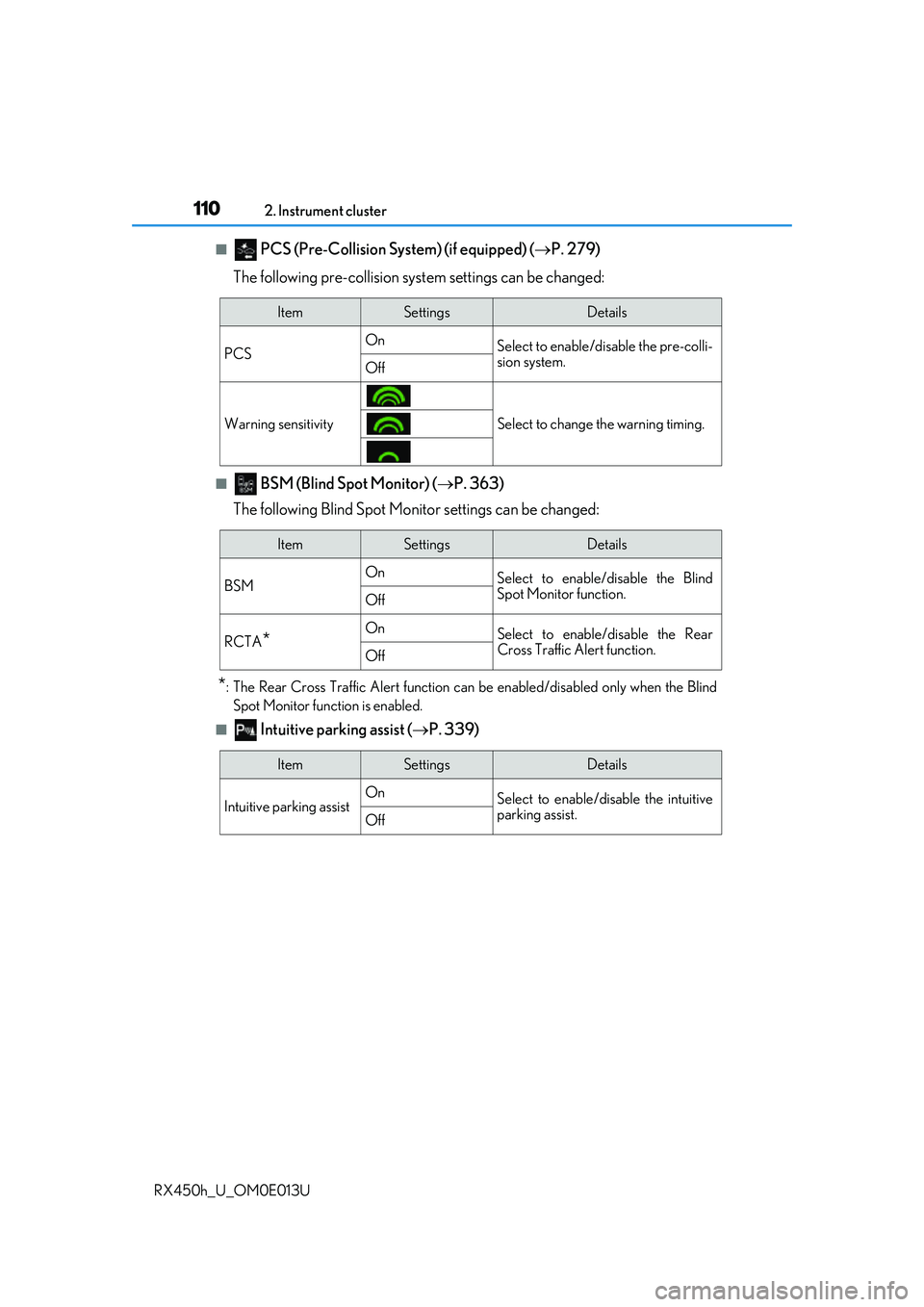
■ PCS (Pre-Collision Sy stem) (if equipped) (P. 279)
The following pre-collision syst em settings can be changed:
■ BSM (Blind Spot Monitor) (P. 363)
The following Blind Spot Monitor settings can be changed:
*: The Rear Cross Traffic Alert function can be enabled/disabled only when the Blind Spot Monitor function is enabled.
■ Intuitive parking assist ( P. 339)
ItemSettingsDetails
PCS On
Select to enable/disable the pre-colli-
sion system.
Off
Warning sensitivitySelect to change the warning timing.
ItemSettingsDetails
BSM On
Select to enable/disable the Blind
Spot Monitor function.
Off
RCTA*OnSelect to enable/disable the Rear
Cross Traffic Alert function.
Off
ItemSettingsDetails
Intuitive parking assist On
Select to enable/disable the intuitive
parking assist.
Off
Page 111 of 660
1112. Instrument cluster
2
Instrument cluster
RX450h_U_OM0E013U
■HUD (Head-up display) (if equipped) (P. 118)
The following head-up displa y settings can be changed:
■Clock (on multi-information display) ( P. 97)
The following clock setting can be changed:
ItemSettingsDetails
Brightness/Position Select to adjust the brightness/posi-
tion of the head-up display.
• Press the / switch to adjust
the display brightness.
• Press the / switch to adjust the display position.
Gauge information
No display
Select to set the content displayed on
the head-up display.Hybrid System Indi-
cator
Tachometer
Driving support
Navigation system
Select to enable/d isable head-up dis-
play content.Driving Assist
Compass
Audio system
ItemSettingsDetails
Display mode 12-hour display
Select to set the display mode of the
clock.
24-hour display
Page 112 of 660

1122. Instrument cluster
RX450h_U_OM0E013U
■Vehicle settings
ItemSettingsDetails
PBD (Power back door) ( P. 142)
The following power back door settings can be changed:
System settings
All OnSelect to enable the power back door
system.
Touchless Sensor
Off (if equipped)Select to disable the touchless sensor.
(Other power back door functions
remain enabled.)
All OffSelect to disable the power back door
system.
Open position adjust-
mentSelect to set the open position at
which the power back door will stop
when opened automatically.
Volume
3 (Loud)Select to set the volume of the buzzer
which sounds when the power back
door is operated.
2 (Medium)
1 (Low)
TPMS (Tire pressure warning system) (P. 488)
Tire pressure warning system initialization
Select to initialize the Tire pressure
warning system. To perform initializa-
tion, press and hold the
switch.
Before performing initialization, make
sure to adjust the inflation pressure of
each tire to the specified level.
( P. 489)
Scheduled maintenance (U.S.A. only)
Maintenance data reset
Select to reset the message indicating
maintenance is re quired, after the
required maintenanc e is performed.
( P. 466)
Page 113 of 660

1132. Instrument cluster
2
Instrument cluster
RX450h_U_OM0E013U
■Meter settings
Oil maintenance
Engine oil maintenance data reset
Select to reset the engine oil mainte-
nance information (message indicat-
ing maintenance is required and
distance until the next oil change)
after engine oil maintenance is per-
formed. (P. 478)
ItemSettingsDetails
ItemSettingsDetails
Language Select to change the language dis-
played.
UnitsSelect to change the units of measure
displayed.
(EV indicator) OnSelect to enable/dis
able the EV indi-
cator. ( P. 78)
Off
Switch settingsSelect to display how to change the
top screen.
Drive information 1Select to select up to 2 items that will
be displayed on ea ch Drive informa-
tion screen (Drive information 1
screen, Drive information 2 screen,
and Drive inform ation 3 screen)
respectively.
(Selectable items: P. 106)
Drive information 2
Drive information 3
Pop-up display
Intersection guid-
ance
Select to enable/disable the pop-up
display.Incoming calls
Brightness adjust-
ment
Color (except F
SPORT models)2 available colorsSelect to set the color of the cursor on
the multi-information display.
Needle (F SPORT
models)3 available colorsSelect to set the tachometer needle
color.
Page 114 of 660
1142. Instrument cluster
RX450h_U_OM0E013U
Tachometer setting
Change according
to driving mode
Select to set the tachometer or
Hybrid System Indicator to always be
displayed or be changed to automati-
cally according to the driving mode.
Always tachometer
Always Hybrid Sys-
tem Indicator
Rev indicator (F
SPORT models)
OnSelect to enable/disable the Rev indi-
cator. ( P. 99)
Off
Rev setting
Select to set the desired engine speed
at which the Rev indicator will begin
to be displayed.
Selectable engine speed range:
2000 rpm to 6000 rpm
Rev peak (F SPORT
models)OnSelect to enable/disable the Rev peak.
( P. 99)
Off
Default settingSelect to reset the meter display set-
tings to the default setting.
ItemSettingsDetails
Page 115 of 660
1152. Instrument cluster
2
Instrument cluster
RX450h_U_OM0E013U
◆Display items
■Odometer
Displays the total distance the vehicle has been driven.
■Trip meter A/trip meter B
Displays the distance the vehicle has been driven since the meter was last
reset. Trip meters A and B can be used to record and display different dis-
tances independently.
To reset, display the desired trip meter and press and hold the “ODO/TRIP”
switch.
■Distance until next engine oil change
Displays the distance the vehicle can be driven until an oil change is neces-
sary.
◆Pop-up display
In some situations the following will be temporarily displayed:
■Distance until next engine oil change
Displays the distance until the next engi ne oil change. This display will be dis-
played in the following situations:
• When the power switch is turned to ON mode.
• When a warning message indicating that oil maintenance should be performed
soon or is required is displayed.
Odometer/trip meter display area