2016 LEXUS RX450H water
[x] Cancel search: waterPage 354 of 660
3544-5. Using the driving support systems
RX450h_U_OM0E013U
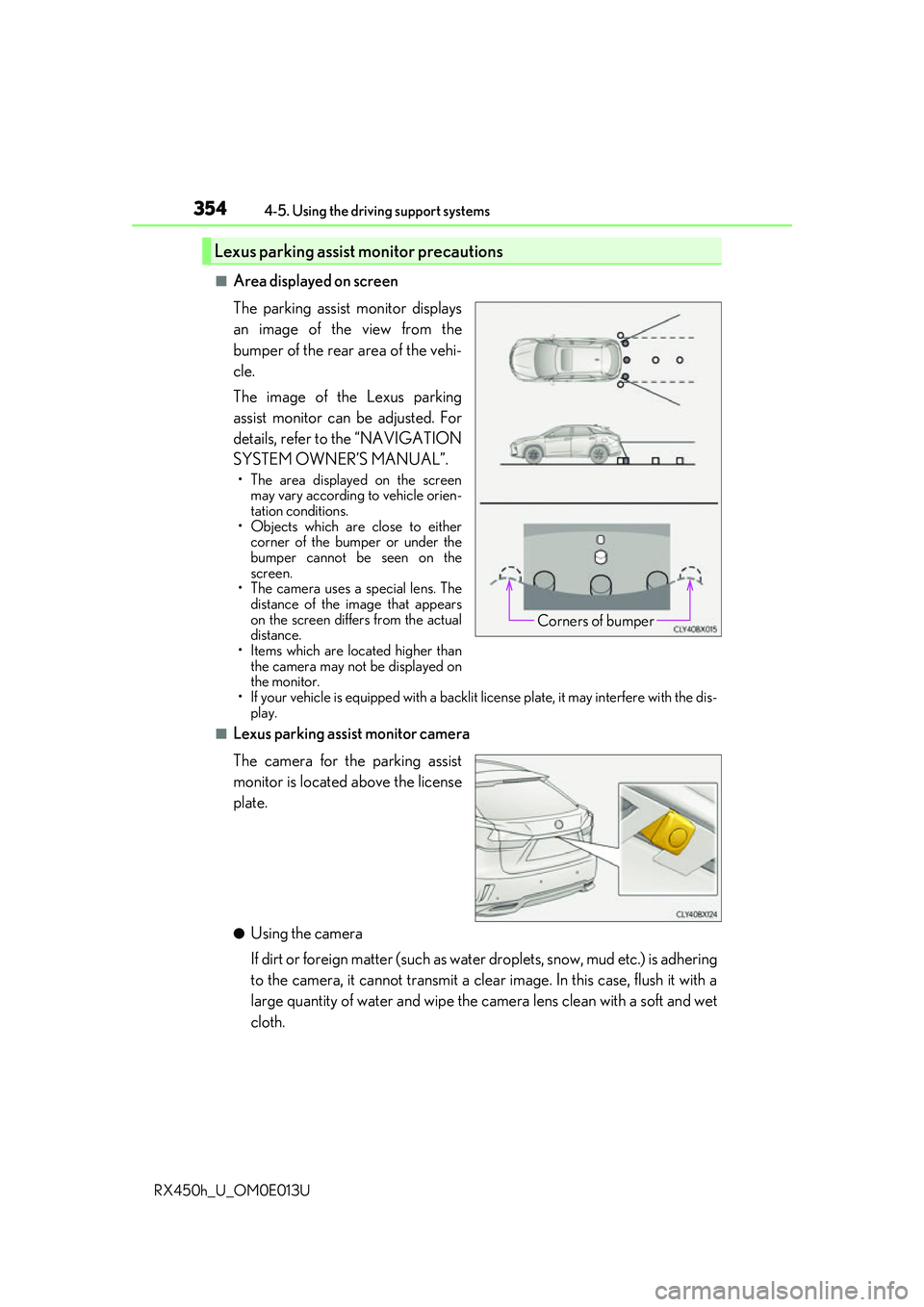
■Area displayed on screen
The parking assist monitor displays
an image of the view from the
bumper of the rear area of the vehi-
cle.
The image of the Lexus parking
assist monitor can be adjusted. For
details, refer to the “NAVIGATION
SYSTEM OWNER’S MANUAL”.
• The area displayed on the screen may vary according to vehicle orien-
tation conditions.
• Objects which are close to either corner of the bumper or under the
bumper cannot be seen on the
screen.
• The camera uses a special lens. The
distance of the image that appears
on the screen differs from the actual
distance.
• Items which are located higher than the camera may not be displayed on
the monitor.
• If your vehicle is equipped with a backlit license plate, it may interfere with the dis-
play.
■Lexus parking assist monitor camera
The camera for the parking assist
monitor is located above the license
plate.
●Using the camera
If dirt or foreign matter (such as wate r droplets, snow, mud etc.) is adhering
to the camera, it cannot transmit a clear image. In this case, flush it with a
large quantity of water and wipe the camera lens clean with a soft and wet
cloth.
Lexus parking assist monitor precautions
Corners of bumper
Page 359 of 660
3594-5. Using the driving support systems
4
Driving
RX450h_U_OM0E013U
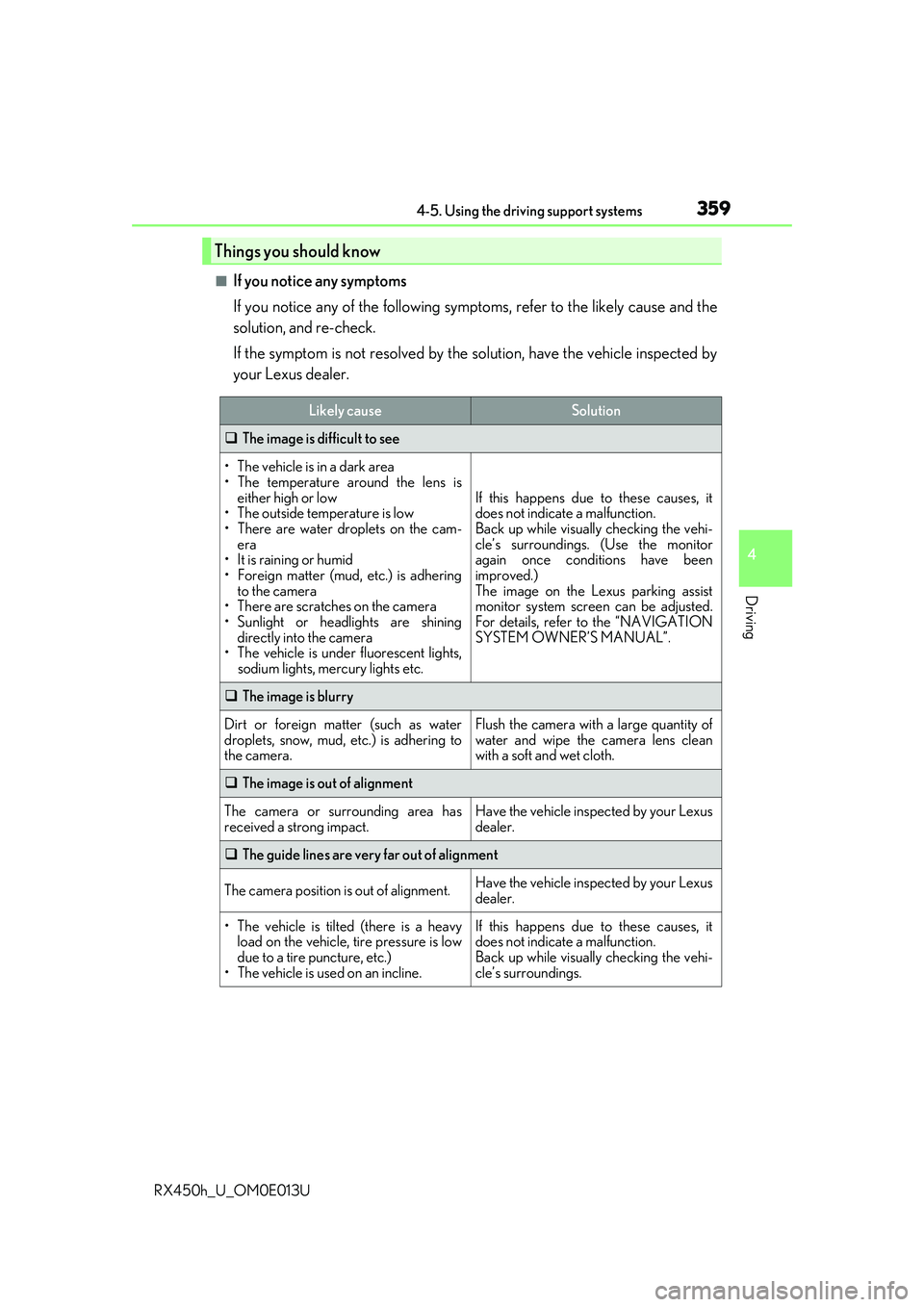
■If you notice any symptoms
If you notice any of the following symptoms, refer to the likely cause and the
solution, and re-check.
If the symptom is not resolved by the solution, have the vehicle inspected by
your Lexus dealer.
Things you should know
Likely causeSolution
The image is difficult to see
• The vehicle is in a dark area
• The temperature around the lens is
either high or low
• The outside temperature is low
• There are water droplets on the cam- era
• It is raining or humid
• Foreign matter (mud, etc.) is adhering to the camera
• There are scratches on the camera
• Sunlight or headlights are shining directly into the camera
•The vehicle is unde r fluorescent lights,
sodium lights, mercury lights etc.
If this happens due to these causes, it
does not indicate a malfunction.
Back up while visually checking the vehi-
cle’s surroundings. (Use the monitor
again once conditions have been
improved.)
The image on the Lexus parking assist
monitor system screen can be adjusted.
For details, refer to the “NAVIGATION
SYSTEM OWNER’S MANUAL”.
The image is blurry
Dirt or foreign matter (such as water
droplets, snow, mud, etc.) is adhering to
the camera.Flush the camera with a large quantity of
water and wipe the camera lens clean
with a soft and wet cloth.
The image is out of alignment
The camera or surrounding area has
received a strong impact.Have the vehicle inspected by your Lexus
dealer.
The guide lines are very far out of alignment
The camera position is out of alignment.Have the vehicle inspected by your Lexus
dealer.
• The vehicle is tilted (there is a heavy
load on the vehicle, tire pressure is low
due to a tire puncture, etc.)
• The vehicle is used on an incline.If this happens due to these causes, it
does not indicate a malfunction.
Back up while visually checking the vehi-
cle’s surroundings.
Page 362 of 660
3624-5. Using the driving support systems
RX450h_U_OM0E013U
NOTICE
■How to use the camera
●The parking assist monitor may not operate properly in the following cases.
• If the back of the vehicle is hit, the position and mounting angle of the camera may change.
• As the camera has a water proof construction, do not detach, disassemble or modify it. This may cause incorrect operation.
• When cleaning the camera lens, flush the camera with a large quantity of water
and wipe it with a soft and wet cloth. Strongly rubbing the camera lens may cause
the camera lens to be scratched and unable to transmit a clear image.
• Do not allow organic solvent, car wax, window cleaner or glass coat to adhere to the camera. If this happens, wi pe it off as soon as possible.
• If the temperature changes rapidly, such as when hot water is poured on the vehi- cle in cold weather, the system may not operate normally.
• When washing the vehicle, do not apply intensive bursts of water to the camera or
camera area. Doing so may result in the camera malfunctioning.
• When the camera is used under fluorescen t lights, sodium light or mercury light
etc., the lights and the illuminated areas may appear to flicker.
●Do not expose the camera to strong impact as this could cause a malfunction.
If this happens, have the vehicle inspected by your Lexus dealer as soon as possible.
Page 370 of 660

3704-5. Using the driving support systems
RX450h_U_OM0E013U
■Conditions under which the BSM function may not function correctly
●The BSM function may not detect vehicles correctly in the following situations:
• When the sensor is misaligned due to a stro ng impact to the sensor or its surround-
ing area
• When mud, snow, ice, a sticke r, etc. is covering the sensor or surrounding area on
the rear bumper
• When driving on a road surf ace that is wet with standing water during bad weather,
such as heavy rain, snow, or fog
• When multiple vehicles are approaching wi th only a small gap between each vehicle
• When the distance between your vehicle and a following vehicle is short
• When there is a significant difference in speed between your vehicle and the vehicle that enters the detection area
• When the difference in speed between your vehicle and another vehicle is changing
• When a vehicle enters a detection area traveling at about the same speed as your vehicle
• As your vehicle starts from a stop, a vehicle remains in the detection area
• When driving up and down cons ecutive steep inclines, such as hills, dips in the road,
etc.
• When driving on roads with sharp bends, consecutive curves, or uneven surfaces
• When vehicle lanes are wide, or when driving on the edge of a lane, and the vehicle in an adjacent lane is far away from your vehicle
• When towing a trailer (vehicles with towing package)
• When items such as a bicycle carrier are installed on the rear of the vehicle
• When there is a significant difference in height between your vehicle and the vehicle that enters the detection area
• Immediately after the BSM function is turned on
●Instances of the BSM function unnecessarily detecting a vehicle and/or object may
increase in the following situations:
• When the sensor is misaligned due to a stro ng impact to the sensor or its surround-
ing area
• When the distance between your vehicle and a guardrail, wall, etc. that enters the detection area is short
• When driving up and down cons ecutive steep inclines, such as hills, dips in the road,
etc.
• When vehicle lanes are narrow, or when driv ing on the edge of a lane, and a vehicle
traveling in a lane other than the ad jacent lanes enters the detection area
• When driving on roads with sharp bends, consecutive curves, or uneven surfaces
• When the tires are slipping or spinning
• When the distance between your vehicle and a following vehicle is short
• When a bicycle carrier or other accessory is installed to the rear of the vehicle
• When towing a trailer (vehicles with towing package)
Page 374 of 660
3744-5. Using the driving support systems
RX450h_U_OM0E013U
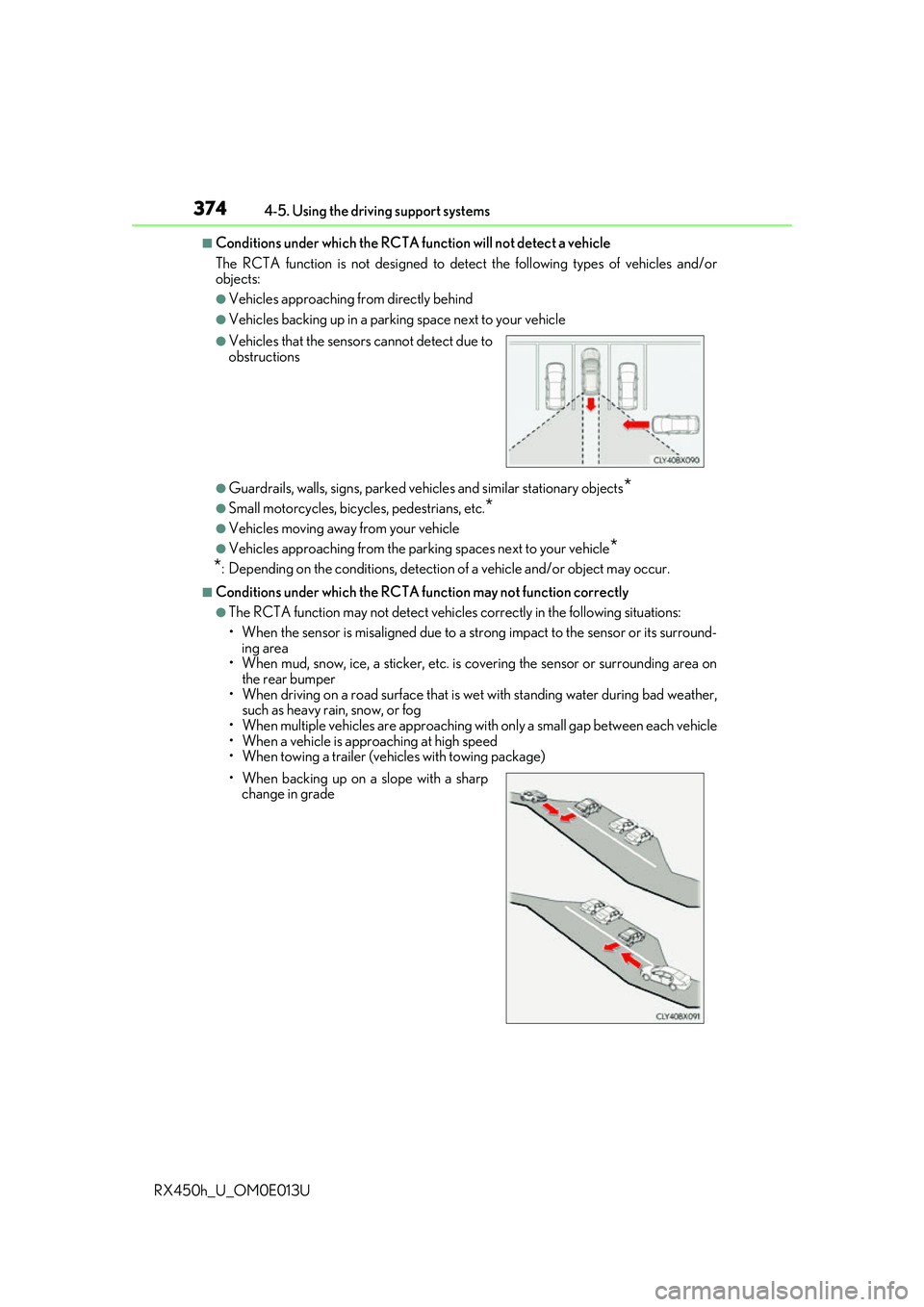
■Conditions under which the RCTA fu nction will not detect a vehicle
The RCTA function is not designed to detect the following types of vehicles and/or
objects:
●Vehicles approaching from directly behind
●Vehicles backing up in a parkin g space next to your vehicle
●Guardrails, walls, signs, parked vehi cles and similar stationary objects*
●Small motorcycles, bicycles, pedestrians, etc.*
●Vehicles moving away from your vehicle
●Vehicles approaching from the parking spaces next to your vehicle*
*
: Depending on the conditions, detection of a vehicle and/or object may occur.
■Conditions under which the RCTA function may not function correctly
●The RCTA function may not detect vehicles correctly in the following situations:
• When the sensor is misaligned due to a stro ng impact to the sensor or its surround-
ing area
• When mud, snow, ice, a sticke r, etc. is covering the sensor or surrounding area on
the rear bumper
• When driving on a road surf ace that is wet with standing water during bad weather,
such as heavy rain, snow, or fog
• When multiple vehicles are approaching wi th only a small gap between each vehicle
• When a vehicle is approaching at high speed
• When towing a trailer (vehicles with towing package)
●Vehicles that the sensors cannot detect due to
obstructions
• When backing up on a slope with a sharp change in grade
Page 390 of 660

3904-6. Driving tips
RX450h_U_OM0E013U
●Use fluids that are appropriate to the prevailing outside temperatures.
•Engine oil
• Engine/power cont rol unit coolant
• Washer fluid
●Have a service technician inspect the condition of the 12-volt battery.
●Have the vehicle fitted with four snow tires or purchase a set of tire chains for
the front tires.
Ensure that all tires are of the specified size and the same brand, and that chains
match the size of the tires.
Perform the following according to the driving conditions:
●Do not try to forcibly open a window or move a wiper that is frozen. Pour
warm water over the frozen area to me lt the ice. Wipe away the water imme-
diately to prevent it from freezing.
●To ensure proper operation of the c limate control system fan, remove any
snow that has accumulated on the air inlet vents in front of the windshield.
●Check for and remove any excess ice or snow that may have accumulated on
the exterior lights, vehicle’s roof, chassi s, around the tires or on the brakes.
●Remove any snow or mud from the bottom of your shoes before getting in the
vehicle.
Winter driving tips
Carry out the necessary preparations an d inspections before driving the vehi-
cle in winter. Always drive the vehicle in a manner appropriate to the prevail-
ing weather conditions.
Pre-winter preparations
Before driving the vehicle
Page 396 of 660

3964-6. Driving tips
RX450h_U_OM0E013U
WARNING
■Off-road driving precautions
Always observe the following precautions to minimize the risk of death, serious injury
or damage to your vehicle:
●Drive carefully when off the road. Do not ta ke unnecessary risks by driving in danger-
ous places.
●Do not grip the steering wheel spokes when driving off-road. A bad bump could jerk
the wheel and injure your hands. Keep both hands and especially your thumbs on the
outside of the rim.
●Always check your brakes for effectiveness immediately after driving in sand, mud,
water or snow.
●After driving through tall grass, mud, rock , sand, rivers, etc., check that there is no
grass, bush, paper, rags, stone, sand, etc. adhering or trapped on the underbody.
Clear off any such matter from the underbody. If the vehicle is used with these materi-
als trapped or adhering to the underbody, a breakdown or fire could occur.
●When driving off-road or in rugged terrain , do not drive at excessive speeds, jump,
make sharp turns, strike obje cts, etc. This may cause loss of control or vehicle rollover
causing death or serious injury. You are also risking expensive damage to your vehi-
cle’s suspension and chassis.
NOTICE
■To prevent water damage
Take all necessary safety measures to ensure that water damage to the hybrid battery
(traction battery), hybrid system or other components does not occur.
●Water entering the engine compartment may cause severe damage to the hybrid
system. Water entering the interior may cause the hybrid battery (traction battery)
stowed under the rear seats to short circuit.
●Water entering the hybrid transmission and rear electric motor (traction motor)
(AWD models only) will cause deterioration in transmission quality. The malfunction
indicator may come on, and the vehicle may not be drivable.
●Water can wash the grease from wheel be arings, causing rusting and premature fail-
ure, and may also enter the hybrid transmissi on case, reducing the gear oil’s lubricat-
ing qualities.
■When you drive through water
If driving through water, such as when cro ssing shallow streams, first check the depth of
the water and the bottom of the riverbed for firmness. Drive slowly and avoid deep
water.
■Inspection after off-road driving
●Sand and mud that has accumulated around brake discs may affect braking efficiency
and may damage brake system components.
●Always perform a maintenance inspection afte r each day of off-road driving that has
taken you through rough terrain, sand, mud, or water. For scheduled maintenance
information, refer to the “Warranty and Services Guide/Owner’s Manual Supple-
ment/Scheduled Maintenance”.
Page 420 of 660

4205-3. Using the interior lights
RX450h_U_OM0E013U
●Illuminated entry system: The lights automatically turn on/off according to power switch
mode, the presence of the electronic key, whether the doors are locked/unlocked, and
whether the doors are opened/closed.
●If the interior lights remain on when the power switch is turned off, the lights will go off
automatically after 20 minutes.
●In the following cases, the interior lights and front personal lights may not respond as
normal.
• When water, dirt, etc., have adhered to the lens surface
• When operated with a wet hand
• When wearing gloves, etc.
●Some functions can be customized ( P. 607)
NOTICE
●Never remove the lens for the front interior light and front personal lights. Otherwise,
the lights will be damaged. If the lens need to remove, contact your Lexus dealer.
●To prevent 12-volt battery discharge, do not leave the lights on longer than necessary
when the hybrid system is off.