Page 378 of 660
3784-5. Using the driving support systems
RX450h_U_OM0E013U
Vehicles with Adaptive Variable Suspension System
Normal mode/Customized mode
Normal mode and customized mode ar e selected by pressing the driving
mode select switch. Each time the switch is pressed, the driving mode
changes between normal mode and customized mode. When customized
mode is selected, the “CUSTOMIZE” indicator will be illuminated.
When Eco drive mode or sport mode is se lected, pressing the switch changes the
driving mode to normal mode.
• Normal mode
Provides an optimal balance of fuel economy, quietness, and dynamic per-
formance. Suitable for city driving.
• Customized mode Allows you to drive with the following functions set to your preferred set-
tings.
Customized mode settings can only be changed on the drive mode cus-
tomization display of the audio system screen.
(Displaying the drive mode customization display: P. 607)
1
Page 379 of 660

3794-5. Using the driving support systems
4
Driving
RX450h_U_OM0E013U
Eco drive mode
Helps the driver accelerate in an eco-friendly manner and improve fuel econ-
omy through moderate throttle charact eristics and by controlling the opera-
tion of the air conditioning system (heating/cooling).
When not in Eco drive mode, if the driving mode select switch is turned to the left, the
Eco drive mode indicator will come on.
Sport mode
•SPORT S mode
Controls the hybrid system to provide quick, powerful acceleration. This
mode is suitable for when agile drivin g response is desired, such as when
driving on roads with many curves.
When not in SPORT S mode, if the driving mode select switch is turned to the
right, the “SPORT S” indicator will come on.
•SPORT S+ mode
Helps to ensure steering performanc e and driving stability by simultane-
ously controlling the steering and suspension in addition to the hybrid sys-
tem. Suitable for sportier driving.
When in SPORT S mode, if the driving mode select switch is turned to the right,
the “SPORT S+” indicator will come on.
FunctionSetting
Powertrain
Normal
Power
Eco
ChassisNormal
Sport
Air conditioning systemNormal
Eco
2
3
Page 380 of 660
3804-5. Using the driving support systems
RX450h_U_OM0E013U
■Operation of the air conditioning system in Eco drive mode
Eco drive mode controls the heating/cooling operations and fan speed of the air condi-
tioning system to enhance fuel efficiency. To improve air conditioning performance,
adjust the fan speed or turn off Eco drive mode.
■Automatic deactivation of sport mode and customized mode
If the power switch is turned off after driv ing in sport mode or customized mode, the
drive mode will be changed to normal mode.
■Driving mode pop-up display (12.3-inch display only)
When the driving mode is changed, the sele cted driving mode will be temporarily dis-
played on the side display. ( P. 402)
Page 382 of 660

3824-5. Using the driving support systems
RX450h_U_OM0E013U
◆E-Four (AWD models)
Electronic On-Demand AWD system. Automatically switches from front-
wheel drive to all-wheel drive (AWD) according to the driving conditions,
helping to ensure reliable handling and st ability. Examples of conditions where
the system will switch to AWD are when cornering, going uphill, starting off or
accelerating, and when the road surface is slippery due to snow, rain, etc.
◆Adaptive Variable Suspension System (if equipped)
Controls the damping force of the shock absorber of each wheel according to
the road and driving conditions, helpin g achieve a comfortable ride, excellent
driveability and a high level of stability.
If SPORT S+ mode is selected using the driving mode select switch, the
damping force will become more su itable for sporty driving. (P. 378)
◆VDIM (Vehicle Dynamics Integrated Management)
Provides integrated control of the ABS, brake assist, TRAC, VSC, hill-start
assist control, and EPS systems
Helps to maintain vehicle stability when swerving on slippery road surfaces by
controlling the brakes and hybrid system output
◆Trailer Sway Control
Helps the driver to control trailer sway by selectively applying brake pressure
for individual wheels and reducing dr iving torque when trailer sway is
detected.
Trailer Sway Control is part of the VSC system and will not operate if VSC
turned off or experiences a malfunction.
Page 387 of 660

387
4
Driving
RX450h_U_OM0E013U4-6. Driving tips
◆Using Eco drive mode
When using Eco drive mode, the torque corresponding to the accelerator
pedal depression amount can be generate
d more smoothly than it is in normal
conditions. In addition, the operation of the air conditioning system (heat-
ing/cooling) will be minimized, improving the fuel economy. (P. 377)
◆Use of Hybrid System Indicator
The Eco-friendly driving is possible by keeping the indicator needle (except F
SPORT models) or bar display (F SPOR T models) of Hybrid System Indicator
within Eco area. ( P. 100)
◆Shift lever operation
Shift the shift lever to D when stopped at a traffic light, or driving in heavy traf-
fic, etc. Shift the shift lever to P when parking. When using the N, there is no
positive effect on fuel consumption. In the N, the gasoline engine operates but
electricity cannot be generated. Also, wh en using the air conditioning system,
etc., the hybrid battery (tractio n battery) power is consumed.
◆Accelerator pedal/brake pedal operation
●Drive your vehicle smoothly. Avoid ab rupt acceleration and deceleration.
Gradual acceleration and deceleration will make more effective use of the
electric motor (traction motor) without having to use gasoline engine
power.
●Avoid repeated acceleration. Repeated acceleration consumes hybrid bat-
tery (traction battery) power, resulting in poor fuel consumption. Battery
power can be restored by driving with the accelerator pedal slightly
released.
◆When braking
Make sure to operate the brakes gently and in a timely manner. A greater
amount of electrical energy can be regenerated when slowing down.
Hybrid vehicle driving tips
For economical and ecological driving, pay attention to the following points:
Page 394 of 660

3944-6. Driving tips
RX450h_U_OM0E013U
●Specific design characteristics give it a higher center of gravity than ordinary
passenger cars. This vehicle design feature causes this type of vehicle to be
more likely to rollover. And, utility vehicles have a significantly higher rollover
rate than other types of vehicles.
●An advantage of the higher ground cl earance is a better view of the road
allowing you to anticipate problems.
●It is not designed for cornering at the same speeds as ordinary passenger cars
any more than low-slung sports cars are designed to perform satisfactorily
under off-road conditions. Therefore, sharp turns at excessive speeds may
cause the vehicle to rollover.
Utility vehicle precautions
This vehicle belongs to the utility vehicle class, which has higher ground clear-
ance and narrower tread in relation to the height of its center of gravity.
Utility vehicle feature
WARNING
■Utility vehicle precautions
Always observe the following precautions to minimize the risk of death, serious injury
or damage to your vehicle:
●In a rollover crash, an unbelted person is significantly more likely to die than a person
wearing a seat belt. Therefore, the driver and all passengers should always fasten
their seat belts.
●Avoid sharp turns or abrupt maneuvers, if at all possible.
Failure to operate this vehicle correctly may result in loss of control or vehicle rollover
causing death or serious injury.
●Loading cargo on the roof luggage carrier will make the center of the vehicle gravity
higher. Avoid high speeds, sudden starts, sharp turns, sudden braking or abrupt
maneuvers, otherwise it may re sult in loss of control or vehicle rollover due to failure
to operate this vehicle correctly.
●Always slow down in gusty crosswinds. Be cause of its profile and higher center of
gravity, your vehicle is more sensitive to side winds than an ordinary passenger car.
Slowing down will allow you to have better control.
●Do not drive horizontally across steep slopes. Driving straight up or straight down is
preferred. Your vehicle (or any similar off- road vehicle) can tip over sideways much
more easily than forward or backward.
Page 532 of 660
5327-2. Steps to take in an emergency
RX450h_U_OM0E013U
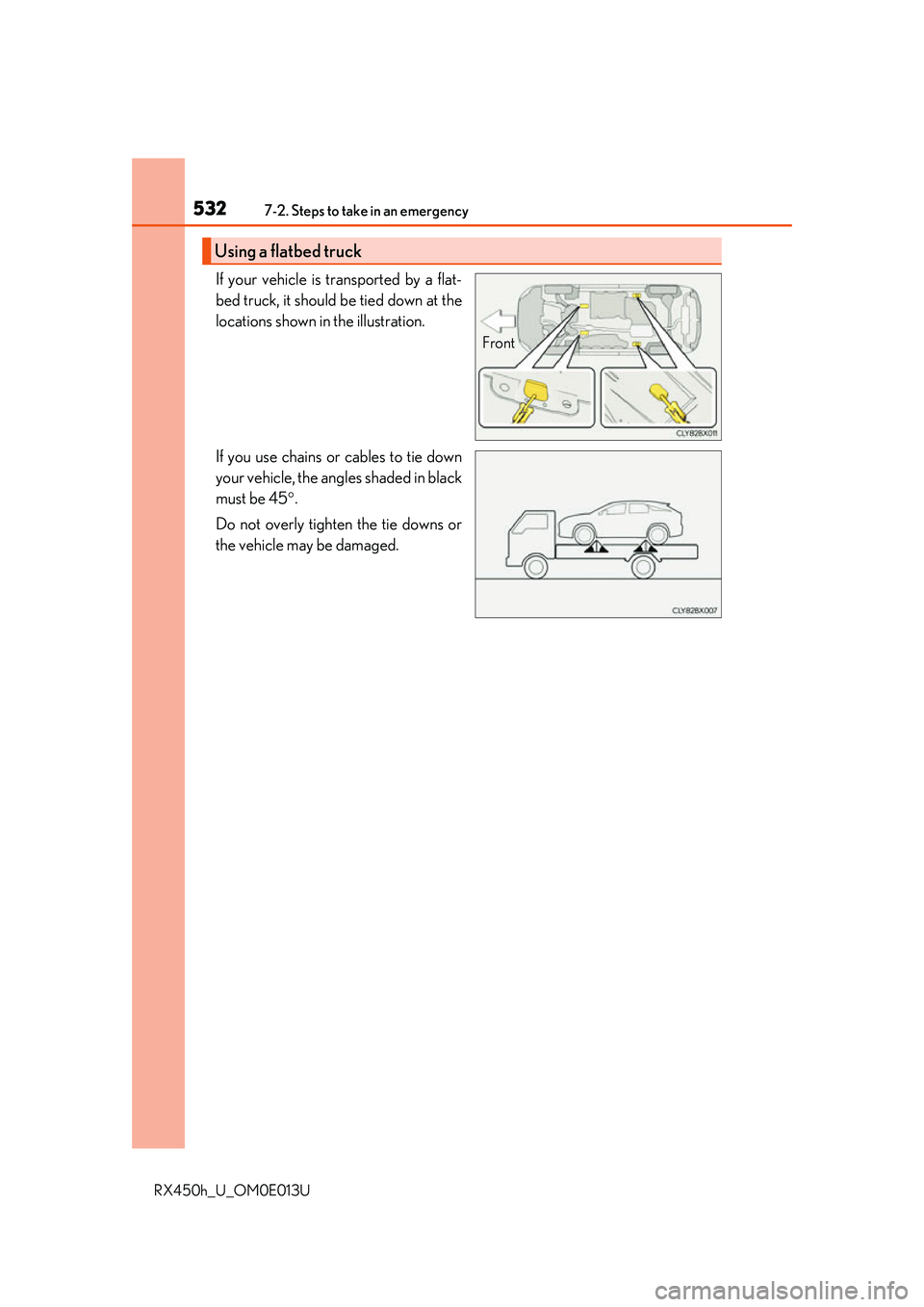
If your vehicle is transported by a flat-
bed truck, it should be tied down at the
locations shown in the illustration.
If you use chains or cables to tie down
your vehicle, the angles shaded in black
must be 45.
Do not overly tighten the tie downs or
the vehicle may be damaged.
Using a flatbed truck
Front
Page 533 of 660
5337-2. Steps to take in an emergency
7
When trouble arises
RX450h_U_OM0E013U
WARNING
Observe the following precautions.
Failure to do so may result in death or serious injury.
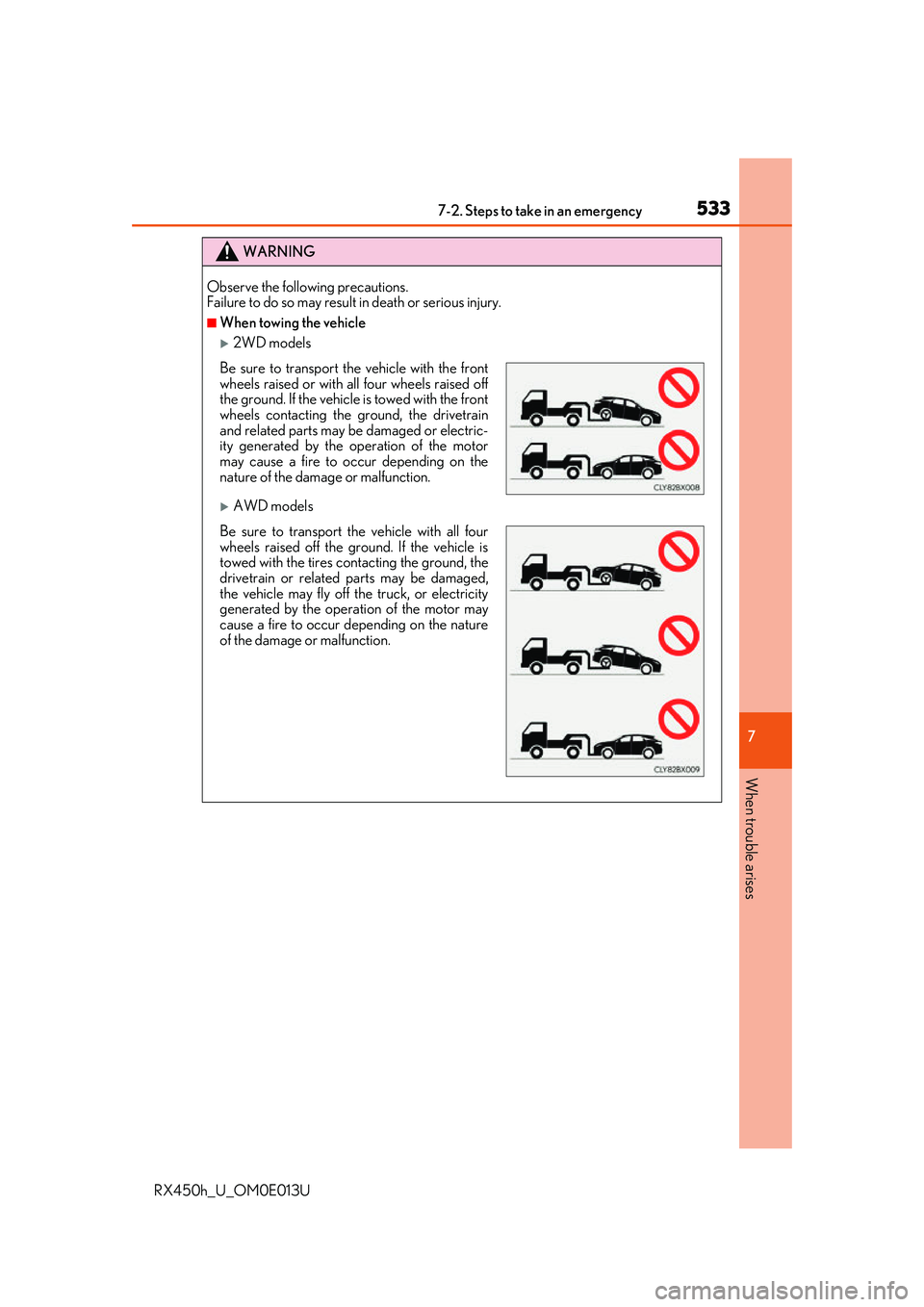
■When towing the vehicle
2WD models
AWD models
Be sure to transport the vehicle with the front
wheels raised or with all four wheels raised off
the ground. If the vehicle is towed with the front
wheels contacting the ground, the drivetrain
and related parts may be damaged or electric-
ity generated by the operation of the motor
may cause a fire to o ccur depending on the
nature of the damage or malfunction.
Be sure to transport the vehicle with all four
wheels raised off the ground. If the vehicle is
towed with the tires contacting the ground, the
drivetrain or related parts may be damaged,
the vehicle may fly off the truck, or electricity
generated by the operation of the motor may
cause a fire to occur depending on the nature
of the damage or malfunction.