2016 LEXUS RX450H lights
[x] Cancel search: lightsPage 94 of 660

942. Instrument cluster
RX450h_U_OM0E013U
*1: These lights turn on when the power switch is turned to ON mode to indicate that a system check is being performe d. They will turn off after the hybrid system is on, or
after a few seconds. There may be a malfunctio n in a system if the lights do not turn on,
or turn off. Have the vehicle inspected by your Lexus dealer.
*2: The light flashes to indicate a malfunction.
The indicators inform the driver of the op erating state of the vehicle’s various sys-
tems.
*1, 2
(if equipped)
PCS warning light
( P. 538)*1Tire pressure warning light
( P. 538)
Low fuel level warning light
( P. 538)
*1Master warning light
( P. 538)
Seat belt reminder light
( P. 538)
Indicators
Turn signal indicator
( P. 244) Cruise control indicator
(
P. 311, 323, 335)
(U.S.A.)
Headlight indicator
( P. 251)
(if equipped)
Radar cruise control
indicator ( P. 311, 323)
(Canada)
Tail light indicator
( P. 251) Cruise control “SET”
indicator
(
P. 311, 323, 335)
Headlight high beam
indicator ( P. 252)
(if equipped)
LDA indicator ( P. 302)
LKA indicator ( P. 292)
*1
(if equipped)
Automatic High Beam
indicator (P. 255)
(if equipped)
LDA indicator ( P. 302)
LKA indicator ( P. 292)
Fog light indicator
( P. 259)
*4
(if equipped)
LDA indicator ( P. 302)
LKA indicator ( P. 292)
Page 96 of 660

962. Instrument cluster
RX450h_U_OM0E013U
F SPORT models
*1: These lights turn on when the power switch is turned to the ON mode to indicate that a system check is being performed. They will turn off after the hybrid system is on, or
after a few seconds. There may be a malfunction in a system if the lights do not turn on,
or turn off. Have the vehicle inspected by your Lexus dealer.
*2: In order to confirm operation, the BSM ou tside rear view mirror indicators illuminate
in the following situations:
• When the BSM function is enabled on of the multi-information display, the
power switch is turned to ON mode.
• When the power switch is in ON mode, the BSM function is enabled on of the multi-information display.
If the system is functioning correctly, the BSM outside rear view mirror indicators will
turn off after a few seconds.
If the BSM outside rear view mirror indicators do not illuminate or do not turn off,
there may be a malfunction in the system.
If this occurs, have the vehicle inspected by your Lexus dealer.
*3: This light illuminates on the outside rear view mirrors.
*4: The light flashes to indicate that the system is operating.
*5: The light comes on when the system is turned off.
*6: This light illuminates on the center panel.
*7: When the outside temperature is approximately 37 F (3 C) or lower, the indicator
will flash for approximately 10 seconds, then stay on. Eco drive mode indicator
(
P. 377) “SPORT S” indicator
(
P. 377)
“SPORT S+” indicator
( P. 377) “CUSTOMIZE” indicator
(
P. 377)
EV drive mode indicator
( P. 237)
WARNING
■If a safety system warning light does not come on
Should a safety system light such as the ABS and SRS warning light not come on when
you start the hybrid system, this could mean that these systems are not available to help
protect you in an accident, which could result in death or serious injury. Have the vehi-
cle inspected by your Lexus dealer immediately if this occurs.
Page 99 of 660

992. Instrument cluster
2
Instrument cluster
RX450h_U_OM0E013U
■Rev indicator (F SPORT models)
When the engine reaches a set
speed, a ring-shaped indicator will
be displayed on the tachometer.
The desired engine speed at which
the Rev indicator will begin to be dis-
played can be set on of the multi-
information display. (P. 109)
■Rev peak (F SPORT models)
The engine speed reaches or
exceeds 4000 rpm, an afterimage
of the tachometer will be displayed
at the highest engine speed for
approximately 1 second.
The brightness of the instrument panel lights can be adjusted.
Darker
Brighter
• The brightness of the instrument panel lights can be adjusted individu-
ally for day mode and night mode
*.
• If the brightness is adjusted when the surroundings are bright and the tail
lights are on (day mode brightness
adjustment), the brightness level of
night mode will be adjusted at the
same time.
*: Day mode and night mode: P. 101
Instrument panel light control
1
2
Page 101 of 660

1012. Instrument cluster
2
Instrument cluster
RX450h_U_OM0E013U
■Tachometer
Hybrid System Indicator switches to the tachometer when driving mode is in sport mode.
The settings of the tachometer display can be changed on of the multi-information
display. ( P. 109)
■Engine speed
On hybrid vehicles, engine speed is precisel y controlled in order to help improve fuel
efficiency and reduce exhaust emissions etc.
There are times when the engine speed that is displayed may differ even when vehicle
operation and driving conditions are the same.
■Brightness of the meters (d ay mode and night mode)
The brightness of the meters is changed between day mode and night mode.
●Day mode: When the tail lights are off or when the tail lights are on but the surrounding
area is bright
●Night mode: When the tail lights are on and the surrounding area is dark
■Outside temperature display
●In the following situations, the correct outside temperature may not be displayed, or the
display may take longer than normal to change.
• When stopped, or driving at low speeds (less than 12 mph [20 km/h])
• When the outside temperature has changed suddenly (at the entrance/exit of a garage, tunnel, etc.)
●When “ ” or “E” is displayed, the sy stem may be malfunctioning.
Take your vehicle to your Lexus dealer.
■Clock settings screen
If the clock adjustment screen is displayed continuously when attempting to change the
clock settings, the system may be malfunctioning.
Have the vehicle inspected by your Lexus dealer.
■Customization
Some functions can be customized. ( P. 109)
NOTICE
■To prevent damage to the engine and its components
●Do not let the indicator needle of the tachometer enter the red zone, which indicates
the maximum engine speed.
●The engine may be overheating if the engine coolant temperature gauge is in the red
zone (H). In this case, immediately stop the vehicle in a safe place, and check the
engine after it has cooled completely. ( P. 574)
Page 116 of 660

1162. Instrument cluster
RX450h_U_OM0E013U
Displays suggestions to the driver in the following situations. To select a response
to a displayed suggestion, use the meter control switches.
The suggestion function can be turned on/off. (Customizable features: P. 607)
■Suggestion to enable the power back door
If the power back door system is disabled (setting on set to off) and the
power back door switch on the instru ment panel is operated, a suggestion
message will be displayed asking if yo u wish to enable the power back door
system. To enable the power back door system, select “Yes”.
After enabling the power back door syst em, press the power back door switch
again to open or close the power back door.
■Suggestion to turn off the headlights
If the headlights are left on for a certai n amount of time after the power switch
has been turned off, a su ggestion message will be displayed asking if you wish
to turn the headlights off. To turn the headlights off, select “Yes”.
If a front door is opened after the power switch is turned off, this suggestion mes-
sage will not be displayed.
■Background color of the indicator/shift posi tion display area (except F SPORT models)
The background color of the indicator/shift position display area is changed according to
the driving mode as follows ( P. 377):
●Eco drive mode: Blue
●Sport mode: Red
■G-force display (if equipped)
●The G-force values may not be zero even when the vehicle is parked, such as when it is
parked on an incline.
●Depending on the vehicle usage conditions, the brake fluid pressure display may not
reach its maximum reading even though the brake pedal is fully depressed.
●If a 12-volt battery terminal is disconnect ed and reconnected, the steering amount dis-
play may be disabled temporarily. After driv ing the vehicle for a while, the display will
be enabled.
■Suspension of the settings display
●Some settings cannot be changed while driv ing. When changing settings, park the
vehicle in a safe place.
●If a warning message is displa yed, operation of the settings display will be suspended.
Suggestion function
Page 133 of 660
1333-1. Key information
3
Operation of each component
RX450h_U_OM0E013U
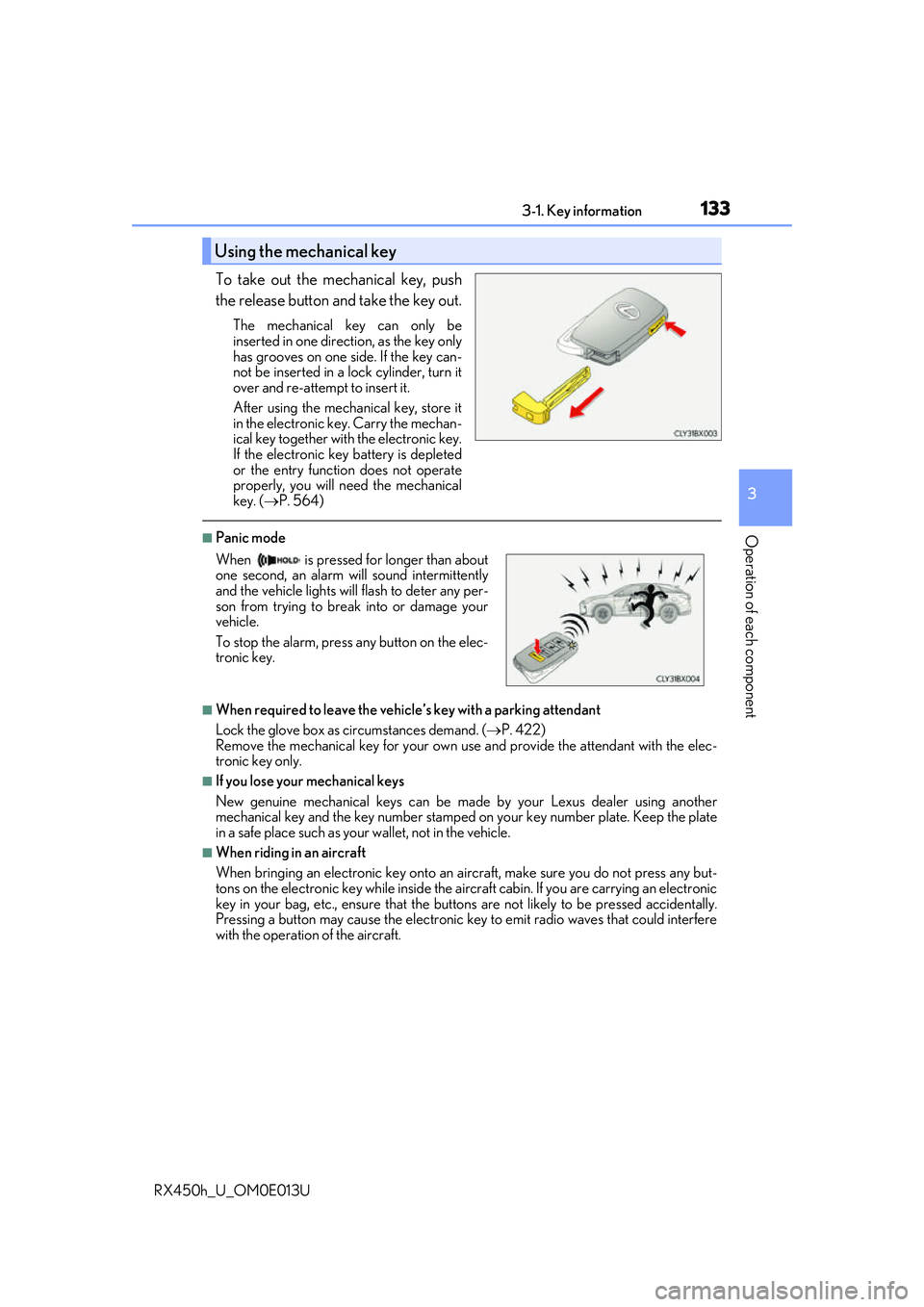
To take out the mechanical key, push
the release button and take the key out.
The mechanical key can only be
inserted in one direction, as the key only
has grooves on one side. If the key can-
not be inserted in a lock cylinder, turn it
over and re-attempt to insert it.
After using the mechanical key, store it
in the electronic key. Carry the mechan-
ical key together with the electronic key.
If the electronic key battery is depleted
or the entry function does not operate
properly, you will need the mechanical
key. ( P. 564)
■Panic mode
■When required to leave the vehicle’s key with a parking attendant
Lock the glove box as circumstances demand. ( P. 422)
Remove the mechanical key for your own use and provide the attendant with the elec-
tronic key only.
■If you lose your mechanical keys
New genuine mechanical keys can be made by your Lexus dealer using another
mechanical key and the key number stamped on your key number plate. Keep the plate
in a safe place such as your wallet, not in the vehicle.
■When riding in an aircraft
When bringing an electronic key onto an aircraft, make sure you do not press any but-
tons on the electronic key while inside the airc raft cabin. If you are carrying an electronic
key in your bag, etc., ensure that the butt ons are not likely to be pressed accidentally.
Pressing a button may cause the electronic key to emit radio waves that could interfere
with the operation of the aircraft.
Using the mechanical key
When is pressed for longer than about
one second, an alarm will sound intermittently
and the vehicle lights will flash to deter any per-
son from trying to break into or damage your
vehicle.
To stop the alarm, press any button on the elec-
tronic key.
Page 148 of 660

1483-2. Opening, closing and locking the doors
RX450h_U_OM0E013U
■Luggage compartment lights
■If the power back door opener is inoperative
The power back door can be unlocked from the inside. The luggage compartment lights turn on when
the power back door is opened with the respec-
tive luggage compartment light switch on. When the power switch is turned off, the
lights will go off automatically after 20 min-
utes.
Remove the cover.
To protect the cover, place a rag between the
flathead screwdriver and cover as shown in
the illustration.
Move the lever.
1
2
Page 183 of 660

1833-4. Adjusting the steering wheel and mirrors
3
Operation of each component
RX450h_U_OM0E013U
The height of the rear view mirror can be adjusted to suit your driving posture.
Adjust the height of the rear view mir-
ror by moving it up and down.
Responding to the level of brightness of the headlights of vehicles behind, the
reflected light is automatically reduced.
Changing automatic anti-glare func-
tion mode
ON/OFF
When the automatic anti-glare function
is in ON mode, the indicator illuminates.
The function will set to ON mode each
time the power switch is turned to ON
mode.
Pressing the button turns the function to
OFF mode. (The indicator also turns
off.)
Inside rear view mirror
The rear view mirror’s position can be adjusted to enable sufficient confirma-
tion of the rear view.
Adjusting the height of rear view mirror
Auto anti-glare function
Indicator