Page 371 of 660
3714-5. Using the driving support systems
4
Driving
RX450h_U_OM0E013U The RCTA function uses radar sensors to detect vehicles approaching from the
right or left at the rear of the vehicle an d alerts the driver of the presence of such
vehicles by flashing the outside rear view mirror indicators and sounding a
buzzer.
Approaching vehicles
Detection areas of approaching vehiclesRCTA function
1
2
Page 406 of 660

406 5-2. Using the air conditio ning system and defogger
RX450h_U_OM0E013U ■
Change the airflow mode
To change the air outlets, press .
The air outlets used are switched
each time the button is pressed.
Air flows to the upper body.
Air flows to the upper body and
feet.
Air flows to the feet.
Air flows to the feet and the
windshield defogger operates■
S-FLOW mode
In S-FLOW mode, priority for the airflow is given to the front seats, reducing
the airflow and air conditioning effect on the rear seats.
If a passenger is not detected in the front passenger seat, priority for the air-
flow will be given to the driver's seat only. In this case, the temperature indicator fo r the front passenger side will turn off.
S-FLOW mode will be activated automatically according to the set tempera-
ture, outside temperature, etc. ( P. 411)The indicator comes on when S-FLOW mode is on.■
Other functions ●
Switching between outside air and recirculated air modes ( P. 4 0 9 )●
Defogging the windshield ( P. 4 0 9 )●
Defogging the rear window and outside rear view mirrors ( P. 4 0 9 )1
2
3
4
Page 409 of 660

4095-2. Using the air conditio ning system and defogger
5
Interior features
RX450h_U_OM0E013U ■
Switching between outside air and recirculated air modes
Press . The mode switches between (recirculated air mode), automatic and
(outside air mode) modes each time the button is pressed.
When the system is switched to automatic mode, the air conditioning system oper-
ates automatically.■
Defogging the windshield
Defoggers are used to defog the windshield and front side windows.
Press . Set the outside/recirculated air mode button to outside air mode if the recirculated
air mode is used. (It may switch automatically.)
To defog the windshield and the side windows early, turn the air flow and tempera-
ture up.
To return to the previous mode, press again when the windshield is
defogged.■
Defogging the rear window and outside rear view mirrors
Defoggers are used to defog the rear window and to remove raindrops, dew
and frost from the outside rear view mirrors.
Press . The defoggers will automatically turn off after a period of time.■
Windshield wiper de-icer (if equipped)
This feature is used to prevent ice fr om building up on the windshield and
wiper blades.
Select on the option control screen. When the windshield wiper de-icer is on , is displayed on the air condition-
ing control screen.
The windshield wiper de-icer will automati cally turn off after a period of time.Other functions
Page 413 of 660

4135-2. Using the air conditio ning system and defogger
5
Interior features
RX450h_U_OM0E013U WA R N I N G ■
To prevent the windshield from fogging up ●
Do not use during cool air operation in extremely humid weather. The differ-
ence between the temperature of the outside air and that of the windshield can cause
the outer surface of the windshield to fog up, blocking your vision.
■
To prevent burns ●
Do not touch the rear view mirror surfaces when the outside rear view mirror defog-
gers are on. ●
Do not touch the glass at lower part of the wi ndshield or to the si de of the front pillars
when the windshield wiper de-icer is on. (if equipped)
NOTICE ■
Humidity sensor
■
To prevent 12-volt battery discharge
Do not leave the air conditioning system on longer than necessary when the hybrid sys-
tem is off. ●
Do not place anything on the instrument
panel which may cover th e air outlets. Other-
wise, air flow may be obstructed, preventing
the windshield defoggers from defogging.
In order to detect fog on the windshield, a sen-
sor which monitors the temperature of the
windshield, the surround humidity, etc. is
installed. ( P. 4 1 2 )
Follow these points to avoid damaging the sen-
sor: ●
Do not disassemble the sensor ●
Do not spray the glass cleaner on the sensor
or subject it to strong impacts ●
Do not stick anything on the sensor
Page 446 of 660

446 5-5. Using the other interior features
RX450h_U_OM0E013U ■
Programming HomeLink ®
Press and release the HomeLink ®
button you want to program and check
that the HomeLink ®
indicator light flashes (orange).Perform within 60 seconds of , or th e indicator light will stop flashing and
programming will not be able to be completed.
Point the remote control transmit-
ter for the device at the rear view
mirror, 1 to 3 in. (25 to 75 mm)
from the HomeLink ®
buttons.Keep the HomeLink ®
indicator light
in view while programming.
For U.S.A. owners
Press and hold the handheld
transmitter button until the
HomeLink ®
indicator light
changes from slowly flashing
orange to rapidly flashing green
(rolling code) or continuously lit
green (fixed code), then release
the button.
Programming an entry gate (for U.S. A. owners)/Programming a device in
the Canadian market
Press and release the remote control transmitter button at 2 second inter-
vals, repeatedly, until the HomeLink ®
indicator light changes from slowly
flashing (orange) to rapidly flashing (green) (rolling code) or continuously
lit (green) (fixed code).
Te s t t h e H o m e L i n k ®
operation by pressing the newly programmed button
and observing the indicator light: ●
Device with fixed code: If the indi cator light is solid/continuous, pro-
gramming has been completed and your garage door or other device
should operate when the HomeLink ®
button is pressed and released.●
Device with rolling code: If the indicator light flashes rapidly, your
garage door opener motor (or other device) is equipped with a rolling
code. Complete the programming process by firmly pressing and hold-
ing the programmed HomeLink ®
button for 2 seconds and then release
the button. 1 3 1
2
3
3
4
Page 612 of 660
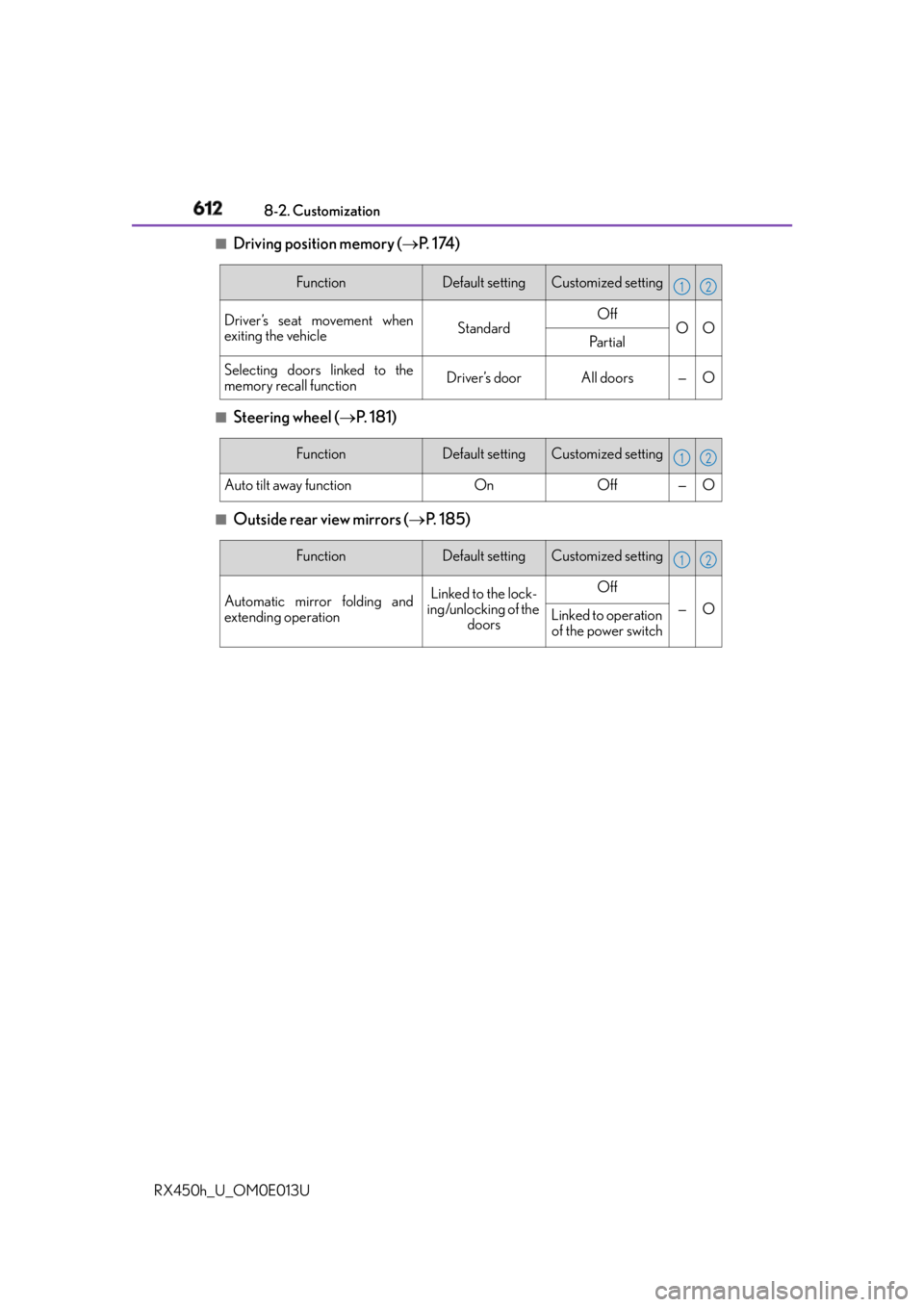
612 8-2. Customization
RX450h_U_OM0E013U ■
Driving position memory ( P. 1 74 )
■
Steering wheel ( P. 181)■
Outside rear view mirrors ( P. 1 8 5 )Function Default setting Customized setting
Driver’s seat movement when
exiting the vehicle Standard Off
O O
Pa r t i a l
Selecting doors linked to the
memory recall function Driver’s door All doors — O 1 2
Function Default setting Customized setting
Auto tilt away function On Off — O 1 2
Function Default setting Customized setting
Automatic mirror folding and
extending operation Linked to the lock-
ing/unlocking of the
doors Off
— O
Linked to operation
of the power switch 1 2
Page 615 of 660
6158-2. Customization
8
Vehicle specifications
RX450h_U_OM0E013U ■
Intuitive parking assist ( P. 3 3 9 )
* : When intuitive parking assist is operating.■
BSM (Blind Spot Monitor) ( P. 363)Function Default setting Customized setting
Detection distance of the front
center sensor Far Near O O
Detection distance of the rear
center sensor Far Near O O
Buzzer volume 3 1 to 5 O O
Display setting
* All sensors dis-
played Display off O O 1 2
Function Default setting Customized setting
Outside rear view mirror indica-
tor brightness Bright Dim O O
Alert timing for presence of
approaching vehicle (BSM func-
tion only) Intermediate Early
O OLate
Only when in blind
spot
RCTA buzzer volume Level 2 Level 1
O —
Level 3 1 2
Page 643 of 660

643Alphabetical index
RX450h_U_OM0E013U Coolant
Capacity ................................................ 587
Checking................................................ 479
Preparing and checking
before winter ................................... 390
Cooling system ..................................... 479
Hybrid system overheating ..........574
Cornering lights .................................... 252
Cruise control
Cruise control..................................... 335
Dynamic radar cruise control...... 323
Dynamic radar cruise control
with full-speed range ....................... 311
Cup holders ............................................ 423
Curtain shield airbags ........................... 39
Customizable features ....................... 607
Customized mode ................................377 Daytime running light system.......... 253
Defogger
Outside rear view mirrors ............409
Rear window ........................................409
Windshield............................................409
Differential .............................................. 588
Dimension ............................................... 582
Dinghy towing ......................................... 231
Display
Dynamic radar cruise control ..... 323
Dynamic radar cruise control
with full-speed range .......................311
Energy monitor..................................... 124
LDA (Lane Departure Alert
with steering control) ...................306
LKA (Lane-Keeping Assist)......... 297
Multi-information display.................102
Warning messages .......................... 543
Do-it-yourself maintenance............... 471
Doors
Automatic door locking and
unlocking system..............................139
Door lock................................................ 138
Outside rear view mirrors ............. 185
Power back door ................................ 142
Rear door child-p rotectors ............139
Side doors ...............................................136
Side windows ....................................... 189
Drive information ...................................106
Drive-start control .................... 205, 242
Driver’s seat belt reminder light .... 538
Driver’s seat position memory.......... 174 D