Page 567 of 700
5678-2. Steps to take in an emergency
8
When trouble arises
RC350_RC300_RC200t_RC F_U (OM24671U)
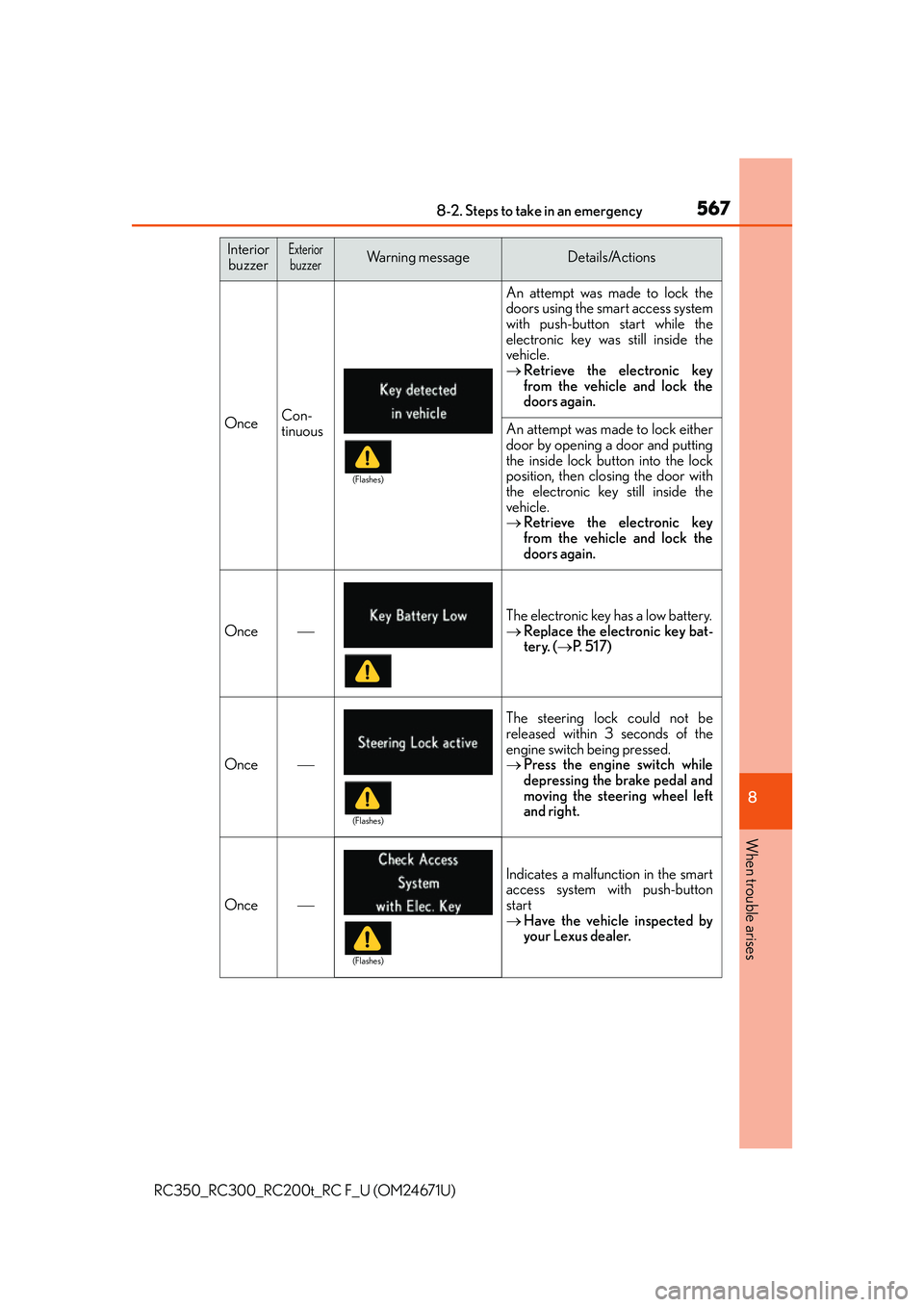
OnceCon-
tinuous
An attempt was made to lock the
doors using the smart access system
with push-button start while the
electronic key was still inside the
vehicle.
Retrieve the electronic key
from the vehicle and lock the
doors again.
An attempt was made to lock either
door by opening a door and putting
the inside lock button into the lock
position, then closing the door with
the electronic key still inside the
vehicle.
Retrieve the electronic key
from the vehicle and lock the
doors again.
Once
The electronic key has a low battery.
Replace the electronic key bat-
tery. ( P. 5 1 7 )
Once
The steering lock could not be
released within 3 seconds of the
engine switch being pressed.
Press the engine switch while
depressing the brake pedal and
moving the steering wheel left
and right.
Once
Indicates a malfunction in the smart
access system with push-button
start
Have the vehicle inspected by
your Lexus dealer.
Interior
buzzerExteriorbuzzerWa r n i n g m e s s a g eDetails/Actions
(Flashes)
(Flashes)
(Flashes)
Page 568 of 700
5688-2. Steps to take in an emergency
RC350_RC300_RC200t_RC F_U (OM24671U)
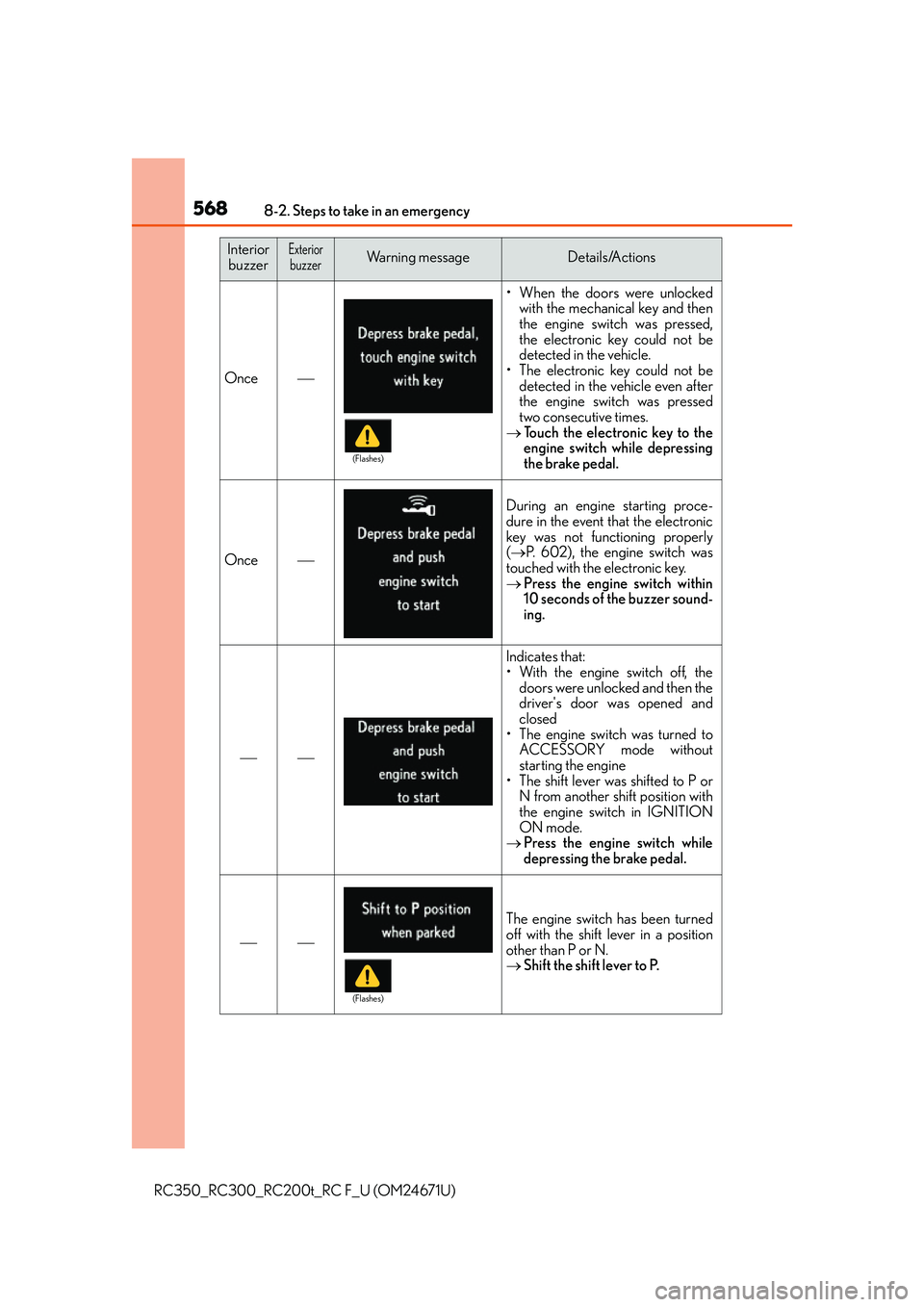
Once
• When the doors were unlockedwith the mechanical key and then
the engine switch was pressed,
the electronic key could not be
detected in the vehicle.
• The electronic key could not be detected in the vehicle even after
the engine switch was pressed
two consecutive times.
Touch the electronic key to the
engine switch while depressing
the brake pedal.
Once
During an engine starting proce-
dure in the event that the electronic
key was not functioning properly
( P. 602), the engine switch was
touched with the electronic key.
Press the engine switch within
10 seconds of the buzzer sound-
ing.
Indicates that:
• With the engine switch off, the
doors were unlocked and then the
driver's door was opened and
closed
• The engine switch was turned to ACCESSORY mode without
starting the engine
• The shift lever was shifted to P or N from another shift position with
the engine switch in IGNITION
ON mode.
Press the engine switch while
depressing the brake pedal.
The engine switch has been turned
off with the shift lever in a position
other than P or N.
Shift the shift lever to P.
Interior
buzzerExteriorbuzzerWa r n i n g m e s s a g eDetails/Actions
(Flashes)
(Flashes)
Page 600 of 700
6008-2. Steps to take in an emergency
RC350_RC300_RC200t_RC F_U (OM24671U)
Use the mechanical key (P. 133) in order to perform the following operations:
■Unlocking the door
Insert the mechanical key while
pulling on the driver’s door han-
dle.
Unlocking the door.
Remove the key, return the handle, and then pull the handle again.
If the electronic key does not operate properly
If communication between the electronic key and vehicle is interrupted ( P.
150) or the electronic key cannot be used because the battery is depleted,
the smart access system with push-button start and wireless remote control
cannot be used. In such cases, the doors and trunk can be opened and the
engine can be started by fo llowing the procedure below.
Locking and unlocking the doors and opening the trunk
1
2
3
Page 601 of 700
6018-2. Steps to take in an emergency
8
When trouble arises
RC350_RC300_RC200t_RC F_U (OM24671U)
■Locking the doorMove the inside lock button to the
lock position.
Close the door.
■Opening the trunk
Turn the mechanical key clockwise
to open.
■Key linked functions
*: These settings must be cust omized at your Lexus dealer.
1
2
Locks both side door
Closes the windows and moon roof (if
equipped) (turn and hold)
*
Unlocks the door
Turning the key rearward unlocks the driver’s
door. Turning the key again unlocks the other
door.
Opens the windows and moon roof (if
equipped) (turn and hold)
*
1
22
33
44
Page 604 of 700
6048-2. Steps to take in an emergency
RC350_RC300_RC200t_RC F_U (OM24671U)
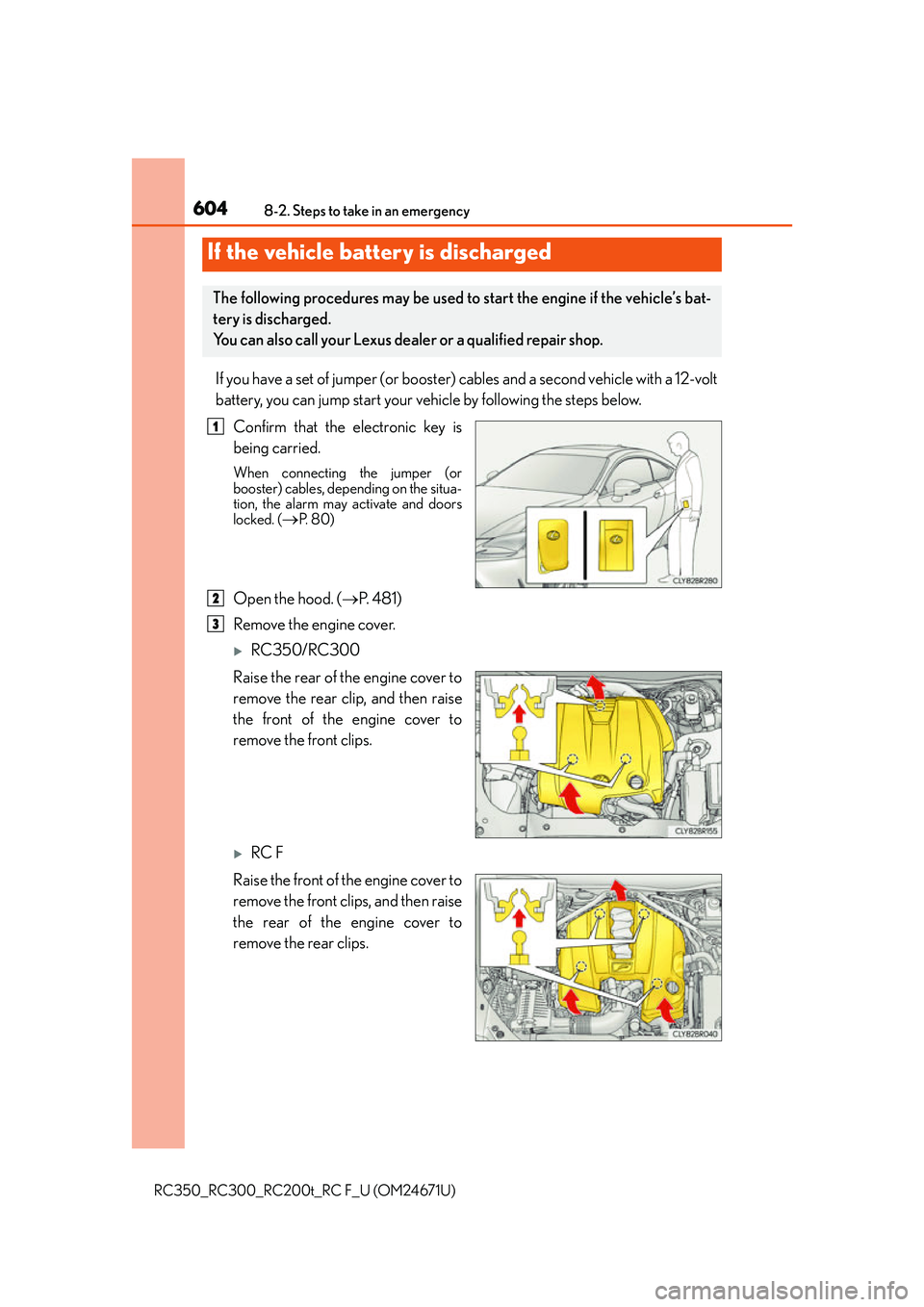
If you have a set of jumper (or booster) cables and a second vehicle with a 12-volt
battery, you can jump start your vehicle by following the steps below.
Confirm that the electronic key is
being carried.
When connecting the jumper (or
booster) cables, depending on the situa-
tion, the alarm may activate and doors
locked. (
P. 8 0 )
Open the hood. ( P. 4 8 1 )
Remove the engine cover.
RC350/RC300
Raise the rear of the engine cover to
remove the rear clip, and then raise
the front of the engine cover to
remove the front clips.
RC F
Raise the front of the engine cover to
remove the front clips, and then raise
the rear of the engine cover to
remove the rear clips.
If the vehicle battery is discharged
The following procedures may be used to start the engine if the vehicle’s bat-
tery is discharged.
You can also call your Lexus dealer or a qualified repair shop.
1
2
3
Page 606 of 700

6068-2. Steps to take in an emergency
RC350_RC300_RC200t_RC F_U (OM24671U)
Start the engine of the second vehicle. Increase the engine speed slightly and
maintain at that level for approximately 5 minutes to recharge the battery of
your vehicle.
Open and close any of the door of your vehicle with the engine switch off.
Maintain the engine speed of the second vehicle and start the engine of your
vehicle by turning the engine switch to IGNITION ON mode.
Once the vehicle’s engine has started, remove the jumper cables in the exact
reverse order from which they were connected.
Once the engine starts, have the vehicle inspected at your Lexus dealer as soon
as possible.
■Starting the engine when the battery is discharged
The engine cannot be started by push-starting.
■To prevent battery discharge
●Turn off the headlights and the audio system while the engine is off.
●Turn off any unnecessary electrical components when the vehicle is running at a low
speed for an extended period, such as in heavy traffic.
■Charging the battery
The electricity stored in the battery will discharge gradually even when the vehicle is not
in use, due to natural discharg e and the draining effects of certain electrical appliances. If
the vehicle is left for a long time, the battery may discharge, and the engine may be
unable to start. (The battery recharges automatically during driving.)
■When recharging or replacing the battery
●In some cases, it may not be possible to unlock the doors using the smart access system
with push-button start when the battery is discharged. Use the wireless remote control
or the mechanical key to lock or unlock the doors.
●The engine may not start on the first attempt after the battery has recharged but will
start normally after the second attempt. This is not a malfunction.
●The engine switch mode is memorized by the vehicle. When the battery is recon-
nected, the system will return to the mode it was in before the battery was discharged.
Before disconnecting the battery, turn the engine switch off.
If you are unsure what mode the engine switch was in before the battery discharged, be
especially careful when reconnecting the battery.
5
6
7
8
Page 655 of 700

6559-2. Customization
9
Vehicle specifications
RC350_RC300_RC200t_RC F_U (OM24671U)
■Door lock (P. 137, 143, 600)
■Smart access system with push-button start and wireless remote control
( P. 137, 143)
FunctionDefault settingCustomized setting
Unlocking using a mechani-
cal key
Driver’s door
unlocked in one
step, both side
doors unlocked in two stepsBoth side doors
unlocked in one step
——O
Automatic door lockShifting the shift
lever to position
other than P
Off
O—OVehicle speed is
approximately 12
mph (20 km/h) or higher
Automatic door unlockShifting the shift
lever to POff
O—ODriver’s door is opened
Locking/unlocking of the
trunk when both side doors
are locked/unlocked
OnOff——O
123
FunctionDefault settingCustomized setting
Operation buzzer volume5OffO—O1 to 7
Operation signal (Emer-
gency flashers)OnOffO—O
Time elapsed before auto-
matic door lock function is
activated if door is not
opened after being
unlocked
60 seconds
Off
O—O30 seconds
120 seconds
Open door warning buzzerOnOff——O
Welcome light illumination
controlOnOff——O
123
Page 656 of 700
6569-2. Customization
RC350_RC300_RC200t_RC F_U (OM24671U)
■Smart access system with push-button start ( P. 137, 143, 148)
■Wireless remote control ( P. 132, 137, 143)
■Driving position memory* ( P. 1 6 0 )
*:If equipped
FunctionDefault settingCustomized setting
Smart access system with
push-button startOnOff——O
Smart door unlockingDriver’s doorBoth side doorsO—O
Number of consecutive
door lock operations2 timesAs many as desired——O
123
FunctionDefault settingCustomized setting
Wireless remote controlOnOff——O
Unlocking operation
Driver’s door
unlocked in one step, both side
doors unlocked in two steps
Both side doors
unlocked in one
stepO—O
Trunk unlocking operationPress and hold (short)
One short press
——O
Push twice
Press and hold (long)
Off
Alarm (panic mode)OnOff——O
123
FunctionDefault settingCustomized setting
Selecting the door linking
driving position memory
with door unlock operation
Driver’s doorBoth side doors——O
123