2016 LEXUS NX300H eco
[x] Cancel search: ecoPage 210 of 680

2104-2. Driving procedures
NX300h_OM_USA_OM78082U
■S mode
●When the shift range is 4 or lower, holding th e shift lever toward “+” sets the shift range
to 6.
●Automatically selects a higher shift range before the engine speed becomes too high.
■Downshifting restriction warning buzzer
To help ensure safety and driving performa nce, downshifting operation may sometimes
be restricted. In some circumstances, downshifting may not be possible even when the
shift lever is operated. (A buzzer will sound twice.)
■When driving with cruise control (if equipped), dynamic radar cruise control (if
equipped) or dynamic radar cruise control with full-speed range (if equipped) acti-
vated
Even when performing the following actions with the intent of enabling engine braking,
engine braking will not activate because cruise control, dynamic radar cruise control or
dynamic radar cruise control with full-speed range will not be canceled.
●While driving in S mode, downshifting to 5 or 4. ( P. 2 0 9 )
●When switching the driving mode to sp ort mode while driving in D position.
( P. 303)
■Restraining sudden start (Drive-Start Control)
When the following unusual operation is pe rformed, the hybrid system output may be
restrained.
●When the shift lever is shifted from R to D, D to R, N to R, P to D, or P to R (D includes S)
with the accelerator pedal depressed, a wa rning message appears on the multi-infor-
mation display. If a warning message is show n on the multi-information display, read the
message and follow the instructions.
●When the accelerator pedal is depresse d too while the vehicle is in reverse.
■If the shift lever cannot be shifted from P
P. 5 9 0
Page 214 of 680

2144-2. Driving procedures
NX300h_OM_USA_OM78082U
The parking brake can be set and released manually. Sets the parking brake
The parking brake indicator light and
parking brake lamp will turn on.
Pull and hold the parking brake switch if
an emergency occurs and it is necessary
to operate the parking brake while driv-
ing.
Releases the parking brake
Operate the parking brake switch while
depressing the brake pedal. Make sure
that the parking brake indicator light
and parking brake lamp turn off.
If the parking brake indicator light and
parking brake lamp flashes, operate the
switch again. ( P. 5 6 6 )
■Parking brake operation
●When the power switch is not in ON mode, the parking brake cannot be released using
the parking brake switch.
●When the power switch is not in ON mode, automatic mode (automatic brake setting
and releasing) is not available.
■If “Parking Brake Overheated Parking Brake Unavailable” is displayed on the multi-
information display
If the parking brake is operated repeatedly over a short period of time, the system may
restrict operation to prevent overheating. If this happens, refrain from operating the
parking brake. Normal operation will return after about 1 minute.
■Parking brake operation sound
When the parking brake operates, a motor sound (whirring sound) may be heard. This
does not indicate a malfunction.
■Parking brake indicator light and parking brake lamp
●Depending on the power switch mode, the parking brake indicator light and parking
brake lamp will turn on and stay on as described below:
ON mode: Comes on until the parking brake is released.
Not in ON mode: Stays on for approximately 15 seconds.
●When the power switch is turned off with th e parking brake set, the parking brake indi-
cator light and parking brake lamp will stay on for about 15 seconds. This does not indi-
cate a malfunction.
Manual mode
U.S.A. Canada
Pa r k i n g
brake lampPa r k i n g
brake lamp
1
2
Page 221 of 680

2214-3. Operating the lights and wipers
4
Driving
NX300h_OM_USA_OM78082U
■Daytime running light system
●To make your vehicle more visible to other drivers during daytime driving, the daytime
running lights turn on automatically (at an in creased intensity) whenever the hybrid sys-
tem is started and the parking brake is releas ed with the headlight switch off or in the
“AUTO” position. (Illuminate brighter than the front parking lights.) Daytime running
lights are not designed for use at night.
Type A only: Daytime running lights can be turned off by operating the switch.
●If a turn signal light is in use, the daytime running light, on the same side, is turned off.
For emergency flashers, both are turned off.
●Compared to turning on the headlights, the daytime running light system offers greater
durability and consumes less electricity, so it can help improve fuel economy.
■Headlight control sensor
■Automatic light off system
●When the headlights come on: The headlights and tail lights turn off 30 seconds after a
door is opened and closed if the power switch is turned to ACCESSORY mode or
turned off. (The lights turn off immediately if on the key is pressed after all the doors
are locked.)
●When only the tail lights come on: The tail lights turn off automatically if the power
switch is turned to ACCESSORY mode or turned off and the driver’s door is opened.
To turn the lights on again, turn the power switch to ON mode, or turn the light switch off
once and then back to or .
■Automatic headlight leveling system (if equipped)
The level of the headlights is automatically ad justed according to the number of passen-
gers and the loading condition of the vehicle to ensure that the headlights do not inter-
fere with other road users.
■Light reminder buzzer
A buzzer sounds when the power switch is turned off or turned to ACCESSORY mode
and the driver’s door is opened while the lights are turned on.
■12-volt battery-saving function
In order to prevent the 12-volt battery of the vehicle from discharging, if the headlights
and/or tail lights are on when the power switch is turned off the 12-volt battery saving
function will operate and automatically turn off all the lights after approximately 20 min-
utes. When the power switch is turned to ON mode, the 12-volt battery-saving function
will be disabled.
When any of the following are performed, the 12-volt battery-saving function is canceled
once and then reactivated. All the lights w ill turn off automatically 20 minutes after the
12-volt battery-saving function has been reactivated:
●When the headlight switch is operated
●When a door is opened or closed
The sensor may not function properly if an
object is placed on the sensor, or anything that
blocks the sensor is affixed to the windshield.
Doing so interferes with the sensor detecting
the level of ambient light and may cause the
automatic headlight system to malfunction.
Page 233 of 680

2334-3. Operating the lights and wipers
4
Driving
NX300h_OM_USA_OM78082U
■If no windshield washer fluid sprays
Check that the washer nozzles are not blocked, if there is washer fluid in the washer fluid
tank.
WA R N I N G
■Caution regarding the use of windshield wi pers in AUTO mode (vehicles with rain-
sensing windshield wipers)
The windshield wipers may operate unexpectedly if the sensor is touched or the wind-
shield is subject to vibration in AUTO mode. Take care that your fingers, etc. do not
become caught in the windshield wipers.
■Caution regarding the use of washer fluid
When it is cold, do not use the washer fluid until the windshield becomes warm. The
fluid may freeze on the windshield and cause lo w visibility. This may lead to an accident,
resulting in death or serious injury.
NOTICE
■When the windshield is dry
Do not use the wipers, as they may damage the windshield.
■When the washer fluid tank is empty
Do not operate the switch continually as the washer fluid pump may overheat.
■When a nozzle becomes blocked
In this case, contact your Lexus dealer.
Do not try to clear it with a pin or other object. The nozzle will be damaged.
■To prevent 12-volt battery discharge
Do not leave the wipers on longer than necessary when the hybrid system is off.
Page 235 of 680
2354-3. Operating the lights and wipers
4
Driving
NX300h_OM_USA_OM78082U
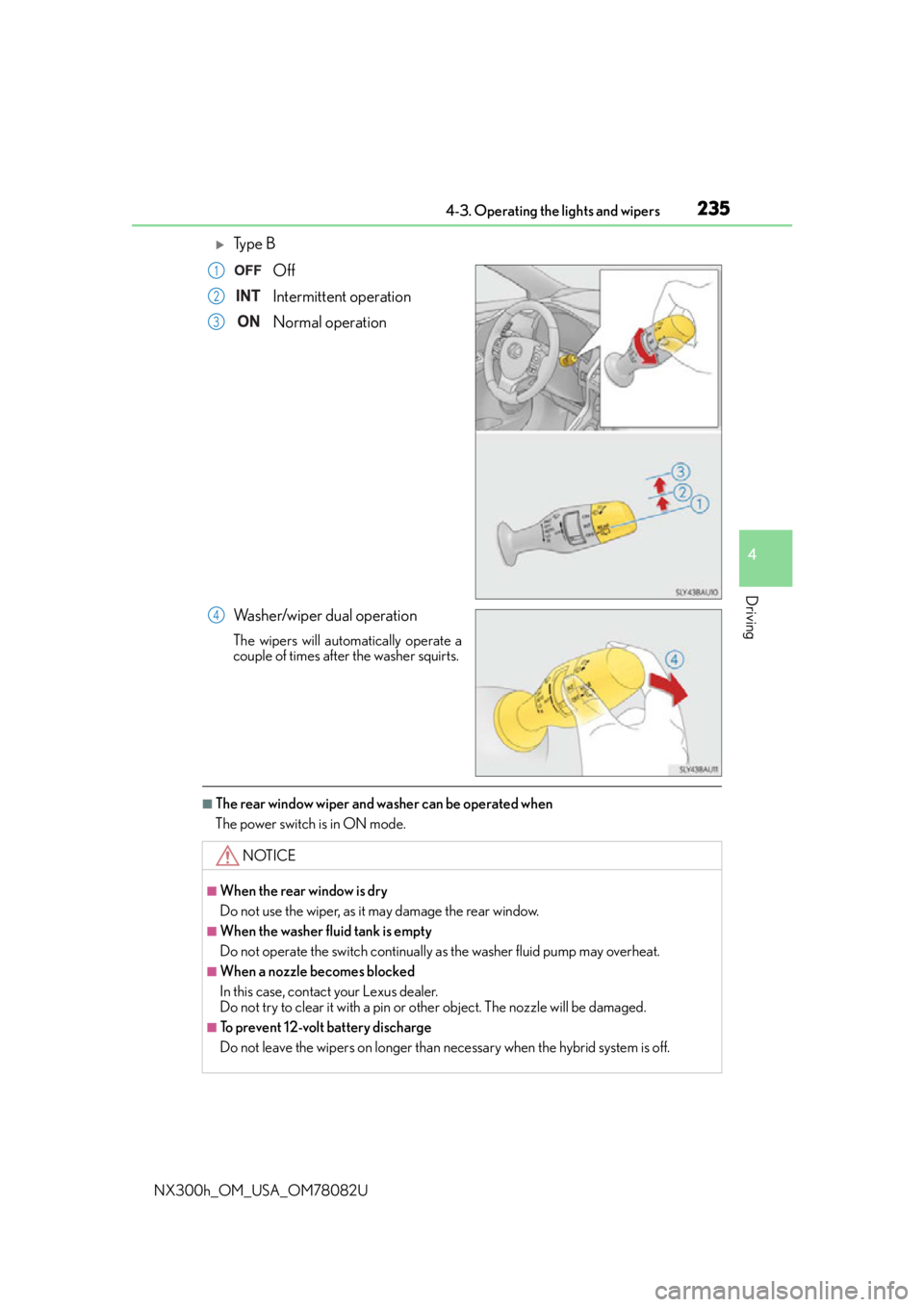
Ty p e BOff
Intermittent operation
Normal operation
Washer/wiper dual operation
The wipers will automatically operate a
couple of times after the washer squirts.
■The rear window wiper and washer can be operated when
The power switch is in ON mode.
1
2
3
4
NOTICE
■When the rear window is dry
Do not use the wiper, as it may damage the rear window.
■When the washer fluid tank is empty
Do not operate the switch continually as the washer fluid pump may overheat.
■When a nozzle becomes blocked
In this case, contact your Lexus dealer.
Do not try to clear it with a pin or other object. The nozzle will be damaged.
■To prevent 12-volt battery discharge
Do not leave the wipers on longer than necessary when the hybrid system is off.
Page 243 of 680

2434-5. Using the driving support systems
4
Driving
NX300h_OM_USA_OM78082U
To change the set speed, operate the lever until the desired set speed is dis-
played.Increases the speed
Decreases the speed
Fine adjustment: Momentarily move
the lever in the desired direction.
Large adjustment: Hold the lever in the
desired direction.
In the vehicle-to-vehicle distance control mode, the set speed will be increased
or decreased as follows: • When the set speed is shown in “MPH”
Fine adjustment: By approximately 1 mph (1.6 km/h) each time the lever is
operated
Large adjustment: By approximately 5 mph (8 km/h) for each 0.75 seconds
the lever is held
• When the set speed is shown in “km/h”
Fine adjustment: By approximately 1 km /h (0.6 mph) each time the lever is
operated
Large adjustment: By approximately 5 km /h (3.1 mph) for each 0.75 seconds
the lever is held
In the constant speed control mode ( P. 246), the set speed will be increased
or decreased as follows:
Fine adjustment: By approximately 1 mph (1.6 km/h) each time the lever is operated
Large adjustment: The set speed can be incr eased or decreased continually until the
lever is released.
Adjusting the set speed
1
2
Page 246 of 680

2464-5. Using the driving support systems
NX300h_OM_USA_OM78082U
When constant speed control mode is sele cted, your vehicle will maintain a set
speed without controlling the vehicle-to-vehicle distance. Select this mode only
when vehicle-to-vehicle distance contro l mode does not function correctly due
to dirt, etc.
Press the “ON/OFF” button to acti-
vate the cruise control.
Press the button again to deactivate the
cruise control.
Switch to constant speed control
mode.
(Push the lever forward and hold for
approximately 1 second.)
Cruise control indicator will come on.
When in constant speed control mode, to return to vehicle-to-vehicle distance con-
trol mode, push the lever forward agai n and hold for approximately 1 second.
After the desired speed has been set, it is not possible to return to vehicle-to-vehicle
distance control mode.
If the power switch is turned off and then turned to ON mode again, the vehicle will
automatically return to vehicle-to-vehicle distance control mode.
Adjusting the speed setting: P. 2 4 3
Canceling and resuming the speed setting: P. 2 4 5
Selecting constant speed control mode
1
2
Page 255 of 680

2554-5. Using the driving support systems
4
Driving
NX300h_OM_USA_OM78082U
Press the “ON/OFF” button to acti-
vate the cruise control.
Radar cruise control indicator will come
on and a message will be displayed on
the multi-information display.
Press the button again to deactivate the
cruise control.
Accelerate or decelerate, with
accelerator pedal operation, to the
desired vehicle speed (above
approximately 30 mph [50 km/h])
and push the lever down to set the
speed.
Cruise control “SET” indicator will come
on.
The vehicle speed at the moment the
lever is released becomes the set speed.
While the vehicle is in vehicle-to-vehicle distance control mode, if the lever is released
when vehicle speed is less than 30 mph (50 km/h) and a vehicle ahead can be
detected, the vehicle will start following th e vehicle ahead at a set speed of 30 mph
(50 km/h).
Setting the vehicle speed (vehicle-to-vehicle distance control mode)
1
2