2016 LEXUS NX200T seat
[x] Cancel search: seatPage 146 of 660

1463-3. Adjusting the seats
NX200t_OM_USA_OM78081U
Your preferred driving position (the posi tion of the driver’s seat, steering wheel
and outside rear view mirrors) can be recorded and recalled by pressing a but-
ton.
Three different driving positions can be recorded into memory.
■Recording procedure
Check that the shift lever is in P.
Turn the engine switch to IGNITION ON mode.
Adjust the driver’s seat, steering wheel and outside rear view mirrors to the
desired positions.
While pressing the “SET” button,
or within 3 seconds after the
“SET” button is pressed, press
button “1”, “2” or “3” until the
buzzer sounds.
If the selected button has already
been preset, the previously recorded
position will be overwritten.
■Recall procedureCheck that the shift lever is in P.
Turn the engine switch to IGNITION ON mode.
Press one of the buttons for the
driving position you want to recall
until the buzzer sounds.
Driving position memory
1
2
3
4
1
2
3
Page 147 of 660

1473-3. Adjusting the seats
3
Operation of each component
NX200t_OM_USA_OM78081U
■To stop the position recall operation part-way through
Perform any of the following:
●Press the “SET” button.
●Press button “1”, “2” or “3”.
●Operate any of the seat adjustment switches (only cancels seat position recall).
●Operate the tilt and telescopic steering co ntrol switch (only cancels steering wheel
position recall).
■Seat positions that can be memorized ( P. 1 3 7 )
The adjusted positions other than the position adjusted by lumbar support switch can be
recorded.
■Operating the driving position memory after turning the engine switch off
Recorded seat positions can be activated up to 180 seconds after the driver’s door is
opened and another 60 seconds after it is closed again.
■In order to correctly use the dr iving position memory function
If a seat position is already in the furthest po ssible position and the seat is operated in the
same direction, the recorded position may be slightly different when it is recalled.
Each electronic key (including a card key) can be registered to recall your pre-
ferred driving position.
■Registering procedure
Record your driving position to button “1”, “2” or “3” before performing the
following:
Carry only the key you want to regist er, and then close the driver’s door.
If 2 or more keys are in the vehicle, the driving position cannot be recorded
properly.
Check that the shift lever is in P.
Turn the engine switch to IGNITION ON mode.
Recall the driving position that you want to record.
While pressing the recalled but-
ton, press and hold the door lock
switch (either lock or unlock) until
the buzzer sounds.
If the button could not be registered,
the buzzer sounds continuously for
approximately 3 seconds.
Memory recall function
1
2
3
4
Page 148 of 660

1483-3. Adjusting the seats
NX200t_OM_USA_OM78081U
■Recall procedure Carry the electronic key that has been registered to the driving position,
and then unlock and open the driver’s door using the smart access system
with push-button start or wireless remote control.
The driving position will move to the reco rded position (not including the steering
wheel). However, the seat will move to a po sition slightly behind the recorded posi-
tion in order to make entering the vehicle easier.
If the driving position is in a position th at has already been recorded, the seat and
outside rear view mirrors will not move.
Turn the engine switch to ACCESSORY mode or IGNITION ON mode,
or fasten a seat belt.
The seat and steering wheel will move to the recorded position.
■Cancelation procedure
Carry only the key you want to cancel and then close the driver’s door.
If 2 or more keys are in the vehicle, the driving position cannot be canceled
properly.
Turn the engine switch to IGNITION ON mode.
While pressing the “SET” button, press and hold the door lock switch
(either lock or unlock) unt il the buzzer sounds twice.
If it could not be canceled, the buzzer sounds continuously for approximately 3
seconds.
■Recalling the driving position using the memory recall function
●Different driving positions can be registered for each electronic key. Therefore, the
driving position that is recalled may be different depending on the key being carried.
●If a door other than the driver’s door is unlocked with the smart access system with
push-button start, the driving position cannot be recalled. In this case, press the driving
position button which has been set.
■Customization
The unlock door settings of the memory re call function can be customized. (Customiz-
able features: P. 6 1 4 )
WA R N I N G
■Seat adjustment caution
Take care during seat adjustment so that th e seat does not strike the rear passenger or
squeeze your body against the steering wheel.
1
2
1
2
Page 149 of 660
1493-3. Adjusting the seats
3
Operation of each component
NX200t_OM_USA_OM78081U
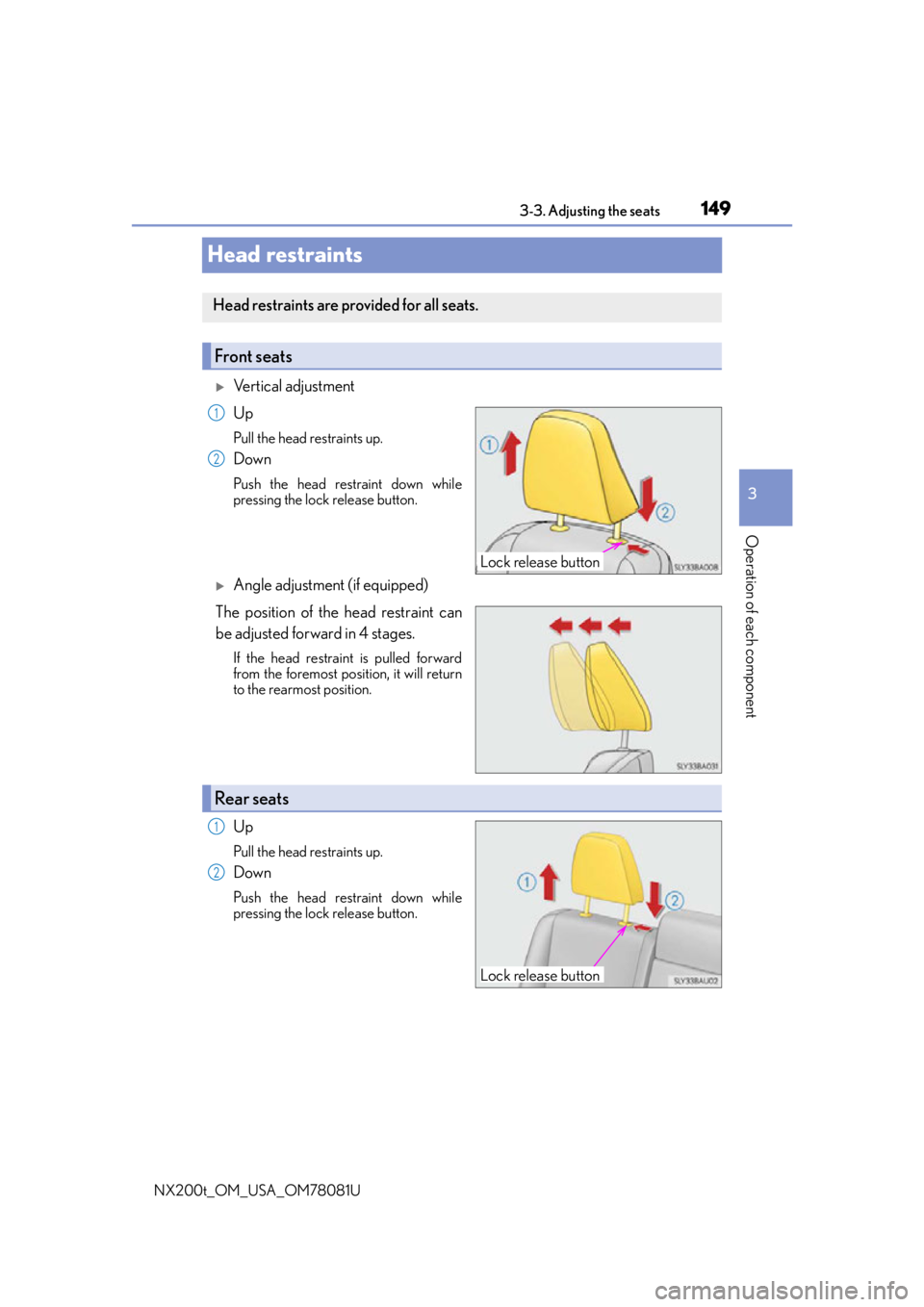
Head restraints
Vertical adjustment
Up
Pull the head restraints up.
Down
Push the head restraint down while
pressing the lock release button.
Angle adjustment (if equipped)
The position of the head restraint can
be adjusted forward in 4 stages.
If the head restraint is pulled forward
from the foremost position, it will return
to the rearmost position.
Up
Pull the head restraints up.
Down
Push the head restraint down while
pressing the lock release button.
Head restraints are provided for all seats.
Front seats
Lock release button
1
2
Rear seats
Lock release button
1
2
Page 150 of 660

1503-3. Adjusting the seats
NX200t_OM_USA_OM78081U
■Removing the head restraints
■Installing the head restraints
■Adjusting the height of the he ad restraints (front seats)
■Adjusting the center rear seat head restraint
Always raise the head restraint one level from the stowed position when using. Pull the head restraint up while pressing the lock
release button.
If the head restraint to uches the ceiling, making
the removal difficult, change the seat height or
angle. ( P. 137, 138)
Align the head restrain t with the installation
holes and push it down to the lock position.
Press and hold the lock release button when
lowering the head restraint.
Make sure that the head restraints are adjusted
so that the center of the head restraint is closest
to the top of your ears.
WA R N I N G
■Head restraint precautions
Observe the following precautions regarding the head restraints.
Failure to do so may result in death or serious injury.
●Use the head restraints designed for each respective seat.
●Adjust the head restraints to the correct position at all times.
●After adjusting the head restraints, push down on them and make sure they are
locked in position.
●Do not drive with the head restraints removed.
Lock release button
Lock release button
Page 152 of 660

1523-4. Adjusting the steering wheel and mirrors
NX200t_OM_USA_OM78081U
To sound the horn, press on or close to
the mark.
■The steering wheel can be adjusted when (power type)
The engine switch is in ACCESSORY or IGNITION ON mode
*.
*: If the driver’s seat belt is fastened, the steering wheel can be adjusted regardless of
engine switch mode.
■Automatic adjustment of the steering position (if equipped)
A desired steering position can be entered to memory and recalled automatically by the
driving position memory system. ( P. 1 4 6 )
■Power easy access system
The steering wheel and driver’s seat move in accordance with engine switch mode and
the driver’s seat belt condition. ( P. 1 4 5 )
■After adjusting the steering wheel (manual type)
Make sure that the steering wheel is securely locked.
The horn may not sound if the steering wheel is not securely locked.
Horn
WA R N I N G
■Caution while driving
Do not adjust the steering wheel while driving.
Doing so may cause the driver to mishandle the vehicle and cause an accident, result-
ing in death or serious injury.
■After adjusting the steering wheel (manual type)
Make sure that the steering wheel is securely locked.
Otherwise, the steering wheel may move suddenly, possibly causing an accident, and
resulting in death or serious injury.
Page 169 of 660

1694-1. Before driving
4
Driving
NX200t_OM_USA_OM78081U
WA R N I N G
Observe the following precautions.
Failure to do so may result in death or serious injury.
■When starting the vehicle
Always keep your foot on the brake pedal while stopped engine running. This prevents
the vehicle from creeping.
■When driving the vehicle
●Do not drive if you are unfamiliar with the location of the brake and accelerator ped-
als to avoid depressing the wrong pedal.
• Accidentally depressing th e accelerator pedal instead of the brake pedal will
result in sudden acceleration that may lead to an accident.
• When backing up, you may twist your body around, leading to difficulty in operat-
ing the pedals. Make sure to operate the pedals properly.
• Make sure to keep a correct driving posture even when moving the vehicle only slightly. This allows you to depress th e brake and accelerator pedals properly.
• Depress the brake pedal using your righ t foot. Depressing the brake pedal using
your left foot may delay response in an emergency, resulting in an accident.
●Do not drive the vehicle over or stop the vehicle near flammable materials.
The exhaust system and exhaust gases can be extremely hot. These hot parts may
cause a fire if there is any flammable material nearby.
●During normal driving, do not turn off the engine. Turning the engine off while driving
will not cause loss of steering or braking co ntrol, but the power assist to these systems
will be lost. This will make it more difficul t to steer and brake, so you should pull over
and stop the vehicle as soon as it is safe to do so.
However, in the event of an emergency, such as if it becomes impossible to stop the
vehicle in the normal way: P. 5 4 1
●Use engine braking (downshift) to maintain a safe speed when driving down a steep
hill.
Using the brakes continuously may cause th e brakes to overheat and lose effective-
ness. ( P. 1 9 8 )
●Do not adjust the positions of the steering wh eel, the seat, or the inside or outside rear
view mirrors while driving.
Doing so may result in a loss of vehicle control.
●Always check that all passengers’ arms, heads or other parts of their body are not
outside the vehicle.
●AWD models: Do not drive the vehicle off-road.
This is not an AWD vehicle designed for of f-road driving. Proceed with all due cau-
tion if it becomes unavoidable to drive off-road.
●Do not drive across a river or through other bodies of water.
This may cause electric/electronic components to short circuit, damage the engine or
cause other serious damage to the vehicle.
●Do not drive in excess of the speed limit. Ev en if the legal speed limit permits it, do not
drive over 85 mph (140 km/h) unless your vehicle has high-speed capability tires.
Driving over 85 mph (140 km/h) may result in tire failure, loss of control and possible
injury. Be sure to consult a tire dealer to determine whether the tires on your vehicle
are high-speed capability tires or not before driving at such speeds.
Page 171 of 660

1714-1. Before driving
4
Driving
NX200t_OM_USA_OM78081U
WA R N I N G
Observe the following precautions.
Failure to do so may result in death or serious injury.
■When the vehicle is stopped
●Do not race the engine.
If the shift lever is in any position other than P or N, the vehicle may accelerate sud-
denly and unexpectedly, causing an accident.
●In order to prevent accidents due to the vehicle rolling away, always keep depressing
the brake pedal while the engine is running, and apply the parking brake as neces-
sary.
●If the vehicle is stopped on an incline, in order to prevent accidents caused by the
vehicle rolling forward or backward, always depress the brake pedal and securely
apply the parking brake as needed.
●Avoid revving or racing the engine.
Running the engine at high speed while the vehicle is stopped may cause the exhaust
system to overheat, which could result in a fire if combustible material is nearby.
■When the vehicle is parked
●Do not leave glasses, cigarette lighters, sp ray cans, or soft drink cans in the vehicle
when it is in the sun.
Doing so may result in the following:
• Gas may leak from a cigarette lighter or spray can, and may lead to a fire.
• The temperature inside the vehicle may cause the plastic lenses and plastic mate- rial of glasses to deform or crack.
• Soft drink cans may fracture, causing the contents to spray over the interior of the
vehicle, and may also cause a short circuit in the vehicle’s electrical components.
●Do not leave cigarette lighters in the vehicle. If a cigarette lighter is in a place such as
the glove box or on the floor, it may be lit accidentally when luggage is loaded or the
seat is adjusted, causing a fire.
●Do not attach adhesive discs to the windsh ield or windows. Do not place containers
such as air fresheners on the instrument panel or dashboard. Adhesive discs or con-
tainers may act as lenses, causing a fire in the vehicle.
●Do not leave a door or window open if the curved glass is coated with a metallized
film such as a silver-colored one. Reflected sunlight may cause the glass to act as a
lens, causing a fire.
●Always shift the shift lever to P, apply the parking brake, stop the engine and lock the
vehicle.
Do not leave the vehicle unattend ed while the engine is running.
●Do not touch the exhaust pipes while the engine is running or immediately after turn-
ing the engine off.
Doing so may cause burns.