2016 LEXUS NX200T PARK
[x] Cancel search: PARKPage 208 of 660

2084-2. Driving procedures
NX200t_OM_USA_OM78081U
■If “Brake Hold Fault Depress Brake to Deacti vate Visit Your Dealer” is displayed on the
multi-information display
The system may be malfunctioning. Have the vehicle inspected by any authorized Lexus
dealer or repairer, or another duly qualified and equipped professional immediately.
■Warning messages and buzzers
Warning messages and buzzers are used to indicate a system malfunction or to inform
the driver of the need for caution. If a warn ing message is shown on the multi-information
display, read the message and follow the instructions.
■If the brake hold operated indicator flashes
P. 5 5 1
WA R N I N G
■When the vehicle is on a steep incline
When using the brake hold system on a stee p incline exercise caution. The brake hold
function may not hold the vehicle in such a situation.
■When stopped on a slippery road
The system cannot stop the vehicle when the gripping ability of the tires has been
exceeded. Do not use the system when stopped on a slippery road.
NOTICE
■When parking the vehicle
The brake hold system is not designed for use when parking the vehicle for a long
period of time. Turning the engine switch of f while the system is holding the brake may
release the brake, which would cause the vehicle to move. When operating the engine
switch, depress the brake pedal, shift the shift lever to P and set the parking brake.
Page 210 of 660

2104-3. Operating the lights and wipers
NX200t_OM_USA_OM78081U
Headlight switch
Turning the end of the lever turns on the lights as follows:
Ty p e A The side marker, parking,
tail, license plate, daytime
running lights ( P. 212),
instrument panel and
switch lights turn on.
The headlights and all the
lights listed above (except
daytime running lights) turn
on.
The headlights, daytime
running lights ( P. 212)
and all the lights listed
above turn on and off auto-
matically (when the engine
switch is in IGNITION ON
mode).
The daytime running lights turn off.
The headlights can be operated manually or automatically.
Operating instructions
1
2
3
4
Page 211 of 660

2114-3. Operating the lights and wipers
4
Driving
NX200t_OM_USA_OM78081U
Ty p e BThe side marker, parking,
tail, license plate, daytime
running lights ( P. 212),
instrument panel and
switch lights turn on.
The headlights and all the
lights listed above (except
daytime running lights) turn
on.
The headlights, daytime
running lights ( P. 212)
and all the lights listed
above turn on and off auto-
matically (when the engine
switch is in IGNITION ON
mode).
The daytime running lights turn on.
With the headlights on, push the
lever away from you to turn on the
high beams.
Pull the lever toward you to the center
position to turn the high beams off.
Pull the lever toward you and release
it to flash the high beams once.
You can flash the high beams with the
headlights on or off.
1
2
3
Turning on the high beam headlights
4
1
2
Page 212 of 660

2124-3. Operating the lights and wipers
NX200t_OM_USA_OM78081U
When the following conditions are met, while the headlights (low beam) are on,
the cornering lights will additionally turn on and light up the direction of move-
ment for the vehicle. This is to ensure excellent visibility when either driving at
intersections or parking at night.
●The steering wheel is operated
●The turn signal lever is operated
●The shift lever is in R
However, when vehicle speed is 40 km/h (25 mph) or above, the cornering
lights do not turn on.
When the cornering lights ar e on for more than 30 minutes, they will automati-
cally turn off.
■Daytime running light system
●To make your vehicle more visible to other drivers during daytime driving, the daytime
running lights turn on automatically (at an increased intensity) whenever the engine is
started and the parking brake is released with the headlight switch off or in the “AUTO”
position. (Illuminate brighter than the front parking lights.) Daytime running lights are
not designed for use at night.
Type A only: Daytime running lights can be turned off by operating the switch.
●If a turn signal light is in use, the daytime running light, on the same side, is turned off.
For emergency flashers, both are turned off.
●Compared to turning on the headlights, the daytime running light system offers greater
durability and consumes less electricity, so it can help improve fuel economy.
■Headlight control sensor
■Automatic light off system
●When the headlights come on: The headlights and tail lights turn off 30 seconds after a
door is opened and closed if the engine switch is turned to ACCESSORY mode or
turned off. (The lights turn off immediately if on the key is pressed after all the doors
are locked.)
●When only the tail lights come on: The tail lights turn off automatically if the engine
switch is turned to ACCESSORY mode or turned off and the driver’s door is opened.
To turn the lights on again, turn the engine switch to IGNITION ON mode, or turn the
light switch off once and then back to or .
Cornering lights (if equipped)
The sensor may not function properly if an
object is placed on the sensor, or anything that
blocks the sensor is affixed to the windshield.
Doing so interferes with the sensor detecting
the level of ambient light and may cause the
automatic headlight system to malfunction.
Page 217 of 660

2174-3. Operating the lights and wipers
4
Driving
NX200t_OM_USA_OM78081U
WA R N I N G
■Limitations of the Automatic High Beam
Do not rely on the Automatic High Beam. Always drive safely, taking care to observe
your surroundings and turning high beam on or off manually if necessary.
NOTICE
■Notes when using the Automatic High Beam system
Observe the following to ensure that the Automatic High Beam functions correctly.
●Do not place items on the dashboard. There is a possibility that the camera sensor will
mistake items reflected in the windshield for streetlights, the headlights of other vehi-
cles, etc.
●Do not install a parking tag or any other accessories near or around the camera sen-
sor.
●Do not overload the vehicle.
●Do not modify the vehicle.
●Do not replace windshield with non-genuine windshield.
Contact your Lexus dealer.
●Do not touch the camera sensor.
●Do not subject the camera sensor to a strong
impact.
●Do not disassemble the camera sensor.
●Do not spill liquids onto the camera sensor.
●Do not apply window tinting or stickers to the
camera sensor or the area of windshield near
the camera sensor.
Page 227 of 660

2274-4. Refueling
4
Driving
NX200t_OM_USA_OM78081U
Opening the fuel tank cap
●Turn the engine switch off and ensure that all the doors and windows are
closed.
●Confirm the type of fuel. (P. 599)
■Fuel types
P. 5 9 9
■Fuel tank opening for unleaded gasoline
To help prevent incorrect fueling, your vehicle has a fuel tank opening that only accom-
modates the special nozzle on unleaded fuel pumps.
Perform the following steps to open the fuel tank cap.
Before refueling the vehicle
WA R N I N G
■When refueling the vehicle
Observe the following precautions while refu eling the vehicle. Failure to do so may
result in death or serious injury.
●After exiting the vehicle and before openin g the fuel door, touch an unpainted metal
surface to discharge any static electricity. It is important to discharge static electricity
before refueling because sparks resulting fr om static electricity can cause fuel vapors
to ignite while refueling.
●Always hold the grips on th e fuel tank cap and turn it slowly to remove it.
A whooshing sound may be heard when the fuel tank cap is loosened. Wait until the
sound cannot be heard before fully removing the cap. In hot weather, pressurized fuel
may spray out of the filler neck and cause injury.
●Do not allow anyone that has not discharged static electricity from their body to come
close to an open fuel tank.
●Do not inhale vaporized fuel.
Fuel contains substances th at are harmful if inhaled.
●Do not smoke while refueling the vehicle.
Doing so may cause the fuel to ignite and cause a fire.
●Do not return to the vehicle or touch any person or object that is statically charged.
This may cause static electricity to build up, resulting in a possible ignition hazard.
■When refueling
Observe the following precautions to prevent fuel overflowing from the fuel tank:
●Securely insert the fuel nozzle into the fuel filler neck.
●Stop filling the tank after the fuel nozzle automatically clicks off.
●Do not top off the fuel tank.
Page 252 of 660

2524-5. Using the driving support systems
NX200t_OM_USA_OM78081U
■Dynamic radar cruise control with full-speed range can be set when
●The shift lever is in D.
●Vehicle speed is above approximately 30 mph (50 km/h).
■Accelerating after setting the vehicle speed
The vehicle can accelerate by operating the accelerator pedal. After accelerating, the
set speed resumes. However, during vehicle-to-vehicle distance control mode, the vehi-
cle speed may decrease below the set speed in order to maintain the distance to the pre-
ceding vehicle.
■Automatic cancelation of vehicle- to-vehicle distance control mode
Vehicle-to-vehicle distance control mode is automatically canceled in the following situ-
ations:
●VSC is activated.
●TRAC is activated for a period of time.
●When the VSC or TRAC system is turned off by pressing the VSC OFF switch.
●The sensor cannot detect properly beca use it is obstructed in some way.
●Brake automatically operated for long peri ods of time, such as traffic jams, etc.
●The parking brake is operated.
●The vehicle is stopped by system control on a steep incline.
●Pre-collision braking is activated.
●The following are detected when the vehicle has been stopped by system control:
• The driver is not wearing a seat belt.
• The driver’s door is opened.
• The back door or hood is opened.
When vehicle-to-vehicle distance control mo de is automatically canceled in the follow-
ing situations, “Radar Cruise Control Unavaila ble” will be displayed on the multi-infor-
mation display:
●Actual vehicle speed falls below approximately 25 mph (40 km/h) when there are no
vehicles ahead.
●The preceding vehicle leaves the lane when your vehicle is following at a vehicle speed
below 25 mph (40 km/h). Otherwise, the se nsor cannot properly detect the vehicle.
●The windshield wipers are operating at high speed (when the wiper switch is set to the
“AUTO” mode or the high speed wiper operation position).
If vehicle-to-vehicle distance control mode is automatically canceled for any other rea-
son, there may be a malfunction in the system. Contact your Lexus dealer.
Page 266 of 660
2664-5. Using the driving support systems
NX200t_OM_USA_OM78081U
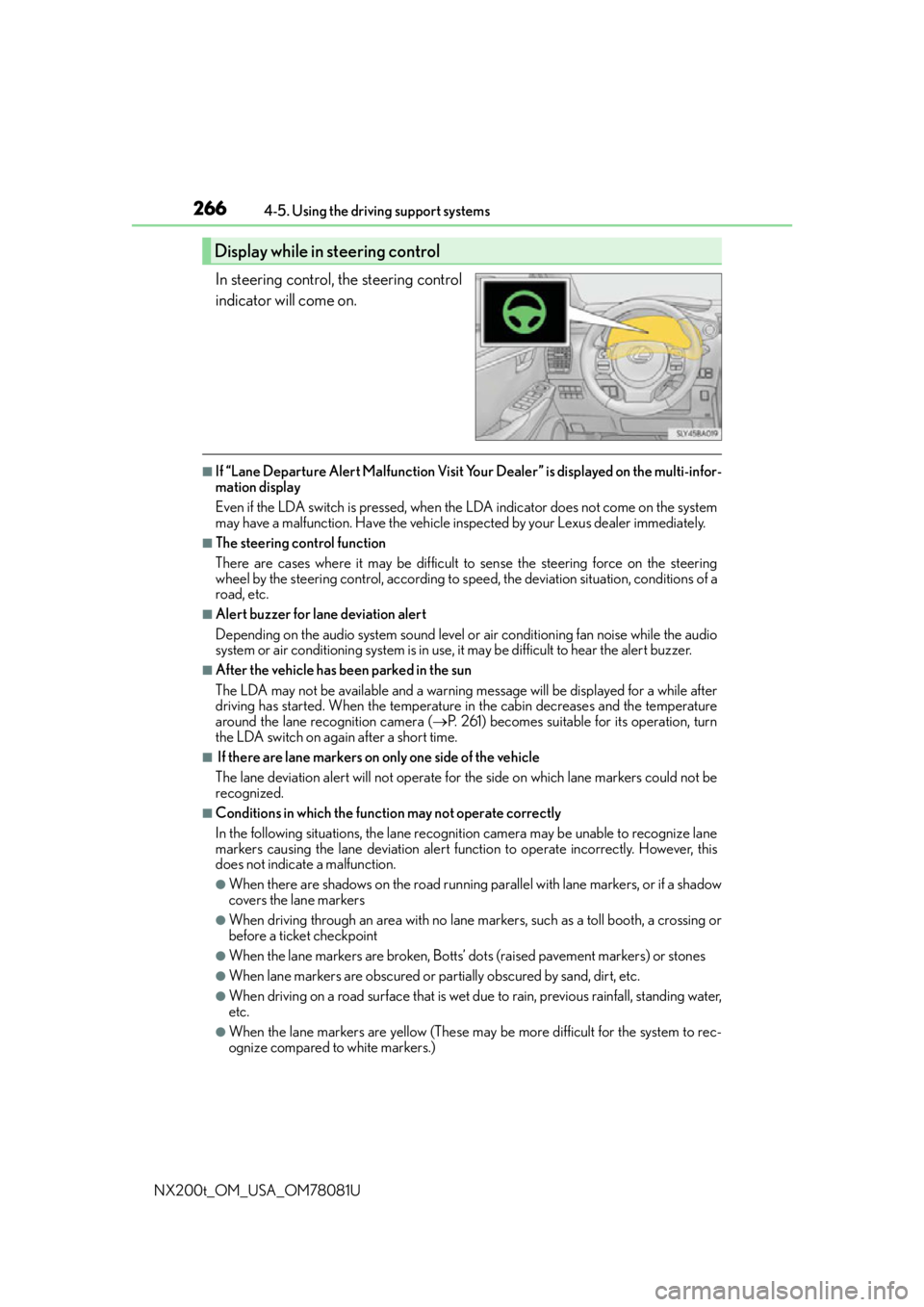
In steering control, the steering control
indicator will come on.
■If “Lane Departure Alert Malfunction Visit Yo ur Dealer” is displayed on the multi-infor-
mation display
Even if the LDA switch is pressed, when th e LDA indicator does not come on the system
may have a malfunction. Have the vehicle in spected by your Lexus dealer immediately.
■The steering control function
There are cases where it may be difficult to sense the steering force on the steering
wheel by the steering control, according to speed, the deviatio n situation, conditions of a
road, etc.
■Alert buzzer for lane deviation alert
Depending on the audio system sound level or air conditioning fan noise while the audio
system or air conditioning system is in use, it may be difficult to hear the alert buzzer.
■After the vehicle has been parked in the sun
The LDA may not be available and a warning message will be displayed for a while after
driving has started. When the temperature in the cabin decreases and the temperature
around the lane recognition camera ( P. 261) becomes suitable for its operation, turn
the LDA switch on again after a short time.
■ If there are lane markers on only one side of the vehicle
The lane deviation alert will not operate for the side on which lane markers could not be
recognized.
■Conditions in which the functi on may not operate correctly
In the following situations, the lane recognition camera may be unable to recognize lane
markers causing the lane deviation alert function to operate incorrectly. However, this
does not indicate a malfunction.
●When there are shadows on the road running parallel with lane markers, or if a shadow
covers the lane markers
●When driving through an area with no lane markers, such as a toll booth, a crossing or
before a ticket checkpoint
●When the lane markers are broken, Botts’ dots (raised pavement markers) or stones
●When lane markers are obscured or partially obscured by sand, dirt, etc.
●When driving on a road surface that is wet du e to rain, previous rainfall, standing water,
etc.
●When the lane markers are yellow (These may be more difficult for the system to rec-
ognize compared to white markers.)
Display while in steering control