Page 103 of 632

LX570_OM_OM60N01U_(U)
1032. Instrument cluster
2
Instrument cluster
■Head-up display
The head-up display may seem dark or hard to see when viewed through sunglasses,
especially polarized sunglasses.
Adjust the brightness of the head-up display or remove your sunglasses.
■When the battery is disconnected
The customize settings of the head-up display will be reset.
■Display brightness
●The brightness of the head-up display can be adjusted on of the multi-information
display. Also, it is automatically adjust ed according to the ambient brightness.
●When the vehicle is stopped, the display may dim temporarily. This is not a malfunction.
■Enabling/disabling of the head-up display
If the head-up display is disabled, it will remain disabled when the engine switch is turned
off then back to IGNITION ON mode.
WA R N I N G
■Before using the head-up display
●Check that the position and brightness of the head-up display image does not inter-
fere with safe driving. Incorrect adjustment of the image’s position or brightness may
obstruct the driver’s view and lead to an accident, resulting in death or serious injury.
●Do not continuously look at the head-up di splay while driving as you may fail to see
pedestrians, objects on the road, etc. ahead of the vehicle.
■Caution for changing settings of the head-up display
As the engine needs to be running while changing the settings of the head-up display,
ensure that the vehicle is parked in a place with adequate ventilation. In a closed area
such as a garage, exhaust gases includin g harmful carbon monoxide (CO) may collect
and enter the vehicle. This may lead to death or a serious health hazard.
Page 104 of 632
104
LX570_OM_OM60N01U_(U)2. Instrument cluster
NOTICE
■To prevent damage to components
■When changing the settings of the head-up display
To prevent battery discharge, ensure that th
e engine is running while the changing the
settings of the head-up display.
●Do not place any drinks near the head-up dis-
play projector. If the projector gets wet, elec-
trical malfunctions may result.
●Do not place anything on or put stickers onto
the head-up display projector.
Doing so could interrupt head-up display
indications.
●Do not touch the inside of the head-up display
projector or thrust sharp edges or the like into
the projector.
Doing so could cause mechanical malfunc-
tions.
Page 105 of 632
105
LX570_OM_OM60N01U_(U)2. Instrument cluster
2
Instrument cluster
Fuel consumption information
Remote Touch screen
Remote Touch knob (
P. 3 9 4 )
“MENU” button
“ENTER” button
Fuel consumption information can be di splayed on the Remote Touch screen.
The fuel consumption information can be displayed and operated on the side
display.
1
2
3
4
Page 106 of 632
106
LX570_OM_OM60N01U_(U)2. Instrument cluster
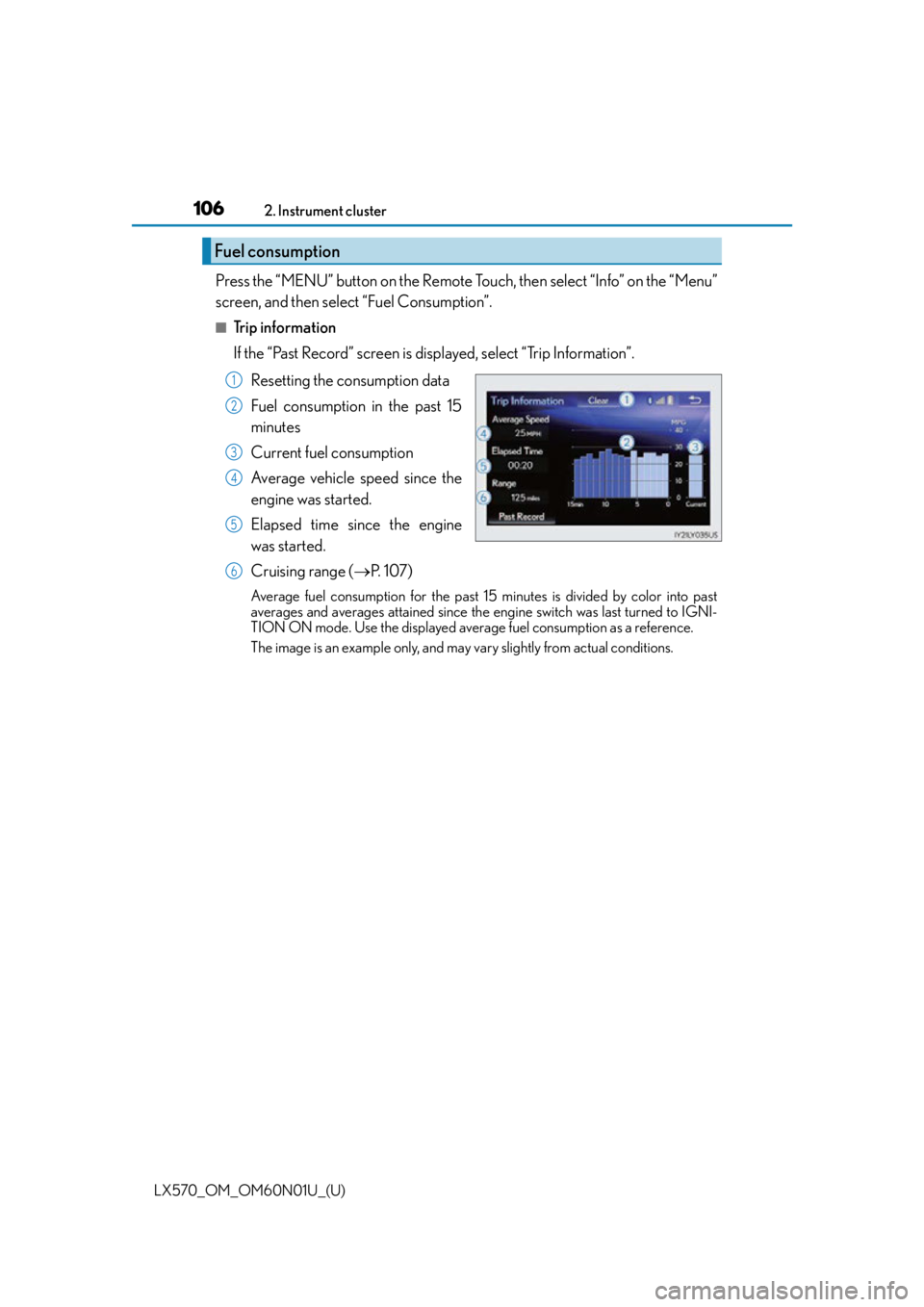
Press the “MENU” button on the Remote Touch, then select “Info” on the “Menu”
screen, and then select “Fuel Consumption”.
■Trip information
If the “Past Record” screen is displayed, select “Trip Information”.
Resetting the consumption data
Fuel consumption in the past 15
minutes
Current fuel consumption
Average vehicle speed since the
engine was started.
Elapsed time since the engine
was started.
Cruising range ( P. 1 0 7 )
Average fuel consumption for the past 15 minutes is divided by color into past
averages and averages attained since the engine switch was last turned to IGNI-
TION ON mode. Use the displayed average fuel consumption as a reference.
The image is an example only, and may vary slightly from actual conditions.
Fuel consumption
1
2
3
4
5
6
Page 107 of 632

LX570_OM_OM60N01U_(U)
1072. Instrument cluster
2
Instrument cluster
■Past record
If the “Trip Information” screen is displayed, select “Past Record”.
Resetting the past record data
Best recorded fuel consumption
Average fuel consumption
Previous fuel consumption record
Updating the average fuel con-
sumption data
The average fuel consumption his-
tory is divided by color into past
averages and the average fuel con-
sumption since the last reset. Use the
displayed average fuel consumption
as a reference.
The image is an example only, and may vary slightly from actual conditions.
■Updating the past record data
Update the average fuel consumption by selecting “Update” to measure the current fuel
consumption again.
■Resetting the data
The fuel consumption data can be deleted by selecting “Clear”.
■Cruising range
Displays the estimated maximum distance that can be driven with the quantity of fuel
remaining.
This distance is computed based on your average fuel consumption.
As a result, the actual distance that can be driven may differ from that displayed.
1
2
3
4
5
Page 108 of 632
108
LX570_OM_OM60N01U_(U)2. Instrument cluster
Vehicle information can be displayed on the side display (
P. 3 9 9 ) , t h e n s e l e c t
or to select the desired screen.
Fuel consumption
Displays the average fuel consumption
for the past 10 minutes in 1 minute inter-
vals, as well as the cruising range.
Past record
Displays the average fuel consumption
and highest fuel consumption.
Trip information
Displays the cruising range, average
fuel consumption and the amount of
time elapsed since the engine was
started.
The image is an example only, and may vary slightly from actual conditions.
Using the side display
Page 149 of 632

LX570_OM_OM60N01U_(U)
1493-3. Adjusting the seats
3
Operation of each component
■Alarms and indicators
The following table describes circumstances and correction procedures when only
alarms are sound.
*: A warning will be shown on the multi-inform ation display in the instrument cluster.
Indicator light and buzzer Situation Correction procedure
Buzzer sounds for 10 sec-
onds Indicator light on
*
Shift lever is not in the P
position with the engine
switch in IGNITION ON
mode.
Stop the switch operation
during the automatic third
seat is in motion. Move the shift lever in the
P position with the engine
switch in IGNITION ON
mode.
Return the third seat from a
halfway position to tum-
bling position or the origi-
nal position with the third
seat return switch or third
seat tumbling switch.
Indicator light flashes*The seat movement is
stopped in a half way when
the back door is opened.
Buzzer sounds for 10 sec-
onds Indicator light
flashes
*
Automatic tumbling or
return operation is
stopped because of a sys-
tem problem.
Have the system checked
by your Lexus dealer.
The seat is not moved to
the table mode from the
original position after 10
seconds the tumbling
switch is pressed. Check something is
caught between the seat
cushion and seatback. If
nothing is caught, have the
system checked by your
Lexus dealer.
Buzzer sounds for 10 sec-
onds Indicator light blinks
slowly
*
Automatic closing opera-
tion is stopped because of
a system problem. Have the system checked
by your Lexus dealer.
Indicator light flashes
Any of the tumbling or
return switch is pushed
when shift lever is not in the
P position with the engine
switch in IGNITION ON
mode.
Move the shift lever in the
P position with the engine
switch in IGNITION ON
mode.
Indicator light flashes 3
times
Table mode switch is
pushed when shift lever is
not in the P position with
the engine switch in IGNI-
TION ON mode.
Page 206 of 632
206
LX570_OM_OM60N01U_(U)4-2. Driving procedures
Stop the vehicle.
Shift the shift lever to P.
Set the parking brake. (
P. 2 1 8 )
If the parking brake is in automatic mode, the parking brake is set automatically when
shifting the shift lever to P. ( P. 2 1 7 )
Press the engine switch.
Release the brake pedal and check that th e display on the instrument cluster is
off.
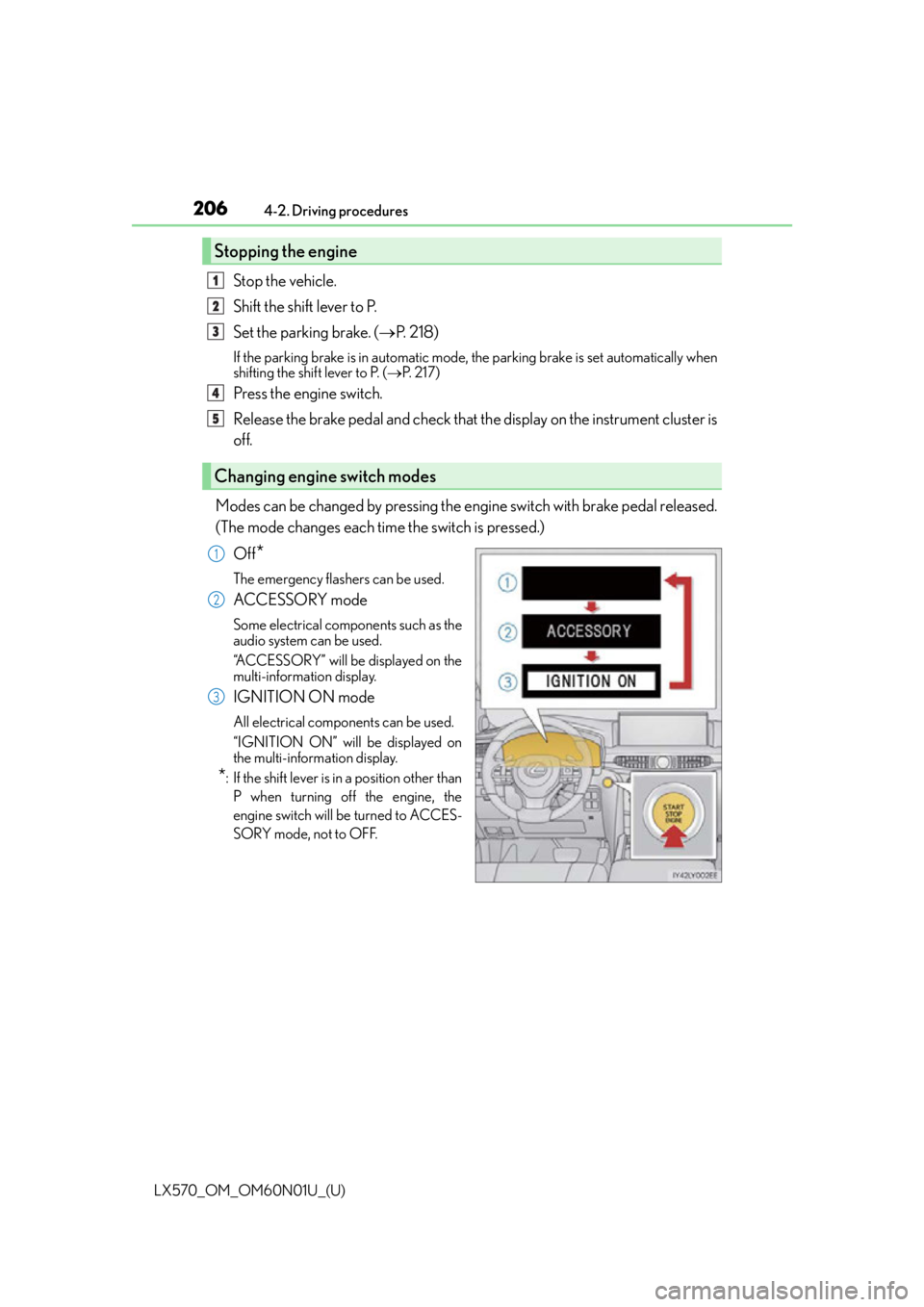
Modes can be changed by pressing the engine switch with brake pedal released.
(The mode changes each time the switch is pressed.) Off
*
The emergency flashers can be used.
ACCESSORY mode
Some electrical components such as the
audio system can be used.
“ACCESSORY” will be displayed on the
multi-information display.
IGNITION ON mode
All electrical components can be used.
“IGNITION ON” will be displayed on
the multi-information display.
*: If the shift lever is in a position other thanP when turning off the engine, the
engine switch will be turned to ACCES-
SORY mode, not to OFF.
Stopping the engine
Changing engine switch modes
1
2
3
4
5
1
2
3