2016 LEXUS LS460L lane assist
[x] Cancel search: lane assistPage 3 of 708

3
1
8
7
6
5
4
3
2
LS460/LS460L_GE (OM50G06E)
3-5. Opening, closing the
windows and moon roof
Power windows...........................236
Moon roof .....................................240
4-1. Before driving
Driving the vehicle .....................246
Cargo and luggage ................... 257
Trailer towing .............................. 258
4-2. Driving procedures
Engine (ignition) switch ...........259
Automatic transmission
(vehicles without
paddle shift switches) ............264
Automatic transmission
(vehicles with paddle
shift switches)............................269
Turn signal lever .........................278
Parking brake .............................. 279
Brake Hold....................................282
Horn.................................................284
4-3. Operating the lights and
wipers
Headlight switch ........................ 285
AHS (Adaptive High-beam
System)......................................... 291
Fog light switch .......................... 298
Windshield wipers and
washer......................................... 300
Headlight cleaner switch ....... 304
4-4. Refueling
Opening the fuel tank cap..... 305
4-5. Using the driving support
systems
Cruise control ............................ 309
Dynamic radar cruise
control........................................... 313
Dynamic radar
cruise control
with full-speed range .............328
LKA
(Lane-Keeping Assist) ..........344
Driving mode select
switch ...........................................354
Electronically modulated
air suspension............................ 358
Driving assist systems.............. 360
PCS (Pre-Crash
Safety system).......................... 368
BSM
(Blind Spot Monitor)............... 381
•The Blind Spot Monitor
function.....................................387
• The RCTA function ........... 390
Lexus night view .........................393
4-6. Driving tips
Winter driving tips .....................399
Eco-friendly driving tips ..........403
4Driving
Page 22 of 708
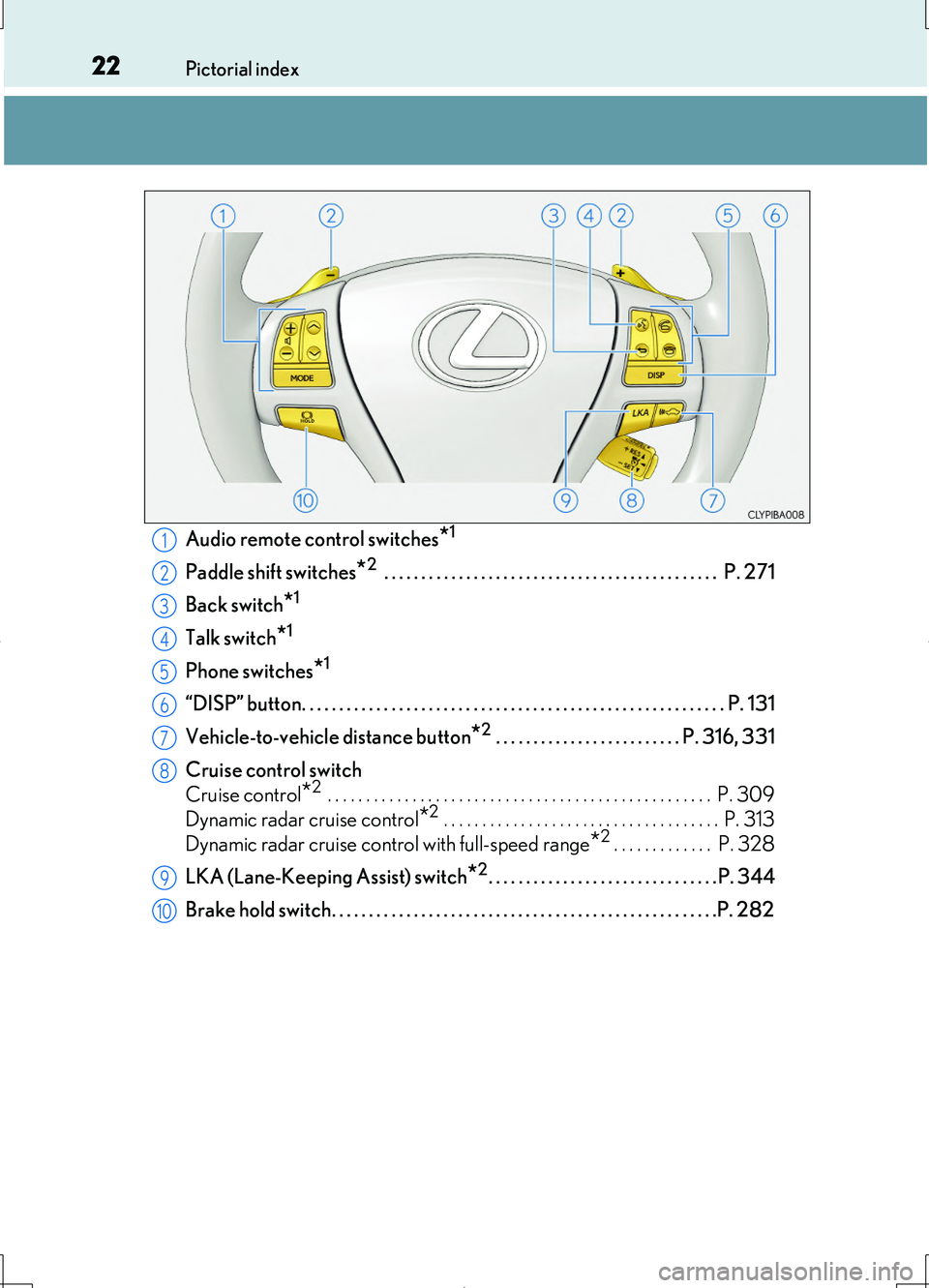
22Pictorial index
LS460/LS460L_GE (OM50G06E)
Audio remote control switches*1
Paddle shift switches*2 . . . . . . . . . . . . . . . . . . . . . . . . . . . . . . . . . . . . . . . . . . . . . P. 271
Back switch*1
Talk switch*1
Phone switches*1
“DISP” button. . . . . . . . . . . . . . . . . . . . . . . . . . . . . . . . . . . . . . . . . . . . . . . . . . . . . . . . . P. 131
Vehicle-to-vehicle distance button*2 . . . . . . . . . . . . . . . . . . . . . . . . . P. 316, 331
Cruise control switch
Cruise control*2 . . . . . . . . . . . . . . . . . . . . . . . . . . . . . . . . . . . . . . . . . . . . . . . . . . P. 309
Dynamic radar cruise control*2 . . . . . . . . . . . . . . . . . . . . . . . . . . . . . . . . . . . . P. 313
Dynamic radar cruise control with full-speed range*2 . . . . . . . . . . . . . P. 328
LKA (Lane-Keeping Assist) switch*2. . . . . . . . . . . . . . . . . . . . . . . . . . . . . . . P. 344
Brake hold switch. . . . . . . . . . . . . . . . . . . . . . . . . . . . . . . . . . . . . . . . . . . . . . . . . . . .P. 282
1
2
3
4
5
6
7
8
9
10
Page 123 of 708
1232. Instrument cluster
2
Instrument cluster
LS460/LS460L_GE (OM50G06E)
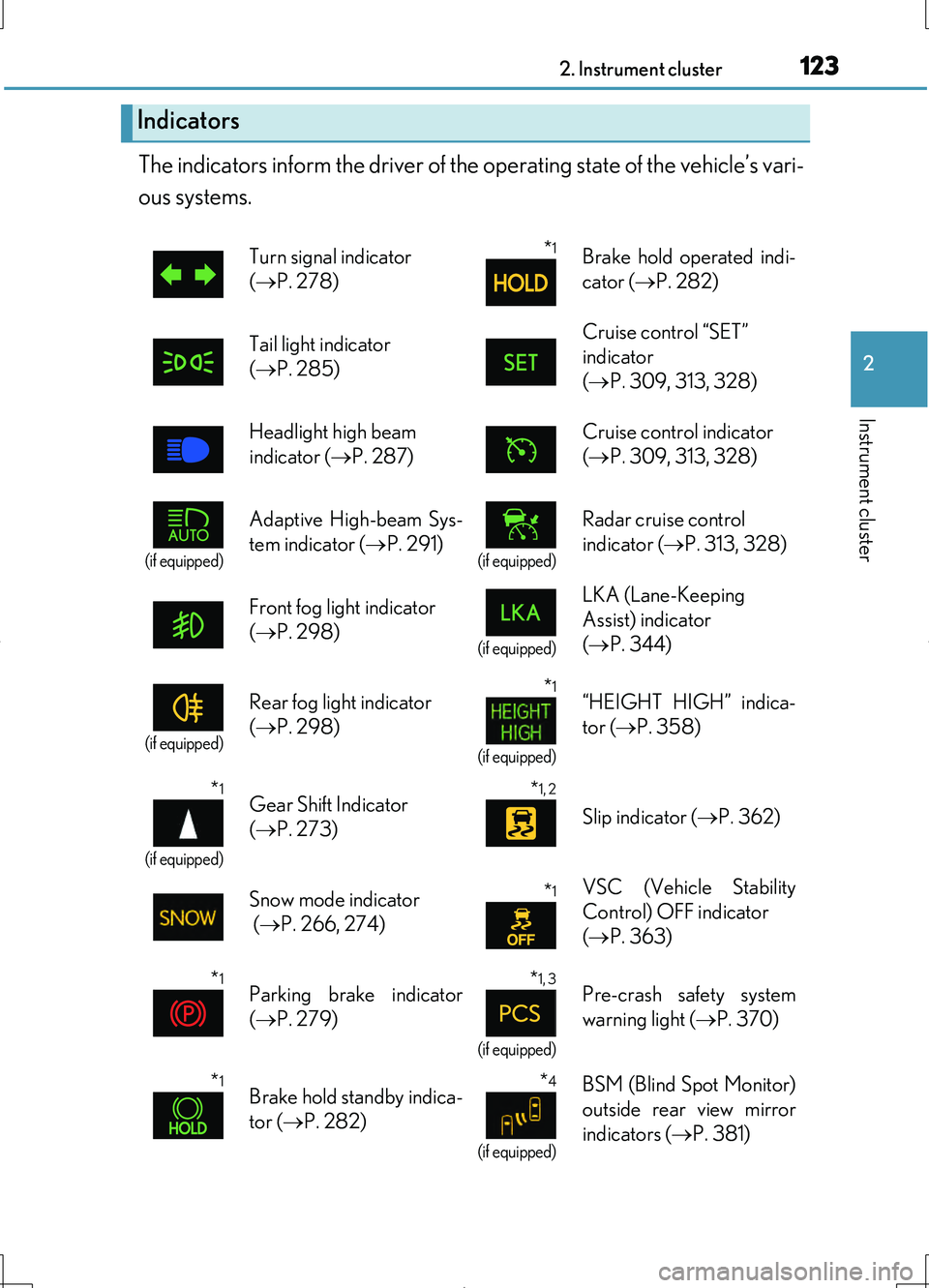
The indicators inform the driver of the operating state of the vehicle’s vari-
ous systems.
Indicators
Turn signal indicator
( P. 278)
*1Brake hold operated indi-
cator ( P. 282)
Tail light indicator
( P. 285)
Cruise control “SET”
indicator
( P. 309, 313, 328)
Headlight high beam
indicator ( P. 287)
Cruise control indicator
( P. 309, 313, 328)
(if equipped)
Adaptive High-beam Sys-
tem indicator ( P. 291)(if equipped)
Radar cruise control
indicator ( P. 313, 328)
Front fog light indicator
( P. 298)(if equipped)
LKA (Lane-Keeping
Assist) indicator
( P. 344)
(if equipped)
Rear fog light indicator
( P. 298)
*1
(if equipped)
“HEIGHT HIGH” indica-
tor ( P. 358)
*1
(if equipped)
Gear Shift Indicator
( P. 273)
*1, 2
Slip indicator (P. 362)
Snow mode indicator
( P. 266, 274)
*1VSC (Vehicle Stability
Control) OFF indicator
( P. 363)
*1Parking brake indicator
( P. 279)
*1, 3
(if equipped)
Pre-crash safety system
warning light ( P. 370)
*1Brake hold standby indica-
tor ( P. 282)
*4
(if equipped)
BSM (Blind Spot Monitor)
outside rear view mirror
indicators ( P. 381)
Page 129 of 708

1292. Instrument cluster
2
Instrument cluster
LS460/LS460L_GE (OM50G06E)
The multi-information display presents the driver with a variety of driving-
related data.
●Trip information ( P. 131)
Displays driving range, fuel consump-
tion and other cruising related infor-
mation
●Drive monitor ( P. 134)
Displays either the average fuel con-
sumption after refueling or the driving
range
●Lexus parking assist-sensor dis-
play* (Refer to “Navigation and
Multimedia System Owner’s
Manual” or “Navigation System
Owner’s Manual”.)
●Dynamic radar cruise control dis-
play* (if equipped) ( P. 313)
●Dynamic radar cruise control
with full-speed range display* (if
equipped) ( P. 328)
●LKA (Lane-Keeping Assist) dis-
play* (if equipped) ( P. 344)
Multi-information display
Display contents
Page 245 of 708

245
4Driving
LS460/LS460L_GE (OM50G06E)
4-1. Before driving
Driving the vehicle..................... 246
Cargo and luggage ................... 257
Trailer towing .............................. 258
4-2. Driving procedures
Engine (ignition) switch ...........259
Automatic transmission
(vehicles without paddle
shift switches)............................ 264
Automatic transmission
(vehicles with paddle
shift switches)............................ 269
Turn signal lever ......................... 278
Parking brake .............................. 279
Brake Hold....................................282
Horn.................................................284
4-3. Operating the lights and
wipers
Headlight switch ........................ 285
AHS (Adaptive High-beam
System)......................................... 291
Fog light switch ...........................298
Windshield wipers and
washer ........................................ 300
Headlight cleaner switch ....... 304
4-4. Refueling
Opening the fuel tank cap..... 305
4-5. Using the driving support
systems
Cruise control .............................309
Dynamic radar
cruise control............................. 313
Dynamic radar cruise
control with
full-speed range ......................328
LKA
(Lane-Keeping Assist).......... 344
Driving mode select
switch ........................................... 354
Electronically modulated
air suspension ...........................358
Driving assist systems ..............360
PCS (Pre-Crash
Safety system) ..........................368
BSM
(Blind Spot Monitor) .............. 381
•The Blind Spot Monitor
function .................................... 387
• The RCTA function .............390
Lexus night view ......................... 393
4-6. Driving tips
Winter driving tips ..................... 399
Eco-friendly driving tips ..........403
Page 337 of 708

3374-5. Using the driving support systems
4
Driving
LS460/LS460L_GE (OM50G06E)
■Dynamic radar cruise control with full-speed range can be set when
●The shift lever is in the D or range 4 or higher of S has been selected.
(vehicles without paddle shift switches)
●The shift lever is in D.
(vehicles with paddle shift switches)
●Range 4 or higher of D has been selected by using the paddle shift.
(vehicles with paddle shift switches)
●Vehicle speed is above approximately 50 km/h (30 mph).
■Accelerating after setting the vehicle speed
The vehicle can accelerate normally. After acceleration, the set speed resumes.
However, during vehicle-to-vehicle distance control mode, the vehicle speed may
decrease below the set speed in order to maintain the distance to the vehicle ahead.
■Automatic cancelation of vehicle -to-vehicle distance control
Vehicle-to-vehicle distance control driving is automatically canceled in the following
situations:
●Actual vehicle speed falls below approximately 40 km/h (25 mph) when there are
no vehicle ahead.
●The preceding vehicle leaves the lane when your vehicle is following at a speed
below 40 km/h (25 mph).
●VSC is activated.
●TRC is activated for a period of time.
●When the VSC or TRC system is turned off by pressing the VSC OFF switch.
●The sensor cannot operate correctly because it is covered in some way.
●The windshield wipers are operating at high speed (when the wiper switch is set to
the “AUTO” mode or the high speed wiper operation position).
●When snow mode is set.
●The parking brake is operated.
●The vehicle is stopped by system control on a steep incline.
●Pre-crash brake assist is activated.
●The following are detected when the vehicle has been stopped by system control:
• The driver is not wearing a seat belt.
• The driver’s door is opened.
• The trunk or hood is opened.
• The vehicle has been stopped for about 3 minutes.
If vehicle-to-vehicle distance control driving is automatically canceled for any other
reason, there may be a malfunction in the system. Contact your Lexus dealer.
Page 338 of 708

3384-5. Using the driving support systems
LS460/LS460L_GE (OM50G06E)
■Automatic cancelation of constant speed control
The cruise control will stop maintaining the vehicle speed in the following situations:
●Actual vehicle speed is more than approximately 16 km/h (10 mph) below the set
vehicle speed.
At this time, the memorized set speed is not retained.
●Actual vehicle speed falls below approximately 40 km/h (25 mph).
●VSC is activated.
●TRC is activated for a period of time.
●When the VSC or TRC system is turned off by pressing the VSC OFF switch.
■When the LKA (Lane-Keeping Assist) will be activated (if equipped)
Using the radar cruise control in vehicle-to-vehicle distance control mode, lane
keeping assistance control is activated.
■Radar sensor and grille cover
Always keep the sensor and grille cover clean to ensure that the vehicle-to-vehicle
distance control operates properly. (Some obstructions, such as snow, ice and plastic
objects, cannot be detected by the obstruction sensor.)
Dynamic radar cruise control with full-speed range is canceled if an obstruction is
detected.
■Warning messages and buzzers for dynamic radar cruise control with full-speed
range
Warning messages and buzzers are used to indicate a system malfunction or to
inform the driver of the need for caution while driving. ( P. 614)
Grille cover
Radar sensor
1
2
Page 344 of 708

3444-5. Using the driving support systems
LS460/LS460L_GE (OM50G06E)
While driving on a freeway or motor highway that has lane markers and
no sharp curves, the system recognizes the lanes using a camera located
above the inside rear view mirror as a sensor to assist the driver with stay-
ing in the lane. The LKA system has two functions.
Camera sensor
LKA (Lane-Keeping Assist)
: If equipped
Summary of functions