Page 113 of 708

1131-2. Theft deterrent system
1
For safety and security
LS460/LS460L_GE (OM50G06E)
Do one of the following to deactivate or stop the alarm:
Vehicles without airbag manual on-off system
●Unlock the doors or open the trunk.
●Turn the engine switch to ACCESSORY or IGNITION ON mode, or
start the engine. (The alarm will be deactivated or stopped after a few
seconds.)
Vehicles with airbag manual on-off system
●Unlock the doors or open the trunk using the entry function or wireless
remote control.
●Start the engine. (The alarm will be deactivated or stopped after a few
seconds.)
■System maintenance
The vehicle has a maintenance-free type alarm system.
■Items to check before locking the vehicle
To prevent unexpected triggering of the alarm and vehicle theft, make sure of the fol-
lowing:
●Nobody is in the vehicle.
●The windows and moon roof (if equipped) are closed before the alarm is set.
●No valuables or other personal items are left in the vehicle.
Deactivating or stopping the alarm
Page 114 of 708
1141-2. Theft deterrent system
LS460/LS460L_GE (OM50G06E)
■Triggering of the alarm
The alarm may be triggered in the following situations:
(Stopping the alarm deactivates the alarm system.)
■Alarm-operated door lock
●When the alarm is operating, the doors are locked automatically to prevent intrud-
ers.
●Do not leave the key inside the vehicle when the alarm is operating, and make sure
the key is not inside the vehicle when recharging or replacing the battery.
●Vehicles with airbag manual on-off system:
The doors or trunk are unlocked using the
mechanical key.
●A person inside the vehicle opens a door,
the trunk or hood.
●The battery is recharged or replaced when
the vehicle is locked. ( P. 639)
NOTICE
■To ensure the system operates correctly
Do not modify or remove the system. If mo dified or removed, the proper operation
of the system cannot be guaranteed.
Page 116 of 708

1161-2. Theft deterrent system
LS460/LS460L_GE (OM50G06E)
■Canceling and automatic re-enabling of the intrusion sensor and tilt sensor
●The alarm will still be set even when the intrusion sensor and tilt sensor are can-
celed.
●After the intrusion sensor and tilt sensor are canceled, pressing the engine switch
or unlocking the doors using the entry function or wireless remote control will re-
enable the intrusion sensor and tilt sensor.
●The intrusion sensor and tilt sensor will automatically be re-enabled when the
alarm system is deactivated.
■Intrusion sensor detection considerations
The sensor may trigger the alarm in the following situations:
●Places with extreme vibrations or noises, or situations in which the vehicle is subject
to repeated impacts or vibrations:
• When parked in a parking garage
• When the vehicle is transported by a ferry, trailer, train, etc.
• When ice adhering to the vehicle is removed
• When the vehicle is in an automatic or high-pressure car wash
• When in a hail or lightning storm
●A window or the moon roof is open.
In this case, the sensor may detect the fol-
lowing:
• Wind or the movement of objects such as
leaves and insects inside the vehicle
• Ultrasonic waves emitted from devices
such as the intrusion sensors of other
vehicles
• The movement of people outside the
vehicle
●Unstable items, such as dangling accesso-
ries or clothes hanging on the coat hooks,
are in the vehicle.
Page 127 of 708

1272. Instrument cluster
2
Instrument cluster
LS460/LS460L_GE (OM50G06E)
■The meters and display illuminate when
The engine switch is in IGNITION ON mode.
■Instrument panel brightness adjustment
●Meters:
The brightness level of the meters when the surroundings are bright (day mode)
and dark (night mode) can be adjusted individually. However, when in day mode,
adjusting the brightness level will also change the brightness level of night mode.
●Clock, air conditioning temperature display and switch lights:
The brightness level of the clock, air conditioning temperature display and switch
lights are linked with the brightness level of meter night mode.
■Light dimmer control (Changing to night mode)
The brightness level of the meter, clock and air conditioning temperature display
lights will change to night mode only wh en the surroundings are dark and the tail
lights are on.
■Automatic adjustment of the brightness level of the meters
The brightness level of the meters will be adjusted automatically according to the
brightness of the surroundings detected by the light sensor. However, the brightness
level of the meters will not be adjusted automatically in the following conditions.
●Day mode: When the brightness of the meter is adjusted to the brightest manually
●Night mode: When the brightness of the meter is adjusted to the brightest or dark-
est manually
■ECO lamp and SPORT lamp
●When all of the following conditions are satisfied and Eco-friendly driving is being
performed, ECO lamp (blue) will illuminate. (ECO lamp will become brighter the
more Eco-friendly your driving is. Also, while the vehicle is stopped or the acceler-
ation exceeds Zone of Eco driving, ECO lamp turns off. ( P. 132) However, when
Eco drive mode is selected, while the vehicle is stopped or the acceleration
exceeds Zone of Eco driving, ECO lamp does not turn off.):
• Driving with the shift lever in D.
• Vehicles with paddle shift switches: Paddle shift switch is not operated.
• Normal mode, comfort mode (if equipped) or Eco drive mode is selected, and
snow mode is not in use.
• The vehicle speed is approximately 130 km/h (80 mph) or below.
●When sport mode is selected, SPORT lamp (red) will illuminate.
Page 143 of 708

143
3
Operation of
each component
LS460/LS460L_GE (OM50G06E)
3-1. Key information
Keys ...................................................144
3-2. Opening, closing and
locking the doors
Smart entry &
start system................................. 153
Wireless remote control........... 177
Doors ............................................... 186
Trunk .................................................. 191
3-3. Adjusting the seats
Front seats...................................... 198
Power rear seat ..........................205
Driving position memory ......... 218
Rear seat position memory.... 223
Head restraints ........................... 225
3-4. Adjusting the steering
wheel and mirrors
Steering wheel ............................ 228
Inside rear view mirror ............ 229
Outside rear view
mirrors ......................................... 232
3-5. Opening, closing the
windows and moon roof
Power windows .......................... 236
Moon roof ..................................... 240
Page 145 of 708
1453-1. Key information
3
Operation of each component
LS460/LS460L_GE (OM50G06E)
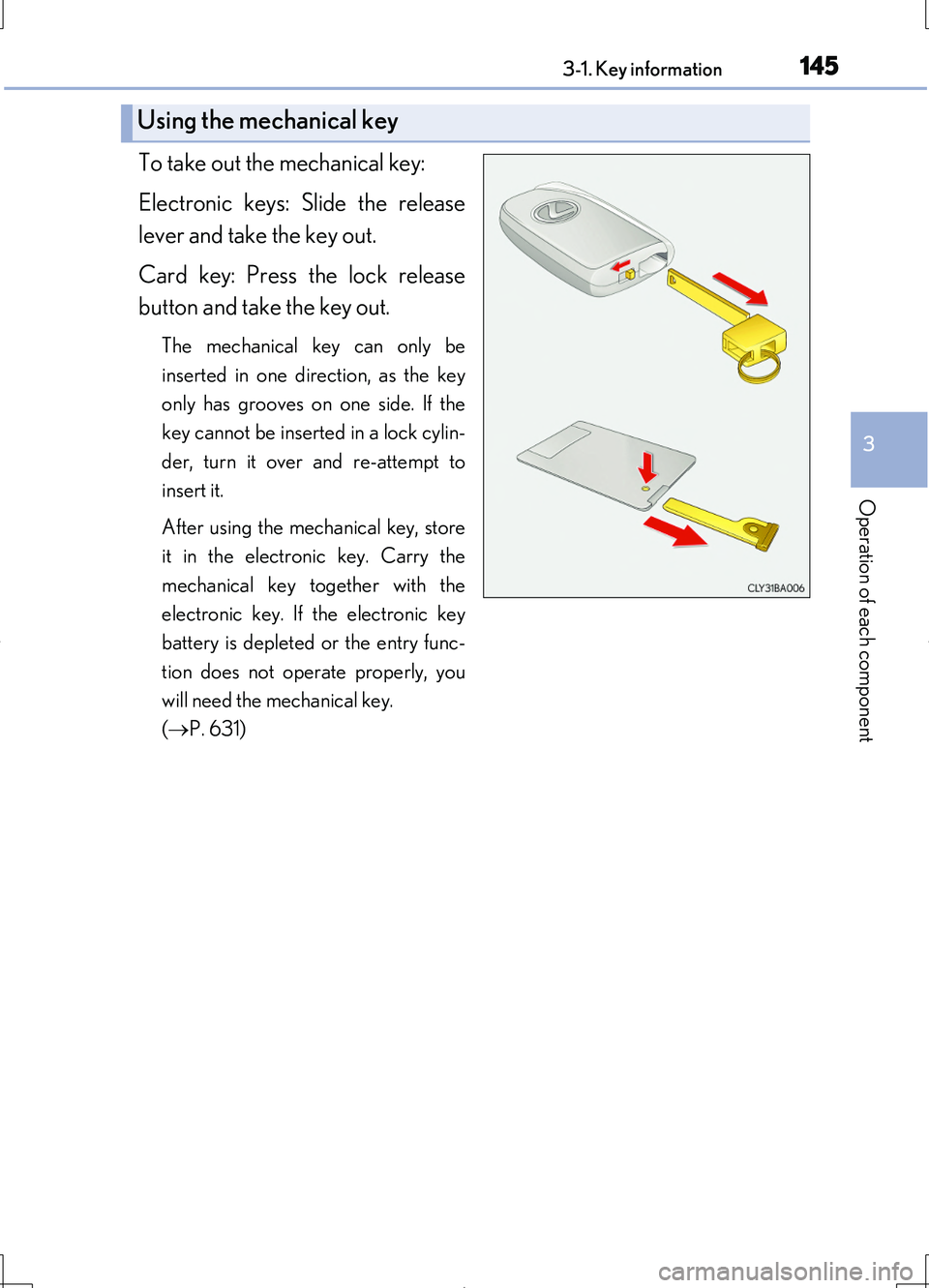
To take out the mechanical key:
Electronic keys: Slide the release
lever and take the key out.
Card key: Press the lock release
button and take the key out.
The mechanical key can only be
inserted in one direction, as the key
only has grooves on one side. If the
key cannot be inserted in a lock cylin-
der, turn it over and re-attempt to
insert it.
After using the mechanical key, store
it in the electronic key. Carry the
mechanical key together with the
electronic key. If the electronic key
battery is depleted or the entry func-
tion does not operate properly, you
will need the mechanical key.
( P. 631)
Using the mechanical key
Page 146 of 708
1463-1. Key information
LS460/LS460L_GE (OM50G06E)
■Electronic keys
●Part of the electronic key uses leather. Refer to P. 514 for details on cleaning the
leather portion.
●When cleaning the metallic portion, wet a cloth and firmly wring out any excess
water from it, then thoroughly wipe off any dirt.
●When not using the electronic key for an extended period of time, store it in a dry
place of normal temperature away from direct sunlight and interior light after
removing any dirt.
■Card key (if equipped)
●The card key is not waterproof.
●The mechanical key that is stored inside the card key should be used only if a prob-
lem arises, such as when the card key does not operate properly.
●If it is difficult to take out the mechanical key, push down the lock release button
using a pen tip etc. If it is still difficult to pull it out, use a coin etc.
■When required to leave the vehicle’s key with a parking attendant
Turn the trunk opener main switch off and lock the glove box and the trunk storage
extension (if equipped) as circumstances demand. ( P. 192, 453, 494)
Remove the mechanical key for your own use and provide the attendant with the
electronic key only.
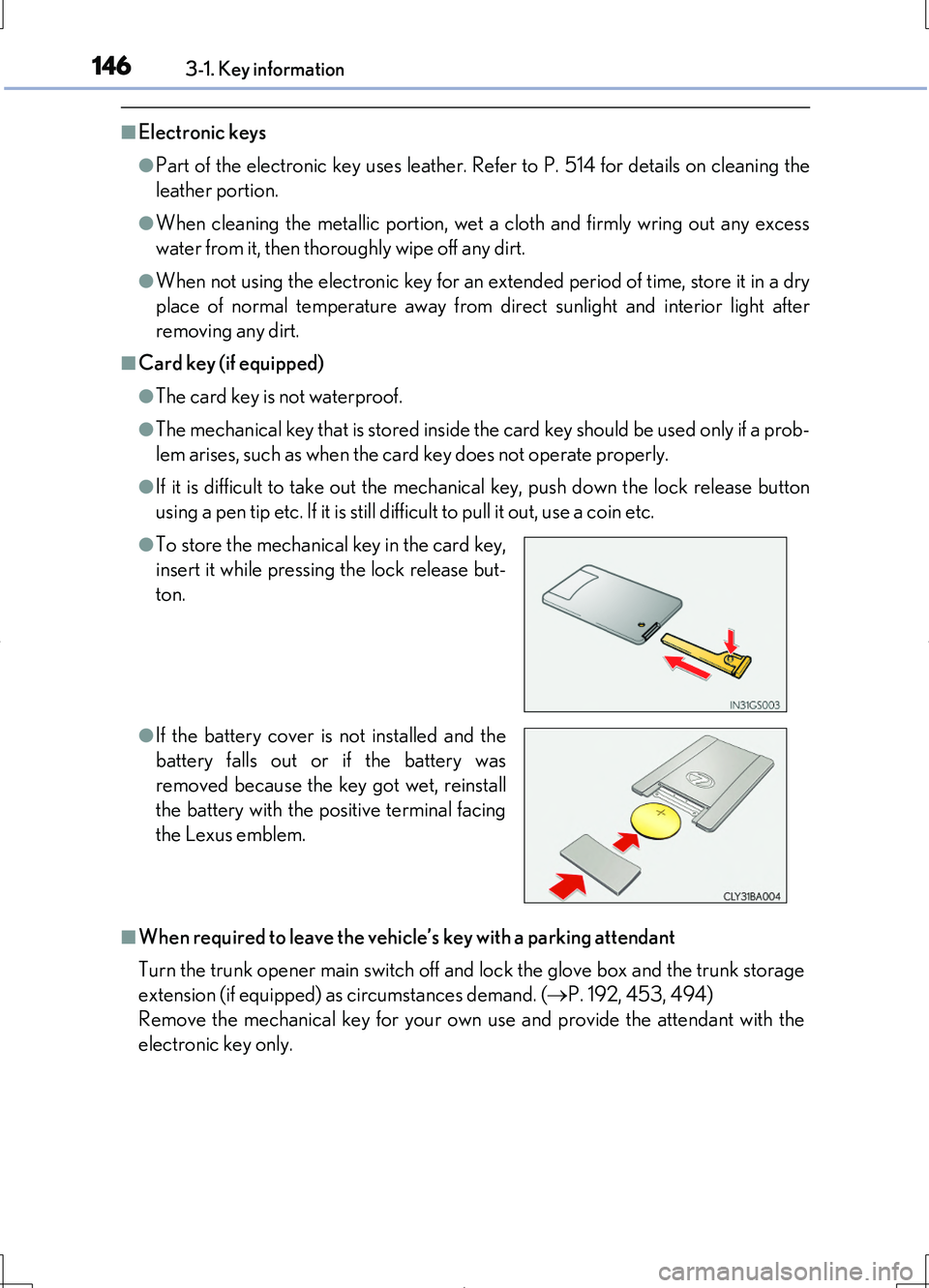
●To store the mechanical key in the card key,
insert it while pressing the lock release but-
ton.
●If the battery cover is not installed and the
battery falls out or if the battery was
removed because the key got wet, reinstall
the battery with the positive terminal facing
the Lexus emblem.
Page 153 of 708
153
3
Operation of each component
LS460/LS460L_GE (OM50G06E)
3-2. Opening, closing and locking the doors
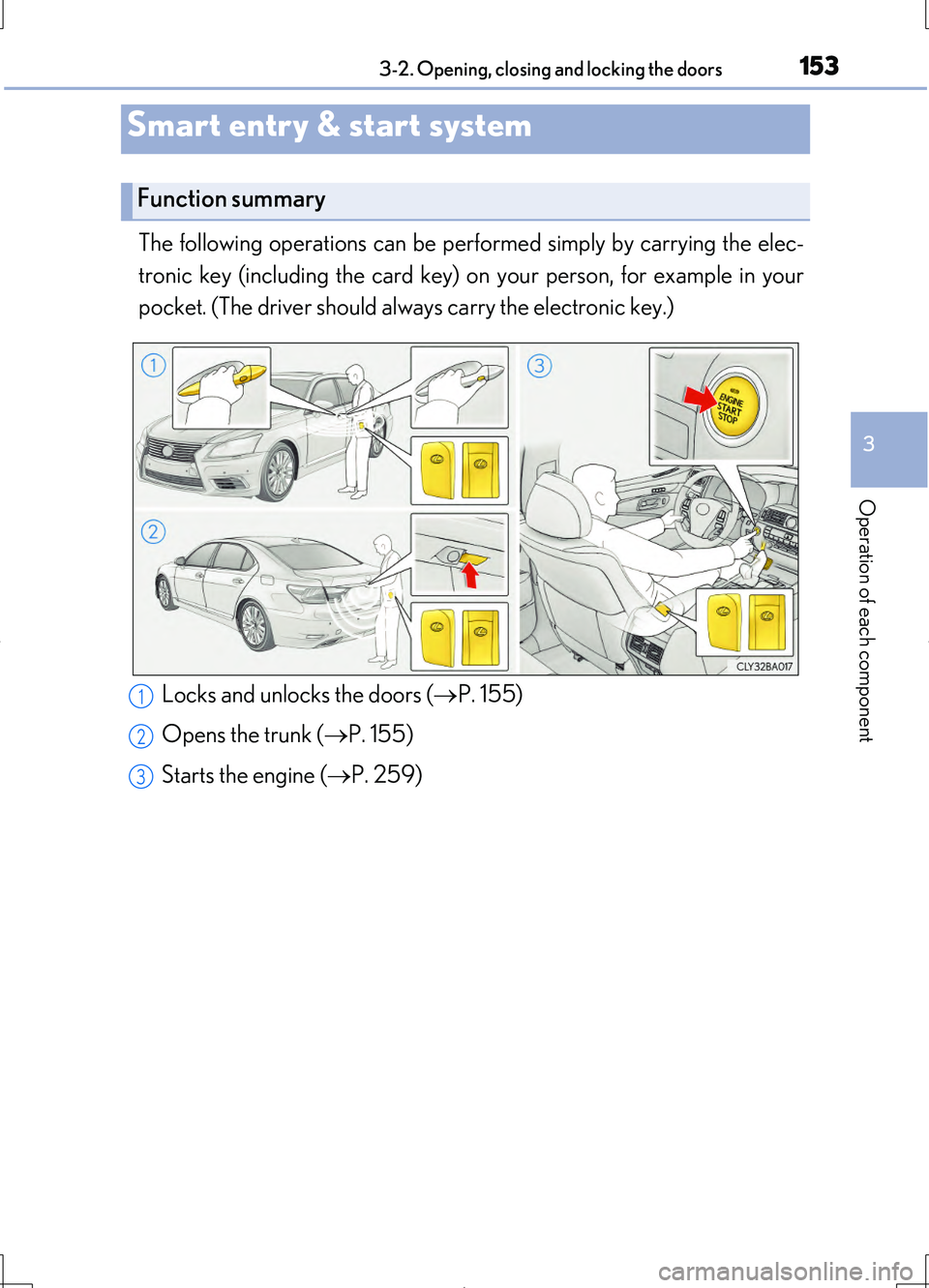
The following operations can be performed simply by carrying the elec-
tronic key (including the card key) on your person, for example in your
pocket. (The driver should always carry the electronic key.)
Smart entry & start system
Function summary
Locks and unlocks the doors ( P. 155)
Opens the trunk ( P. 155)
Starts the engine ( P. 259)
1
2
3