2016 Lexus IS300h mirror
[x] Cancel search: mirrorPage 435 of 628
435
IS300h_EE(OM53D56E)
6
Interior features
6-4. Using the other interior features
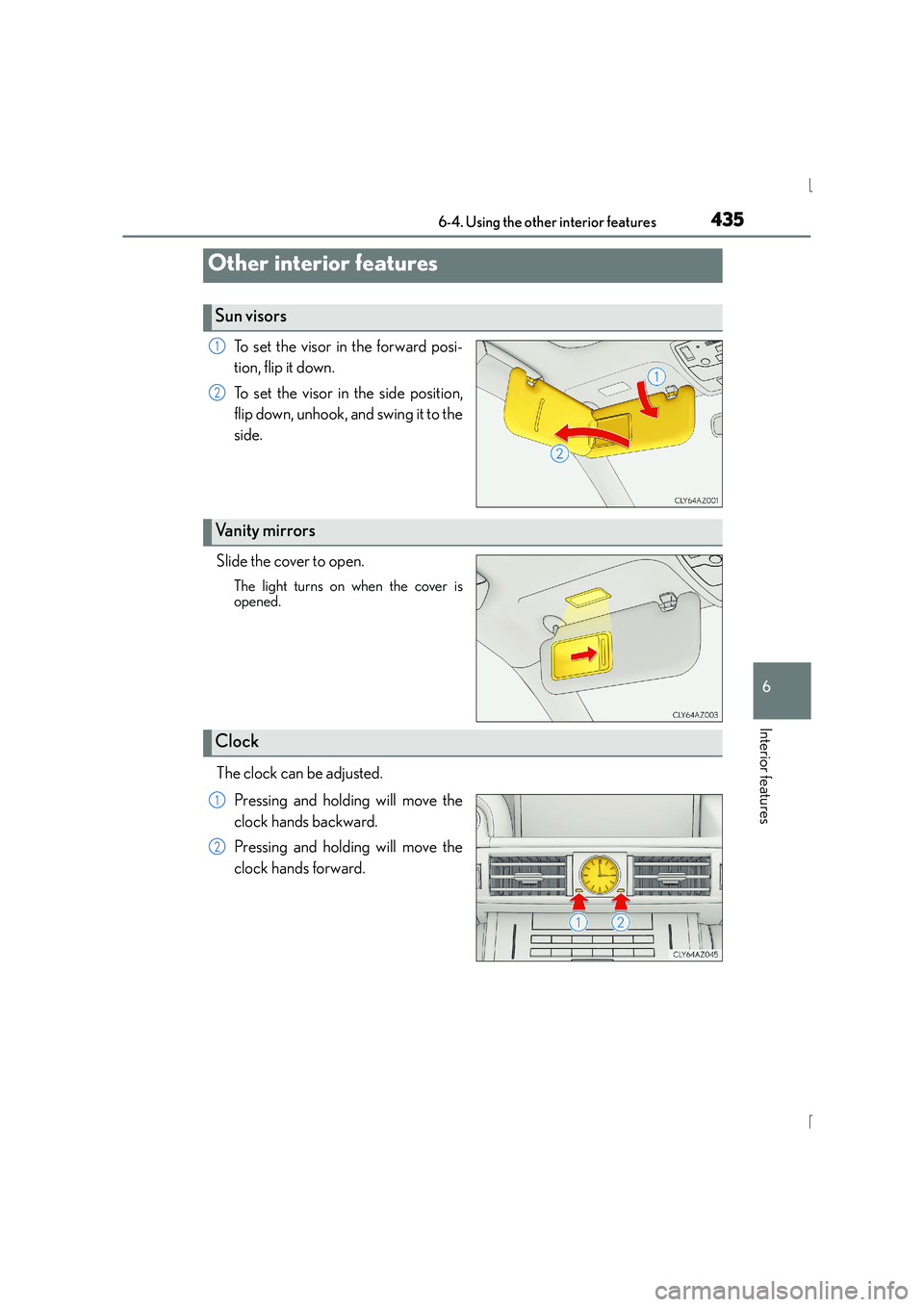
To set the visor in the forward posi-
tion, flip it down.
To set the visor in the side position,
flip down, unhook, and swing it to the
side.
Slide the cover to open.
The light turns on when the cover is
opened.
The clock can be adjusted. Pressing and holding will move the
clock hands backward.
Pressing and holding will move the
clock hands forward.
Other interior features
Sun visors
1
2
Vanity mirrors
Clock
1
2
Page 442 of 628

442
IS300h_EE(OM53D56E)7-1. Maintenance and care
●Working from top to bottom, liberally
apply water to the vehicle body, wheel
wells and underside of the vehicle to remove any dirt and dust.
●Wash the vehicle body using a sponge or soft cloth, such as a chamois.
●For hard-to-remove marks, use car wash soap and rinse thoroughly with
water.
●Wipe away any water.
●Wax the vehicle when the waterproof coating deteriorates.
If water does not bead on a clean surface, apply wax when the vehicle body is cool.
■Self-restoring coat
The vehicle body has a self-restoring coating that is resistant to small surface scratches
caused in a car wash etc.
●The coating lasts for 5 to 8 years from when the vehicle is delivered from the plant.
●The restoration time differs depending on the depth of the scratch and outside temper-
ature.
The restoration time may become shorter when the coating is warmed by applying
warm water.
●Deep scratches caused by keys, coins, etc. cannot be restored.
●Do not use wax that contain abrasives.
■Automatic car washes
●Fold the mirrors before washing the vehicle. Start washing from the front of the vehicle.
Make sure to extend the mirrors before driving.
●Brushes used in automatic car washes may scratch the vehicle surface and harm your
vehicle’s paint.
■High pressure car washes
●Do not allow the nozzles of the car wash to come within close proximity of the windows.
●Before using the car wash, check that the fuel filler door on your vehicle is closed prop-
erly.
■When using a car wash (vehicles with entry function)
If the door handle becomes wet while the electronic key is within the effective range, the
door may lock and unlock repeatedly. In that case, follow the following correction proce-
dures to wash the vehicle:
●Place the key in a position 2 m (6 ft.) or more separate from the vehicle while the vehi-
cle is being washed. (Take care to ensure that the key is not stolen.)
●Set the electronic key to battery-saving mode to disable the smart entry & start system.
( → P. 1 5 0 )
Cleaning and protecti ng the vehicle exterior
Perform the following to protect the vehicle and maintain it in prime condi-
tion:
Page 503 of 628

5037-3. Do-it-yourself maintenance
7
Maintenance and care
IS300h_EE(OM53D56E)
■Outer foot lightsPress the upper part of the out-
side rear view mirror to tilt the
mirror face upward, and apply
protective tape to the lower part
of the mirror cover.
Insert 2 flathead screwdrivers
wrapped in protective tape, and
disconnect the tabs behind the
mirror.
Pry the mirror out toward you, dis-
connecting the tabs 2 at a time.
Work carefully, ensuring that you do
not drop the mirror.
Disconnect the connectors
behind the mirror, and remove
the mirror.
When removing the thin connectors,
make sure to mark one of the con-
nectors with a piece of tape, to avoid
mixing them up when reinstalling.
Work carefully, ensuring that you do
not drop the mirror.
When handling the mirror, do not
touch the parts applied with grease.
The number of connectors equipped
differs by vehicle specification.
Remove the 5 screws and take off
the mirror’s outer cover and the
cover behind the mirror.
1
2
3
4
Page 505 of 628

5057-3. Do-it-yourself maintenance
7
Maintenance and care
IS300h_EE(OM53D56E)
Install the visor cover on the mir-
ror frame, secure it with a screw,
and install the side turn signal light
and outer foot light.
Use only the screw position shown in
the illustration.
Align the tabs on the side turn signal
light unit and the cover and install it.
Interlock the groove of the outer foot
light unit with the tabs on the cover
and secure it.
After installing the outer foot light
unit, turn on the outer foot light to
visually check that there is no light
leaking from the bulb base.
Disconnect the tabs, and sepa-
rate the top and bottom of the
outer cover of the mirror.
8
9
Page 506 of 628

5067-3. Do-it-yourself maintenance
IS300h_EE(OM53D56E)
Install the outer cover of the mir-
ror by installing the lower side
first, then installing the upper side.
When installing the lower side of the
cover, insert the side turn signal light
pin into the hole in the cover.
Secure the cover with screws and
reconnect the connectors back
together.
Secure the wire harness by reinstall-
ing it to the hooks on the back side of
the mirror surface as it was.
Align the tabs, and secure the
mirror by pushing in each diago-
nally-opposite pair of tabs in
order.
Make sure to insert the tabs in order
as shown in the illustration, and push
them in until a click is heard.
If you do not hear the click, do not
force the tabs in. Instead, remove the
mirror and check that the tabs are
aligned.
After securing the mirror, remove the
protective tape applied to the lower
part of the mirror cover.
10
11
12
Page 596 of 628

5969-2. Customization
IS300h_EE(OM53D56E)
■Outside rear view mirrors ( →P. 1 8 1 )
*: If equipped
■Powe r w i n d ows ( →P. 185)
■Moon roof* (→ P. 1 8 9 )
*: If equipped
FunctionDefault settingCustomized setting
Automatic mirror folding and
extending operation*
Linked to the
locking/unlock-
ing of the doorsOff
——OLinked to operation of the power switch
123
FunctionDefault settingCustomized setting
Mechanical key linked oper-
ationOffOn——O
Wireless remote control
linked operationOffOn——O
Wireless remote control
linked operation signal
(buzzer)OnOff——O
123
FunctionDefault settingCustomized setting
Mechanical key linked oper-
ationOffOn——O
Linked operation of compo-
nents when mechanical key is
used (open only)Slide onlyTilt only——O
Wireless remote control
linked operationOffOn——O
Linked operation of compo-
nents when wireless remote
control is used (open only)Slide onlyTilt only——O
Wireless remote control
linked operation signal
(buzzer)
OnOff——O
123
Page 611 of 628

611Alphabetical index
IS300h_EE(OM53D56E)
Child-protectors ................................... 140
Cleaning ........................................442, 446Aluminum wheels .............................. 443
Exterior.................................................... 442
Interior .....................................................446
Seat belts................................................ 447
Clock .........................................................435
Coat hooks ..............................................439
Condenser ............................................. 462
Console box ........................................... 429
Coolant .....................................................460 Capacity ................................................ 583
Checking .............................................. 460
Preparing and checking
before winter .................................... 322
Cooling system......................................460
Engine overheating ............................571
Hybrid system overheating ............571
Cruise control Cruise control .....................................250
Dynamic radar cruise control ..... 254
Cup holders ............................................430
Current fuel consumption....................116
Curtain shield airbags ........................... 43
Customizable features ....................... 592 DAB (Digital Audio Broadcast) ..... 352
Daytime running light system ......... 230
Defogger
Outside rear view mirrors .............. 418
Rear window..........................................418
Windshield ............................................. 418
Differential............................................... 585
Digital Audio Broadcast (DAB) ..... 352
Dimensions ............................................. 578
Display Drive information...................................116
Dynamic radar cruise control ..... 254
LDA (Lane Departure Alert) ........ 271
Multi-information display...................115
Warning message .............................527
Distance ...................................................... 117
Do-it-yourself maintenance ...............451
Door courtesy lights Location ................................................. 425
Wattage ................................................ 588
Door lock
Doors......................................................... 136
Smart entry & start system ............. 149
Wireless remote control .................130D
Page 612 of 628

612Alphabetical index
IS300h_EE(OM53D56E)
Doors .......................................................... 136Automatic door locking and
unlocking system............................. 140
Door lock.................................................139
Open door warning buzzer .......... 137
Open door warning
light ........................................................ 523
Outside rear view mirrors................ 181
Rear door child-protector ............ 140
Side windows........................................ 185
Drive information..................................... 116
Drive info 1/Drive info 2........................ 117
Driver’s and front passenger’s seat belt reminder light ...................523
Driver’s seat position memory ......... 169
Driving ........................................................ 194 Break-in tips .......................................... 195
Correct driving posture .................... 36
Driving mode select switch .......... 293
Hybrid vehicle driving tips ............320
Procedures .............................................194
Winter drive tips................................. 322
Dynamic radar cruise control.......... 254 E-mail ........................................................388
Eco drive mode ..................................... 293
Elapsed time .............................................. 116
Electric motor (traction motor) ..........79
Electric Power Steering (EPS) ....... 296
Function.................................................. 296
Warning light........................................522
Electronic key ......................................... 130 Battery-saving function ....................150
If the electronic key does not operate properly ............................ 563
Replacing the battery ......................488
Emergency, in case of
If a warning message is displayed .............................................527
If the 12-volt battery is discharged ........................................ 566
If the electronic key does not operate properly ............................ 563
If the hybrid system will not start .......................................................560
If the shift lever cannot be shifted from P................................... 562
If the warning buzzer sounds........ 521
If the warning light turns on ............ 521E