Page 405 of 628
4055-12. Other function
5
Lexus Display Audio system
IS300h_EE(OM53D56E)
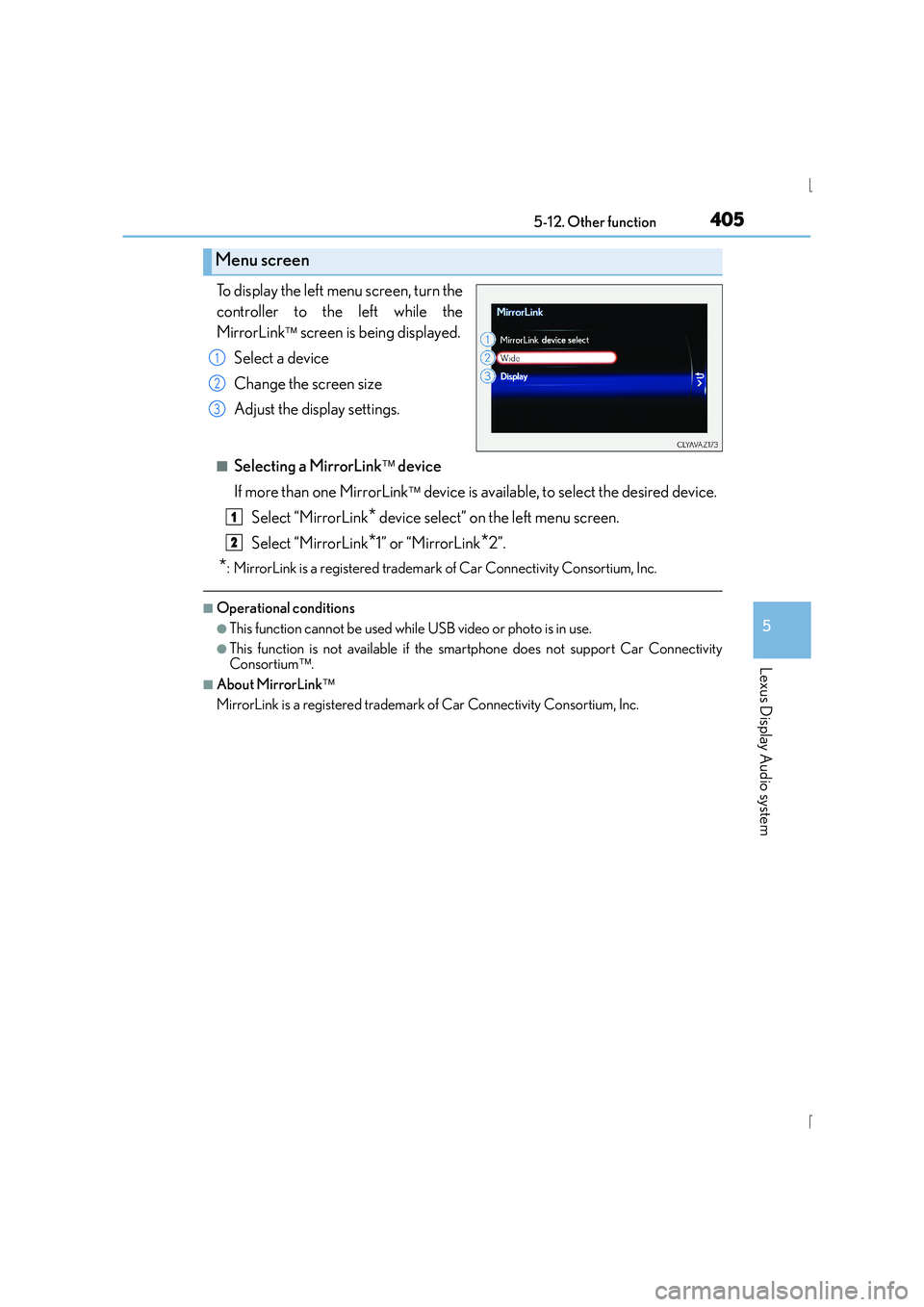
To display the left menu screen, turn the
controller to the left while the
MirrorLink
screen is being displayed.
Select a device
Change the screen size
Adjust the display settings.
■Selecting a MirrorLink device
If more than one MirrorLink
device is available, to select the desired device.
Select “MirrorLink
* device select” on the left menu screen.
Select “MirrorLink
*1” or “MirrorLink*2”.
*: MirrorLink is a registered trademark of Car Connectivity Consortium, Inc.
■Operational conditions
●This function cannot be used while USB video or photo is in use.
●This function is not available if the smartphone does not support Car Connectivity
Consortium.
■About MirrorLink
MirrorLink is a registered trademark of Car Connectivity Consortium, Inc.
Menu screen
1
2
3
1
2
Page 406 of 628
4065-12. Other function
IS300h_EE(OM53D56E)
Go to “USB photo”: → “Info” → “USB1 photo” or “USB2 photo”
→ P. 335
Move the controller to the left to display the menu screen. Change the full screen mode.
Select to set the slide show display
on/off.
Start the slide show at a selected folder.
Change the play speed.
Change the play mode.
Move the controller to the right and select “Browse”.
Select the desired folder, and then select a file to begin using the selected
folder.
USB photo
Connecting a USB memory device enables you to enjoy photo on the Lexus
Display Audio display.
Connecting a USB memory device
Menu screen
1
2
3
4
Selecting a folder
1
2
Page 407 of 628
4075-12. Other function
5
Lexus Display Audio system
IS300h_EE(OM53D56E)
■USB memory functions
→P. 3 6 5
■USB memory
●Compatible devices
USB memory device that can be used for JPEG display.
●Compatible device formats
The following device format can be used:
• USB communication format: USB2.0 FS (480 Mbps)
• File system format: FAT16/32 (Windows)
• Correspondence class: Mass storage class
●JPEG file compatibility
• Compatible image size: Maximum 10 MB
• Compatible pixel size: Maximum 10,000,000 pixels
NOTICE
■If the console box lid cannot be fully closed
→P. 3 6 8
■To prevent damage to the USB memory device or its terminals
→P. 3 6 8
Page 409 of 628
4095-12. Other function
5
Lexus Display Audio system
IS300h_EE(OM53D56E)
■Microphone
→P. 3 8 1
■Speech commands may not be recognized if:
●Spoken too quickly
●Spoken at a low or high volume
●Passengers are talking while speech commands are spoken
Page 412 of 628
412
IS300h_EE(OM53D56E)6-1. Using the air conditioning system
Automatic air conditioning system
Air outlets and fan speed are automatically adjusted according to the temper-
ature setting.
Vehicles with a Lexus Display Audio system: Press the “MENU” button on the
Lexus Display Audio controller, then select “Climate” to display the air condi-
tioning operation screen.
For details on the Lexus Display Audio controller, refer to “Lexus Display
Audio controller” on P. 330.
Vehicles with a navigation system:
Press the “MENU” button on the Remote
Touch, then select “Climate” to display the air conditioning control screen.
For details on the Remote Touch, refer to the “NAVIGATION AND MULTI-
MEDIA SYSTEM OWNER’S MANUAL”.
The illustrations below are for left-hand drive vehicles.
The button positions and shapes will di ffer for right-hand drive vehicles.
Also, the display and button positions will differ depending on the type of the
system.
Page 415 of 628
4156-1. Using the air conditioning system
6
Interior features
IS300h_EE(OM53D56E)
XWith a Lexus Display AudioAdjust the left-hand side temperature setting
Adjust the fan speed setting
Select to set auto mode on/off, fan off, blower customization ( →P. 4 1 9 ) a n d
displaying the option control screen ( →P. 4 1 7 )
Select the air flow mode
Adjust the right-hand side temperature setting
Adjust the temperature setting
Move the Lexus Display Audio controller left/right to select the desired item
( to ).
When , , or is selected:
Move the controller forward/backward or turn it left/right for adjusting.
When or is selected:
Move the controller forward/backward or turn it left/right to select a screen
button, then press the controller.
Air conditioning contro l screen (if equipped)
(With “DUAL” mode) (Without “DUAL” mode)
1
2
3
4
5
6
1
16
21256
34
Page 448 of 628

4487-1. Maintenance and care
IS300h_EE(OM53D56E)
NOTICE
■Cleaning detergents
●Do not use the following types of detergent, as they may discolor the vehicle interior
or cause streaks or damage to painted surfaces:
• Non-seat portions: Organic substances such as benzene or gasoline, alkaline oracidic solutions, dye, and bleach
• Seats: Alkaline or acidic solutions, such as thinner, benzene, and alcohol
●Do not use polish wax or polish cleaner. The instrument panel’s or other interior part’s
painted surface may be damaged.
■Preventing damage to leather surfaces
Observe the following precautions to avoid damage to and deterioration of leather
surfaces:
●Remove any dust or dirt from leather surfaces immediately.
●Do not expose the vehicle to direct sunlight for extended periods of time. Park the
vehicle in the shade, especially during summer.
●Do not place items made of vinyl, plastic, or containing wax on the upholstery, as they
may stick to the leather surface if the vehicle interior heats up significantly.
■Water on the floor
Do not wash the vehicle floor with water.
Vehicle systems such as the audio system may be damaged if water comes into contact
with electrical components such as the audio system above or under the floor of the
vehicle. Water may also cause the body to rust.
■When cleaning the inside of the windsh ield (vehicles with LDA [Lane Departure
Alert])
Be careful not to touch the camera sensor ( →P. 2 7 0 ) .
If the camera is accidentally scratched or hit, LDA may not operate properly or may
cause a malfunction.
■Cleaning the inside of the rear window
●Do not use glass cleaner to clean the rear window, as this may cause damage to the
rear window defogger heater wires or antenna. Use a cloth dampened with luke-
warm water to gently wipe the window clean. Wipe the window in strokes running
parallel to the heater wires or antenna.
●Be careful not to scratch or damage the heater wires or antenna.
Page 525 of 628

5258-2. Steps to take in an emergency
8
When trouble arises
IS300h_EE(OM53D56E)
■If the tire pressure warning light frequently comes on after blinking for 1 minute
If the tire pressure warning light frequently comes on after blinking for 1 minute when the
power switch is turned to ON mode, have it checked by any authorized Lexus dealer or
repairer, or another duly qualified and equipped professional.
■Warning buzzer
In some cases, the buzzer may not be heard due to being in a noisy location or audio
sound.
CAUTION
■If both the ABS and the brake system warning lights remain on
Stop your vehicle in a safe place immediately and contact any authorized Lexus dealer
or repairer, or another duly qualified and equipped professional. The vehicle will
become extremely unstable during braking, and the ABS system may fail, which could
cause an accident resulting in death or serious injury.
■When the electric power steering system warning light comes on
The steering wheel may become extremely heavy.
If the steering wheel becomes heavier than us ual when operating, hold firmly and oper-
ate using more force than usual.
■If the tire pressure warning light comes on
Be sure to observe the following precautions. Failure to do so could cause a loss of
vehicle control and result in death or serious injury.
XVehicles with an emergency tire puncture repair kit
●Stop your vehicle in a safe place as soon as possible. Adjust the tire inflation pressure
immediately.
●If the tire pressure warning light comes on even after tire inflation pressure adjust-
ment, it is probable that you have a flat tire. Check the tires. If a tire is flat, repair the
flat tire by using emergency tire puncture repair kit.
●Avoid abrupt maneuvering and braking. If the vehicle tires deteriorate, you could lose
control of the steering wheel or the brakes.
XVehicles with run-flat tires
●Decelerate to the lowest appropriate speed as soon as possible. Do not drive over 60
km/h (37 mph).
●Check and adjust the tire in flation pressure immediately.
●If the tire pressure warning light comes on even after tire inflation pressure adjust-
ment, it is probable that you have a flat tire. Have the tire replaced by the nearest
authorized Lexus dealer or repairer, or another duly qualified and equipped profes-
sional.
●Avoid abrupt maneuvering and braking. If the vehicle tires deteriorate, you could lose
control of the steering wheel or the brakes.
■If a blowout or sudden air leakage should occur
The tire pressure warning system may not activate immediately.