Page 126 of 542
126
2-1. Driving procedures
Engine (ignition) switch
Performing the following operations when carrying the electronic key on
your person starts the engine or changes “ENGINE START STOP” switch
modes.
nStarting the engine
Automatic transmission
Check that the parking brake is set.
Check that the shift lever is set in P.
Sit in the driver’s seat and firmly depress the brake pedal.
The “ENGINE START STOP” switch indicator turns green.
Press the “ENGINE START
STOP” switch.
The engine will crank until it
starts or for up to 30 seconds,
whichever is less.
Continue depressing the brake
pedal until the engine is com-
pletely started.
The engine can be started from
any mode.
STEP1
STEP2
STEP3
STEP4
Page 128 of 542
128
2-1. Driving procedures
nChanging “ENGINE START STOP” switch mode
Modes can be changed by pressing the “ENGINE START STOP”
switch with the brake pedal (vehicles with an automatic transmission)
or clutch pedal (vehicles with a manual transmission) released. (The
mode changes each time the switch is pressed.)
OFF*
Emergency flashers can be
used.
ACCESSORY mode
Some electrical components
such as the audio system can be
used.
The “ENGINE START STOP”
switch indicator turns amber.
IGNITION ON mode
All electrical components can
be used.
The “ENGINE START STOP”
switch indicator turns amber.
*: Vehicles with an automatic
transmission, the engine cannot
be switched to OFF unless the
shift lever is in P.
Page 129 of 542
129
2-1. Driving procedures
2
When driving
nIf the engine does not start
The engine immobilizer system may not have been deactivated. (→P. 7 7 )
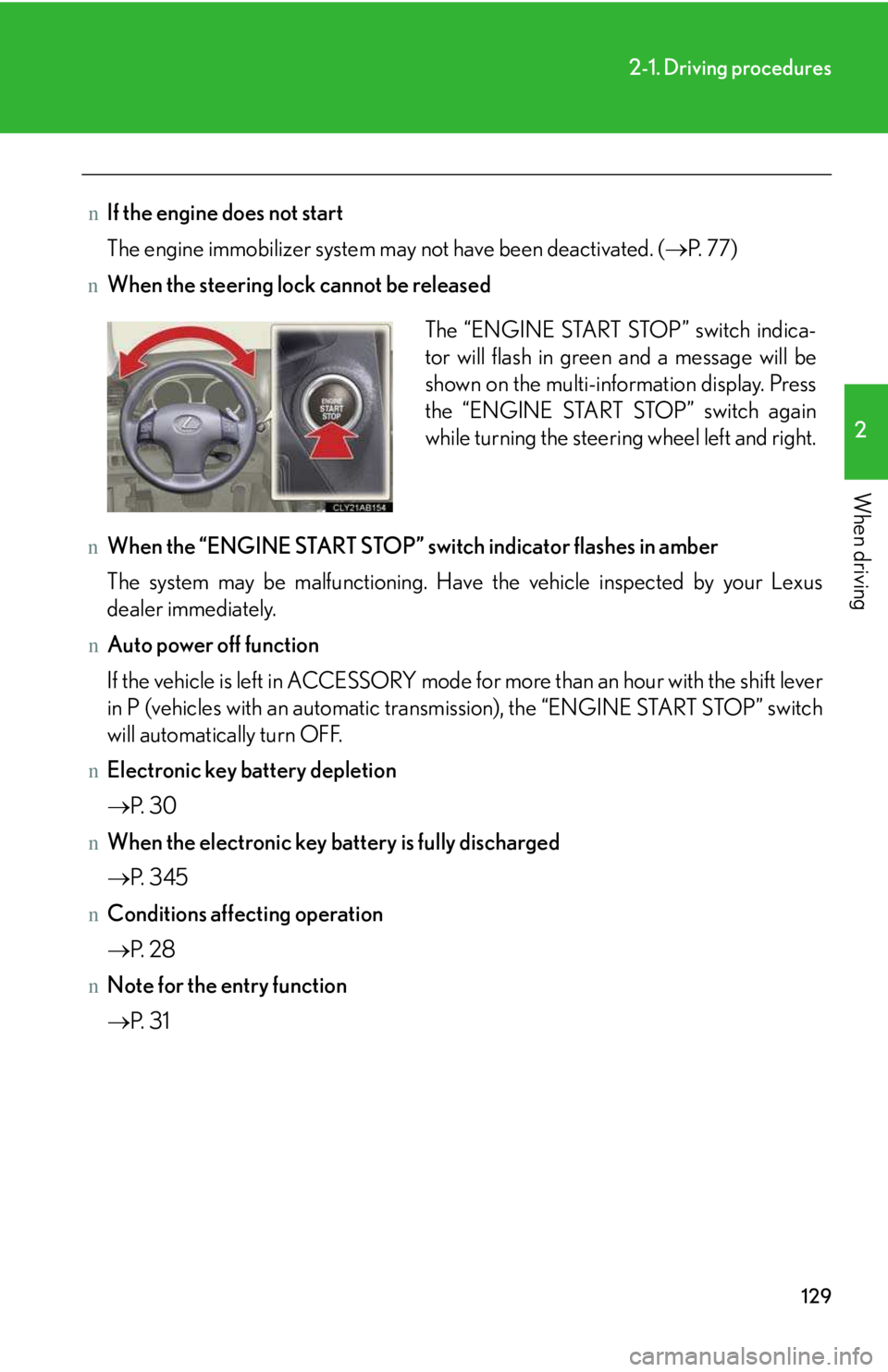
nWhen the steering lock cannot be released
nWhen the “ENGINE START STOP” switch indicator flashes in amber
The system may be malfunctioning. Have the vehicle inspected by your Lexus
dealer immediately.
nAuto power off function
If the vehicle is left in ACCESSORY mode for more than an hour with the shift lever
in P (vehicles with an automatic transmission), the “ENGINE START STOP” switch
will automatically turn OFF.
nElectronic key battery depletion
→P. 30
nWhen the electronic key battery is fully discharged
→P. 34 5
nConditions affecting operation
→P. 28
nNote for the entry function
→P. 31
The “ENGINE START STOP” switch indica-
tor will flash in green and a message will be
shown on the multi-information display. Press
the “ENGINE START STOP” switch again
while turning the steering wheel left and right.
Page 131 of 542
131
2-1. Driving procedures
2
When driving
Automatic transmission∗
Select a shift position appropriate for the driving conditions.
nShifting the shift lever
While the “ENGINE START STOP” switch is in IGNITION
ON mode, depress the brake pedal and move the shift lever.
nShift position uses
*: To improve fuel consumption and reduce noises, set the shift lever in the D
position for normal driving.
Shift positionFunction
PParking the vehicle or starting the engine
RReversing
NNeutral
DNormal driving*
SS mode driving (→P. 13 4 )
∗: If equipped
Page 136 of 542
136
2-1. Driving procedures
nIf does not come on even after shifting the shift lever to S
This may indicate a malfunction in the automatic transmission system. Have the
vehicle inspected by your Lexus dealer immediately.
(In this situation, the vehicle will operate as if the shift lever is in D.)
nAI-SHIFT
The AI-SHIFT automatically shifts the gear to the optimal position according to the
driver performance and driving conditions.
The AI-SHIFT automatically operates when the shift lever is in the D position. How-
ever, operating the “-” shift paddle switch will restrict the function’s operation. (Shift-
ing the shift lever to the S position cancels the function.)
CAUTION
nWhen driving on slippery road surfaces
Be careful of downshifting and sudden acceleration, as this could result in the vehi-
cle skidding to the side or spinning.
Page 140 of 542
140
2-1. Driving procedures
Parking brake
NOTICE
nBefore driving
Fully release the parking brake.
Driving the vehicle with the parking brake set will lead to brake components over-
heating, which may affect braking performance and increase brake wear.
Vehicles with an automatic transmission
Sets the parking brake*
(Depressing the pedal again
releases the parking brake.)
*: Fully depress the parking
brake pedal with your left
foot while depressing the
brake pedal with your right
foot.
Vehicles with a manual transmission
Sets the parking brake
Fully set the parking brake while depressing the brake pedal.
Releases the parking brake
Slightly raise the lever and lower it completely while pressing the button.
Canada U.S.A.
CanadaU.S.A.
Page 149 of 542
149
2-2. Instrument cluster
2
When driving
nIndicators
The indicators inform the driver of the operating state of the vehi-
cle’s various systems.
Turn signal indicator
(→P. 13 9 )
(vehicles with
an automatic
transmission)
“ECT SNOW” indicator
(→P. 13 2 )
Headlight high beam indi-
cator (→P. 15 6 )
(vehicles with
a manual
transmission)
“ETCS SNOW” indicator
(→P. 13 8 )
(U.S.A.)
Headlight indicator
(→P. 15 6 )
(vehicles with
an automatic
transmission)
“ECT PWR” indicator
(→P. 13 2 )
(Canada)
Tail light indicator
(→P. 15 6 )
Cruise control indicator
(→P. 166)
Front fog light indicator
(→P. 15 9 )
(if equipped)
“AFS OFF” indicator light
(→P. 15 7 )
(vehicles with an automatic trans-
mission)
Shift position and shift range indica-
tors (→P. 1 3 1 )
(if equipped)
Intuitive parking assist
indicator (→P. 18 0 )
Slip indicator (→P. 18 7 )
VSC off indicator
(→P. 188)
SRS airbag on-off indica-
tor (→P. 95 )
*
*
*
*
Page 154 of 542

154
2-2. Instrument cluster
nGear position display
(vehicles with an automatic transmission only)
Indicates the current gear, and the range of gears
that is available when the shift lever is in the D or S
position. the gear range is shown by the number of
dots (•) and the current gear is shown as a number.
The transmission automatically selects the gears
within the driver selected gear range.
In the illustration to the left, a range of 6 available gears
(1 through 6) has been selected by the driver. (The shift
lever is in the D or S position with 6 ranges enabled) It is
possible for the transmission to automatically select
between all 6 of the gears. In this case, the transmission
has selected third gear.
nSystem check display
After switching the “ENGINE START STOP” switch to IGNITION ON mode,
“CHECK” is displayed while system operation is checked. When the system check
is complete, “COMPLETED” is displayed before returning to the normal screen.
nOutside temperature display
In the following situations, the correct outside temperature may not be displayed, or
the display may take longer than normal to change.
lWhen stopped, or driving at low speeds (less than 12 mph [20 km/h])
lWhen the outside temperature has changed suddenly (at the entrance/exit of a
garage, tunnel, etc.)