Page 271 of 544
GS450h_OM_OM30E99U_(U)
2714-5. Using the driving support systems
4
Driving
WA R N I N G
■The ABS does not operate effectively when
●The limits of tire gripping performance have been exceeded. (such as excessively
worn tires on a snow covered road).
●The vehicle hydroplanes while driving at high speed on wet or slick roads.
■Stopping distance when the ABS is operating may exceed that of normal conditions
The ABS is not designed to shorten the vehicle’s stopping distance. Always maintain a
safe distance from the vehicle in front of you, especially in the following situations:
●When driving on dirt, gravel or snow-covered roads
●When driving with tire chains
●When driving over bumps in the road
●When driving over roads with potholes or uneven surfaces
■TRAC may not operate effectively when
Directional control and power may not be achievable while drivin g on slippery road
surfaces, even if the TRAC system is operating.
Drive the vehicle carefully in conditions where stability and power may be lost.
■Hill-start assist control does not operate effectively when
●Do not overly rely on the hill-start assist control. The hill-start assist control may not
operate effectively on steep inclines and roads covered with ice.
●Unlike the parking brake, hill-start assist control is not intended to hold the vehicle
stationary for an extended period of time. Do not attempt to use hill-start assist con-
trol to hold the vehicle on an incline, as doing so may lead to an accident.
■When the VSC is activated
The slip indicator light flashes. Always drive carefully. Reckless driving may cause an
accident. Exercise particular care when the indicator light flashes.
■When the TRAC/VSC systems are turned off
Be especially careful and drive at a speed ap propriate to the road conditions. As these
are the systems to help ensure vehicle st ability and driving force, do not turn the
TRAC/VSC systems off unless necessary.
■Replacing tires
Make sure that all tires are of the specified size, brand, tread pattern and total load
capacity. In addition, make sure that the tires are inflated to the recommended tire infla-
tion pressure level.
The ABS, TRAC and VSC systems will not function correctly if different tires are
installed on the vehicle.
Contact your Lexus dealer for further information when replacing tires or wheels.
■Handling of tires and the suspension
Using tires with any kind of problem or modi fying the suspension will affect the driving
assist systems, and may caus e a system to malfunction.
Page 284 of 544
2845-1. Remote Touch screen
GS450h_OM_OM30E99U_(U)
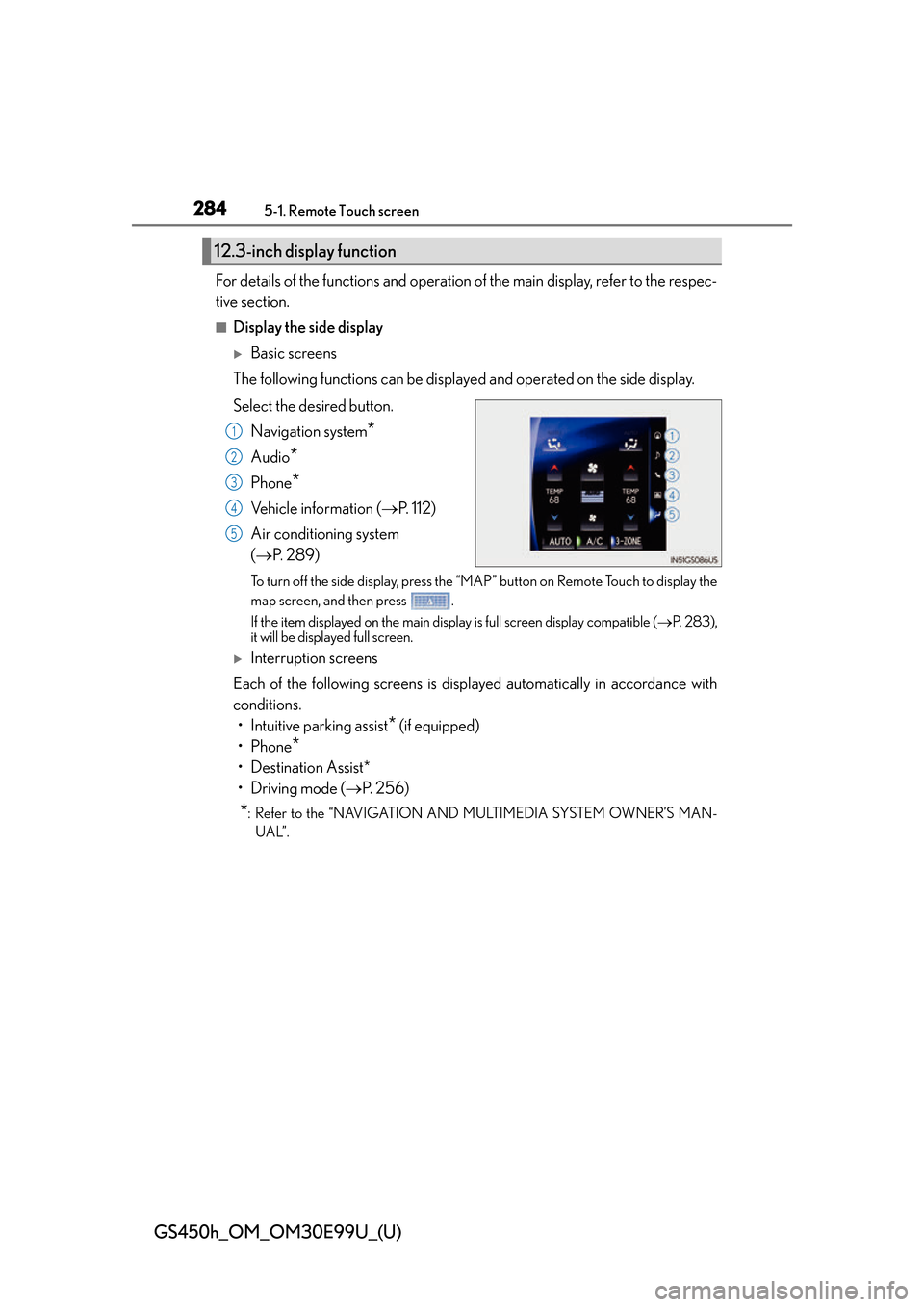
For details of the functions and operation of the main display, refer to the respec-
tive section.
■Display the side display
Basic screens
The following functions can be displaye d and operated on the side display.
Select the desired button. Navigation system
*
Audio*
Phone*
Vehicle information ( P. 112)
Air conditioning system
( P. 2 8 9 )
To turn off the side display, press the “MAP” button on Remote Touch to display the
map screen, and then press .
If the item displayed on the main display is full screen display compatible ( P. 2 8 3 ) ,
it will be displayed full screen.
Interruption screens
Each of the following screens is displayed automatically in accordance with
conditions. • Intuitive parking assist
* (if equipped)
•Phone
*
• Destination Assist*
•Driving mode ( P. 2 5 6 )
*: Refer to the “NAVIGATION AND MULTIMEDIA SYSTEM OWNER’S MAN-
UAL”.
12.3-inch display function
1
2
3
4
5
Page 409 of 544
4097-2. Steps to take in an emergency
GS450h_OM_OM30E99U_(U)
7
When trouble arises
(If equipped)
Indicates a malfunction in the Lexus parking assistAll assist-sensors flash.
A buzzer also sounds.
Have the vehicle inspected by your Lexus dealer.
(If equipped)
Indicates that Lexus parking assist-sensor is dirty or cov-
ered with ice
A buzzer also sounds.
Clean the sensor.
Indicates an attempt was made to release the parking
brake with a door open or the front passenger’s seat belt
unfastened
A buzzer also sounds.
Close all doors and fasten the front passenger’s seat
belt before releasing the parking brake.
Wa r n i n g m e s s a g eDetails/Actions
(Flashes)
Page 413 of 544
4137-2. Steps to take in an emergency
GS450h_OM_OM30E99U_(U)
7
When trouble arises
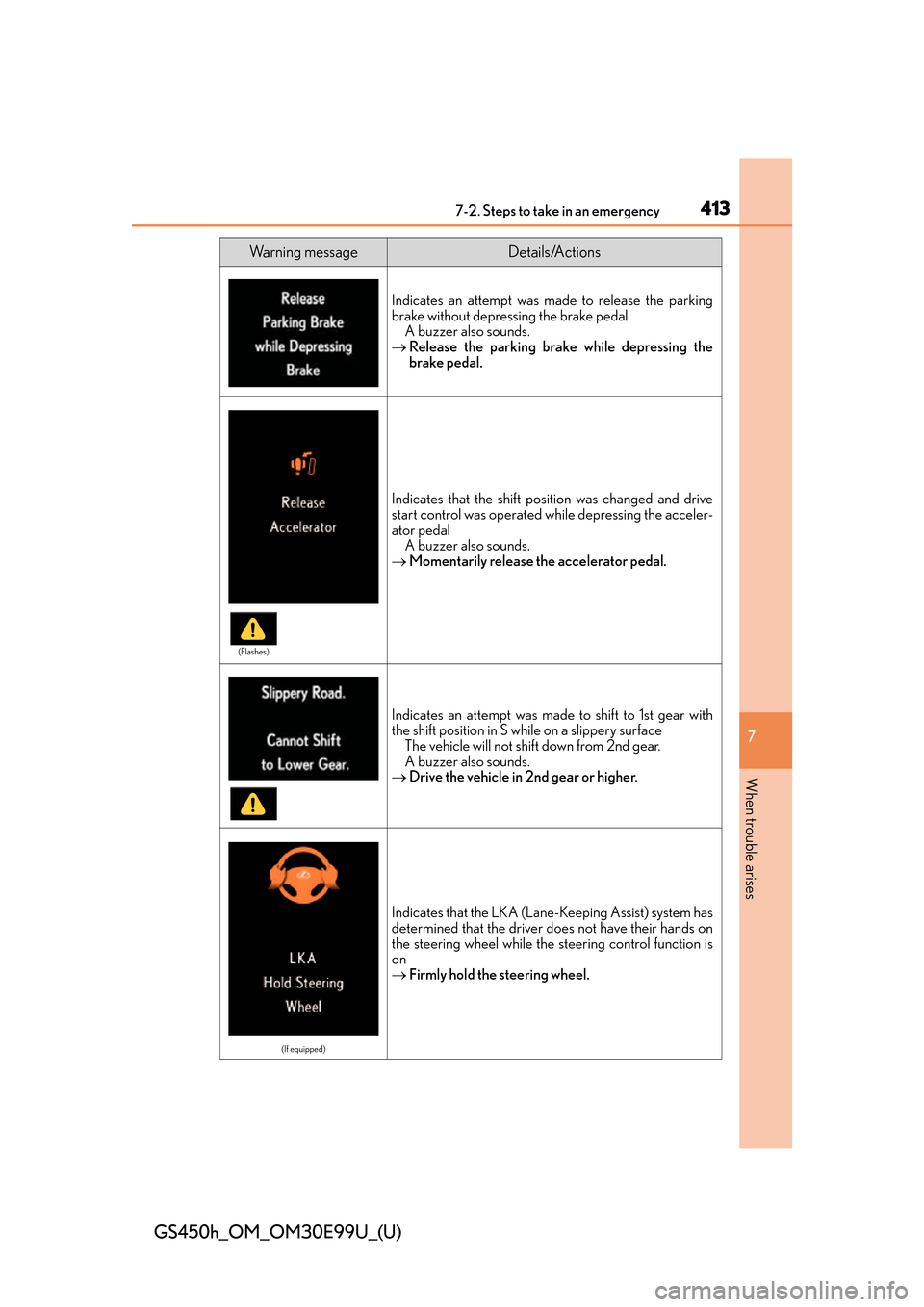
Indicates an attempt was made to release the parking
brake without depressing the brake pedalA buzzer also sounds.
Release the parking brake while depressing the
brake pedal.
Indicates that the shift position was changed and drive
start control was operated while depressing the acceler-
ator pedal
A buzzer also sounds.
Momentarily release th e accelerator pedal.
Indicates an attempt was made to shift to 1st gear with
the shift position in S while on a slippery surface
The vehicle will not shift down from 2nd gear.
A buzzer also sounds.
Drive the vehicle in 2nd gear or higher.
(If equipped)
Indicates that the LKA (Lane- Keeping Assist) system has
determined that the driver does not have their hands on
the steering wheel while the steering control function is
on
Firmly hold the steering wheel.
Wa r n i n g m e s s a g eDetails/Actions
(Flashes)
Page 420 of 544
4207-2. Steps to take in an emergency
GS450h_OM_OM30E99U_(U)
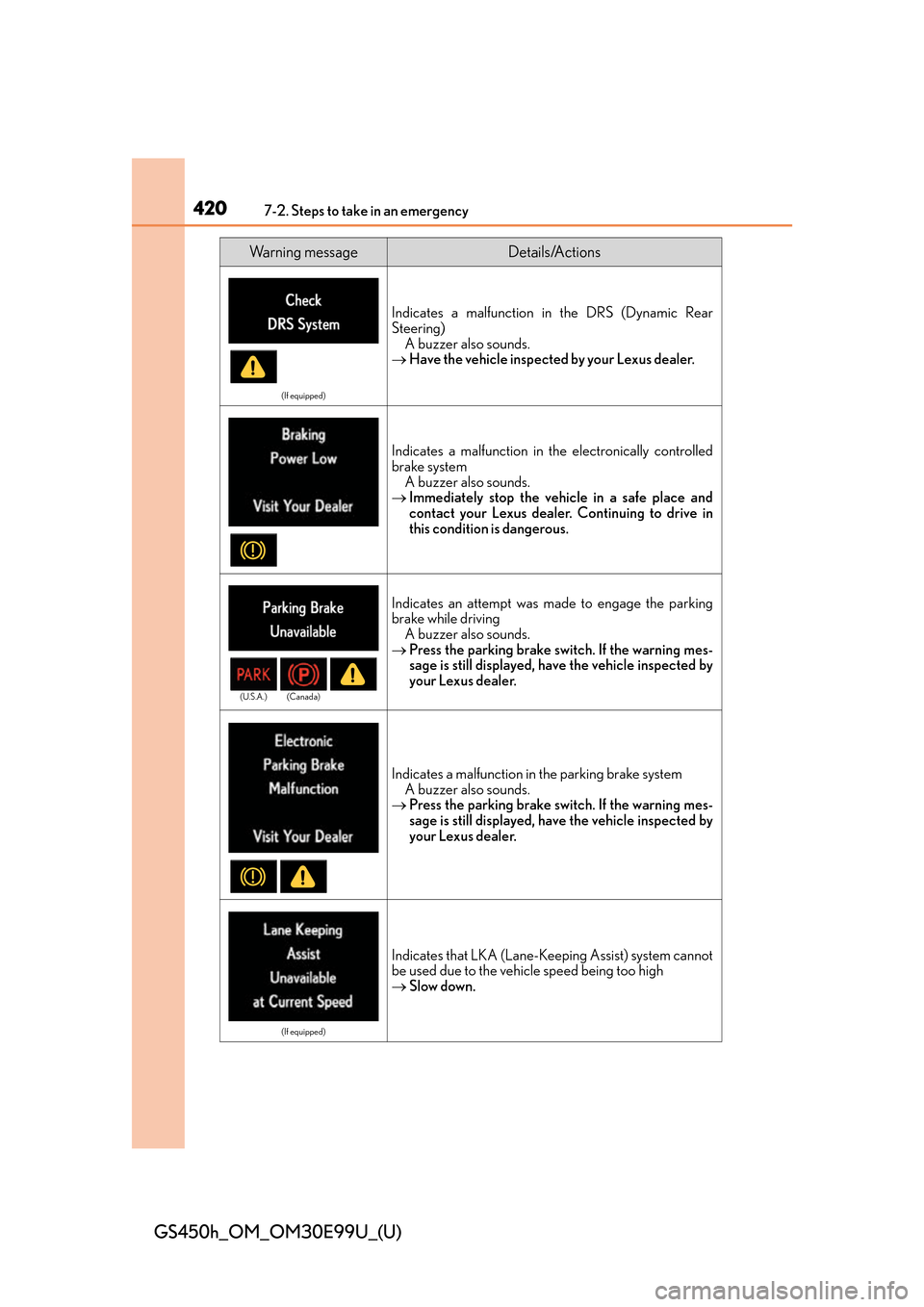
(If equipped)
Indicates a malfunction in the DRS (Dynamic Rear
Steering) A buzzer also sounds.
Have the vehicle inspected by your Lexus dealer.
Indicates a malfunction in th e electronically controlled
brake system A buzzer also sounds.
Immediately stop the vehicle in a safe place and
contact your Lexus dealer. Continuing to drive in
this condition is dangerous.
Indicates an attempt was made to engage the parking
brake while driving
A buzzer also sounds.
Press the parking brake switch. If the warning mes-
sage is still displayed, have the vehicle inspected by
your Lexus dealer.
Indicates a malfunction in the parking brake system
A buzzer also sounds.
Press the parking brake switch. If the warning mes-
sage is still displayed, have the vehicle inspected by
your Lexus dealer.
(If equipped)
Indicates that LKA (Lane-Ke eping Assist) system cannot
be used due to the vehicle speed being too high
Slow down.
Wa r n i n g m e s s a g eDetails/Actions
(U.S.A.) (Canada)
Page 445 of 544
4457-2. Steps to take in an emergency
GS450h_OM_OM30E99U_(U)
7
When trouble arises
WA R N I N G
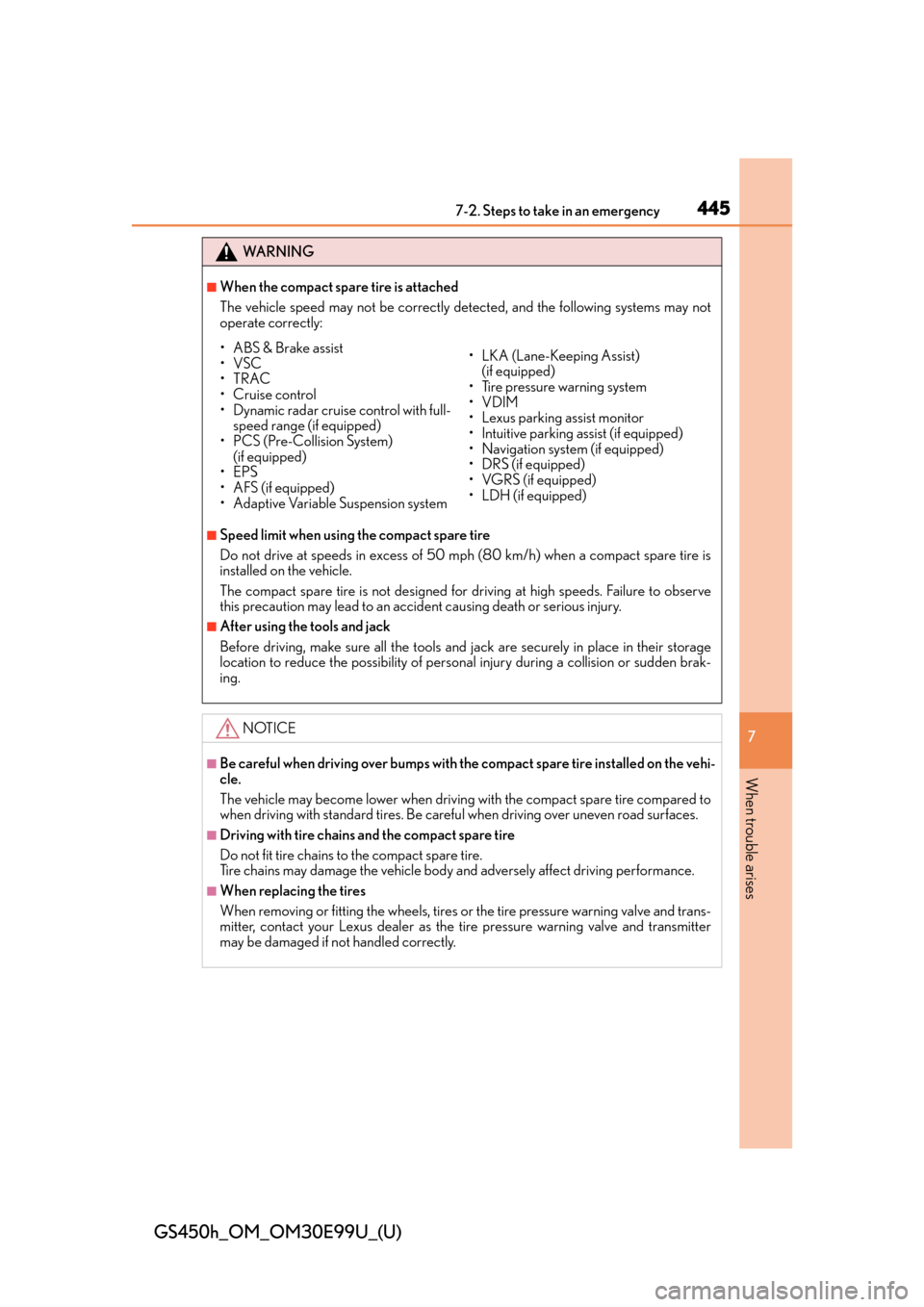
■When the compact spare tire is attached
The vehicle speed may not be correctly detected, and the following systems may not
operate correctly:
■Speed limit when using the compact spare tire
Do not drive at speeds in excess of 50 mph (80 km/h) when a compact spare tire is
installed on the vehicle.
The compact spare tire is not designed for driving at high speeds. Failure to observe
this precaution may lead to an accident causing death or serious injury.
■After using the tools and jack
Before driving, make sure all the tools and jack are securely in place in their storage
location to reduce the possibility of personal injury during a collision or sudden brak-
ing.
NOTICE
■Be careful when driving over bumps with the compact spare tire installed on the vehi-
cle.
The vehicle may become lower when driving with the compact spare tire compared to
when driving with standard ti res. Be careful when driving over uneven road surfaces.
■Driving with tire chains and the compact spare tire
Do not fit tire chains to the compact spare tire.
Tire chains may damage the vehicle body and adversely affect driving performance.
■When replacing the tires
When removing or fitting the wheels, tires or the tire pressure warning valve and trans-
mitter, contact your Lexus dealer as the tire pressure warning valve and transmitter
may be damaged if not handled correctly.
• ABS & Brake assist
•VSC
•TRAC
•Cruise control
• Dynamic radar cruise control with full-
speed range (if equipped)
• PCS (Pre-Collision System)
(if equipped)
•EPS
•AFS (if equipped)
• Adaptive Variable Suspension system • LKA (Lane-Keeping Assist)
(if equipped)
• Tire pressure warning system
•VDIM
• Lexus parking assist monitor
• Intuitive parking assist (if equipped)
• Navigation system (if equipped)
• DRS (if equipped)
• VGRS (if equipped)
• LDH (if equipped)
Page 499 of 544
GS450h_OM_OM30E99U_(U)
4998-2. Customization
8
Vehicle specifications
■Intuitive parking assist*1, 2
*1:If equipped
*2: Refer to the “NAVIGATION AND MULTIMEDIA SYSTEM OWNER’S MANUAL”.
■Driving mode select switch (P. 256)
FunctionDefault
settingCustomized setting
Detection distance of the front center
sensorFarNearO—O
Detection distance of the rear center
sensorFarNearO—O
Buzzer volume31 to 5O—O
Display setting
(when intuitive parking assist is operat-
ing)All sensors displayedDisplay offO—O
123
FunctionDefault
settingCustomized setting
Power train controlNormalPo w e rO——Eco
Chassis controlNormalSportO——
Air conditioning operationNormalEcoO——
123
Page 519 of 544
519
GS450h_OM_OM30E99U_(U)
Index
What to do if... (Troubleshooting)................................ 520
Alphabetical index................................. 524
For information regarding the equipm ent listed below, refer to the
“NAVIGATION AND MULTIMEDIA SYSTEM OWNER’S MAN-
UAL”.
•Audio system
• Navigation system
• Intuitive parking assist
• Lexus parking assist monitor