Page 52 of 624
521-1. For safe use
GS350_200t_GS F_OM_OM30E86U_(U)
Front passenger occupant classification system
Seat belt reminder light
SRS warning light
“AIR BAG OFF” indicator light
“AIR BAG ON” indicator light
Your vehicle is equipped with a front passenger occupant classification sys-
tem. This system detects the conditions of the front passenger seat and acti-
vates or deactivates the devices for the front passenger.
1
2
3
4
Page 53 of 624

531-1. For safe use
GS350_200t_GS F_OM_OM30E86U_(U)
1
For safety and security
■Adult*1
■Child*4
Condition and operation in the front passenger occupant classification
system
Indicator/
warning light
“A I R B A G O N ” a n d “A I R B A G O F F ”
indicator lights“A I R B A G O N ”
SRS warning lightOff
Seat belt reminder lightOff*2
or
flashing
*3
Devices
Front passenger airbag
Activated
Side airbag
on the front passenger seat
Curtain shield airbag
in the front passenger side
Front passenger knee airbag
Front passenger’s seat belt pretensioner
Indicator/
warning light
“A I R B A G O N ” a n d “A I R B A G O F F ”
indicator lights“A I R B A G O F F ” or
“A I R B A G O N ”
*4
SRS warning lightOff
Seat belt reminder lightOff*2 or
flashing
*3
Devices
Front passenger airbagDeactivated or activated
*4
Side airbag
on the front passenger seat
ActivatedCurtain shield airbag
in the front passenger side
Front passenger knee airbagDeactivated or activated
*4
Front passenger’s seat belt pretensionerActivated
Page 54 of 624
541-1. For safe use
GS350_200t_GS F_OM_OM30E86U_(U)
■Child restraint system with infant*5
■Unoccupied
Indicator/
warning light
“A I R B A G O N ” a n d “A I R B A G O F F ”
indicator lights“AIR BAG OFF”*6
SRS warning lightOff
Seat belt reminder lightOff*2 or
flashing
*3
Devices
Front passenger airbagDeactivated
Side airbag
on the front passenger seat
ActivatedCurtain shield airbag
in the front passenger side
Front passenger knee airbagDeactivated
Front passenger’s seat belt pretensionerActivated
Indicator/
warning light
“A I R B A G O N ” a n d “A I R B A G O F F ” indicator lights“A I R B A G O F F ”
SRS warning light
Off
Seat belt reminder light
Devices
Front passenger airbagDeactivated
Side airbag
on the front passenger seat
ActivatedCurtain shield airbag
in the front passenger side
Front passenger knee airbagDeactivated
Front passenger’s seat belt pretensionerActivated
Page 55 of 624
551-1. For safe use
GS350_200t_GS F_OM_OM30E86U_(U)
1
For safety and security
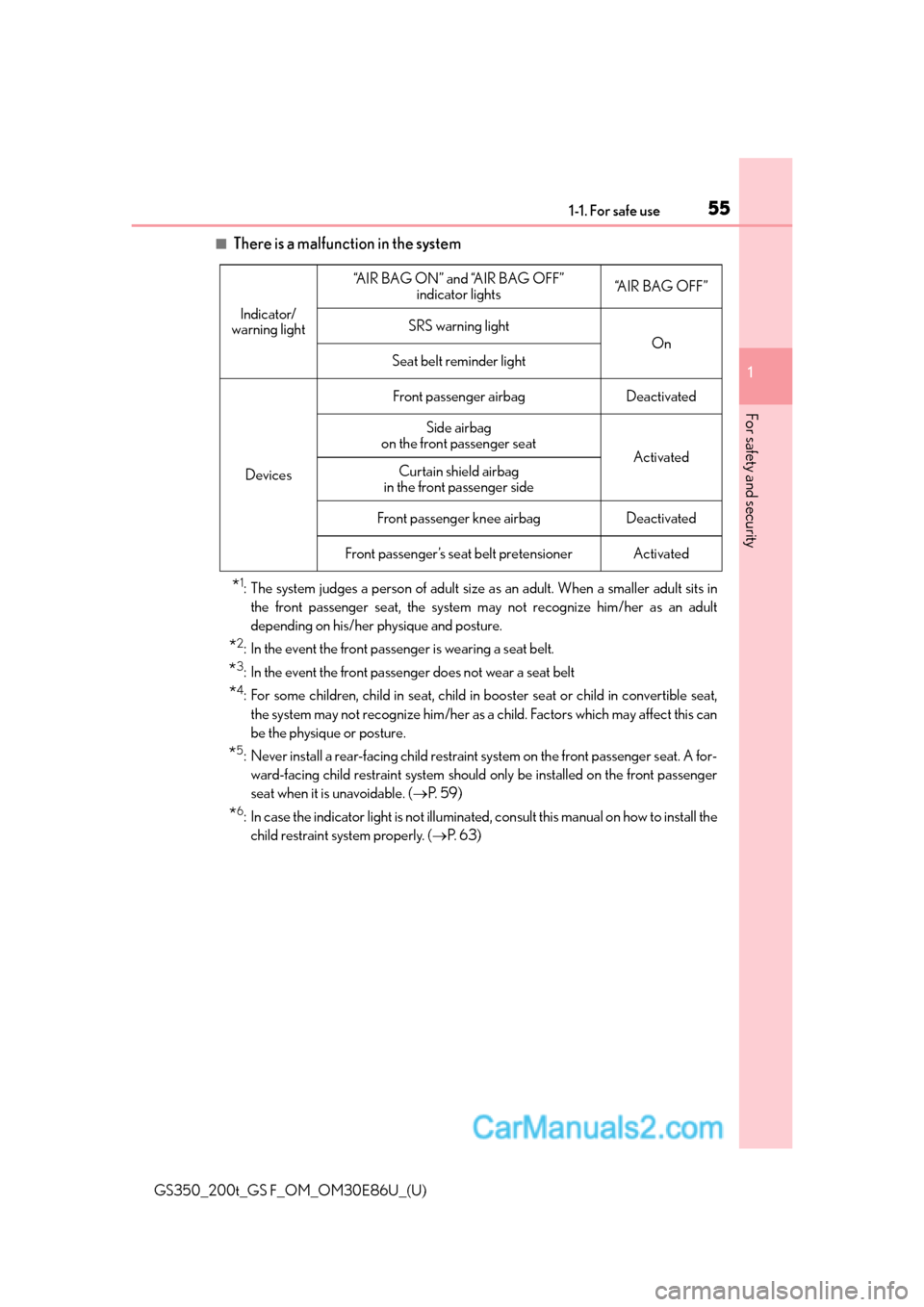
■There is a malfunction in the system
*1: The system judges a person of adult size as an adult. When a smaller adult sits in
the front passenger seat, the system may not recognize him/her as an adult
depending on his/her physique and posture.
*2: In the event the front passenger is wearing a seat belt.
*3: In the event the front passenger does not wear a seat belt
*4: For some children, child in seat, child in booster seat or child in convertible seat,
the system may not recognize him/her as a child. Factors which may affect this can
be the physique or posture.
*5: Never install a rear-facing child restraint system on the front passenger seat. A for- ward-facing child restraint system should only be installed on the front passenger
seat when it is unavoidable. ( P. 5 9 )
*6: In case the indicator light is not illuminated, consult this manual on how to install the
child restraint system properly. ( P. 6 3 )
Indicator/
warning light
“A I R B A G O N ” a n d “A I R B A G O F F ” indicator lights“A I R B A G O F F ”
SRS warning light
On
Seat belt reminder light
Devices
Front passenger airbagDeactivated
Side airbag
on the front passenger seat
ActivatedCurtain shield airbag
in the front passenger side
Front passenger knee airbagDeactivated
Front passenger’s seat belt pretensionerActivated
Page 75 of 624

751-2. Theft deterrent system
GS350_200t_GS F_OM_OM30E86U_(U)
1
For safety and security
■System maintenance
The vehicle has a maintenance-free type alarm system.
■Items to check before locking the vehicle
To prevent unexpected triggering of the alarm and vehicle theft, make sure of the follow-
ing:
●Nobody is in the vehicle.
●The windows and moon roof are closed before the alarm is set.
●No valuables or other personal items are left in the vehicle.
■Triggering of the alarm
The alarm may be triggered in the following situations:
(Stopping the alarm deactivates the alarm system.)
■Alarm-operated door lock
In the following cases, the door may automatically lock:
●When a person remaining in the vehicle unlocks the door and the alarm is activated.
●While the alarm is activated, a person re maining in the vehicle unlocks the door.
●When recharging or replacing the battery.
●A person inside the vehicle opens a door, the
trunk or hood, or unlocks the vehicle using an
inside lock button.
●The battery is recharged or replaced when the
vehicle is locked. (P. 5 2 6 )
NOTICE
■To ensure the system operates correctly
Do not modify or remove the system. If modified or removed, the proper operation of
the system cannot be guaranteed.
Page 105 of 624

GS350_200t_GS F_OM_OM30E86U_(U)
1052. Instrument cluster
2
Instrument cluster
■●
Scheduled Maintenance (P. 3 8 6 )
●Oil Maintenance ( P. 4 0 4 )
●TPMS (Tire pressure warning system) ( P. 4 1 5 )
■
●
Language
Select to change the la nguage on the display.
●Units
Select to change the unit of measure.
●Eco Driving Indicator Light
Select to activate/deactivate the Eco Driving Indicator Light.
● switch
Displays a procedure to register a desired screen to .
You can register 1 screen as a shortcut , which can be displayed by pressing .
●Drive information 1 /2 /3
Select to select up to 2 items that will be displayed on a Drive information screen,
up to 3 Drive information screens can be set.
●Pop-up display
Select to set the following pop-up displa ys, which may appear in some situations,
on/off. • Route guidance of the navigation system-linked display (if equipped)
• Incoming call display of the hands-free phone system
• Instrument panel brightne ss adjustment display
●Accent color (except F SPORT models)
Select to change the accent colors on the screen, such as the cursor color.
●Needle (F SPORT models)
Select to change the needle color for the tachometer.
●Rev indicator (F SPORT models)
Select to set the rev indicator on/off.
When set to on, proceed to set the engine speed at which the rev indicator will be
displayed.
Selectable engine speed range:
GS350: 2000 rpm to 6800 rpm
GS200t: 2000 rpm to 6100 rpm
●Rev peak (F SPORT models)
Select to set the rev peak on/off.
●Default settings
Registered or changed meter settings will be deleted or returned to their default
setting.
Page 116 of 624
116
GS350_200t_GS F_OM_OM30E86U_(U)2. Instrument cluster
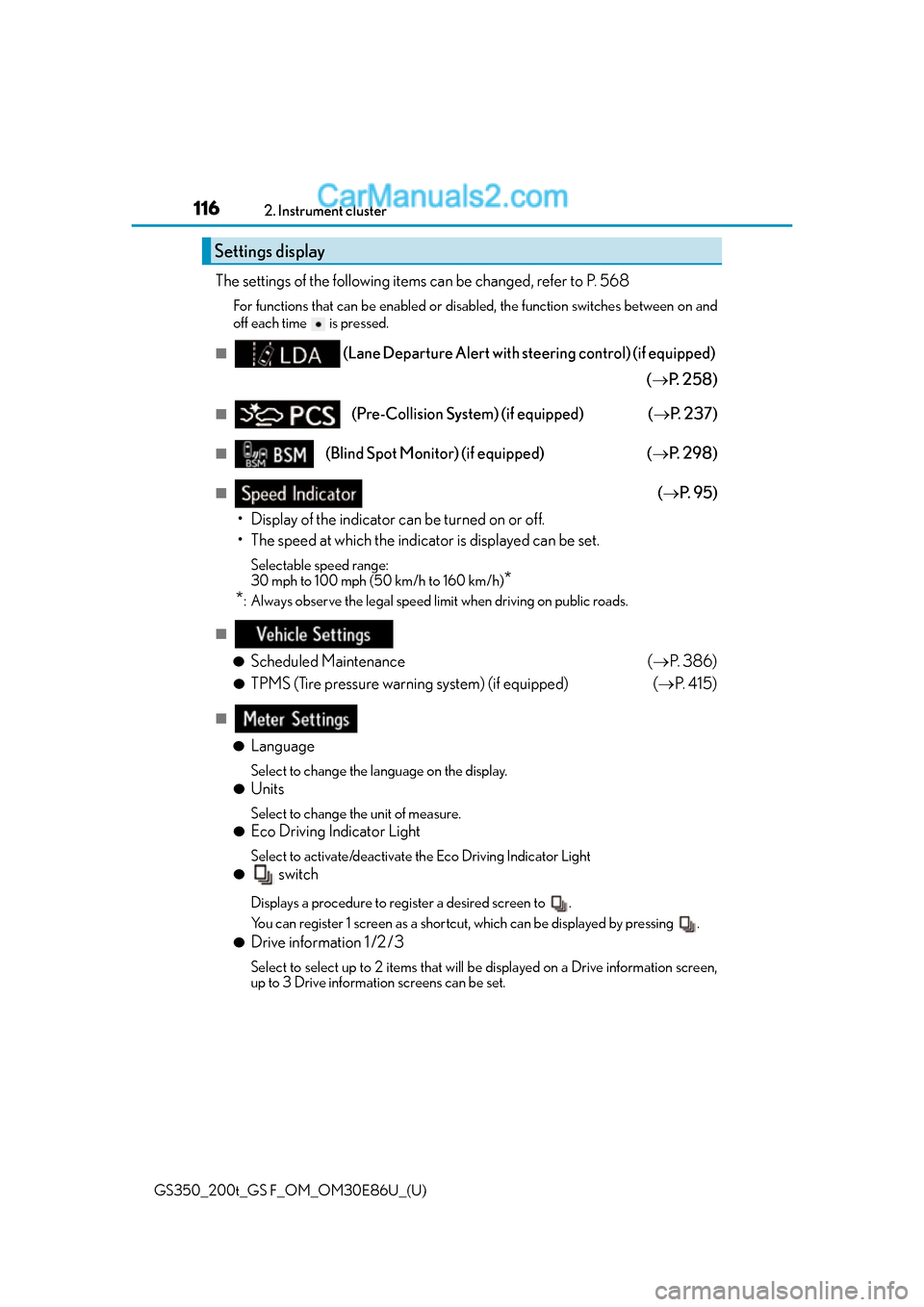
The settings of the following items can be changed, refer to P. 568
For functions that can be enabled or disabled, the function switches between on and
off each time is pressed.
■(Lane Departure Alert with steering control) (if equipped)
( P. 2 5 8 )
■(Pre-Collision System) (if equipped) ( P. 2 3 7 )
■(Blind Spot Monitor) (if equipped) ( P. 2 9 8 )
■( P. 9 5 )
• Display of the indicator can be turned on or off.
• The speed at which the indicator is displayed can be set.
Selectable speed range:
30 mph to 100 mph (50 km/h to 160 km/h)
*
*
: Always observe the legal speed limit when driving on public roads.
■
●
Scheduled Maintenance (P. 3 8 6 )
●TPMS (Tire pressure warning system) (if equipped) ( P. 4 1 5 )
■
●
Language
Select to change the la nguage on the display.
●Units
Select to change the unit of measure.
●Eco Driving Indicator Light
Select to activate/deactivate the Eco Driving Indicator Light
● switch
Displays a procedure to register a desired screen to .
You can register 1 screen as a shortcut , which can be displayed by pressing .
●Drive information 1 /2 /3
Select to select up to 2 items that will be displayed on a Drive information screen,
up to 3 Drive information screens can be set.
Settings display
Page 154 of 624

154
GS350_200t_GS F_OM_OM30E86U_(U)3-2. Opening, closing and
locking the doors and trunk
■When the vehicle is not driven for extended periods
●To prevent theft of the vehicle, do not leave the electronic key within 6 ft. (2 m) of the
vehicle.
●The smart access system with push-button start can be deactivated in advance.
( P. 5 6 8 )
■To operate the system properly
●Make sure to carry the electronic key when operating the system. Do not get the elec-
tronic key too close to the vehicle when op erating the system from the outside of the
vehicle.
Depending on the position and holding condit ion of the electronic key, the key may not
be detected correctly and the system may no t operate properly. (The alarm may go off
accidentally, or the door lock prev ention function may not operate.)
●Do not leave the electronic key inside the trunk.
The key confinement prevention function ma y not operate, depending on the location
of the key (close to a spare tire, the inside edge of the trunk), conditions (inside a metal
bag, close to metallic objects) and the radio waves in the surrounding area. (P. 1 4 5 )
■If the smart access system with push-button start does not operate properly
●Locking and unlocking the doors and open ing the trunk: Use the mechanical key.
( P. 5 2 0 )
●Starting the engine: P. 5 2 1
■Customization
Settings (e. g. smart access system with push-button start) can be changed.
(Customizable features: P. 5 6 8 )
■If the smart access system with push-butto n start has been deactivated in a customized
setting
●Locking and unlocking the d oors and opening the trunk:
Use the wireless remote control or mechanical key. ( P. 137, 144, 520)
●Starting the engine and changing engine switch modes: P. 5 2 1
●Stopping the engine: P. 1 9 8

