2016 Lexus GS300h Malfunction
[x] Cancel search: MalfunctionPage 177 of 620

1773-3. Adjusting the seats
3
Operation of each component
GS450h_300h_OM_OM30F00E_(EE)
WA R N I N G
■Operating the front passenger’s seat from the driver’s seat (if equipped)
Do not operate the front passenger’s seat when a passenger is seated in it. In addition,
do not let anyone sit down in the front passenger’s seat while the seat is being operated.
The front passenger may catch their legs between the instrument panel and seat,
resulting in injury.
■When adjusting the seat positions or the ottoman (if equipped)
Make sure to leave enough space around the feet so they do not get stuck.
■When using the ottoman (if equipped)
●Do not operate the ottoman when the vehicle is moving.
Failure to do so may cause death or serious injury in the event of sudden braking or a
collision.
●Do not sit on the ottoman of the passenger seat.
Doing so may cause seat belts to be worn improperly, which may lead to serious
injury or death in the event of sudden braking or a collision.
●Do not step on the ottoman.
Doing so could damage the ottoman, or could cause you to seriously injure yourself
by falling over.
●Stow the ottoman when you get in or out of the vehicle or when the ottoman is not in
use to avoid stumbling over it.
●Do not allow anyone to put their hands or feet under the passenger seat when stow-
ing the ottoman.
NOTICE
■Operating the front passenger’s seat from the driver’s seat (if equipped)
Before operating the front passenger’s seat, make sure that there is no luggage or any
other objects on the seat or in the f ootwell that could prevent its operation.
Such items may result in excess force being applied, causing damage to the seat and/or
the luggage.
■To prevent an ottoman malfunction (if equipped)
●Do not place any objects in the front passe nger footwell that could prevent the oper-
ation of the ottoman.
●Do not place heavy luggage on the ottoman.
●Do not place anything under the ottoman when in use.
There is a possibility that something may get caught and cause damages when stow-
ing the ottoman.
Page 192 of 620

1923-4. Adjusting the steering wheel and mirrors
GS450h_300h_OM_OM30F00E_(EE)
■Mirror angle can be adjusted when
The power switch is in ACCESSORY or ON mode.
■When the mirrors are fogged up
The outside rear view mirrors can be cleared using the mirror defoggers. Turn on the
rear window defogger to turn on the outside rear view mirror defoggers. (→P. 3 7 2 )
■Automatic adjustment of the mirror angle
A desired mirror face angle can be entered to memory and recalled automatically by the
driving position memory. ( →P. 1 7 8 )
■Auto anti-glare function
When the anti-glare inside rear view mirror is set to automatic mode, the outside rear
view mirrors will activate in conjunction with the anti-glare inside rear view mirror to
reduce reflected light. ( →P. 1 8 8 )
■Using automatic mode in cold weather
When automatic mode is used in cold weather, the door mirror could freeze up and
automatic stowing and return may not be possible. In this event, remove any ice and snow
from the door mirror, then either operate the mirror using manual mode or move the mir-
ror by hand.
WA R N I N G
■Important points while driving
Observe the following precautions while driving.
Failure to do so may result in loss of control of the vehicle and cause an accident, result-
ing in death or serious injury.
●Do not adjust the mirrors while driving.
●Do not drive with the mirrors folded.
●Both the driver and passenger side mirrors must be extended and properly adjusted
before driving.
■When a mirror is moving
To avoid personal injury and mirror malfunction, be careful not to get your hand caught
by the moving mirror.
■When the mirror defoggers are operating
Do not touch the rear view mirror surfaces, as they can become very hot and burn you.
Page 220 of 620
2204-2. Driving procedures
GS450h_300h_OM_OM30F00E_(EE)
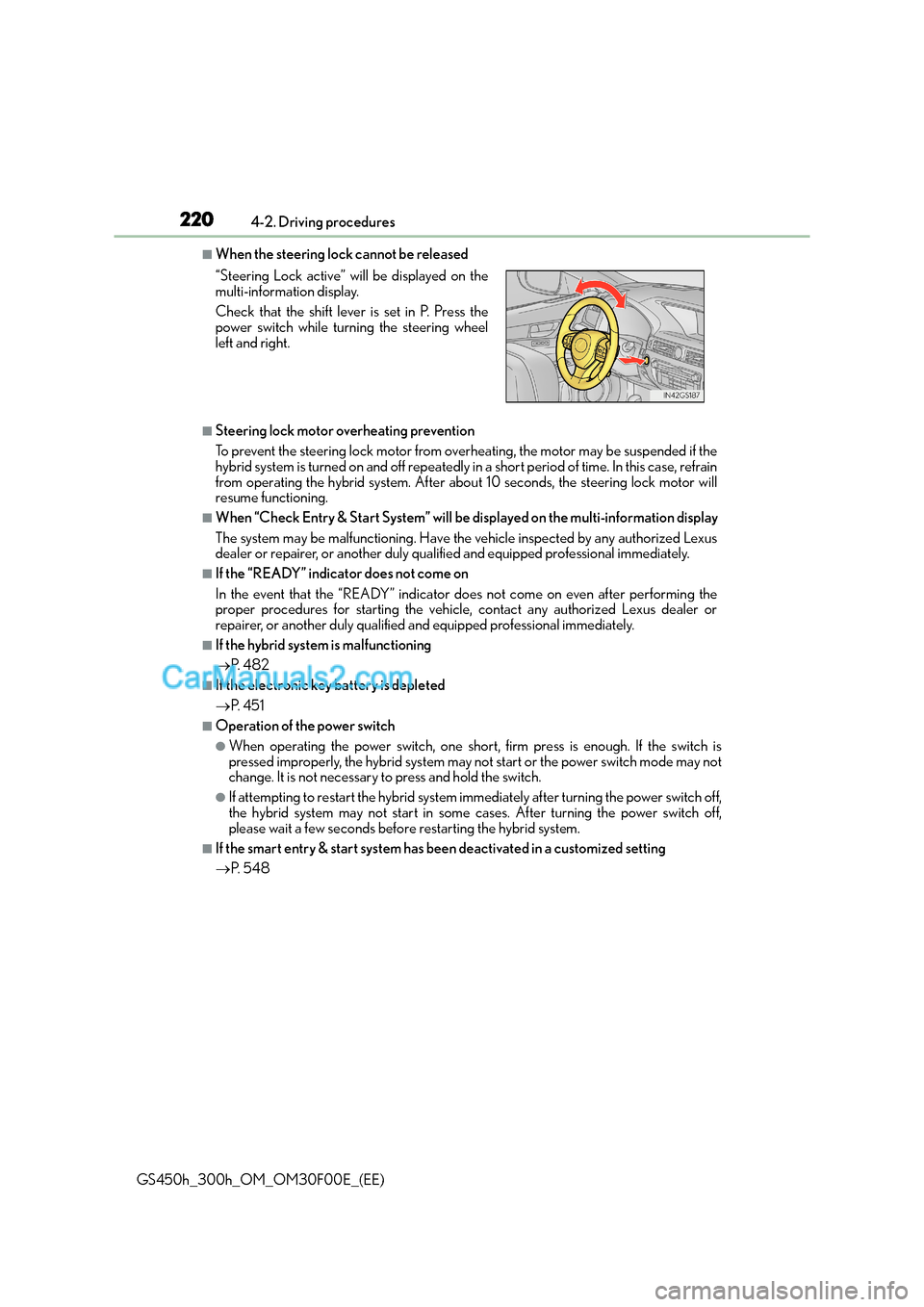
■When the steering lock cannot be released
■Steering lock motor overheating prevention
To prevent the steering lock motor from overheating, the motor may be suspended if the
hybrid system is turned on and off repeatedly in a short period of time. In this case, refrain
from operating the hybrid system. After about 10 seconds, the steering lock motor will
resume functioning.
■When “Check Entry & Start System” will be displayed on the multi-information display
The system may be malfunctioning. Have the vehicle inspected by any authorized Lexus
dealer or repairer, or another duly qualified and equipped professional immediately.
■If the “READY” indicator does not come on
In the event that the “READY” indicator does not come on even after performing the
proper procedures for starting the vehicle, contact any authorized Lexus dealer or
repairer, or another duly qualified and equipped professional immediately.
■If the hybrid system is malfunctioning
→ P. 4 8 2
■If the electronic key battery is depleted
→P. 4 5 1
■Operation of the power switch
●When operating the power switch, one short, firm press is enough. If the switch is
pressed improperly, the hybrid system may no t start or the power switch mode may not
change. It is not necessary to press and hold the switch.
●If attempting to restart the hybrid system immediately after turning the power switch off,
the hybrid system may not start in some cases. After turning the power switch off,
please wait a few seconds before restarting the hybrid system.
■If the smart entry & start system has been deactivated in a customized setting
→P. 5 4 8
“Steering Lock active” w
ill be displayed on the
multi-information display.
Check that the shift lever is set in P. Press the
power switch while turning the steering wheel
left and right.
Page 221 of 620

2214-2. Driving procedures
4
Driving
GS450h_300h_OM_OM30F00E_(EE)
WA R N I N G
■When starting the hybrid system
Always start the hybrid system while sitting in the driver’s seat. Do not depress the
accelerator pedal while starting the hybrid system under any circumstances.
Doing so may cause an accident resulting in death or serious injury.
■Caution while driving
If hybrid system failure occurs while the vehicle is moving, do not lock or open the
doors until the vehicle reaches a safe and complete stop. Activation of the steering lock
in this circumstance may lead to an accident, resulting in death or serious injury.
■Stopping the hybrid system in an emergency
If you want to stop the hybrid system in an emergency while driving the vehicle, press
and hold the power switch for more than 2 se conds, or press it briefly 3 times or more
in succession. ( →P. 4 6 9 )
However, do not touch the power switch while driving except in an emergency. Turning
the hybrid system off while driving will not cause loss of steering or braking control,
however, power assist to the steering will be lost. This will make it more difficult to steer
smoothly, so you should pull over and stop the vehicle as soon as it is safe to do so.
NOTICE
■To prevent 12-volt battery discharge
●Do not leave the power switch in ACCESSORY or ON mode for long periods of
time without the hybrid system on.
●If “POWER ON” is displayed on the multi-in formation display, the power switch is not
off. Exit the vehicle after turning the power switch off.
●Do not stop the hybrid system when the shift lever is in a position other than P. If the
hybrid system is stopped in another shift lever position, the power switch will not be
turned off but instead be turned to ACCESSORY mode. If the vehicle is left in
ACCESSORY mode, 12-volt battery discharge may occur.
■When starting the hybrid system
If the hybrid system becomes difficult to start, have your vehicle checked by any autho-
rized Lexus dealer or repairer, or anothe r duly qualified and equipped professional
immediately.
■Symptoms indicating a malfunction with the power switch
If the power switch seems to be operating somewhat differently than usual, such as the
switch sticking slightly, there may be a malfunction. Contact any authorized Lexus
dealer or repairer, or another duly qualif ied and equipped professional immediately.
Page 232 of 620

2324-2. Driving procedures
GS450h_300h_OM_OM30F00E_(EE)
■Parking brake operation
●When the power switch is not in ON mode, the parking brake cannot be released using
the parking brake switch.
●When the power switch is not in ON mode, automatic mode (automatic brake setting
and releasing) is not available.
●If the parking brake is operated repeatedly over a short period of time, the system may
restrict operation to prevent overheating. If this happens, refrain from operating the
parking brake. Normal operation will return after about 1 minute.
●Vehicles with towing package: In situations such as when parking while towing a trailer,
the maximum amount of braking force can be used by pressing the parking brake
switch with the parking brake already set.
●Vehicles without towing package: In situations such as when parking on a steep slope*,
the maximum amount of braking force can be used by pressing the parking brake
switch with the parking brake already set.
*: Use wheel chocks when parking on a steep slope.
■Parking brake operation sound
When the parking brake operates, a motor sound (whirring sound) may be heard. This
does not indicate a malfunction.
■Parking brake indicator light
●Depending on the power switch mode, the parking brake indicator light will come on
and stay on as described below:
ON mode: Comes on until the parking brake is released.
Not in ON mode: Stays on for approximately 15 seconds.
●When the power switch is turned off with the parking brake set, the parking brake indi-
cator light will stay on for about 15 seco nds. This does not indicate a malfunction.
■When there is a malfunction in the system
Warning lights and/or warning message will turn on or flash. (→P. 4 7 8 , 4 8 2 )
Depending on the condition, the park ing brake indicator light may flash.
■Parking brake engaged warning buzzer
→P. 4 8 8
■Usage in winter time
→P. 3 5 4
Page 233 of 620

2334-2. Driving procedures
4
Driving
GS450h_300h_OM_OM30F00E_(EE)
NOTICE
■When parking the vehicle
Before you leave the vehicle, set the parking brake, shift the shift lever to P and make
sure that the vehicle does not move.
■When the system malfunctions
Stop the vehicle in a safe place and check the warning messages.
■When the parking brake cannot be released due to a malfunction
Use the parking brake release tool to manually release the parking brake. (→P. 5 4 6 )
Driving the vehicle with the parking brake set will lead to brake components overheat-
ing, which may affect braking performance and increase brake wear.
Page 234 of 620

2344-2. Driving procedures
GS450h_300h_OM_OM30F00E_(EE)
Brake Hold
Turns the brake hold system on
The brake hold standby indicator
(green) comes on. While the system is
holding the brake, the brake hold oper-
ated indicator (yellow) comes on.
■Brake hold system operating conditions
The brake hold system cannot be turn ed on in the following conditions:
●The driver’s door is not closed.
●The driver is not wearing the seat belt.
●“EPB Activation Stopped Incompletely” or “Electronic Parking Brake Malfunction Visit
Your Dealer” is displayed on the multi-information display.
If any of the conditions above are detected when the brake hold system is enabled, the
system will turn off and the brake hold standby indicator light will go off. In addition, if any
of the conditions are detected while the sy stem is holding the brake, a warning buzzer
will sound and a message will be shown on th e multi-information display. The parking
brake will then be set automatically.
■Brake hold function
●If the brake pedal is left released for a period of about 3 minutes after the system has
started holding the brake, th e parking brake will be set automatically. In this case, a
warning buzzer sounds and a message is shown on the multi-information display.
●To turn the system off while the system is holding the brake, firmly depress the brake
pedal and press the button again.
●The brake hold function may not hold the vehicle when the vehicle is on a steep incline.
In this situation, it may be necessary for the driver to apply the brakes. A warning
buzzer will sound and the multi-information di splay will inform the driver of this situa-
tion. ( →P. 4 8 2 )
The brake hold system keeps the brake applied when the shift lever is in D, S or
N with the system on and the brake peda l has been depressed to stop the vehi-
cle. The system releases the brake wh en the accelerator pedal is depressed
with the shift lever in D or S to allow smooth start off.
Page 235 of 620

2354-2. Driving procedures
4
Driving
GS450h_300h_OM_OM30F00E_(EE)
■When the parking brake is set automatically while the system is holding the brakes
The parking brake will not be released automatically. Perform one of the following proce-
dures to release the parking brake and confirm that the parking brake indicator light
turns off. ( →P. 2 3 1 )
●With the brake pedal depressed, operate the parking brake switch.
●Fasten your seat belt, check that the shift leve r is in either D or R and slowly depress the
accelerator pedal.
■Warning message and buzzers
Warning messages and buzzers are used to in dicate a system malfunction or to inform
the driver of the need for caution. ( →P. 4 8 2 )
WA R N I N G
■When the vehicle is on a steep incline
When using the brake hold system on a steep incline exercise caution. The brake hold
function may not hold the vehicle in such a situation.
■When stopped on a slippery road
The system cannot stop the vehicle when the gripping ability of the tires has been
exceeded. Do not use the system when stopped on a slippery road.
NOTICE
■When parking the vehicle
The brake hold system is not designed for use when parking the vehicle for a long
period of time. Turning the power switch o ff while the system is holding the brake may
release the brake, which would cause the vehicle to move. When operating the power
switch, depress the brake pedal, set the parking brake and shift the shift lever to P.