Page 1 of 114

1
ES300h_QG_OM33B89U_(U)
The Quick Guide is not intended as a substitute for your Owner’s
Manual. We strongly encourage you to review the Owner’s
Manual and supplementary manuals so you will have a better
understanding of your vehicle’s capabilities and limitations.
Air Conditioning System .................................................................................................................82
Audio System (with Lexus Display Audio System) Lexus Display Audio operation buttons ............................................................................... 78
Using the steering switches to change audio sources ................................................... 78
Audio menu screen.............................................................................................................. ......... 79
Operating the audio system using the steering wheel switches ................................. 81
Audio System (with navigation system)
*
Audio control screen........................................................................................................... ......... 67
Remote control (steering wheel switches).......................................................................... 67
Basic operation ................................................................................................................ ...............68
Radio ................................................................................................................................................... 69
DVD player/CD player ........................................................................................................... .... 70
Operating an iPod .............................................................................................................. ........... 72
Automatic High Beam ......................................................................................................................36
BSM (Blind Spot Monitor) .............................................................................................................. 49
Cruise Control ...................................................................................................................................... 41
Door Locks ............................................................................................................................................ 101
Driving Mode Select Switch ......................................................................................................... 50
Driving Position Memory ................................................................................................................ 23
Dynamic Radar Cruise Control ................................................................................................... 43
Energy Monitor/Consumption Screen ..................................................................................... 14
EV Drive Mode .................................................................................................................................... 29
Floor mat installation ............................................................................................................................ 11
Front Seats .............................................................................................................................................. 21
Fuel Tank Cap ............................................................................................................................... ...... 104
Garage Door Opener ...................................................................................................................... 93
Contents
*: These features may be operated by Voice Command (See P.86)
Page 9 of 114
9
ES300h_QG_OM33B89U_(U)
OverviewInstrument Panel
Remote Touch P.52
Heated steering wheel switch*
VSC OFF switch*
Seat heater and ventilator switches P.91
Driving mode select switch P.50
Shift lever P.30
Rear sunshade switch P.92
Lexus Display Audio controller P.73
EV drive mode switch P.29
Page 23 of 114
23
ES300h_QG_OM33B89U_(U)
Driving Position Memory (if equipped)
■Driving position memory
■
Recording procedure
Check that the shift lever is in P.
Turn the power switch to ON mode.
Adjust the driver’s seat, steering wheel, and outside rear view mirrors to the desired
positions. While pressing the “SET” button, or within 3
seconds after the “SET” button is pressed,
press button “1”, “2” or “3” until the buzzer
sounds.If the selected button has already been
preset, the previously recorded position
will be overwritten.
■Recall procedure
Check that the shift lever is in P.
Turn the power switch to ON mode.
Press one of the buttons for the driving
position you want to recall until the buzzer
sounds.
This feature automatically adjusts the front se ats, steering wheel (power adjustment type)
and outside rear view mirrors to suit your preferences.
1
2
3
4
1
2
3
Page 47 of 114
47
ES300h_QG_OM33B89U_(U)
LDA (Lane Departure Alert with
steering control) (if equipped)
■Turning LDA system on
Press the LDA switch to turn the LDA sys-
tem on.
The LDA indicator illuminates and a
message is displayed on the multi-infor-
mation display.
Press the LDA switch again to turn the
LDA system off.
When the LDA system is turned on or
off, operation of the LDA system contin-
ues in the same condition the next time
the hybrid system is started.
When driving on highways and freeways with wh ite or yellow lines, this function alerts the
driver when the vehicle might depart from its lane and provides assistance by operating
the steering wheel to keep the vehicle in its lane.
The LDA system recognizes visible white or yellow lines with the camera sensor on the
upper portion of the front windshield.
Page 62 of 114
62
ES300h_QG_OM33B89U_(U)
Hands-free System For Cellular Phone
(with navigation system)
■Bluetooth® phone pairing
Compatible Bluetooth®-equipped phones can be connected to the vehicle, enabling hands-
free operation. Please refer to the cellular ph one manufacturer’s user guide for pairing pro-
cedures, or go to “www.lexus.com/MobileLink
” (for U.S.A.) for more phone information.
To use a Bluetooth
® phone, it is necessary
to first register it in the system.
Press on the steering wheel.
Select “Yes”.
When this screen is displayed, search
for the device name displayed on this
screen on the screen of your
Bluetooth
® device.
Refer to the cellular phone user’s man-
ual for cellular phone operation.
Register the Bluetooth
® device using
your Bluetooth
® device.
Check that the following screen is dis-
played when registration is complete.
Select “OK” when the connection sta-
tus changes from “Connecting...” to
“Connected”.
2
1
2
33
4
55
66
Page 65 of 114
65
ES300h_QG_OM33B89U_(U)
■Calling by name
You can call by giving a name registered in the contacts. For details, refer to the
“NAVIGATION SYSTEM OWNER’S MANUAL”.
Press .
Say “Call ”.
■Calling by favorites list
Press on the steering wheel.
Select the “Favorites” tab and select
the desired contact.
Select the desired number.
Check that the “Call” screen is dis-
played.
11
2
: Pressing this switch turns the voice command system on. Say a command after the
beep.
21
2
33
4
Page 66 of 114
66
ES300h_QG_OM33B89U_(U)
■Calling using e-mail/SMS/MMS message
Press on the steering wheel.
Select .
Select the desired message.
Select .
Check that the “Call” screen is dis-
played.
■Receiving a call
When a call is receiv ed, this screen is
displayed with a sound.
Press on the steering wheel to
talk on the phone.
To refuse the call, press on the steer-
ing wheel.
■ Steering switches
Increases/decreases volume
Start the voice command system
Sending/Receiving/“Phone” screen
display
End call/Refuse call
21
2
3
4
5
The tab display may vary depending on the type of cellular phone.
11
2
1
2
3
4
Page 67 of 114
67
ES300h_QG_OM33B89U_(U)
Audio System (with navigation system)
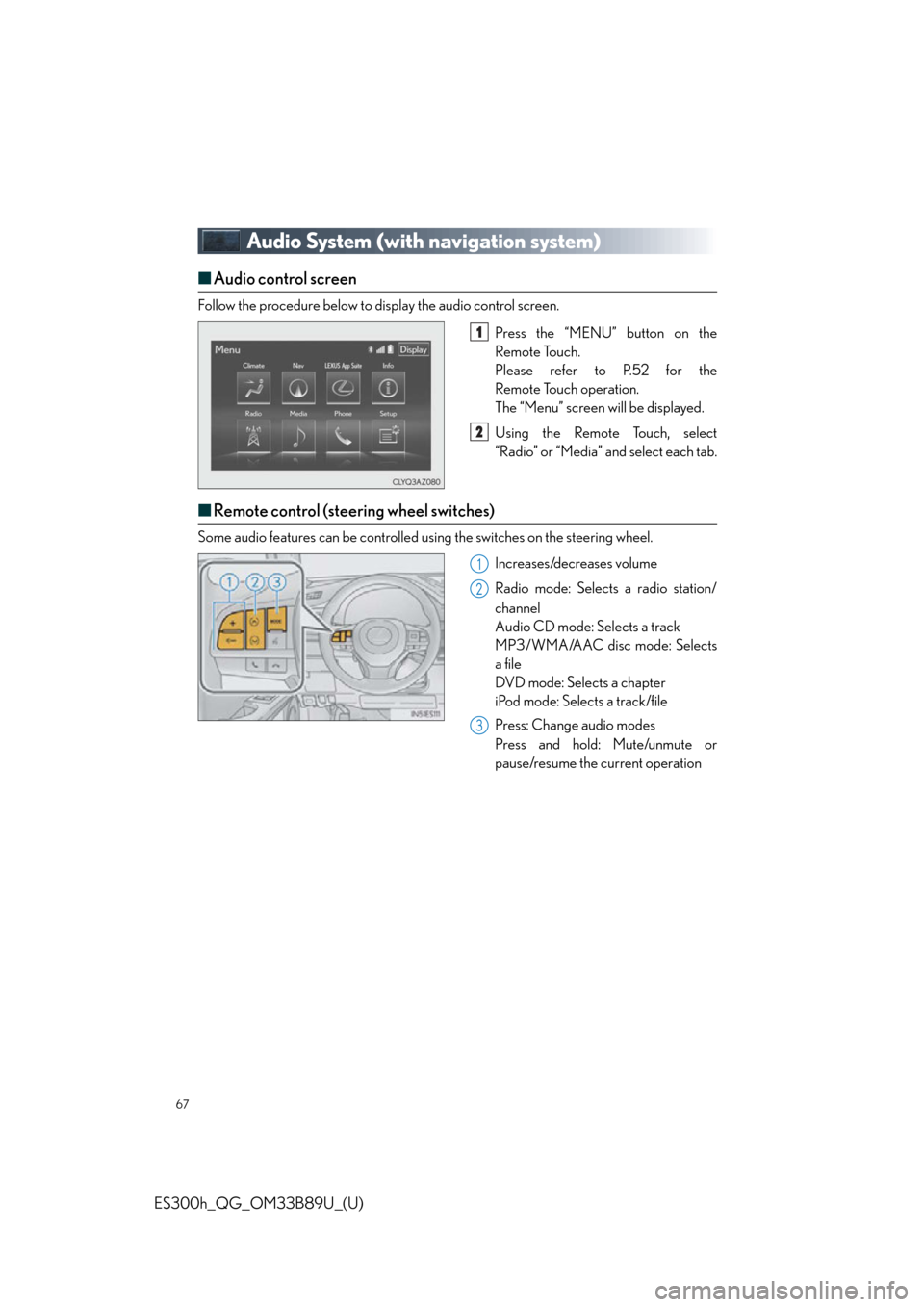
■Audio control screen
Follow the procedure below to display the audio control screen.
Press the “MENU” button on the
Remote Touch.
Please refer to P.52 for the
Remote Touch operation.
The “Menu” screen will be displayed.
Using the Remote Touch, select
“Radio” or “Media” and select each tab.
■Remote control (steering wheel switches)
Some audio features can be controlled usin g the switches on the steering wheel.
Increases/decreases volume
Radio mode: Selects a radio station/
channel
Audio CD mode: Selects a track
MP3/WMA/AAC disc mode: Selects
a file
DVD mode: Selects a chapter
iPod mode: Selects a track/file
Press: Change audio modes
Press and hold: Mute/unmute or
pause/resume the current operation
1
2
1
2
3