Page 35 of 114
35
ES300h_QG_OM33B89U_(U)
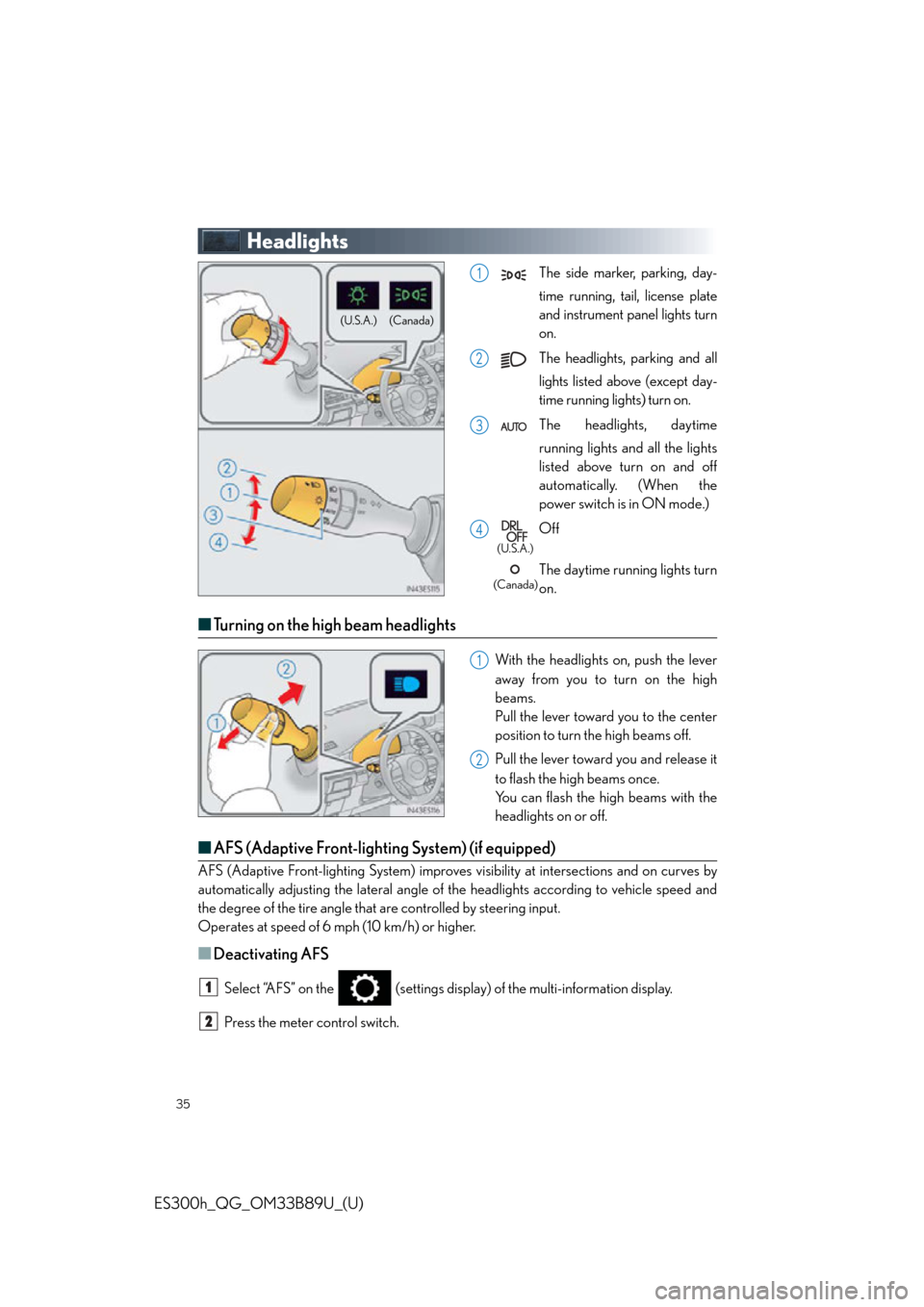
Headlights
The side marker, parking, day-
time running, tail, license plate
and instrument panel lights turn
on.
The headlights, parking and all
lights listed above (except day-
time running lights) turn on.
The headlights, daytime
running lights and all the lights
listed above turn on and off
automatically. (When the
power switch is in ON mode.)
Off
The daytime running lights turn
on.
■Turning on the high beam headlights
With the headlights on, push the lever
away from you to turn on the high
beams.
Pull the lever toward you to the center
position to turn the high beams off.
Pull the lever toward you and release it
to flash the high beams once.
You can flash the high beams with the
headlights on or off.
■AFS (Adaptive Front-lighting System) (if equipped)
AFS (Adaptive Front-lighting System) improves visibility at intersections and on curves by
automatically adjusting the lateral angle of the headlights according to vehicle speed and
the degree of the tire angle that are controlled by steering input.
Operates at speed of 6 mph (10 km/h) or higher.
■Deactivating AFS
Select “AFS” on the (settings displa y) of the multi-information display.
Press the meter control switch.
(Canada)
(U.S.A.)
1
2
3
4
(U.S.A.)
(Canada)
1
2
1
2
Page 36 of 114
36
ES300h_QG_OM33B89U_(U)
Automatic High Beam (if equipped)
■Activating the Automatic High Beam system
Push the lever away from you with the
headlight switch in the or
position.
Press the Automatic High Beam
switch.
The Automatic High Beam indicator
will come on when the headlights are
turned on automatically to indicate
that the system is active.
The Automatic High Beam uses an in-vehicle camera sensor to assess the brightness of
streetlights, the lights of vehicl es ahead, etc., and automatica lly turns the high beam on or
off as necessary.
1
2
Page 48 of 114
48
ES300h_QG_OM33B89U_(U)
Intuitive Parking Assist (if equipped)
■Turning the system on and off
Turns the intuitive parking assist on/off
When on, the indicator light comes on to
inform the driver that the system is oper-
ational.
The distance from your vehicle to nearby ob stacles when parallel parking or maneuver-
ing into a garage is measured by the sens ors and communicated via the multi-informa-
tion display, navigation sy stem screen or Lexus Display Audio system screen and a
buzzer. Always check the surrounding area when using this system.
Page 51 of 114
51
ES300h_QG_OM33B89U_(U)
Tire Pressure Warning System
■The tire inflation pressure display function
The tire pressure detected by the tire pres-
sure warning system can be displayed on
the multi-information display. ( P. 3 3 )
The illustration used is intended as an exam-
ple, and may differ from the image that is
actually displayed on the multi-information
display.
■ Initializing the tire pressure warning system
Press and hold the tire pressure warning
reset switch until the tire pressure warning
light blinks slowly 3 times.
Your vehicle is equipped with a tire pressure warning system that uses tire pressure warn-
ing valves and transmitters to detect low tire inflation pressure before serious problems
arise.
Page 91 of 114
91
ES300h_QG_OM33B89U_(U)
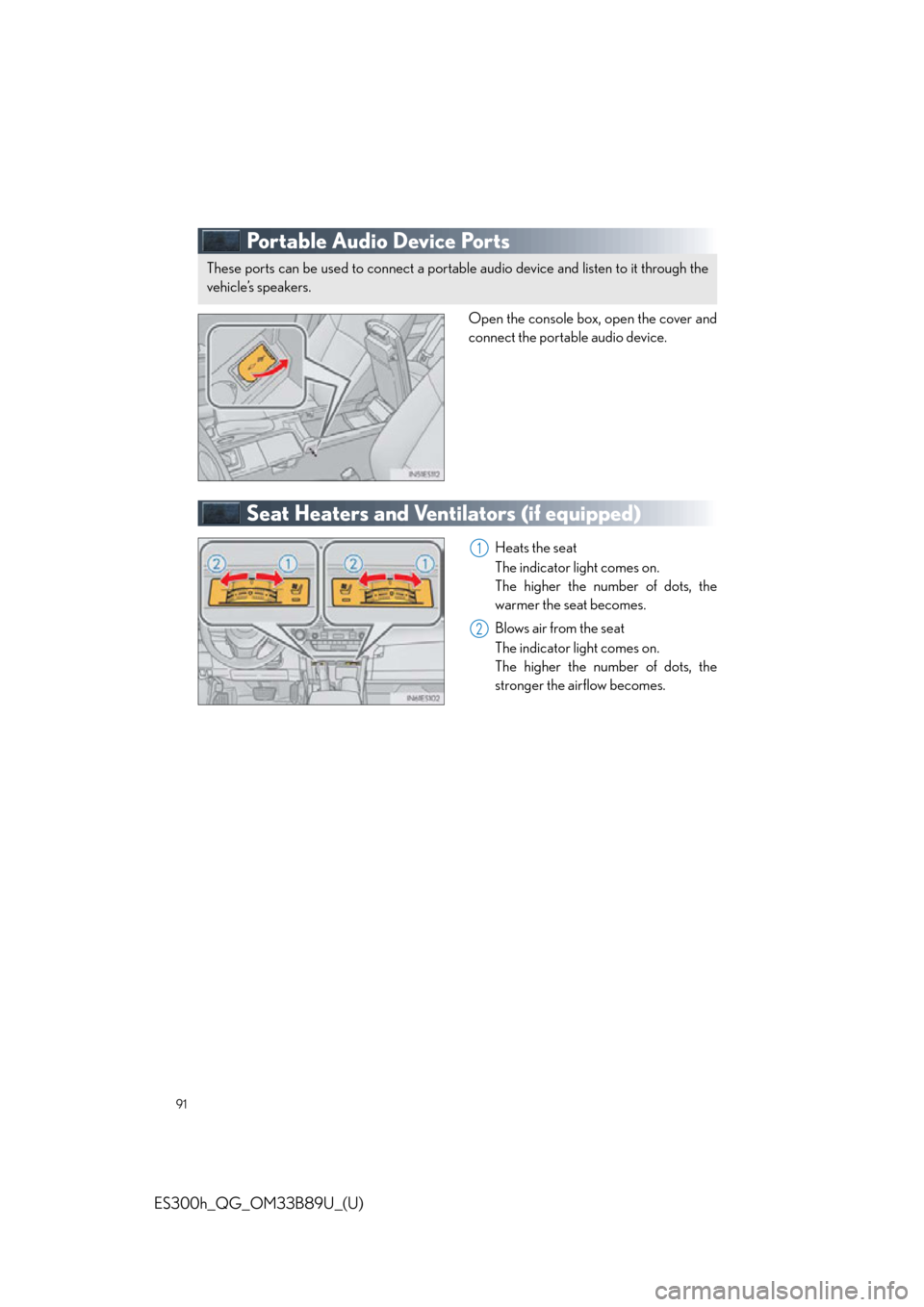
Portable Audio Device Ports
Open the console box, open the cover and
connect the portable audio device.
Seat Heaters and Ventilators (if equipped)
Heats the seat
The indicator light comes on.
The higher the number of dots, the
warmer the seat becomes.
Blows air from the seat
The indicator light comes on.
The higher the number of dots, the
stronger the airflow becomes.
These ports can be used to connect a portable audio device and listen to it through the
vehicle’s speakers.
1
2
Page 93 of 114

93
ES300h_QG_OM33B89U_(U)
Garage door opener
■Programming the HomeLink®
The HomeLink® wireless control system in your ve hicle has 3 buttons which can be pro-
grammed to operate 3 different devices. Refer to the programming methods on the follow-
ing pages to determine the method wh ich is appropriate for the device.
HomeLink
® indicator light
Garage door operation indicators
HomeLink
® icon
Illuminates while HomeLink
® is oper-
ating.
Buttons
■ Programming HomeLink®
Press and release the HomeLink® button you want to program and check that the
HomeLink
® indicator light flashes (orange).
Perform within 60 seconds of , or the in dicator light will stop flashing and pro-
gramming will not be able to be completed.
Point the remote control transmitter for
the device at the rear view mirror, 1 to 3
in. (25 to 75 mm) from the
HomeLink
® buttons.
Keep the HomeLink
® indicator light
in view while programming.
For U.S.A. owners Press and hold the handheld transmit-
ter button until the HomeLink
® indica-
tor light changes from slowly flashing
orange to rapidly flashing green (roll-
ing code) or continuously lit green
(fixed code), then release the button.
The garage door opener can be programmed to operate garage doors, gates, entry
doors, door locks, home lighting system s, security systems, and other devices.
1
2
3
4
1
31
2
3
Page 94 of 114

94
ES300h_QG_OM33B89U_(U)
Programming an entry gate (for U.S.A. owners)/Programming a device in the Cana-
dian marketPress and release the remote control transmitter button at 2 second intervals, repeat-
edly, until the HomeLink
® indicator light changes from sl owly flashing (orange) to rap-
idly flashing (green) (rolling code) or continuously lit (green) (fixed code).
Te s t t h e H o m e L i n k
® operation by pressing the newly programmed button and observ-
ing the indicator light:
● Device with fixed code: If the indicator light is solid/continuous, programming has
been completed and your garage door or other device should operate when the
HomeLink
® button is pressed and released.
● Device with rolling code: If the indicator light flashes rapidly, your garage door
opener motor (or other device) is equipp ed with a rolling code. Complete the pro-
gramming process by firmly pressing and holding the programmed HomeLink
®
button for 2 seconds and then release the button.
● If the garage door or other device does not operate, proceed to “Programming a
rolling code system”.
Repeat the steps above to program another device for any of the remaining
HomeLink
® buttons.
3
4
5
Page 95 of 114
95
ES300h_QG_OM33B89U_(U)
■Programming other devices
For U.S.A. owners:
To program an entry gate, see the OWNER’S MANUAL.
To program other devices, contact your Lexus dealer.
For Canadian owners: To program all other devices, follow the same procedure as for garage door programming.
■Operating HomeLink®
Press the appropriate HomeLink® button. The HomeLink® indicator light should turn on.
LEXUS Enform Safety Connect
(for U.S.A., if equipped)
■System components
“SOS” button
LED light indicators
Microphone
Safety Connect is a subscription-based telema tics service that uses Global Positioning
System (GPS) data and embedded cellular te chnology to provide safety and security
features to subscribers. Safety Connect is supported by Lexus’ designated response
center, which operates 24 hours per day, 7 days per week.
Safety Connect service is available by subscription on select, telematics hardware-
equipped vehicles.
1
2
3