2016 Lexus ES300h warning
[x] Cancel search: warningPage 91 of 600

91
ES300h_OM_OM33B71U_(U)2. Instrument cluster
2
Instrument cluster
Multi-information display
The multi-information display presents the driver with a variety of vehicle data.
Displays the following information
when an icon is selected. (
P. 9 2 )
Drive information
Select to display various drive data.
( P. 9 2 )
Navigation system-linked dis-
play (if equipped)
Select to display the following na vigation system-linked information.
• Route guidance
• Compass display (north-up display/heading-up display)
Audio system-linked display
Select to enable selection of an audio source or track on the display using the
meter control switches.
Driving assist information
Select to display the cruise control or dynamic radar cruise control/LDA (Lane
Departure Alert with steering control) information, when the system is used.
( P. 213, 222, 234)
Warning message display
Select to display warning me ssages and measures to be taken if a malfunction is
detected. ( P. 5 0 5 )
Settings display
Select to change the meter display settings. ( P. 5 5 7 )
Display contents
Page 93 of 600

ES300h_OM_OM33B71U_(U)
932. Instrument cluster
2
Instrument cluster
■Average speed (after reset*2/a f t e r s t a r t )*1
Displays the average vehicle speed since the function was reset and the
hybrid system was started, respectively
■Elapsed time (after reset*2/after start)*1
Displays the elapsed time since the function was reset and the hybrid system
was started, respectively
■Distance (range/after start)*1
Displays the estimated maximum distance that can be driven with the quantity
of fuel remaining and the distance driven after the hybrid system was started
respectively.
• This distance is computed based on your average fuel consumption. As a result,
the actual distance that can be driven may differ from that displayed.
• When only a small amount of fuel is added to the tank, the display may not be
updated.
When refueling, turn the power switch off. If the vehicle is refueled without turning
the power switch off, the display may not be updated.
■Energy monitor
P. 9 6
■Tire inflation pressure
Displays inflation pressure of each tire.
The inflation pressure of the sp are tire will not be displayed.
■LDA (Lane Departure Alert with steering control) vehicle sway warning (if
equipped)
P. 2 1 3
■Display off
A blank screen is displayed
*1: Displayed when the item is set in “Drive In fo 1”, “Drive Info 2” or “Drive Info 3”.
( P. 5 5 7 )
*2: The function can be reset by pressing the of the meter control switches for
longer than 1 second when th e item to reset is displayed.
If there is more than one item that can be reset, the item selection screen will appear.
Page 95 of 600

ES300h_OM_OM33B71U_(U)
952. Instrument cluster
2
Instrument cluster
■System check display
After turning the power switch to ON mode, opening image is displayed while system
operation is checked. When the system check is complete, the normal screen will return.
■Suspension of the settings display
In the following situations, the settings display using the meter control switches will be
suspended.
●When a warning message appears on the multi-information display
●When the vehicle begins to move
■Tire inflation pressure
●It may take a few minutes to display the tire inflation pressure after the power switch is
turned to ON mode. It may also take a few minutes to display the tire inflation pressure
after inflation pressure has been adjusted.
●“---” may be displayed if the tire information cannot be determined due to unfavorable
radio wave conditions.
●Tire inflation pressure changes with temperat ure. The displayed values may also be dif-
ferent from the values measured using a tire pressure gauge.
■When disconnecting and reconnec ting 12-volt battery terminals
The drive information will be reset.
■Liquid crystal display
P. 8 9
WA R N I N G
■Caution for use while driving
For safety, avoid operating the meter control switch while driving as much as possible,
and do not look continuously at the multi- information display while driving. Stop the
vehicle and operate the meter control switch. Failure to do so may cause a steering
wheel operation error, resultin g in an unexpected accident.
■Cautions during setting up the display
As the hybrid system needs to be operating during setting up the display, ensure that
the vehicle is parked in a place with adequate ventilation. In a closed area such as a
garage, exhaust gases includin g harmful carbon monoxide (CO) may collect and enter
the vehicle. This may lead to death or a serious health hazard.
NOTICE
■During setting up the display
To prevent 12-volt battery discharge, ensure that the hybrid system is operating while
setting up the display features.
Page 122 of 600
122
ES300h_OM_OM33B71U_(U)3-2. Opening, closing and
locking the doors and trunk
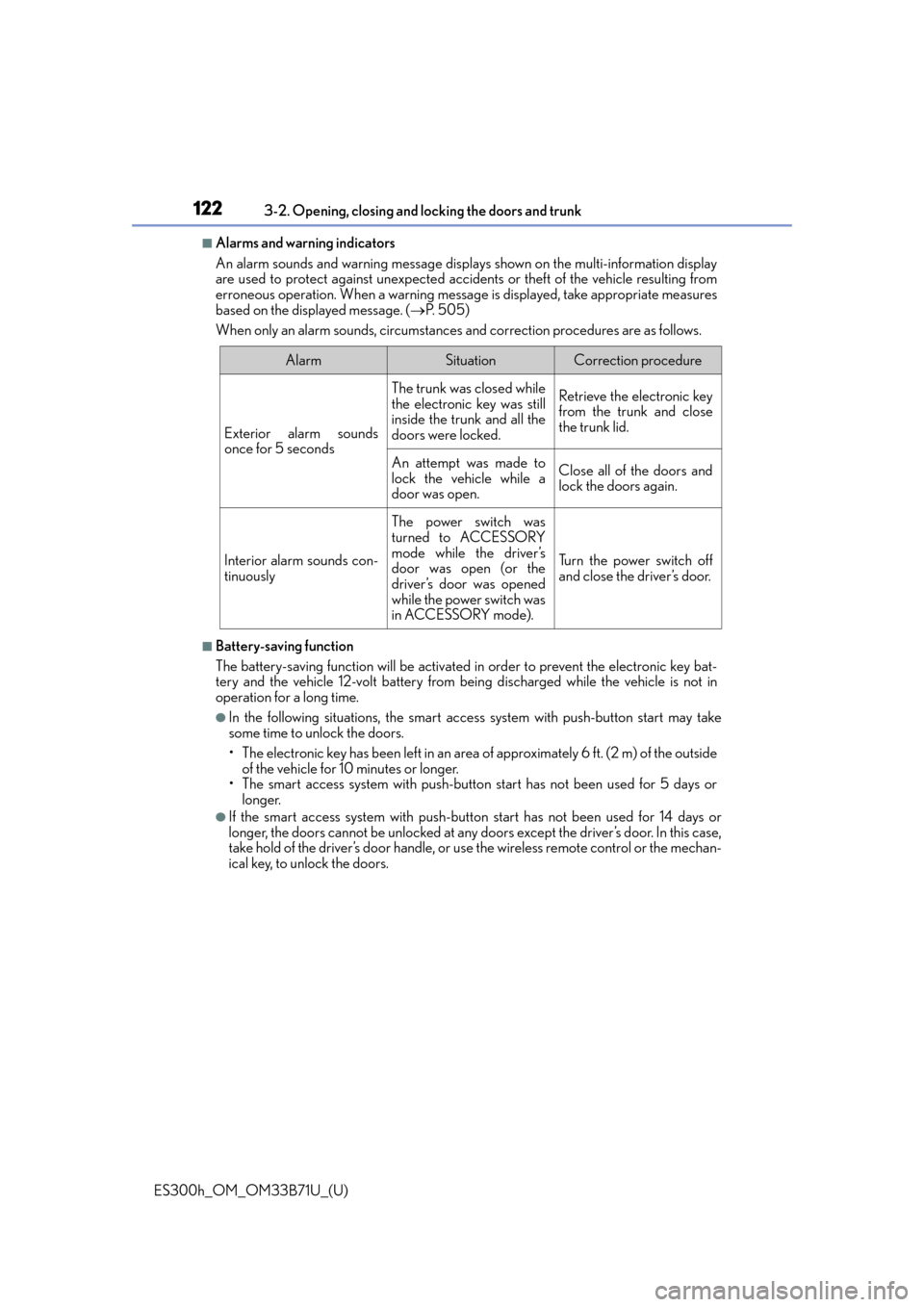
■Alarms and warning indicators
An alarm sounds and warning message displa ys shown on the multi-information display
are used to protect against unexpected acci dents or theft of the vehicle resulting from
erroneous operation. When a warning messag e is displayed, take appropriate measures
based on the displayed message. ( P. 5 0 5 )
When only an alarm sounds, circumstances and correction procedures are as follows.
■Battery-saving function
The battery-saving function will be activated in order to prevent the electronic key bat-
tery and the vehicle 12-volt battery from being discharged while the vehicle is not in
operation for a long time.
●In the following situations, the smart access system with push-button start may take
some time to unlock the doors.
• The electronic key has been left in an area of approximately 6 ft. (2 m) of the outside
of the vehicle for 10 minutes or longer.
• The smart access system with push-butto n start has not been used for 5 days or
longer.
●If the smart access system with push-butto n start has not been used for 14 days or
longer, the doors cannot be unlocked at any doors except the driver’s door. In this case,
take hold of the driver’s door handle, or us e the wireless remote control or the mechan-
ical key, to unlock the doors.
AlarmSituationCorrection procedure
Exterior alarm sounds
once for 5 seconds
The trunk was closed while
the electronic key was still
inside the trunk and all the
doors were locked.Retrieve the electronic key
from the trunk and close
the trunk lid.
An attempt was made to
lock the vehicle while a
door was open.Close all of the doors and
lock the doors again.
Interior alarm sounds con-
tinuously
The power switch was
turned to ACCESSORY
mode while the driver’s
door was open (or the
driver’s door was opened
while the power switch was
in ACCESSORY mode).
Tu r n t h e p o w e r s w i t c h o f f
and close the driver’s door.
Page 146 of 600

146
ES300h_OM_OM33B71U_(U)3-5. Opening, closing the windows and moon roof
■When the window cannot be opened or closed
When the jam protection function or catch
protection function operates unusually and
the door window cannot be open ed or closed, perform the following operations with the
power window switch of that door.
●Stop the vehicle. With the power switch in ON mode, within 4 seconds of the jam pro-
tection function or catch protection func tion activating, continuously operate the
power window switch in the one-touch closing direction or one-touch opening direc-
tion so that the door window can be opened and closed.
●If the door window cannot be opened and closed even when performing the above
operations, perform the following proc edure for function initialization.
Turn the power switch to ON mode.
Pull and hold the power window switch in the one-touch closing direction and com-
pletely close the door window.
Release the power window switch for a moment and then resume pulling and hold-
ing the switch in the one-touch closing direction for approximately 4 seconds.
Press and hold the power window switch in the one-touch opening direction. After
the door window is complete ly opened, continue holding the switch for an additional
1 second or more.
Pull and hold the power window switch in the one-touch closing direction again.
After the door window is completely clos ed, continue holding the switch for a fur-
ther 1 second or more.
If you release the switch while the window is moving, start again from the beginning.
If the window reverses and cannot be fully cl osed or opened, have the vehicle inspected
by your Lexus dealer.
■Door lock linked window operation
●The power windows can be opened an d closed using the mechanical key.* ( P. 5 2 1 )
●The power windows can be opened us ing the wireless remote control.* ( P. 1 0 8 )
*: These settings must be customized at your Lexus dealer.
■When the 12-volt battery is disconnected
The window lock switch is disabled. If nece ssary, press the window lock switch after
reconnecting the 12-volt battery.
■Power windows open warning buzzer
The buzzer sounds and a message is shown on the multi-information display in the instru-
ment cluster when the power switch is turned off and the driver’s door is opened with the
power windows open.
■Customization
Settings (e.g. linked door lock operation) can be changed.
(Customizable features: P. 5 5 5 )
1
2
3
4
5
Page 150 of 600

150
ES300h_OM_OM33B71U_(U)3-5. Opening, closing the windows and moon roof
■When the moon roof does not close normally
Perform the following procedure:
●If the moon roof closes
but then re-opens slightly
Stop the vehicle.
Press and hold the “CLOSE” switch.
*1
The moon roof will close, reopen and pause for approximately 10 seconds.*2 Then it
will close again, tilt up and pause for approx imately 1 second. Finally, it will tilt down,
open and close.
Check to make sure that the moon roof is completely closed and then release the
switch.
●If the moon roof tilts down but then tilts back up
Stop the vehicle.
Press and hold the “UP” switch
*1 until the moon roof moves into the tilt up position
and stops.
Release the “UP” switch once and then press and hold the “UP” switch again.
*1
The moon roof will pause for approximatel y 10 seconds in the tilt up position.*2
Then it will adjust slightly and pause for approximately 1 second. Finally, it will tilt
down, open and close.
Check to make sure that the moon roof is completely closed and then release the
switch.
*1: If the switch is released at the incorrec t time, the procedure will have to be per-
formed again from the beginning.
*2: If the switch is released after the above mentioned 10 second pause, automatic operation will be disabled. In that case, press and hold the “CLOSE” or “UP” switch,
and the moon roof will tilt up and pause fo r approximately 1 second. Then it will tilt
down, open and close. Check to make sure that the moon roof is completely closed
and then release the switch.
If the moon roof does not fully close even after performing the above procedure cor-
rectly, have the vehicle inspected by your Lexus dealer.
■Moon roof open warning buzzer
The buzzer sounds and a message is shown on the multi-information display in the instru-
ment cluster when the power switch is turned off and the driver’s door is opened with the
moon roof open.
■Customization
Settings (e.g. linked door lock operation) can be changed.
(Customizable features: P. 5 5 5 )
1
2
3
1
2
3
4
Page 155 of 600

ES300h_OM_OM33B71U_(U)
1554-1. Before driving
4
Driving
■When starting off on a uphill
The hill-start assist control will activate. (P. 2 7 2 )
■For fuel-efficient driving
Keep in mind that hybrid vehicles are similar to conventional vehicles, and it is necessary
to refrain from activities such as sudden acceleration. ( P. 2 7 8 )
■Driving in the rain or adverse weather conditions
●Drive carefully, because visibility may be reduced, the windows may become fogged-
up, and the road will be slippery.
●Drive carefully when it gets we t or icy, because the road surface will be especially slip-
pery.
●Slow down when water is present on the roadway, because there may be a layer of
water between the tires and the road surface, preventing the steering and brakes from
operating properly.
■Restraining the hybrid system output (Brake Override System)
●When the accelerator and brake pedals are de pressed at the same time, the hybrid sys-
tem output may be restrained.
●A warning message is displayed on the multi-information display while the system is
operating. If a warning message is shown on the multi-information display, read the
message and follow the instructions.
■Breaking in your new Lexus
To extend the life of the ve hicle, observing the followin g precautions is recommended:
●For the first 186 miles (300 km):
Avoid sudden stops.
●For the first 621 miles (1000 km):
• Do not drive at extremely high speeds.
• Avoid sudden acceleration.
• Do not drive continuously in low gears.
• Do not drive at a constant speed for extended periods.
■Drum-in-disc type parking brake system
Your vehicle has a drum-in-disc type parking brake system. This type of brake system
needs bedding-down of the brake shoes periodically or whenever the parking brake
shoes and/or drum are replaced. Have your Lexus dealer perform the bedding down
operation.
■Operating your vehicle in a foreign country
Comply with the relevant vehi cle registration laws and confirm the availability of the cor-
rect fuel. ( P. 5 4 3 )
■Eco-friendly driving
P. 8 8
Page 175 of 600

ES300h_OM_OM33B71U_(U)
1754-2. Driving procedures
4
Driving
■S mode
●When the shift range is 4 or lower, holding the shift lever toward “+” sets the shift range
to 6.
●To prevent excessive engine speed, a function was adopted that automatically selects a
higher shift range before the engine speed becomes too high.
■When driving with cruise control or dynamic radar cruise control activated
Even when performing the following actions with the intent of enabling engine braking,
the engine brake will not operate in the S mo de, even when downshifting to 5 or 4.
( P. 2 3 4 )
■Downshifting restrictions warning buzzer
To help ensure safety and driving performa nce, downshifting operation may sometimes
be restricted. In some circumstances, downshifting may not be possible even when the
shift lever is operated. (A buzzer will sound twice.)
■If the S indicator does not come on ev en after shifting the shift lever to S
This may indicate a malfunct ion in the hybrid transmission system. Have the vehicle
inspected by your Lexus dealer immediately.
(In this situation, the transmission will operat e in the same manner as when the shift lever
is in D.)
■If the shift lever cannot be shifted from P
P. 5 2 0
■AI-SHIFT
AI-SHIFT automatically select s the suitable gear according to driver performance and
driving conditions.
AI-SHIFT automatically operates when the shift lever is in D. (Shifting the shift lever to S
cancels the function.)
WA R N I N G
■When driving on slippery road surfaces
Do not accelerate or shift gears suddenly.
Sudden changes in engine braking may cause th e vehicle to spin or skid, resulting in an
accident.
NOTICE
■Hybrid battery (traction battery) charge
If the shift lever is in N, the hybrid batter y (traction battery) will not be charged even
when the engine is running. Therefore, if the ve hicle is left with the shift lever in N for a
long period of time, the hybrid battery (tr action battery) will discharge, and this may
result in the vehicle not being able to start.