Page 371 of 600
371
ES300h_OM_OM33B71U_(U)5-12. Other function
5
Lexus Display Audio system
“Information” screen
Go to “Information”: “MENU” button
“Info”
Display the fuel consumption.
( P. 9 9 )
Display the Traffic Map picture.
Display the “USB Photo” screen.
( P. 3 7 3 )
Display the weather information.
( P. 3 7 5 )
Available when in a traffic supported
HD Radio coverage area
Go to “Traffic Map”: “MENU” button “Info”“Traffic Incidents”
Current position of your car
Traffic information line
The line color means the following:
Red: Heavy congestion
Yellow: Moderate traffic
Green: Free flowing traffic
Display “Information” screen
1
2
3
4
Traffic information map
1
2
Page 373 of 600
373
ES300h_OM_OM33B71U_(U)5-12. Other function
5
Lexus Display Audio system
USB photo
Go to “USB Photo”: “MENU” button
“Info” “USB1 Photo” or “USB2
Photo”
P. 2 9 4
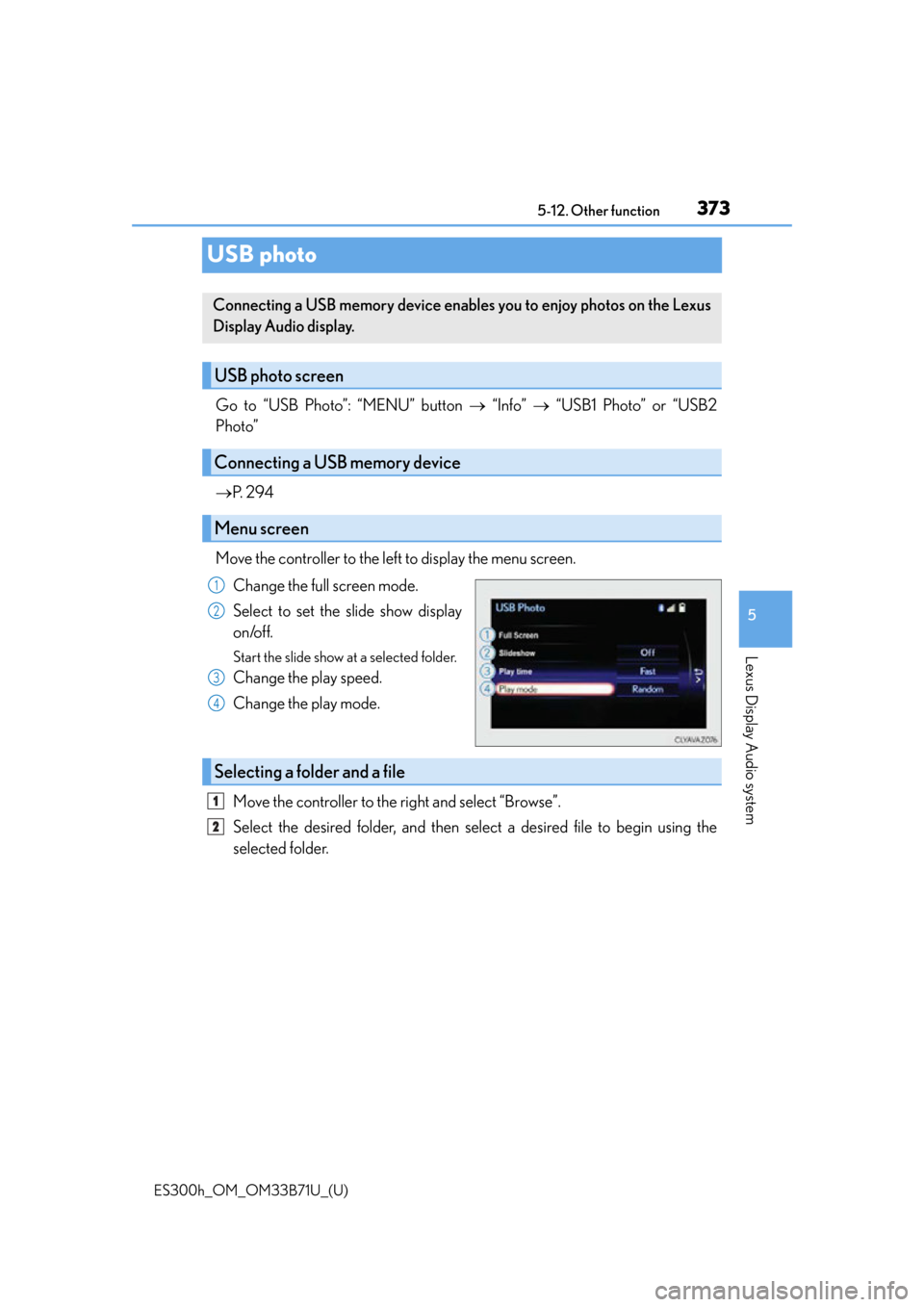
Move the controller to the left to display the menu screen. Change the full screen mode.
Select to set the slide show display
on/off.
Start the slide show at a selected folder.
Change the play speed.
Change the play mode.
Move the controller to the right and select “Browse”.
Select the desired folder, and then select a desired file to begin using the
selected folder.
Connecting a USB memory device enables you to enjoy photos on the Lexus
Display Audio display.
USB photo screen
Connecting a USB memory device
Menu screen
1
2
3
4
Selecting a folder and a file
1
2
Page 374 of 600
3745-12. Other function
ES300h_OM_OM33B71U_(U)
■USB memory functions
P. 3 3 1
■USB memory
●Compatible devices
USB memory device that can be used for JPEG display.
●Compatible device formats
The following device format can be used:
• USB communication format: USB2.0 FS (480 Mbps)
• File system format: FAT16/32 (Windows)
• Correspondence class: Mass storage class
●JPEG file compatibility
• Compatible image size: Maximum 10MB
• Compatible pixel size: Maximum 10,000,000 pixels
NOTICE
■To prevent damage to the USB memory device or its terminals
P. 3 3 3
Page 377 of 600

ES300h_OM_OM33B71U_(U)
3775-12. Other function
5
Lexus Display Audio system
■Microphone
P. 3 4 6
■When using the microphone
●It is unnecessary to speak directly into the microphone when giving a command.
●Wait for the confirmation beep before speaking a command.
●Voice commands may not be recognized if:
• Spoken too quickly.
• Spoken at a low or high volume.
• The roof or windows are open.
• Passengers are talking while voice commands are spoken.
• The air conditioning speed is set high.
• The air conditioning vents are turned towards the microphone.
●In the following conditions, the system ma y not recognize the command properly and
using voice commands may not be possible:
• The command is incorrect or unclear. No te that certain words, accents or speech
patterns may be difficult for the system to recognize.
• There is excessive background noise, such as wind noise.
■When searching for a track
●A USB memory or iPod must be connected to enable track searching and playback.
( P. 2 9 4 )
●When a USB memory or iPod is connected, recognition data is created so tracks can
be searched using voice commands.
●Recognition data is updated un der the following conditions:
• When the USB memory or iPod data has changed.
• When the voice recognition language is changed. (P. 2 9 7 )
●While the recognition data is being created or being updated, a track search cannot be
performed using a voice command.
■The Gracenote® media database
P. 3 2 3
Page 583 of 600

583Alphabetical index
ES300h_OM_OM33B71U_(U)
Audio system*....................................... 286
Audio input............................................294
AUX port...............................................294
Bluetooth
® audio ..............................343
CD player ............................................... 319
iPod ...........................................................326
MP3/WMA disc ................................ 319
Optimal use ......................................... 305
Portable music player ......................334
Radio ..........................................................312
Setup menu ...........................................296
Steering wheel audio switches ...............................................293
USB memory ...................................... 330
Automatic air conditioning system .................................................... 384
Automatic headlight leveling system ..................................................... 180
Automatic High Beam .......................... 181
Automatic light control system ......................................................178
AUX port
*.............................................. 294
Auxiliary box .......................................... 402 Back-up lights
Replacing light bulbs ...................... 488
Wattage ................................................. 542
Battery (12-volt battery) .................... 455 If the 12-volt battery is discharged .................................... 523
Preparing and checking before winter....................................................280
Battery (traction battery) ....................... 71
Bluetooth
®*
Audio system ....................................... 335
Hands-free system (for cellular phone) ....................... 345
Brake Fluid .......................................................... 453
Parking brake ........................................ 177
Warning light ....................................... 499
Brake assist .............................................. 272
Break-in tips ............................................. 155
Brightness control Instrument panel light control ........ 87
BSM (Blind Spot Monitor) ................264
B
*: For vehicles with navigation system, refer to the
“NAVIGATION SYSTEM OWNER’S MANUAL”.
Page 597 of 600

597Alphabetical index
ES300h_OM_OM33B71U_(U)
TiresChains....................................................... 281
Checking............................................... 459
If you have a flat tire ......................... 508
Inflation pressure ................................. 541
Information ........................................... 546
Replacing .............................................. 508
Rotating tires ....................................... 459
Size ............................................................. 541
Snow tires ............................................. 283
Spare tire ............................................... 508
Tire inflation pressure display function ................................................... 92
Tire pressure warning system .... 460
Warning light ........................................ 501
Tools...........................................................509
Top tether strap........................................ 63
Total load capacity .................................163
Towing Dinghy towing ...................................... 165
Emergency towing............................494
Towing eyelet...................................... 496
Trailer towing ........................................ 164
TRAC (Traction Control) ..................272
Traction battery (hybrid battery) ........ 71
Traction motor (electric motor) .......... 71
Transmission Driving mode select switch .......... 262
Hybrid transmission............................173
If the shift lever cannot be shifted from P .................................. 520
Trip information........................................ 92
Trip meters ................................................. 86 Trunk
Internal trunk release lever .............. 116
Jam protection function..................... 116
Luggage security system.................. 115
Power trunk opener and closer .....114
Smart access system with push-button start......................114
Trunk closer switch.............................. 115
Trunk easy closer ................................. 116
Trunk features......................................403
Trunk handle ........................................... 115
Trunk light................................................. 116
Trunk opener main switch ............... 115
Trunk opener switch ............................114
Wireless remote control................. 108
Trunk light Trunk light................................................. 116
Wattage ................................................. 542
Turn signal lights Replacing light bulbs ...........484, 487
Turn signal lever ................................... 176
Wattage ................................................. 542
USB memory
*.......................................294
U
*: For vehicles with navigation system, refer to the
“NAVIGATION SYSTEM OWNER’S MANUAL”.
Page:
< prev 1-8 9-16 17-24