2016 KIA Sportage signal
[x] Cancel search: signalPage 15 of 501
25
Your vehicle at a glance
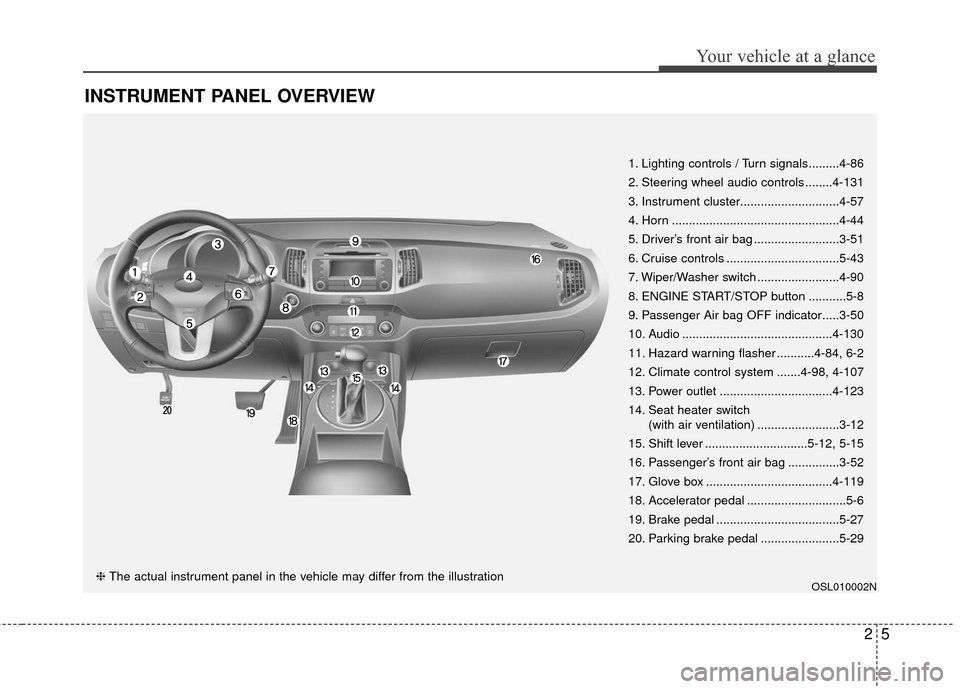
INSTRUMENT PANEL OVERVIEW
OSL010002N
1. Lighting controls / Turn signals.........4-86
2. Steering wheel audio controls ........4-131
3. Instrument cluster.............................4-57
4. Horn .................................................4-44
5. Driver’s front air bag .........................3-51
6. Cruise controls .................................5-43
7. Wiper/Washer switch ........................4-90
8. ENGINE START/STOP button ...........5-8
9. Passenger Air bag OFF indicator.....3-50
10. Audio ............................................4-130
11. Hazard warning flasher ...........4-84, 6-2
12. Climate control system .......4-98, 4-107
13. Power outlet .................................4-123
14. Seat heater switch(with air ventilation) ........................3-12
15. Shift lever ..............................5-12, 5-15
16. Passenger’s front air bag ...............3-52
17. Glove box .....................................4-119
18. Accelerator pedal .............................5-6
19. Brake pedal ....................................5-27
20. Parking brake pedal .......................5-29
❈ The actual instrument panel in the vehicle may differ from the illustration
Page 63 of 501
347
Safety features of your vehicle
C040900AHM-EU
How does the air bag system
operate
Air bags are activated (able toinflate if necessary) only when the
ignition switch is turned to the ON
or START position.
Air bags inflate instantly in the event of a serious frontal collision
or side collision in order to help
protect the occupants from serious
physical injury.
Also, the side and/or curtain air
bags inflate instantly in the event of
a rollover in order to help protect
the occupants from serious physi-
cal injury.
There is no single speed at which the air bags will inflate.
Generally, air bags are designed to
inflate based upon the severity of a
collision and its direction. These
two factors determine whether the
sensors produce an electronic
deployment/ inflation signal. Air bag deployment depends on a
number of factors including vehicle
speed, angles of impact and the
density and stiffness of the vehi-
cles or objects which your vehicle
hits in the collision. The determin-
ing factors are not limited to those
mentioned above.
The front air bags will completely inflate and deflate in an instant.
It is virtually impossible for you to
see the air bags inflate during an
accident.
It is much more likely that you will
simply see the deflated air bags
hanging out of their storage com-
partments after the collision.
In order to help provide protection in a severe collision, the air bags
must inflate rapidly. The speed of
the air bag inflation is a conse-
quence of extremely short time in
which a collision occurs and the
need to inflate the air bag between
the occupant and the vehicle struc-
tures before the occupant impacts
those structures. This speed of inflation reduces the
risk of serious or life-threatening
injuries in a severe collision and is
thus a necessary part of the air
bag design.
However, air bag inflation can also
cause injuries which can include
facial abrasions, bruises and bro-
ken bones because the inflation
speed also causes the air bags to
expand with a great deal of force.
There are even circumstances under which contact with the
steering wheel or passenger air
bag can cause fatal injuries,
especially if the occupant is
positioned excessively close to
the steering wheel or passenger
air bag.
Page 92 of 501
45
Features of your vehicle
To activate the immobilizer sys-tem:
Turn the ignition key to the OFF posi-
tion. The immobilizer system acti-
vates automatically. Without a valid
ignition key for your vehicle, the
engine will not start.
To deactivate the immobilizersystem:
Insert the ignition key into the key
cylinder and turn it to the ON posi-
tion.
In order to prevent theft of your vehi-
cle, do not leave spare keys or your
key number anywhere in the vehicle.
The ignition key and key number are
unique to your vehicle, and therefore,
should be kept confidential.
✽ ✽ NOTICE
When starting the engine, do not use
the key with other immobilizer keys
around. Otherwise the engine may
not start or may stop soon after it
starts. Keep each key separately in
order to avoid a starting malfunc-
tion.
Do not put metal accessories near
the ignition switch.
Metal accessories may interrupt the
transponder signal and may prevent
the engine from being started.
✽ ✽NOTICE
If you need additional keys or lose
your keys, consult an authorized Kia
dealer.
CAUTION- Immobilizer
damage
Do not expose your immobilizer
system to moisture, static elec-tricity and rough handling. Thismay damage your immobilizer.
CAUTION- Immobilizer alterations
Do not change, alter or adjust
the immobilizer system becauseit could cause the immobilizersystem to malfunction.
Page 95 of 501
Features of your vehicle
84
D020200AAM-EU
Transmitter precautions
The transmitter will not work if any of
the following occurs:
The ignition key is in the ignitionswitch.
You exceed the operating distance limit (10 m [about 30 feet]).
The battery in the transmitter is weak.
Other vehicles or objects may be blocking the signal.
The weather is extremely cold.
The transmitter is close to a radio transmitter such as a radio station
or an airport which can interfere
with normal operation of the trans-
mitter. When the transmitter does not work
properly, open and close the door
with the ignition key. If you have a
problem with the transmitter, contact
an authorized Kia dealer.
If the transmitter is in close proxim-
ity to your cell phone or smart
phone, the signal from the trans-
mitter could be blocked by normal
operation of your cell phone or
smart phone. This is especially
important when the phone is active
such as making call, receiving
calls, text messaging, and/or send-
ing/receiving emails. Avoid placing
the transmitter and your cell phone
or smart phone in the same pants
or jacket pocket and maintain ade-
quate distance between the two
devices.
CAUTION
Keep the smart key away fromwater or any liquid as it canbecome damaged and not func-tion properly.
Page 101 of 501
Features of your vehicle
14
4
When the smart key does not work
properly, open and close the door
with the mechanical key. If you
have a problem with the smart key,
contact an authorized Kia dealer.
If the smart key is in close proximi- ty to your cell phone or smart
phone, the signal from the smart
key could be blocked by normal
operation of your cell phone or
smart phone. This is especially
important when the phone is active
such as making call, receiving
calls, text messaging, and/or send-
ing/receiving emails. Avoid placing
the smart key and your cell phone
or smart phone in the same pants
or jacket pocket and maintain ade-
quate distance between the two
devices.
✽ ✽ NOTICE
If the keyless entry system is inoper-
ative due to exposure to water or liq-
uids, it will not be covered by your
manufacturer’s vehicle warranty.
This device complies with
Industry Canada Standard RSS-
210.
Operation is subject to the following
two conditions:
1.This device may not cause harmful
interference, and
2.This device must accept any inter- ference received, including inter-
ference that may cause undesired
operation.
✽ ✽ NOTICE
Changes or modifications not
expressly approved by the party
responsible for compliance could
void the user's authority to operate
the equipment.
CAUTION- Transmitter
Keep the smart key away from
water or any liquid as it canbecome damaged and not func-tion properly.
Page 138 of 501
451
Features of your vehicle
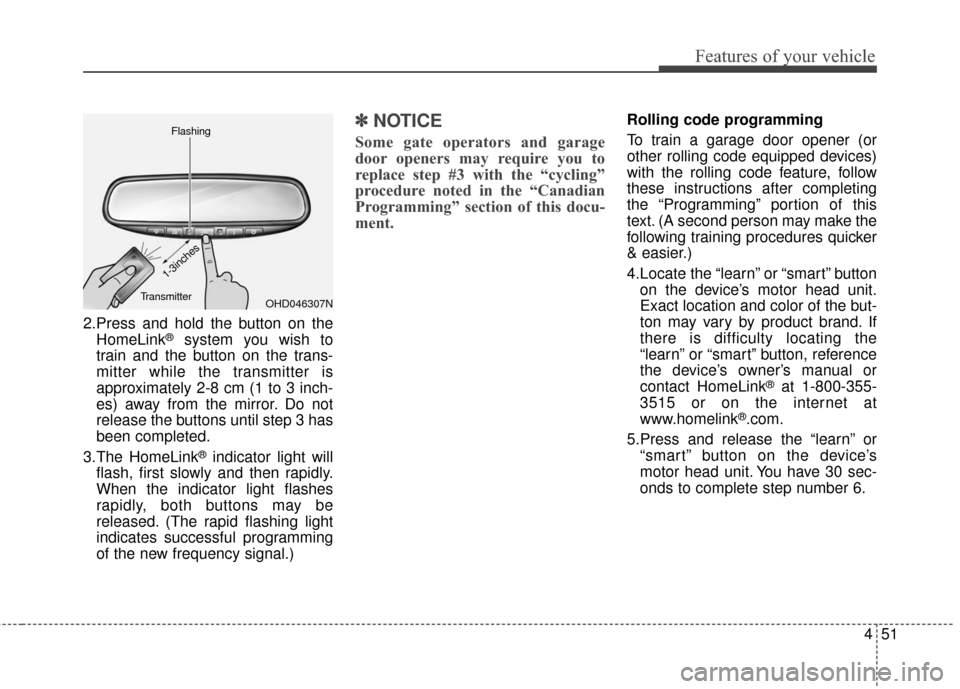
2.Press and hold the button on theHomeLink®system you wish to
train and the button on the trans-
mitter while the transmitter is
approximately 2-8 cm (1 to 3 inch-
es) away from the mirror. Do not
release the buttons until step 3 has
been completed.
3.The HomeLink
®indicator light will
flash, first slowly and then rapidly.
When the indicator light flashes
rapidly, both buttons may be
released. (The rapid flashing light
indicates successful programming
of the new frequency signal.)
✽ ✽ NOTICE
Some gate operators and garage
door openers may require you to
replace step #3 with the “cycling”
procedure noted in the “Canadian
Programming” section of this docu-
ment.
Rolling code programming
To train a garage door opener (or
other rolling code equipped devices)
with the rolling code feature, follow
these instructions after completing
the “Programming” portion of this
text. (A second person may make the
following training procedures quicker
& easier.)
4.Locate the “learn” or “smart” button
on the device’s motor head unit.
Exact location and color of the but-
ton may vary by product brand. If
there is difficulty locating the
“learn” or “smart” button, reference
the device’s owner’s manual or
contact HomeLink
®at 1-800-355-
3515 or on the internet at
www.homelink
®.com.
5.Press and release the “learn” or “smart” button on the device’s
motor head unit. You have 30 sec-
onds to complete step number 6.
OHD046307N
Flashing
1-3inches
Transmitter
Page 139 of 501
Features of your vehicle
52
4
6.Return to the vehicle and firmly
press and release the programmed
HomeLink
®button up to three
times. The rolling code equipped
device should now recognize the
HomeLink
®signal and activate
when the HomeLink®button is
pressed. The remaining two but-
tons may now be programmed if
this has not previously been done.
Refer to the “Programming” portion
of this text. Operating HomeLink
®
To operate, simply press the pro-
grammed HomeLink®button.
Activation will now occur for the
trained product (garage door, securi-
ty system, entry door lock, estate
gate, or home or office lighting). For
convenience, the hand-held trans-
mitter of the device may also be used
at any time. The HomeLink
®Wireless
Controls System (once programmed)
or the original hand-held transmitter
may be used to activate the device
(e.g. garage door, entry door lock,
etc.). In the event that there are still
programming difficulties, contact
HomeLink
®at 1-800-355-3515 or on
the internet at www.homelink®.com. Erasing programmed HomeLink
®
buttons
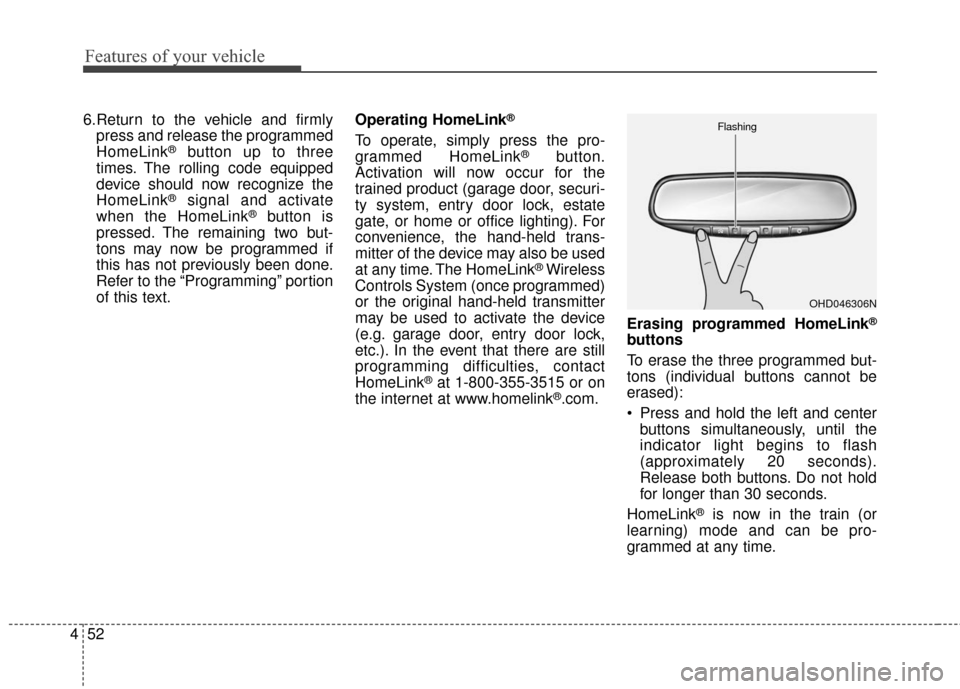
To erase the three programmed but-
tons (individual buttons cannot be
erased):
Press and hold the left and center
buttons simultaneously, until the
indicator light begins to flash
(approximately 20 seconds).
Release both buttons. Do not hold
for longer than 30 seconds.
HomeLink
®is now in the train (or
learning) mode and can be pro-
grammed at any time.
OHD046306N
Flashing
Page 140 of 501
453
Features of your vehicle
Reprogramming a single
HomeLink®button
To program a device to HomeLink
®
using a HomeLink®button previously
trained, follow these steps:
1. Press and hold the desired HomeLink
®button. Do NOT release
until step 4 has been completed.
2. When the indicator light begins to flash slowly (after 20 seconds), posi-
tion the hand-held transmitter 2-8 cm
(1 to 3 inches) away from the
HomeLink
®surface.
3. Press and hold the hand-held trans- mitter button (or press and “cycle” -
as described in “Canadian
Programming” above).
4. The HomeLink
®indicator light will
flash, first slowly and then rapidly.
When the indicator light begins to
flash rapidly, release both buttons.
The previous device has now been
erased and the new device can be acti-
vated by pushing the HomeLink
® button
that has just been programmed. This
procedure will not affect any other pro-
grammed HomeLink
®buttons. Gate operator programming &
canadian programming
During programming, your hand-held
transmitter may automatically stop
transmitting. Continue to press and
hold the HomeLink
®button (note
steps 2 through 4 in the
“Programming” portion of this text)
while you press and re-press
(“cycle”) your handheld transmitter
every two seconds until the frequen-
cy signal has been learned. The indi-
cator light will flash slowly and then
rapidly after several seconds upon
successful training. Accessories
If you would like additional informa-
tion on the HomeLink
®Wireless
Control System, HomeLink®compat-
ible products, or to purchase other
accessories such as the HomeLink
®
Lighting Package, please contact
HomeLink®at 1-800-355-3515 or on
the internet at www.homelink®.com.