Page 308 of 565
Features of your vehicle
224
4
Commands available during
Audio CD operation. Commands available dur-
ing USB and MP3 CD operation.
Command Function
Random Randomly plays the tracks within the CD.
Random Off Cancels random play to play tracks in sequen-
tial order.
RepeatRepeats the current track.
Repeat Off Cancels repeat play to play tracks in sequen-
tial order.
Track 1~30 Plays the desired track number.
Command Function
Random Randomly plays the files within the current
folder.
Random Off Cancels random play to play files in sequential
order.
Repeat Repeats the current file.
Repeat Off Cancels repeat play to play files in sequential
order.
Information Displays the information screen of the current
file.
Next Folder Plays the first file in the next folder.
Previous Folder Plays the first file in the previous folder.
UM CAN (ENG) 4b (Audio).qxp 11/7/2014 3:02 PM Page 224
Page 309 of 565
4225
Features of your vehicle
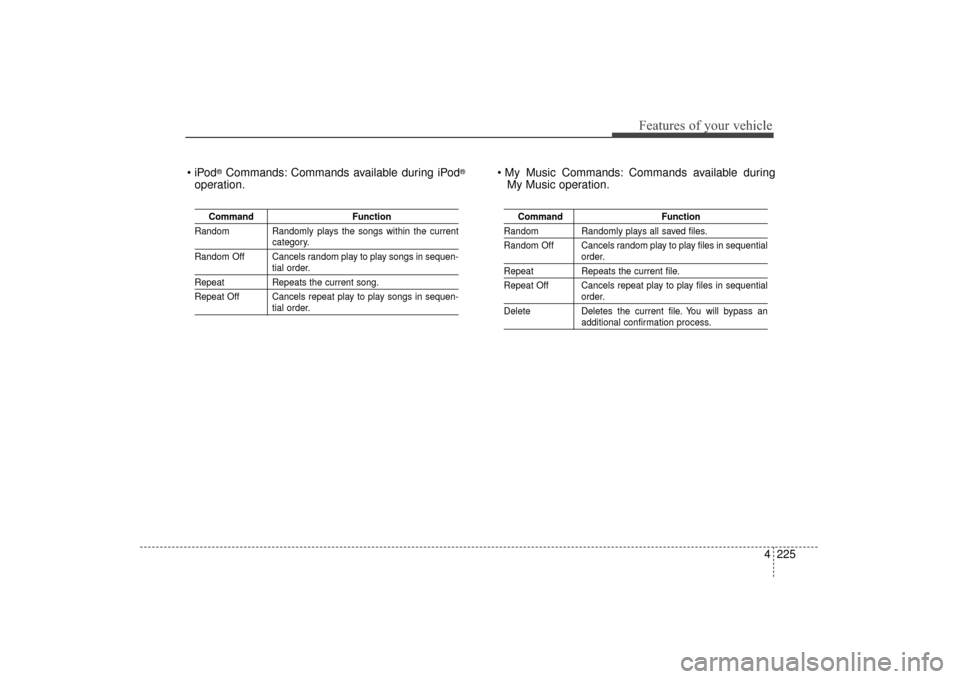
®Commands: Commands available during iPod®
operation. Commands available during
My Music operation.
Command Function
Random Randomly plays the songs within the current
category.
Random Off Cancels random play to play songs in sequen-
tial order.
Repeat Repeats the current song.
Repeat Off Cancels repeat play to play songs in sequen-
tial order.
Command Function
Random Randomly plays all saved files.
Random Off Cancels random play to play files in sequential
order.
RepeatRepeats the current file.
Repeat Off Cancels repeat play to play files in sequential
order.
Delete Deletes the current file. You will bypass an
additional confirmation process.
UM CAN (ENG) 4b (Audio).qxp 11/7/2014 3:02 PM Page 225
Page 310 of 565

Features of your vehicle
226
4
Command Function
PlayPlays the currently paused song.
PausePauses the current song.
Bluetooth®Wireless Technology A udio Commands:
Commands available during
Bluetooth®Wireless
Technology audio streaming from mobile phone oper-
ation Command Operation iPod
®is a registered trademark of Apple Inc. iPod®
mobile digital device sold separately. The
Bluetooth®word mark and logos are registered
trademarks owned by Bluetooth SIG, Inc. and any
use of such marks by Kia is under license. A
Bluetooth®enabled cell phone is required to use
Bluetooth®wireless technology. SiriusXM™ service
requires a subscription, sold separately, after 3-
month trial included with vehicle purchase. If you
decide to continue your SiriusXM™ service at the
end of the trial subscription, the plan you choose
will automatically renew and bill at the current rates
until you call SiriusXM™ at 1-866-635-2349 to can-
cel. See our Customer Agreement for complete
terms at www.siriusxm.com. Sirius satellite service
is available only to those at least 18 and older in the
48 contiguous United States, D.C., and P.R. (with
coverage limitations). SiriusXM™ Traffic available
in select markets. See siriusxm.com/traffic for more
information. Sirius, XM and all related marks and
logos are trademarks of Sirius XM Radio Inc.
Android™ is a trademark of Google, Inc. BlackBerry
®
is a registered trademark of Research In Motion
Limited (RIM).
UM CAN (ENG) 4b (Audio).qxp 11/7/2014 3:02 PM Page 226
Page 311 of 565
4227
Features of your vehicle
DECLARATION OF CONFORMITY
IC
Caution: Any changes or modifications to the equipment not expressly approved by the party responsible for compliance could void user’s authority to operate the equipment.
Operation is subject to the following two conditions:
(1) This device may not cause harmful interference, and
(2) This device must accept any interference received, including interference that may cause undesired operation.
UM CAN (ENG) 4b (Audio).qxp 11/11/2014 6:18 PM Page 227
Page 493 of 565

749
Maintenance
Recharging battery
When recharging the battery,
observe the following precautions:
The battery must be removed fromthe vehicle and placed in an area
with good ventilation.
Do not allow cigarettes, sparks, or flame near the battery.
Watch the battery during charging, and stop or reduce the charging
rate if the battery cells begin
gassing (boiling) violently or if the
temperature of the electrolyte of
any cell exceeds 49°C (120°F).
Wear eye protection when check- ing the battery during charging.
Disconnect the battery charger in the following order.
1. Turn off the battery charger main switch.
2. Unhook the negative clamp from the negative battery terminal.
3. Unhook the positive clamp from the positive battery terminal. Before performing maintenance or
recharging the battery, turn off all
accessories and stop the engine.
The negative battery cable must be removed first and installed last
when the battery is disconnected.
Reset items
Items should be reset after the bat-
tery has been discharged or the bat-
tery has been disconnected.
Auto up/down window (See chapter 4)
Sunroof (See chapter 4)
Trip computer (See chapter 4)
Climate control system (See chapter 4)
Integrated Memory System (See chapter 3)
Audio (See chapter 4)
UM CAN (ENG) 7.qxp 12/1/2014 1:18 PM Page 49
Page 510 of 565

Maintenance
66
7
If you do not have a spare, use a
fuse of the same rating from a circuityou may not need for operating thevehicle, such as the power outletfuse.
If the head lamp, turn signal lamp,
stop signal lamp, fog lamp, DRL, tail
lamp, HMSL do not work and the
fuses are OK, check the fuse panel
in the engine compartment. If a fuse
is blown, it must be replaced.
✽ ✽ NOTICE
If the headlamp, fog lamp, turn sig-
nal lamp, or tail lamp malfunction
even without any problem to the
lamps, have the vehicle checked by
an authorized Kia dealer for assis-
tance.
Fuse switch
Always, put the fuse switch at the ON
position.
If you move the switch to the OFF
position, some items such as audio
and digital clock must be reset and
transmitter (or smart key) may not
work properly. When the switch is
Off, the caution indicator will be dis-
played on the instrument cluster.
Always place the fuse switch in the
ON position while driving the vehicle.
OUMA074017
CAUTION - Fuse Panel
Covers
Put all switches in ON when
driving.
If the vehicle remains idle for over 1 month, put all switchesin OFF to prevent the batteriesfrom being discharged.
Excluding long-term parking for over 1 month, the contactpoints of switches may wearout upon extensive use.Please refrain from excessiveuse of switches.
UM CAN (ENG) 7.qxp 12/1/2014 1:18 PM Page 66
Page 514 of 565

Maintenance
70
7
DescriptionFuse ratingProtected component
AIR BAG IND.10ACluster, A/C Control Module
A/CON 3 30AFuse - A/CON 2, Blower Motor
A/CON 2 7.5AA/C Control Module (Auto)
START 7.5AE/R Junction Block (Start Relay), Transaxle Range Switch
AIR BAG 15ASRS Control Module, Passenger Occupant Detection Sensor
MODULE 2 10ACrash Pad Switch, 4WD ECM, Lane Departure Warning Module, Console Switch, Rear Parking Assist
Sensor LH/RH, Rear Parking Assist Buzzer, Rear Parking Assist Sensor LH/RH (Center), Blind Spot
Detection Radar LH/RH, Electric Parking Brake Module
ACC 10APCB Block (PDM (ACC) Relay, Power Outlet Relay), BCM, Audio, A/V & Navigation Head Unit,
360° camera monitoring Unit, Smart Key Control Module, AMP, USB Charger, Telematics Unit
MODULE 4 10AAuto Head Lamp Leveling Device Module, Head Lamp Leveling Device Actuator LH/RH
BRAKE SWITCH 7.5ASmart Key Control Module, Stop Lamp Switch
MODULE 3 10AA/C Control Module, A/V & Navigation Head Unit, Electro Chromic Mirror, Driver IMS Control Module, ATM
Shift Lever Indicator, Rear Seat Warmer LH, Front Air Ventilation Control Module, Front Seat Warmer
Control Module, Telematics Unit
MODULE 1 10ABCM, Stop Lamp Switch, Driver/Passenger Doormodule
UM CAN (ENG) 7.qxp 12/1/2014 1:19 PM Page 70
Page 515 of 565

771
Maintenance
DescriptionFuse ratingProtected component
SMART KEY 1 15ASmart Key Control Module
A/CON (RR) 15AICM Relay Box (Rear Blower Motor Relay)
SUNROOF 2 20ASunroof Control Module (Roller)
SUNROOF 1 20ASunroof Control Module (Glass)
CLUSTER 10AInstrument Cluster
GATEWAY10AGateway (MCU IG1)
IMMO.10ASmart Key Control Module, Immobilizer Module
IG1 15AE/R Junction Block (Fuse - MDPS 3, TCU 1), PCB Block (Fuse - ABS 3, SENSOR 6, ECU 1, CRUISE)
MULTIMEDIA 15AUSB Charger, Audio, A/V & Navigation Head Unit, Telematics Unit
MEMORY 2 10AInstrument Cluster, Data Link Connector, A/C Control Module, Rear A/C Control Module, Clock Spring,
MUT, Electro Chromic Mirror, Driver/Passenger Door Module, Passenger Power Window Switch, Driver IMS
Control Module
DOOR LOCK 20ADoor Lock Relay, Door Unlock Relay, Tail Gate Relay, DRIVER/PASSENGER/RL/RR DOOR MODULE
SMART KEY 2 10AStart/Stop Button Switch, Smart Key Control Module, Immobilizer Module
WASHER 15ABCM, Multifunction Switch
MDPS 7.5AMDPS UNIT(COLUMN TYPE), Steering Angle Sensor
UM CAN (ENG) 7.qxp 12/1/2014 1:19 PM Page 71