Page 121 of 565

437
Features of your vehicle
✽
✽NOTICE
• If you press the door unlock but-
ton (2), the Smart Liftgate
(Tailgate) function will be deacti-
vated temporarily. But, if you do
not open any door for 30 seconds,
the smart liftgate (tailgate) func-
tion will be activated again.
• If you press the liftgate (tailgate) open button (3) for more than 1
second, the liftgate (tailgate) opens.
• If you press the door lock button (1) or liftgate (tailgate) open but-
ton (3) when the Smart Liftgate
(Tailgate) function is not in the
Detect and Alert stage, the smart
liftgate (tailgate) function will not
be deactivated.
• In case you have deactivated the Smart Liftgate (Tailgate) function
by pressing the smart key button
and opened a door, the smart lift-
gate (tailgate) function can be acti-
vated again by closing and locking
all doors.
Detecting area
The Smart Liftgate (tailgate) oper-
ates with a welcome alert if the
smart key is detected within
50~100 cm (20~40 inches) from
the liftgate (tailgate).
The alert stops once the smart key is positioned outside the detecting
area during the Detect and Alert
stage.
✽ ✽ NOTICE
• The Smart Liftgate (Tailgate) func-
tion will not work if any of the fol-
lowing occurs:
- The smart key is close to a radiotransmitter such as a radio sta-
tion or an airport which can
interfere with normal operation
of the transmitter.
- The smart key is near a mobile two way radio system or a cellu-
lar phone.
- Another vehicle’s smart key is being operated close to your
vehicle.
• The detecting range may decrease or increase when :
- One side of the tire is raised toreplace a tire or to inspect the
vehicle.
- The vehicle is parked on a slope or unpaved road, etc.
OUM044019
UM CAN (ENG) 4.qxp 12/1/2014 12:51 PM Page 37
Page 122 of 565
Features of your vehicle
38
4
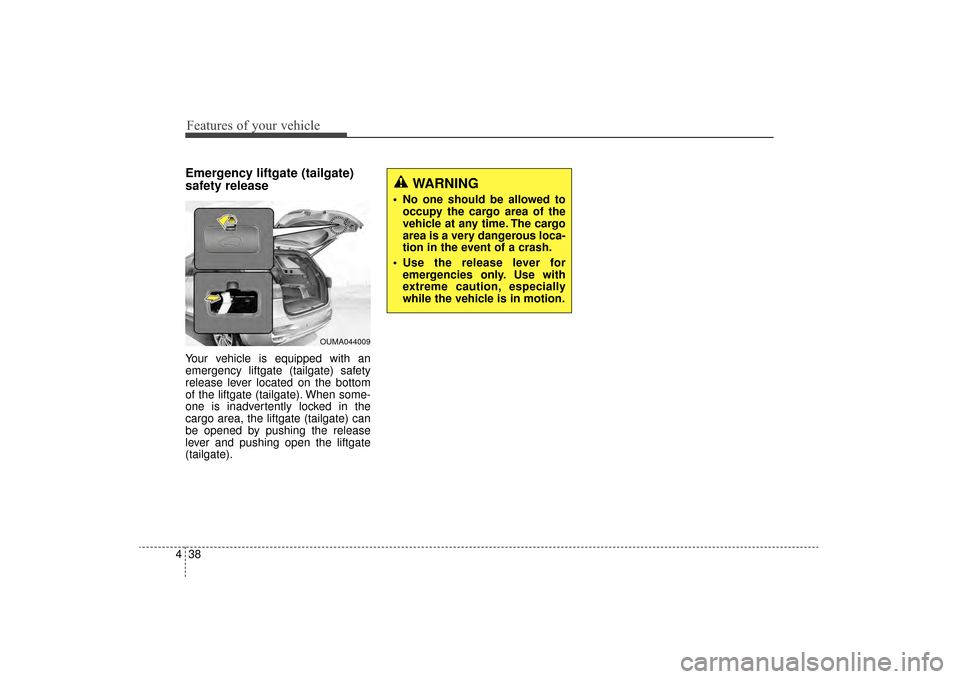
Emergency liftgate (tailgate)
safety release
Your vehicle is equipped with an
emergency liftgate (tailgate) safety
release lever located on the bottom
of the liftgate (tailgate). When some-
one is inadvertently locked in the
cargo area, the liftgate (tailgate) can
be opened by pushing the release
lever and pushing open the liftgate
(tailgate).
WARNING
No one should be allowed to
occupy the cargo area of the
vehicle at any time. The cargo
area is a very dangerous loca-
tion in the event of a crash.
Use the release lever for emergencies only. Use with
extreme caution, especially
while the vehicle is in motion.
OUMA044009
UM CAN (ENG) 4.qxp 12/1/2014 12:51 PM Page 38
Page 170 of 565

Features of your vehicle
86
4
Driving Assist
Smart Cruise Control Response
(if equipped)
Choose the sensitivity of the smart
cruise control.
Rear Cross Traffic Alert (if equipped)
If this item is checked, rear cross
traffic alert function will be activated.
Forward Collision Warning
(if equipped)
If this item is checked, forward collision
warning function will be activated.
Door / Liftgate (Tailgate)
Automatically lock
Disable:
The auto door lock operation will
be deactivated.
Enable on speed: All doors will be automatically
locked when the vehicle speed
exceeds 15km/h (9.3mph).
Enable on shift: All doors will be automatically
locked if the automatic transaxle
shift lever is shifted from the P
(Park) position to the R (Reverse),
N (Neutral), or D (Drive) position. Automatically unlock
Disable:
The auto door unlock operation will
be canceled.
On Key out: All doors will be automatically
unlocked when the ignition key is
removed from ignition switch or
Engine Start/Stop Button is set to
the OFF position.
On shift to P: All doors will be automatically
unlocked if the automatic transaxle
shift lever is shifted to the P (Park)
position.
UM CAN (ENG) 4.qxp 12/1/2014 12:54 PM Page 86
Page 171 of 565

487
Features of your vehicle
Two Press Unlock
Off:The two press unlock function will
be deactivated. Therefore, all doors
will unlock if the door is unlocked.
On: The driver’s door will unlock if the
door is unlocked. When the door is
unlocked again within 4 seconds,
all doors will unlock.
Horn Feedback
Off: The Horn feedback operation will
be deactivated.
On: After locking the door by pressing
the lock button on the transmitter, if
you press the lock button again
within 4 seconds, the warning
sound will operate once to indicate
that all doors are locked. Power liftgate (tailgate) (if equipped)
If this item is checked, the power lift-
gate (tailgate) function will be activat-
ed.
Smart liftgate (tailgate) (if equipped)
If this item is checked, the smart lift-
gate (tailgate) function will be activat-
ed.Lights
One touch turn signal
If this item is checked, the lane
change signals will blink 3, 5 or 7
times when the turn signal lever is
moved slightly.
Head Lamp Delay (if equipped)
If this item is checked, the headlamp
delay function will be activated.
Welcome Light (if equipped)
If this item is checked, the welcome
light function of the pocket lamp will
be activated.
UM CAN (ENG) 4.qxp 12/1/2014 12:54 PM Page 87
Page 177 of 565
493
Features of your vehicle
Door / Hood / liftgate (tailgate)Open
It means that any door, hood, or liftgate (tailgate) is open.
Sunroof Open (if equipped)
The warning message illuminates
if you turn off the engine and then
open the driver's door when the
sunroof is open.
Align steering wheel (if equipped)
This warning message illuminatesif you start the engine when the
steering wheel is turned to more
than 90 degrees to the left or right.
It means that you should turn the steering wheel and make the angle
of the steering wheel be less than
30 degrees.OUM044133
OUM044134OYP044141N
UM CAN (ENG) 4.qxp 12/1/2014 12:54 PM Page 93
Page 197 of 565

4113
Features of your vehicle
The 360° camera monitoring system
is not a substitute for proper and safe
parking procedures. The 360° cam-
era monitoring system may not
detect every object surrounding the
vehicle. Always drive safely and use
caution when parking.
The 360° camera monitoring system
can assist in parking by allowing the
driver to see around the vehicle.
Push the button into the [ON] posi-
tion to operate the system.
To cancel the system, push the but-
ton again.Operating conditions
- When the Engine Start/Stop
Button is ON position
- When the transaxle is on D, N or R
- When the vehicle speed is not over 20km/h (12.4 mph)
When the vehicle speed is over 20km/h (12.4mph), the 360° camera
monitoring system is turned off. If
the vehicle speed is not over 20km/h
(12.4mph) after turning off the 360°
camera monitoring system by over
speed, the 360° camera monitoring
system is not turned on. To operate
again, push the button.
When the vehicle moves back- wards, regardless of On/Off of but-
ton and vehicle speed, the 360°
camera monitoring system is oper-
ated.
When the liftgate (tailgate) and driver/passenger door are opened
and the outside mirror is folded, the
warning is illuminated in 360° cam-
era monitoring system. If the 360° camera monitoring sys-
tem is not operating normally, the
system should be checked by an
authorized Kia dealer.
When the vehicle moves over 10km/h forward after moving back-
ward, the 360° camera monitoring
system screen will be turned off.
360° CAMERA MONITORING SYSTEM (IF EQUIPPED)
OUM044050
WARNING
This system is a supplementary
function only. It is the responsi-
bility of the driver to always
check the area around the vehi-
cle before and while moving.
UM CAN (ENG) 4.qxp 12/1/2014 12:54 PM Page 113
Page 209 of 565
4125
Features of your vehicle
Luggage lamp (if equipped)
: The light comes on when theliftgate (tailgate) is opened.
: The light stays off at all times.
: The light stays on at all times.
Vanity mirror lamp (if equipped)
Opening the lid of the vanity mirror
will automatically turn on the mirror
light.
* The actual sunvisor lamp in the vehi-cle may differ from the illustration.
Glove box lamp
The glove box lamp comes on when
the glove box is opened.
To prevent unnecessary charging
system drain, close the glove box
securely after using the glove box.
OUM044074OUMA044432OUM044073
CAUTION- Vanity mirror
lamp
If you use the vanity mirror lamp,turn off the lamp before return-ing the sunvisor to its originalposition, otherwise it couldresult in battery discharge andpossible sunvisor damage.
UM CAN (ENG) 4.qxp 12/1/2014 12:56 PM Page 125
Page 210 of 565

Features of your vehicle
126
4
WELCOME SYSTEM (IF EQUIPPED)
Headlight (Headlamp) escort
function
The headlights (and/or taillights)
remain on for approximately 5 min-
utes after the ignition key is removed
or turned to the ACC or LOCK posi-
tion. However, if the driver’s door is
opened and closed, the headlights
are turned off after 15 seconds.
The headlights can be turned off by
pressing the lock button on the trans-
mitter or smart key twice or turning
off the light switch from the headlight
or Auto light position.
Interior light
When the interior light switch is in the
DOOR position and all doors (and lift-
gate (tailgate)) are locked and
closed, the room lamp will come on
for 30 seconds if any of the below is
performed.
Without smart key system
- When the door unlock button ispressed on the transmitter.
With the smart key system - When the door unlock button ispressed on the smart key.
- When the button of the outside door handle is pressed.
At this time, if you press the door lock
button, the lamps will turn off imme-
diately.
Pocket lamp (if equipped)
When all doors are locked and
closed, the pocket lamp will come on
for 15 seconds if any of the below is
performed.
With the smart key system - When the door unlock button ispressed on the smart key.
- When the button of the outside door handle is pressed.
At this time, if you press the door lock
button, the lamps will turn off imme-
diately.
UM CAN (ENG) 4.qxp 12/1/2014 12:56 PM Page 126