2016 KIA Sorento clock
[x] Cancel search: clockPage 479 of 565

735
Maintenance
ENGINE COOLANT
The high-pressure cooling system
has a reservoir filled with year round
antifreeze coolant. The reservoir is
filled at the factory.
Check the antifreeze protection and
coolant level at least once a year: at
the beginning of the winter season,
and before traveling to a colder cli-
mate.Checking the coolant level Turn the engine off and wait until itcools down. Use extreme care
when removing the radiator cap.
Wrap a thick towel around it, and
turn it counterclockwise slowly to
the first stop. Step back while the
pressure is released from the cool-
ing system.
When you are sure all the pressure
has been released, press down on
the cap, using a thick towel, and
continue turning counterclockwise
to remove it.
Even if the engine is not operating, do not remove the radiator cap or
the drain plug while the engine and
radiator are hot. Hot coolant and
steam may still blow out under
pressure, causing serious injury.
WARNING
Removing radiator
cap
Never attempt to remove the
radiator cap while the engine is
operating or hot. Doing so
might lead to cooling system
and engine damage and could
result in serious personal injury
from escaping hot coolant or
steam.
UM CAN (ENG) 7.qxp 12/1/2014 1:17 PM Page 35
Page 510 of 565

Maintenance
66
7
If you do not have a spare, use a
fuse of the same rating from a circuityou may not need for operating thevehicle, such as the power outletfuse.
If the head lamp, turn signal lamp,
stop signal lamp, fog lamp, DRL, tail
lamp, HMSL do not work and the
fuses are OK, check the fuse panel
in the engine compartment. If a fuse
is blown, it must be replaced.
✽ ✽ NOTICE
If the headlamp, fog lamp, turn sig-
nal lamp, or tail lamp malfunction
even without any problem to the
lamps, have the vehicle checked by
an authorized Kia dealer for assis-
tance.
Fuse switch
Always, put the fuse switch at the ON
position.
If you move the switch to the OFF
position, some items such as audio
and digital clock must be reset and
transmitter (or smart key) may not
work properly. When the switch is
Off, the caution indicator will be dis-
played on the instrument cluster.
Always place the fuse switch in the
ON position while driving the vehicle.
OUMA074017
CAUTION - Fuse Panel
Covers
Put all switches in ON when
driving.
If the vehicle remains idle for over 1 month, put all switchesin OFF to prevent the batteriesfrom being discharged.
Excluding long-term parking for over 1 month, the contactpoints of switches may wearout upon extensive use.Please refrain from excessiveuse of switches.
UM CAN (ENG) 7.qxp 12/1/2014 1:18 PM Page 66
Page 515 of 565

771
Maintenance
DescriptionFuse ratingProtected component
SMART KEY 1 15ASmart Key Control Module
A/CON (RR) 15AICM Relay Box (Rear Blower Motor Relay)
SUNROOF 2 20ASunroof Control Module (Roller)
SUNROOF 1 20ASunroof Control Module (Glass)
CLUSTER 10AInstrument Cluster
GATEWAY10AGateway (MCU IG1)
IMMO.10ASmart Key Control Module, Immobilizer Module
IG1 15AE/R Junction Block (Fuse - MDPS 3, TCU 1), PCB Block (Fuse - ABS 3, SENSOR 6, ECU 1, CRUISE)
MULTIMEDIA 15AUSB Charger, Audio, A/V & Navigation Head Unit, Telematics Unit
MEMORY 2 10AInstrument Cluster, Data Link Connector, A/C Control Module, Rear A/C Control Module, Clock Spring,
MUT, Electro Chromic Mirror, Driver/Passenger Door Module, Passenger Power Window Switch, Driver IMS
Control Module
DOOR LOCK 20ADoor Lock Relay, Door Unlock Relay, Tail Gate Relay, DRIVER/PASSENGER/RL/RR DOOR MODULE
SMART KEY 2 10AStart/Stop Button Switch, Smart Key Control Module, Immobilizer Module
WASHER 15ABCM, Multifunction Switch
MDPS 7.5AMDPS UNIT(COLUMN TYPE), Steering Angle Sensor
UM CAN (ENG) 7.qxp 12/1/2014 1:19 PM Page 71
Page 527 of 565

783
Maintenance
Headlamp (bulb type) -high/low
1. Open the hood.
2. Remove the headlamp assemblyfrom the body of the vehicle
3. Remove the headlamp bulb cover by turning it counterclockwise.
4. Remove the socket from the assembly by turning the socket
counterclockwise until the tabs on
the socket align with the slots on
the assembly.
5. Remove the bulb by pulling it out.
6. Inset a new bulb into the socket. 7. Install the socket in the assembly
by aligning the tabs on the socket
with the slots in the assembly.
Push the socket into the assembly
and turn the socket clockwise.
8. Install the headlamp bulb cover by turning it clockwise.
Turn signal lamp
Follow the steps 1 to 3 from the pre-
vious page.
4. Remove the socket from theassembly by turning the socket
counterclockwise until the tabs on
the socket align with the slots on
the assembly.
5. Remove the bulb from the socket by pressing it in and rotating it
counterclockwise until the tabs on
the bulb align with the slots in the
socket. Pull the bulb out of the
socket
OUM074108L
Turn signal
OUM074053L
High lamp Low lamp
UM CAN (ENG) 7.qxp 12/1/2014 1:19 PM Page 83
Page 528 of 565

Maintenance
84
7
6. Insert a new bulb by inserting it
into the socket and rotating it until
it locks into place.
7. Install the socket in the assembly by aligning the tabs on the socket
with the slots in the assembly.
Push the socket into the assembly
and turn the socket clockwise.
✽ ✽NOTICE
If bulb will not rotate inside socket,
remove bulb, rotate 180°, and try
again.
Front fog lamp bulbs
(if equipped)
1. Remove the front bumper under cover.
2. Reach your hand into the back of the front bumper.
3. Disconnect the power connector from the socket.
4. Remove the bulb-socket from the housing by turning the socket
counter clockwise until the tabs on
the socket align with the slots on
the housing. 5. Install the new bulb-socket into the
housing by aligning the tabs on
the socket with the slots in the
housing. Push the socket into the
housing and turn the socket clock-
wise.
6. Connect the power connector to the socket.
7. Reinstall the front bumper under cover.
✽ ✽NOTICE
Always have the headlamp aiming
adjusted after an accident or after
the headlamp assembly is reinstalled
at an authorized Kia dealer.OUMA074109
UM CAN (ENG) 7.qxp 12/1/2014 1:19 PM Page 84
Page 531 of 565
787
Maintenance
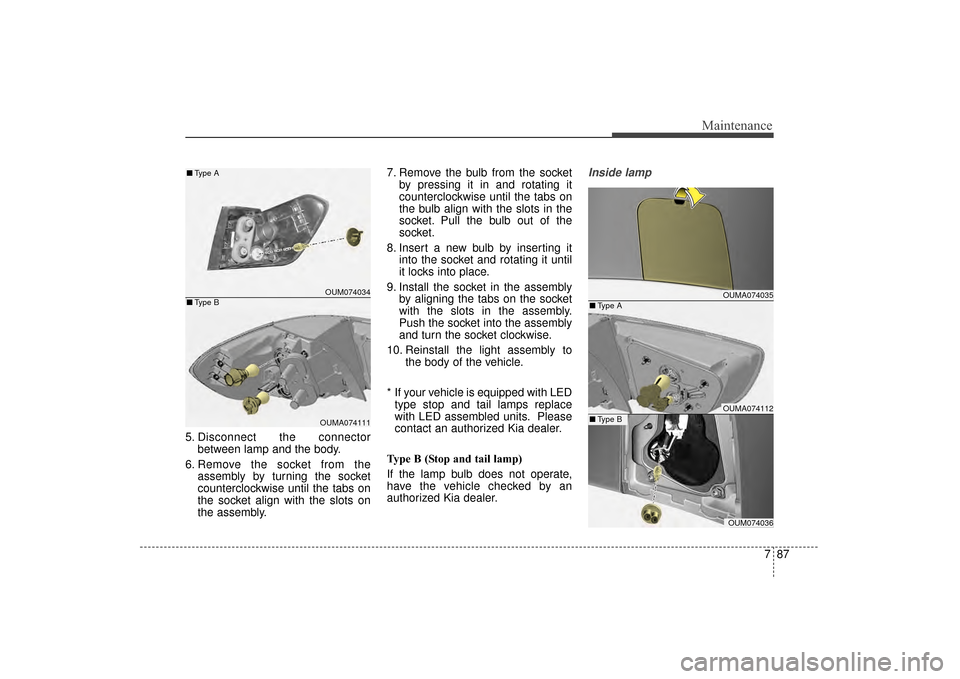
5. Disconnect the connectorbetween lamp and the body.
6. Remove the socket from the assembly by turning the socket
counterclockwise until the tabs on
the socket align with the slots on
the assembly. 7. Remove the bulb from the socket
by pressing it in and rotating it
counterclockwise until the tabs on
the bulb align with the slots in the
socket. Pull the bulb out of the
socket.
8. Insert a new bulb by inserting it into the socket and rotating it until
it locks into place.
9. Install the socket in the assembly by aligning the tabs on the socket
with the slots in the assembly.
Push the socket into the assembly
and turn the socket clockwise.
10. Reinstall the light assembly to the body of the vehicle.
* If your vehicle is equipped with LED type stop and tail lamps replace
with LED assembled units. Please
contact an authorized Kia dealer.
Type B (Stop and tail lamp)
If the lamp bulb does not operate,
have the vehicle checked by an
authorized Kia dealer.
Inside lamp
OUMA074035
OUMA074112
OUM074036
■ Type A
■Type B
OUM074034
OUMA074111
■
Type A
■ Type B
UM CAN (ENG) 7.qxp 12/1/2014 1:20 PM Page 87
Page 532 of 565
Maintenance
88
7
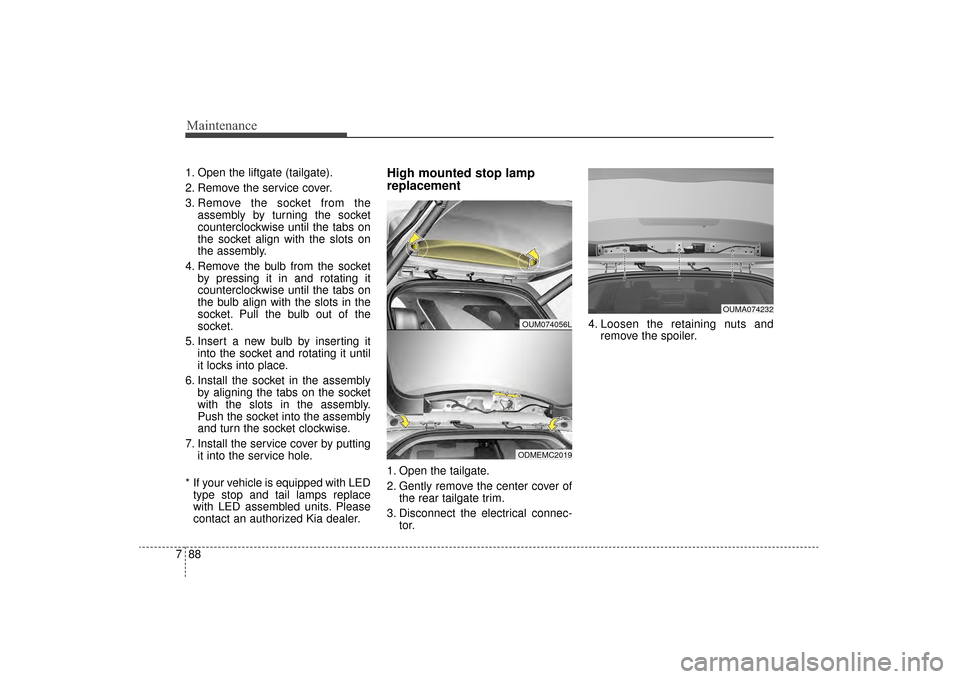
1. Open the liftgate (tailgate).
2. Remove the service cover.
3. Remove the socket from the
assembly by turning the socket
counterclockwise until the tabs on
the socket align with the slots on
the assembly.
4. Remove the bulb from the socket by pressing it in and rotating it
counterclockwise until the tabs on
the bulb align with the slots in the
socket. Pull the bulb out of the
socket.
5. Insert a new bulb by inserting it into the socket and rotating it until
it locks into place.
6. Install the socket in the assembly by aligning the tabs on the socket
with the slots in the assembly.
Push the socket into the assembly
and turn the socket clockwise.
7. Install the service cover by putting it into the service hole.
* If your vehicle is equipped with LED type stop and tail lamps replace
with LED assembled units. Please
contact an authorized Kia dealer.High mounted stop lamp
replacement
1. Open the tailgate.
2. Gently remove the center cover of the rear tailgate trim.
3. Disconnect the electrical connec- tor. 4. Loosen the retaining nuts and
remove the spoiler.
OUM074056L
ODMEMC2019
OUMA074232
UM CAN (ENG) 7.qxp 12/1/2014 1:20 PM Page 88
Page 557 of 565

Index
2I
Advanced smart cruise control system (ASCC) . . . . . . 5-53Limitations of the system . . . . . . . . . . . . . . . . . . . . . 5-63
Speed setting (ASCC) . . . . . . . . . . . . . . . . . . . . . . . 5-54
To adjust the sensitivity of advanced smartcruise control . . . . . . . . . . . . . . . . . . . . . . . . . . . . . 5-62
To convert to cruise control mode . . . . . . . . . . . . . . 5-63
Vehicle to vehicle distance setting (ASCC) . . . . . . . 5-58
Air bag - advanced supplemental restraint system . . . 3-43 Air bag warning label. . . . . . . . . . . . . . . . . . . . . . . . 3-67
Air bag warning light . . . . . . . . . . . . . . . . . . . . . . . . 3-46
Curtain air bag . . . . . . . . . . . . . . . . . . . . . . . . . . . . . 3-60
Do not install a child restraint on the frontpassenger’s seat . . . . . . . . . . . . . . . . . . . . . . . . . . . 3-46
Driver's and passenger's front air bag . . . . . . . . . . . 3-56
How does the air bag system operate . . . . . . . . . . . 3-44
Inflation and non-inflation conditions of the air bag . . 3-61
Occupant Detection System (ODS) . . . . . . . . . . . . . 3-50
Side air bag. . . . . . . . . . . . . . . . . . . . . . . . . . . . . . . . 3-58
SRS Care . . . . . . . . . . . . . . . . . . . . . . . . . . . . . . . . . 3-66
SRS components and functions . . . . . . . . . . . . . . . . 3-47
Air cleaner . . . . . . . . . . . . . . . . . . . . . . . . . . . . . . . . . . 7-40\
Filter replacement. . . . . . . . . . . . . . . . . . . . . . . . . . . 7-40
Air conditioning system . . . . . . . . . . . . . . . . . . . . . . . . . 8-5
All wheel drive (AWD). . . . . . . . . . . . . . . . . . . . . . . . . 5-19 All wheel drive (AWD) transfer mode selection . . . 5-21
For safe all wheel drive operation . . . . . . . . . . . . . . 5-22 Tight corner brake effect . . . . . . . . . . . . . . . . . . . . . 5-20
Appearance care . . . . . . . . . . . . . . . . . . . . . . . . . . . . . . 7-91 Exterior care . . . . . . . . . . . . . . . . . . . . . . . . . . . . . . . 7-91
Interior care . . . . . . . . . . . . . . . . . . . . . . . . . . . . . . . 7-96
Audio system . . . . . . . . . . . . . . . . . . . . . . . . . . . . . . . 4-171 Antenna . . . . . . . . . . . . . . . . . . . . . . . . . . . . . . . . . 4-171
Aux, USB and iPod
®port . . . . . . . . . . . . . . . . . . . 4-173
Basic method of use . . . . . . . . . . . . . . . . . . . . . . . . 4-195
Bluetooth
®Wireless Technology . . . . . . . . . . . . . . 4-180
Bluetooth®wireless technology audio . . . . . . . . . . 4-202
Clock settings . . . . . . . . . . . . . . . . . . . . . . . . . . . . . 4-188
How vehicle audio works . . . . . . . . . . . . . . . . . . . . 4-174
Phone . . . . . . . . . . . . . . . . . . . . . . . . . . . . . . . . . . . 4-\
204
Radio . . . . . . . . . . . . . . . . . . . . . . . . . . . . . . . . . . . 4-\
190
Set up . . . . . . . . . . . . . . . . . . . . . . . . . . . . . . . . . . . 4-\
186
SIRIUS™ Satellite Radio information . . . . . . . . . 4-192
SIRIUS™ radio . . . . . . . . . . . . . . . . . . . . . . . . . . . 4-193
Sound settings . . . . . . . . . . . . . . . . . . . . . . . . . . . . 4-187
Standard audio system . . . . . . . . . . . . . . . . . . . . . . 4-183
Steering wheel remote controller . . . . . . . . . . . . . . 4-172
System controllers and functions . . . . . . . . . . . . . . 4-184
System settings . . . . . . . . . . . . . . . . . . . . . . . . . . . . 4-189
Using iPod
®device . . . . . . . . . . . . . . . . . . . . . . . . 4-179
Using the USB device . . . . . . . . . . . . . . . . . . . . . . 4-178
Voice command list . . . . . . . . . . . . . . . . . . . . . . . . 4-221
Voice recognition . . . . . . . . . . . . . . . . . . . . . . . . . . 4-182
Voice recognition . . . . . . . . . . . . . . . . . . . . . . . . . . 4-218
Automatic climate control system . . . . . . . . . . . . . . . 4-139
A
UM CAN (ENG) INDEX.qxp 12/1/2014 11:55 AM Page 2