Page 108 of 565

Features of your vehicle
24
4
With central door lock switch
Operate by pressing the central door
lock switch.
When pressing the front portion (1)
of the switch, all vehicle doors will
lock. When pressing the rear portion (2)
of the switch, all vehicle doors will
unlock.
If the key is in the ignition switch and any front door is opened, the
doors will not lock even though the
front portion (1) of the central door
lock switch is pressed.
Impact sensing door unlock
system
In the event of air bag deployment
resulting from a vehicle impact, all
doors will automatically unlock.
✽ ✽ NOTICE
You can select some auto door
lock/unlock features in “User Settings”
For more information, refer to
“User Settings” in this chapter.
OUM044005
Driver’s door
OUM034082L
Passenger’s door
WARNING - Doors
The doors should always be
fully closed and locked while the
vehicle is in motion to prevent
accidental opening of the door.
WARNING - Unattended
children/animals
Never leave children or animals
unattended in your vehicle. An
enclosed vehicle can become
extremely hot, causing death or
severe injury to unattended
children or animals who cannot
escape the vehicle
UM CAN (ENG) 4.qxp 12/1/2014 12:50 PM Page 24
Page 109 of 565
425
Features of your vehicle
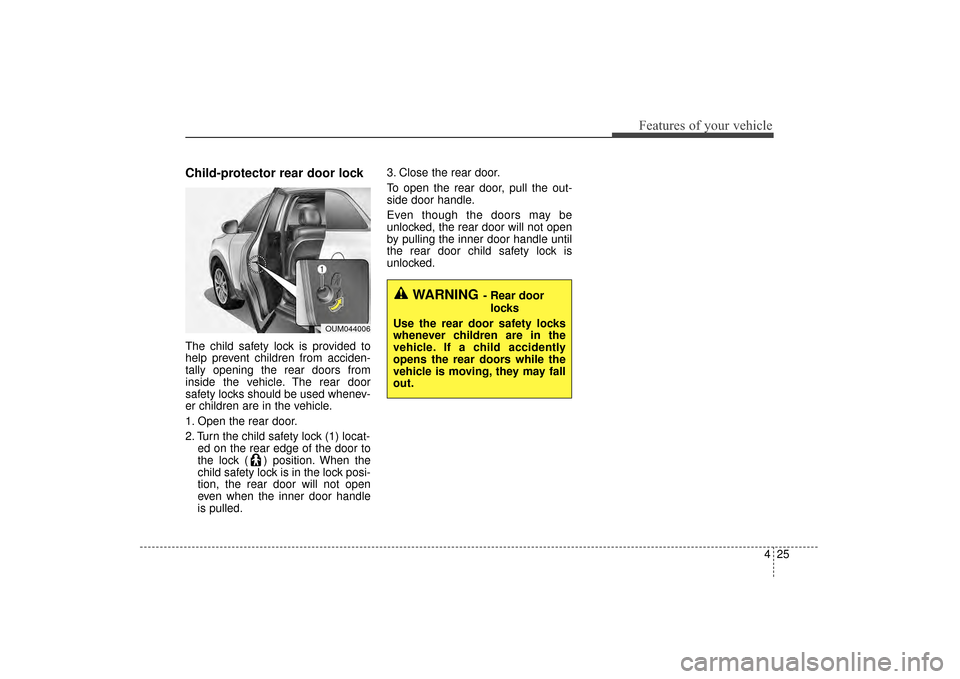
Child-protector rear door lock
The child safety lock is provided to
help prevent children from acciden-
tally opening the rear doors from
inside the vehicle. The rear door
safety locks should be used whenev-
er children are in the vehicle.
1. Open the rear door.
2. Turn the child safety lock (1) locat-ed on the rear edge of the door to
the lock ( ) position. When the
child safety lock is in the lock posi-
tion, the rear door will not open
even when the inner door handle
is pulled. 3. Close the rear door.
To open the rear door, pull the out-
side door handle.
Even though the doors may be
unlocked, the rear door will not open
by pulling the inner door handle until
the rear door child safety lock is
unlocked.
OUM044006
WARNING- Rear door
locks
Use the rear door safety locks
whenever children are in the
vehicle. If a child accidently
opens the rear doors while the
vehicle is moving, they may fall
out.
UM CAN (ENG) 4.qxp 12/1/2014 12:50 PM Page 25
Page 110 of 565

Features of your vehicle
26
4
Opening the liftgate (tailgate)
The liftgate (tailgate) is locked or
unlocked when all doors are locked
or unlocked with the key, transmit-
ter (or smart key) or central door
lock switch.
If unlocked, the liftgate (tailgate) can be opened by pressing the
handle switch and then pulling the
handle up.
Only the liftgate (tailgate) is unlocked if the liftgate (tailgate)
unlock button on the smart key is
pressed (if equipped). Once the lift-
gate (tailgate) is opened and then
closed, the liftgate (tailgate) is
locked automatically. The liftgate (tailgate) swings upward.
Make sure no objects or people are
near the rear of the vehicle when
opening the liftgate (tailgate).
✽ ✽
NOTICE
In cold and wet climates, door lock
and door mechanisms may not work
properly due to freezing conditions.
Closing the liftgate (tailgate)
To close the liftgate (tailgate), lower
and push down the liftgate (tailgate)
firmly. Make sure that the liftgate
(tailgate) is securely latched.
Make sure your hands, feet and other
parts of your body are safely out of
the way before closing the liftgate
(tailgate).
LIFTGATE (TAILGATE) (for manual liftgate (tailgate))
CAUTION
-
Liftgate (Tailgate) lift
Make certain that you close the
liftgate (tailgate) before drivingyour vehicle. Possible damagemay occur to the liftgate (tail-gate) lift cylinders and attachedhardware if the liftgate (tailgate)is not closed prior to driving.OUMA044007OUMA044008
UM CAN (ENG) 4.qxp 12/1/2014 12:50 PM Page 26
Page 118 of 565

Features of your vehicle
34
4
Smart Liftgate (Tailgate)
(if equipped)
On a vehicle equipped with a smart
key, the liftgate (tailgate) can be
opened using the Smart Liftgate
(Tailgate) system.
How to use the Smart Liftgate
(Tailgate)
The liftgate (tailgate) can be opened
with no-touch activation satisfying all
the conditions below.
After 15 seconds when all doors are closed and locked
Positioned in the detecting area for more than 3 seconds.
✽ ✽ NOTICE
• The Smart Liftgate (Tailgate) does
not operate when:
- The smart key is detected within15 seconds after the doors are
closed and locked, and is contin-
uously detected.
- The smart key is detected within 15 seconds after the doors are
closed and locked, and within 1.5
m (60 inches) from the front door
handles. (for vehicles equipped
with Welcome Light)
- A door is not locked or closed.
- The smart key is in the vehicle.
1. Setting
To activate the Smart Liftgate
(Tailgate), go to User Settings Mode
and select Smart Liftgate (Tailgate)
on the LCD display.
For more information, refer to the
"LCD Display" section in this
chapter.
OUMA044015
UM CAN (ENG) 4.qxp 12/1/2014 12:51 PM Page 34
Page 120 of 565

Features of your vehicle
36
4
Make sure you close the liftgate (tail-
gate) before driving your vehicle.
Make sure there are no people or
objects around the liftgate (tailgate)
before opening or closing the liftgate
(tailgate). Make sure objects in the lift-
gate (tailgate) do not come out when
opening the liftgate (tailgate) on a
slope. It may cause serious injury.
Make sure to deactivate the Smart
Liftgate (Tailgate) when washing your
vehicle. Otherwise, the liftgate (tail-
gate) may open inadvertently. The key
should be kept out of reach of children.
Children may inadvertently open the
Smart Liftgate (Tailgate) while playing
around the rear area of the vehicle.How to deactivate the Smart
Liftgate (Tailgate) function usingthe smart key
1. Door lock
2. Door unlock
3. Liftgate (Tailgate) open
4. Panic
If you press any button of the smart
key during the Detect and Alert
stage, the Smart Liftgate (Tailgate)
function will be deactivated.
Make sure to be aware of how to
deactivate the Smart Liftgate
(Tailgate) function for emergency sit-
uations.
CAUTION
-
Liftgate (Tailgate) lift
Make certain that you close theliftgate (tailgate) before drivingyour vehicle. Possible damagemay occur to the liftgate (tail-gate) lift cylinders and attachedhardware if the liftgate (tailgate)is not closed prior to driving.
OXM043001
UM CAN (ENG) 4.qxp 12/1/2014 12:51 PM Page 36
Page 121 of 565

437
Features of your vehicle
✽
✽NOTICE
• If you press the door unlock but-
ton (2), the Smart Liftgate
(Tailgate) function will be deacti-
vated temporarily. But, if you do
not open any door for 30 seconds,
the smart liftgate (tailgate) func-
tion will be activated again.
• If you press the liftgate (tailgate) open button (3) for more than 1
second, the liftgate (tailgate) opens.
• If you press the door lock button (1) or liftgate (tailgate) open but-
ton (3) when the Smart Liftgate
(Tailgate) function is not in the
Detect and Alert stage, the smart
liftgate (tailgate) function will not
be deactivated.
• In case you have deactivated the Smart Liftgate (Tailgate) function
by pressing the smart key button
and opened a door, the smart lift-
gate (tailgate) function can be acti-
vated again by closing and locking
all doors.
Detecting area
The Smart Liftgate (tailgate) oper-
ates with a welcome alert if the
smart key is detected within
50~100 cm (20~40 inches) from
the liftgate (tailgate).
The alert stops once the smart key is positioned outside the detecting
area during the Detect and Alert
stage.
✽ ✽ NOTICE
• The Smart Liftgate (Tailgate) func-
tion will not work if any of the fol-
lowing occurs:
- The smart key is close to a radiotransmitter such as a radio sta-
tion or an airport which can
interfere with normal operation
of the transmitter.
- The smart key is near a mobile two way radio system or a cellu-
lar phone.
- Another vehicle’s smart key is being operated close to your
vehicle.
• The detecting range may decrease or increase when :
- One side of the tire is raised toreplace a tire or to inspect the
vehicle.
- The vehicle is parked on a slope or unpaved road, etc.
OUM044019
UM CAN (ENG) 4.qxp 12/1/2014 12:51 PM Page 37
Page 123 of 565
439
Features of your vehicle
(1) Driver’s door power windowswitch
(2) Front passenger’s door power window switch
(3) Rear door (left) power window switch
(4) Rear door (right) power window switch
(5) Window opening and closing
(6) Automatic power window up/down* (Driver's and
Passenger's window)
(7) Power window and rear sunroof* lock switch
* if equipped
In cold and wet climates, power win-
dows may not work properly due to
freezing conditions.
WINDOWS
OUMA044020
UM CAN (ENG) 4.qxp 12/1/2014 12:51 PM Page 39
Page 124 of 565

Features of your vehicle
40
4
Power windows
The ignition switch must be in the ON
position for power windows to operate.
Each door has a power window
switch that controls the door's win-
dow. The driver has a power window
lock button which can block the oper-
ation of passenger windows. The
power windows can be operated for
approximately 30 seconds after the
ignition key is removed or turned to
the ACC or LOCK (or OFF) position.
However, if the front doors are
opened, the power windows cannot
be operated even within the 30 sec-
ond period.
✽ ✽
NOTICE
While driving with the rear windows
down or with the sunroof (if
equipped) in an open (or partially
open) position, your vehicle may
demonstrate a wind buffeting or
pulsation noise. This noise is a nor-
mal occurrence and can be reduced
or eliminated by taking the follow-
ing actions. If the noise occurs with
one or both of the rear windows
down, partially lower both front
windows approximately one inch. If
you experience the noise with the
sunroof open, slightly reduce the
size of the sunroof opening.
Window opening and closing
The driver’s door has a master power
window switch that controls all the
windows in the vehicle.
To open or close a window, press
down or pull up the front portion of
the corresponding switch to the first
detent position (5).
OYP044035K
UM CAN (ENG) 4.qxp 12/1/2014 12:51 PM Page 40