2016 KIA SORENTO Blind Spot Detection
[x] Cancel search: Blind Spot DetectionPage 3 of 50
VIDEOS & QR CODES . . . . . . . . . . . . . . . . . . . 2
INSTRUMENT CLUSTERInstrument Cluster Overview . . . . . . . . . . . . . . . . . 3Indicators & Warning Lights . . . . . . . . . . . . . . . . . 4Tire Pressure Monitoring System (TPMS) . . . . . . . . . . 5Fuel Economy . . . . . . . . . . . . . . . . . . . . . . . . . 5LCD Instrument Cluster Modes . . . . . . . . . . . . . . . 6Trip Computer / Tripmeter . . . . . . . . . . . . . . . . . . 6User Settings . . . . . . . . . . . . . . . . . . . . . . . . . 7Service Mode . . . . . . . . . . . . . . . . . . . . . . . . . 7Drive Mode Integrated Control System . . . . . . . . . . . . 8Active ECO System (ECO Mode)* . . . . . . . . . . . . . . . 8
DRIVER’S PANELElectronic Stability Control (ESC) . . . . . . . . . . . . . . . 9Hill-Start Assist Control (HAC) . . . . . . . . . . . . . . . . 9Instrument Panel Dimmer . . . . . . . . . . . . . . . . . . 9AC Inverter* . . . . . . . . . . . . . . . . . . . . . . . . . . 9Blind Spot Detection (BSD) System* . . . . . . . . . . . . . 10Lane Departure Warning System (LDWS)* . . . . . . . . . .11Forward Collision Warning System (FCWS)* . . . . . . . . .11Power Windows, Window Lock & Central Door Lock . . . . . 12Power Folding Outside Mirrors* . . . . . . . . . . . . . . . 12Heated Outside Mirrors . . . . . . . . . . . . . . . . . . . . 12Automatic Door Lock /Unlock . . . . . . . . . . . . . . . . 12Fuel Door Release Button . . . . . . . . . . . . . . . . . . 12Reverse Parking Aid Function* . . . . . . . . . . . . . . . . 13Engine Start/Stop Button* . . . . . . . . . . . . . . . . . .13
STEERING WHEEL CONTROLSTilt/ Telescoping Steering Wheel . . . . . . . . . . . . . . .14Headlights & High Beams . . . . . . . . . . . . . . . . . . . 14Turn Signals & Fog Lights* . . . . . . . . . . . . . . . . . .15Windshield/Rear Wipers & Washers . . . . . . . . . . . . . 15Bluetooth® Wireless Technology . . . . . . . . . . . . . . . 16Audio Controls . . . . . . . . . . . . . . . . . . . . . . . .18Standard Cruise Control . . . . . . . . . . . . . . . . . . .18Advanced Smart Cruise Control (ASCC)* . . . . . . . . . . . 19
AUDIO SYSTEMSStandard Audio System* . . . . . . . . . . . . . . . . . . .20UVO eServices System* . . . . . . . . . . . . . . . . . . . 21UVO eServices with Premium Navigation* . . . . . . . . . .22
CENTER PANELSurround View Monitor (SVM)* . . . . . . . . . . . . . . . 23Digital Clock . . . . . . . . . . . . . . . . . . . . . . . . 24Aux/USB/iPod® Ports, Power Outlets & AC Inverter* . . . . 24Automatic Gear Shift with Sportmatic® Shifting . . . . . . 25AWD (All-Wheel Drive) Lock* . . . . . . . . . . . . . . . . 25Automatic Climate Control* . . . . . . . . . . . . . . . . . 26Manual Climate Control* . . . . . . . . . . . . . . . . . . 28Electronic Parking Brake (EPB)* . . . . . . . . . . . . . . 29Auto Hold* . . . . . . . . . . . . . . . . . . . . . . . . . 29Heated Steering Wheel* . . . . . . . . . . . . . . . . . . 30Seat Warmers / Ventilated Seats* . . . . . . . . . . . . . 30
S E AT I N GFront Seat Headrest Adjustment . . . . . . . . . . . . . . 31Driver Position Memory System* . . . . . . . . . . . . . . 31Power Adjustable Driver's Seat* . . . . . . . . . . . . . . 32Manual Adjustable Driver's Seat* . . . . . . . . . . . . . . 322nd-Row Folding Seat . . . . . . . . . . . . . . . . . . . 332nd-Row Auto Folding Seat* . . . . . . . . . . . . . . . . 333rd-Row Seat - Folding* . . . . . . . . . . . . . . . . . . 34
OTHER KEY FEATURESRemote Keyless Entry (Folding Key)* . . . . . . . . . . . . 35Double-Turn Lock /Unlock All . . . . . . . . . . . . . . . . 35Smart Key* . . . . . . . . . . . . . . . . . . . . . . . . . 36HomeLink® with Auto-Dimming Rearview Mirror* . . . . . 37Power Liftgate (Tailgate)* . . . . . . . . . . . . . . . . . . 38Map/Room Lamps . . . . . . . . . . . . . . . . . . . . . 40Sunvisor . . . . . . . . . . . . . . . . . . . . . . . . . . 40Panoramic Sunroof Operation* . . . . . . . . . . . . . . . 41Back-Up Warning System (Rear Parking Assist System)* . 42Rear-Camera Display . . . . . . . . . . . . . . . . . . . . 42Hood Release Lever and Latch . . . . . . . . . . . . . . . 43 Fuel Cap / Malfunction Indicator (Check Engine Light) . . . 43Child Safety Locks . . . . . . . . . . . . . . . . . . . . . 43
SAFETY FEATURESOccupant Detection System (ODS) /Passenger Airbag Off Indicator . . . . . . . . . . . . . . . 44Seat Belts . . . . . . . . . . . . . . . . . . . . . . . . . . 44Seat Belt Retractor Locks . . . . . . . . . . . . . . . . . 44
LEGAL DISCLAIMERS (See Back Inside Cover Page) MAINTENANCE (See Back Cover)
ESSENTIAL FEATURES
SORENTO FE ATURES & FUNCTIONS GUIDE
Air Conditioning / Automatic Climate Control* . . . . . . 26
Audio System – Standard Audio System* . . . . . . . . 20
Audio System – UVO eServices System* . . . . . . . . 21
Audio System – UVO eServices / Premium Navigation* . 22
Aux/USB/iPod® Ports , Power Outlets & AC Inverter* . . 24
Bluetooth® Wireless Technology . . . . . . . . . . . . . 16
Cruise Control / Advanced Smart Cruise Control (ASSC)* 18
Digital Clock . . . . . . . . . . . . . . . . . . . . . . . 24
Passenger Airbag Off Indicator . . . . . . . . . . . . . . 44
Service Mode . . . . . . . . . . . . . . . . . . . . . . . . 7
Smart Key* . . . . . . . . . . . . . . . . . . . . . . . . 36
Tire Pressure Monitoring System (TPMS) . . . . . . . . . 5
Trip Computer / Tripmeter . . . . . . . . . . . . . . . . . 6
User Settings . . . . . . . . . . . . . . . . . . . . . . . . 7
Windshield/Rear Wipers & Washers . . . . . . . . . . . 15
*IF EQUIPPED
Driving while distracted can result in a loss of vehicle control that may lead to an accident, severe personal injury and death. The driver’s primary responsibility is in the safe and legal operation of a vehicle, and use of any handheld devices, other equipment or vehicle systems which take the driver’s eyes, attention and focus away from the safe operation of a vehicle or that are not permissible by law should never be used during operation of the vehicle.
Page 9 of 50

7
Service Interval Setting F
To set the service interval in User Settings mode:
•Press the Mode button A to cycle to User
Settings and press the OK button B to enter
•If Service Interval is OFF, press the OK button B
to turn ON
•Roll the OK button B to select /change the
interval setting
•Press the OK button B to select the interval
To enter the User Settings mode in the LCD Instrument Cluster
Modes, press the Mode button A when the vehicle is at a
standstill and with the ENGINE START/ STOP button in the ON
position and select User Settings by pressing the OK button B .
You can navigate the selections on the display by rolling the OK
button B, and then selecting the item by pressing the OK button B .
Press the Return button C to go back to the previous mode/item
User Settings mode:
Driving Assist
•Smart Cruise Control Response*
•Rear Cross Traf fic Alert*
•Forward Collision Warning*
Door/Liftgate (Tailgate)
•Automatically Lock/Unlock
•Two Press Unlock
•Door Lock Sound
•Power Liftgate*
•Smart Liftgate*
Lights
•One-Touch Turn Signal
•Head Lamp Delay*
•Welcome Light*
Sound
•Park Assist System Volume*
•Blind Spot Detection Sound*
•Welcome Sound*
User Settings
Seat/Steering
•Easy Seat Access*
•Steering Position
Service Interval
•ON/OFF
•Set mileage/months
Other Features
•Fuel Economy Auto Reset ON/OFF
•Wiper/Lights Display*
•Fuel Economy Unit
•Speedometer Subscale*
•Temperature Unit
•Tire Pressure Unit
•Language
To enter Service Mode, press the
Mode button A, scroll to Service
Mode by rolling the OK button B . Then press the OK button B to
enter . System will display number
of miles remaining until next
service is due, as well as the type
of service due .
When service is required, the
following will be displayed:
Service Required D .
To reset the Service Mode system,
press and hold the OK button B
for more than 1 second .
Press the Return button C to go back to the previous
mode/item
To turn Service In OFF E, go to User Settings .
Service Mode To view these videos on your mobile device, snap these QR Codes or visit the listed website .
Refer to page 2 for more information .
LCD Display: Maintenance Video
LCD Display Video
QR CODES
www.KuTechVideos.com/um13/2016
www.KuTechVideos.com/um13/2016
(Type B cluster)
Servic e Interval
- 3 0 00 0mi.-3 3 65daysH old : R e se tOK
N
Service r equired
-3 0 00 0miH old : R e se tOK
N-3 3 65days
S e rv ic e Interval
Of f
N
D
E
F
ALWAYS CHECK THE OWNER’S MANUAL FOR COMPLETE OPER ATING INFORMATION AND SAFET Y WARNINGS. *IF EQUIPPED
INSTRUMENT CLUSTER
Page 12 of 50
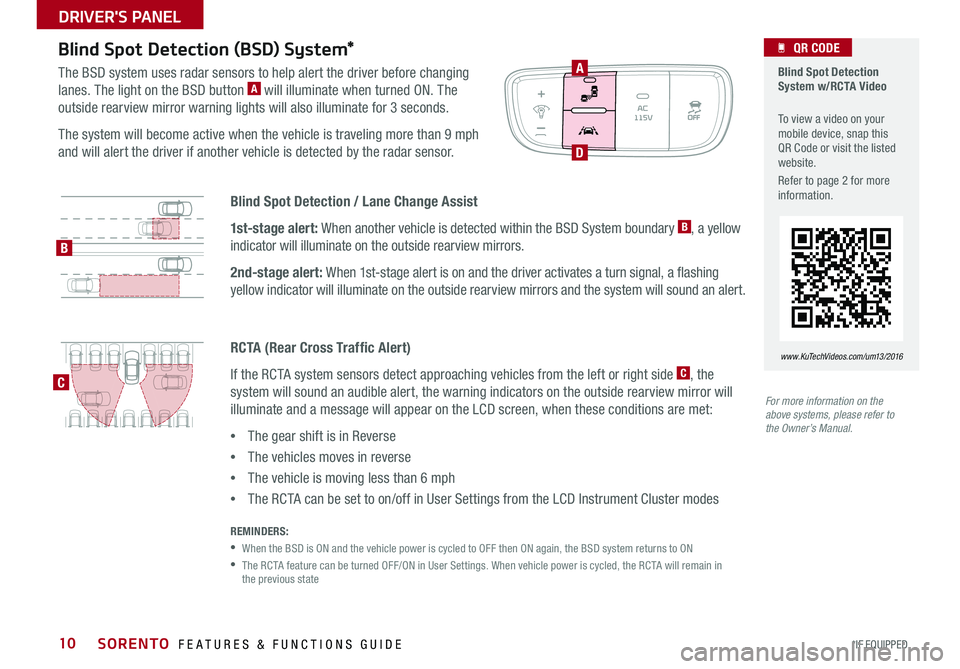
10
Blind Spot Detection / Lane Change Assist
1st-stage alert: When another vehicle is detected within the BSD System boundary B, a yellow
indicator will illuminate on the outside rearview mirrors .
2nd-stage alert: When 1st-stage alert is on and the driver activates a turn signal, a flashing
yellow indicator will illuminate on the outside rearview mirrors and the system will sound an alert .
Blind Spot Detection (BSD) System*
The BSD system uses radar sensors to help alert the driver before changing
lanes . The light on the BSD button A will illuminate when turned ON . The
outside rearview mirror warning lights will also illuminate for 3 seconds .
The system will become active when the vehicle is traveling more than 9 mph
and will alert the driver if another vehicle is detected by the radar sensor .
REMINDERS:
•When the BSD is ON and the vehicle power is cycled to OFF then ON again, the BSD system returns to ON
• The RCTA feature can be turned OFF/ON in User Settings . When vehicle power is cycled, the RCTA will remain in the previous state
For more information on the above systems, please refer to the Owner’s Manual.
Blind Spot Detection System w/RCTA Video
To view a video on your mobile device, snap this QR Code or visit the listed website .
Refer to page 2 for more information .
QR CODE
www.KuTechVideos.com/um13/2016
A
D
B
C
RCTA (Rear Cross Traffic Alert)
If the RCTA system sensors detect approaching vehicles from the left or right side C, the
system will sound an audible alert, the warning indicators on the outside rearview mirror will
illuminate and a message will appear on the LCD screen, when these conditions are met:
•The gear shift is in Reverse
•The vehicles moves in reverse
•The vehicle is moving less than 6 mph
•The RCTA can be set to on/off in User Settings from the LCD Instrument Cluster modes
SORENTO FEATURES & FUNCTIONS GUIDE
*IF EQUIPPED
DRIVER'S PANEL
Page 47 of 50

Driving while distracted is dangerous and should be avoided. Drivers should remain attentive to driving and always exercise caution when using the steering-wheel-mounted controls while dri\
ving.
Driving while distracted can result in a loss of vehicle control that may lead to an accident, severe personal injury and death. The driver’s primary responsibility is in the safe and legal operation of a vehicle, and use of any handheld devices, other equipment or vehicle systems which take the driver’s eyes, attention and focus away from the safe operation of a vehicle or that are not permissible by law should never be used during operation of the vehicle.
Safety Features: No system, no matter how advanced, can compensate for all driver error and/or driving conditions. Always drive responsibly.
Advanced Smart Cruise Control, Blind Spot Detection, and Lane Departure Warning systems are not substitutes for proper and safe driving. These systems may not detect every object alongside, behind, or in the path of the vehicle. Always drive safely and use caution.
Electronic Stability Control and Hill-Start Assist Control: No system, no matter how advanced, can compensate for all driver error and/or driving conditions. Always drive responsibly.
Back-Up Warning System (Rear Parking Assist System) / Rear-Camera Display: The Back-Up Warning System (Rear Parking Assist System) / Rear-Camera Display are not substitutes for proper and safe backing-up proce\
dures. These systems may not detect every object alongside, behind, or in the path of the vehicle. Always drive safely and use caution when backing up.
Tilt/Telescoping Steering Wheel: Never attempt to adjust steering wheel position when vehicle is in motion.
Front Seat Headrest Adjustment: Never attempt to adjust headrests when vehicle is in motion.
Seat Belts / Airbags: For maximum protection, always wear your Seat Belt.
Navigation: GPS maps and directions are for information purposes only, and Kia does not make any warranties about the accuracy of that information. Kia is not responsible for loss or delay resulting from the use of the \
navigation system. Caution: Do not enter information into the navigation system while the vehicle is moving. Failure to pay attention to travel conditions and vehicle operation while the vehicle is in motion could result in loss of vehicle control. Operate the system only when it is safe and legal to do so.
TPMS: Even with the Tire-Pressure Monitoring System (TPMS), always check your tire pressure on a regular basis.
Bluetooth® Wireless Technology: A compatible Bluetooth® wireless technology-enabled cell phone is required to use Bluetooth® wireless technology. The Bluetooth® word mark and logos are registered trademarks owned by Bluetooth SIG, Inc. and any use of such marks by Kia is under license. Other trademarks and trade names are those of their respective owners. A Bluetooth® enabled cell phone is required to use Bluetooth® wireless technology.
SiriusXM®: SiriusXM Satellite Radio, SiriusXM Traffic and SiriusXM Travel Link each require a subscription sold separately, or as a package, by SiriusXM Radio Inc. If you decide to continue your service at the end of your trial subscription, the plan you choose will automatically renew and bill at then-current rates \
until you call 1-866-635-2349 to cancel. See SiriusXM Customer Agreement for complete terms at www.siriusxm.com. Other fees and taxes will apply. All fees and programming are subject to change. Not all vehicles or devices are capable of receiving all services offered by SiriusXM. Data displays and individual product availability vary by vehicle hardware. Current information and features may not be available in all locations, or on all receivers. Weather Forecast, Current Conditions may not be available in all locations. Images above are for representative purposes only and are not real products. For actual features and images of real products, consult the vehicle manufacturer. SiriusXM is not responsible for any errors or inaccuracies in the data services or their use in the vehicle. Travel Link Stocks displays current price and daily delta of around 7,000 a\
ctively reported securities traded on the NYSE®, NASDAQ® and AMEX®. The service is delayed approximately 20 minutes. SiriusXM satellite service is available only to those at least 18 years of age in the 48 contiguous USA, DC, and Puerto Rico (with coverage limitations). SiriusXM Internet Radio service is available throughout our satellite service area and in AK and HI. © 2014 SiriusXM Radio Inc. Sirius, XM and all related marks and logos are trademarks of SiriusXM Radio Inc.
UVO eServices app: Apple iPhone® and select Android™ devices only are UVO eServices compatible. iPhone® is a registered trademark of Apple Inc. Android™ is a registered trademark of Google Inc. No subscription fee for UVO eServices. No charge for the UVO eServices app. App uses your smartphone cellular data service. Normal data rates will apply.
Sportmatic® is a registered trademark of Kia Motors America.
iPod® is a registered trademark of Apple Inc. iPod® mobile digital device sold separately.
HomeLink® is a registered trademark of Gentex Corporation.
Pandora is a registered trademark of Pandora Media, Inc.
HD Radio™ and the HD Radio logo are proprietary trademarks of iBiquity Digital Corporation.
LEGAL DISCLAIMERSSales Consultant:
______________________________________________________________
Date:
____________________
Sales Manager:
________________________________________________________________
Date:
____________________
Customer:
_____________________________________________________________________
Date:
____________________
Page 50 of 50

KEY FEATURE WALKTHROUGHDURING DELIVERY Aux/USB/iPod
® Ports, Power Outlets & AC Inverter* – page 24
Blind Spot Detection (BSD)* – page 10 Clock Setup – page 24 Engine Start /Stop Button – page 13 HomeLink
® with Auto-Dimming Rearview Mirror – page 37
Lane Departure Warning System (LDWS)* – page 11 Passenger Airbag Off Indicator – page 44
Panoramic Sunroof Operation* – page 41 Rear-Camera Display* – page 42 Seat Warmers / Ventilated Seats* – page 30 Smart Key – page 36 Sunvisor – page 40 Tire Pressure Monitoring System ( TPMS) – page 5
*if equipped
Explain first service process and schedule first service appointment Tour Parts & Service departments, introduce staff and explain value of Kia Parts and Service Review recommended maintenance schedule and maintenance requirements to validate warranty Review business hours and Customer 360° Care Review the Kia 10-year/100,000-mile warranty program Ensure 100% satisfaction with sales and delivery process and no problems with the vehicle Confirm time and best contact number for initial dealer follow-up
ASCC / Cruise Control – page 18-19
Demonstrate operation
Bluetooth
® Wireless Technology – pages 16-17
Demonstrate operation
CRUISECANCEL
RES
OKSET
MODE
CRUISECANCEL
RES
OKSET
Sales Consultant:
______________________________________________________________
Date:
____________________
Sales Manager:
________________________________________________________________
Date:
____________________
Customer:
_____________________________________________________________________
Date:
____________________
Standard Audio System*
– page 20
For furthur operational information, refer to the Owner’s Manual.
DISP
RADIO
MEDIA
PHONE SCAN
SETUP
MENU
SEEK
TRACK C AT
ENTERTUNE
FILECLOCK
POWER
PUSH
VOL
1 2
3
4 5
6RPT RDM
FOLDER
UVO eServices with Premium Navigation*
– page 22
For further operational information, refer to the Car Multimedia System User’s Manual.
UVO eServices System*
– page 21
For further operational information, refer to the UVO System User’s Manual.
UVO
RADIO
NAVI
PHONE MAPINFOSETUP
CD-IN
MAP
MEDIA
SEEK
TRACKPWR VOL
FILETUNE
CLOCK
ENTERTUNE
FILE
POWER
PUSHVOL
SEEK
TRACK CATEGORY
FM/AM
S AT
MEDIA eServices
PHONE
SETUP
SORENTO
CUSTOMER DELIVERY CHECKLIST