Page 240 of 477
Features of your vehicle
170
4
Turning Bluetooth System Off
Press the key Select
[Phone] Select [Bluetooth System
Off]
Once
Bluetooth®Wireless Technology
is turned off,
Bluetooth®Wireless
Technology related features will not be
supported within the audio system.
To turn
Bluetooth®Wireless Technology
back on, go to [Phone]
and select “Yes”.
SETUP/CLOCK
SETUP/CLOCK
Page 245 of 477
Features of your vehicle
4175
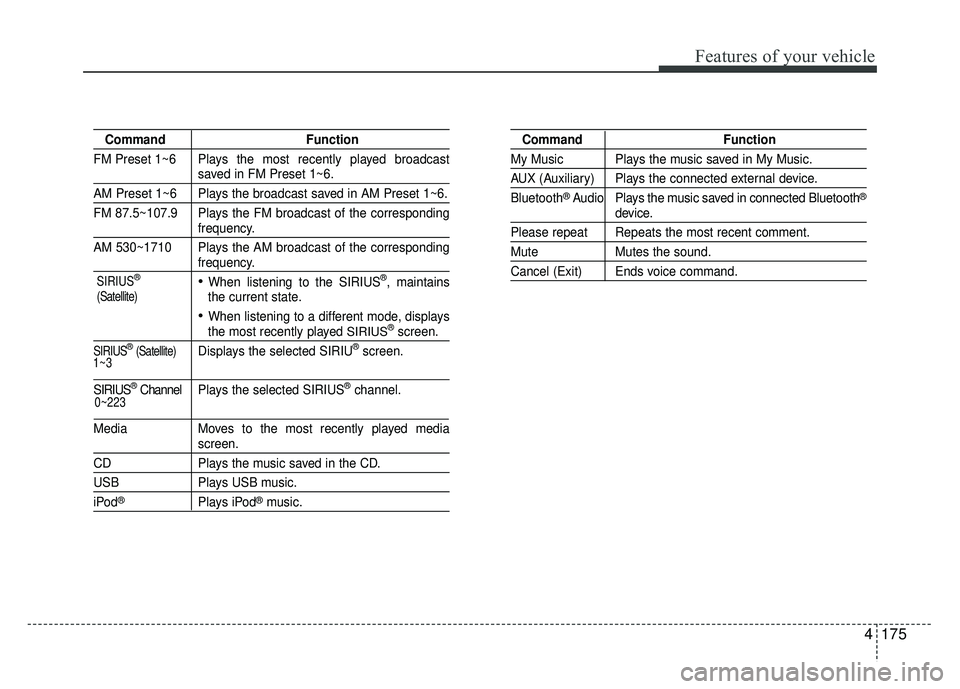
CommandFunction
FM Preset 1~6 Plays the most recently played broadcast
saved in FM Preset 1~6.
AM Preset 1~6 Plays the broadcast saved in AM Preset 1~6.
FM 87.5~107.9 Plays the FM broadcast of the corresponding
frequency.
AM 530~1710 Plays the AM broadcast of the corresponding
frequency.
When listening to the SIRIUS®, maintains
the current state.
When listening to a different mode, displaysthe most recently played SIRIUS®screen.
SIRIUS®(Satellite)Displays the selected SIRIU®screen.
SIRIUS®Channel P l ay s the selected SIRIUS®channel.
Media Moves to the most recently played media
screen.
CD Plays the music saved in the CD.
USBPlays USB music.
iPod®Plays iPod®music.
Command Function
My Music Plays the music saved in My Music.
AUX (Auxiliary) Plays the connected external device.
Bluetooth
®Audio Plays the music saved in connected Bluetooth®
device.
Please repeat Repeats the most recent comment.
Mute Mutes the sound.
Cancel (Exit) Ends voice command.
0~223
1~3 SIRIUS
®
(Satellite)
Page 247 of 477
Features of your vehicle
4177
Audio CD commands : Commands available duringAudio CD operation. Commands available dur-
ing USB and MP3 CD operation.
Command Function
Random Randomly plays the tracks within the CD.
Random Off Cancels random play to play tracks in sequen-
tial order.
RepeatRepeats the current track.
Repeat Off Cancels repeat play to play tracks in sequen-
tial order.
Track 1~30 Plays the desired track number.
Command Function
Random Randomly plays the files within the current
folder.
Random Off Cancels random play to play files in sequential
order.
Repeat Repeats the current file.
Repeat Off Cancels repeat play to play files in sequential
order.
Information Displays the information screen of the current
file.
Next Folder Plays the first file in the next folder.
Previous Folder Plays the first file in the previous folder.
Page 249 of 477

Features of your vehicle
4179
CommandFunction
PlayPlays the currently paused song.
PausePauses the current song.
Bluetooth®Wireless Technology A udio Commands :
Commands available during
Bluetooth®Wireless
Technology audio streaming from mobile phone oper-
ation Command Operation iPod
®is a registered trademark of Apple Inc. iPod®
mobile digital device sold separately. The
Bluetooth®word mark and logos are registered
trademarks owned by Bluetooth SIG, Inc. and any
use of such marks by Kia is under license. A
Bluetooth
®enabled cell phone is required to use
Bluetooth®Wireless Technology. Sirius XM®service
requires a subscription, sold separately, after 3-
month trial included with vehicle purchase. If you
decide to continue your Sirius XM
®service at the
end of the trial subscription, the plan you choose
will automatically renew and bill at the current rates
until you call Sirius XM
®at 1-866-635-2349 to can-
cel. See our Customer Agreement for complete
terms at www.siriusxm.com. Sirius satellite service
is available only to those at least 18 and older in the
48 contiguous United States, D.C., and P.R. (with
coverage limitations). Sirius XM
®Traffic available in
select markets. See siriusxm.com/traffic for more
information. Sirius, XM and all related marks and
logos are trademarks of Sirius XM Radio Inc.
Android™ is a trademark of Google, Inc.
BlackBerry
®is a registered trademark of Research
In Motion Limited (RIM).
Page 400 of 477

Maintenance
50
7
Battery recharging
Your vehicle has a maintenance-free,
calcium-based battery.
If the battery becomes discharged
in a short time (because, for exam-
ple, the headlights or interior lights
were left on while the vehicle was
not in use), recharge it by slow
charging (trickle) for 10 hours.
If the battery gradually discharges because of high electric load while
the vehicle is being used, recharge
it at no more than 20-30A for two
hours. When recharging the battery,
observe the following precautions:
The battery must be removed from
the vehicle and placed in an area
with good ventilation.
Watch the battery during charging, and stop or reduce the charging
rate if the battery cells begin
gassing (boiling) violently or if the
temperature of the electrolyte of
any cell exceeds 120°F (49°C).
Wear eye protection when check- ing the battery during charging.
Disconnect the battery charger in the following order.
1. Turn off the battery charger main switch.
2. Unhook the negative clamp from the negative battery terminal.
3. Unhook the positive clamp from the positive battery terminal.
Before performing maintenance or recharging the battery, turn off all
accessories and stop the engine.
The negative battery cable must be removed first and installed last
when the battery is disconnected.
Reset items
Items should be reset after the bat-
tery has been discharged or the bat-
tery has been disconnected.
Auto down window (See section 4)
Sunroof (See section 4)
Trip computer (See section 4)
Climate control system (See section 4)
Clock (See section 4)
Audio (See section 4)
Page 417 of 477

767
Maintenance
If you do not have a spare, use afuse of the same rating from a circuityou may not need for operating thevehicle, such as the cigar lighterfuse.
If the headlights or other electrical
components do not work and the
fuses are OK, check the fuse block in
the engine compartment. If a fuse is
blown, it must be replaced.
Memory fuse
Your vehicle is equipped with the
memory fuse to prevent battery dis-
charge if your vehicle is parked with-
out being operated for prolonged
periods. Use the following proce-
dures before parking the vehicle for
prolonged periods.
1. Turn off the engine.
2. Turn off the headlights and tail lights.
3. Open the driver’s side panel cover and pull up the memory fuse. If the memory fuse is pulled up from
the fuse panel, the warning chime,
audio, clock and interior lamps, etc.,
will not operate. Some items must be
reset after replacement. Refer to
“Battery” in this section.
Even though the memory fuse is
pulled up, the battery can still be dis-
charged by operation of the head-
lights or other electrical devices.
OUB071021
Page 422 of 477

Maintenance
72
7
Instrument panel fuse panel
Fuse Name Fuse rating Circuit Protected
POWER OUTLET 15A Power Outlet
C/LIGHTER 20A Cigarette Lighter
ACC 10AFront Map Lamp, Power Outside Mirror Switch, BCM,
Low DC-DC Convertor, Smart Key Control Module, Audio,
A/V & Navigation Head Unit, Digital Clock
A/BAG IND 10A Instrument Cluster
A/BAG 10ASBR PAB Indicator, SRS Control Module
Passenger Weight Classification Sensor
MODULE 2 10A BCM
MDPS 10A EPS Control Module
WIPER RR 15A Multifunction Switch, Rear Wiper Relay, Rear Wiper Motor
HTD STRG 15A Steering Wheel Heater
FOG LAMP RR 10A -
FOG LAMP FRT 15A Front Fog Lamp Relay
MODULE 1 10A ATM Shift Lever Switch, Door Warning Switch
STOP LAMP 15AData Link Connector, Smart Key Control Module, Stop Lamp Switch
Stop Lamp Relay, PCB Fuse & Relay Box (HAC Relay)
CLUSTER 10AAudio, BCM, ATM Shift Lever ILL., Crash Pad Switch
Instrument Cluster, Tire Pressure Monitoring Module
IG1 1 10AMultipurpose Check Connector, Driver CCS Seat Warmer Module
Passenger Seat Warmer Module
With ISG : Crash Pad Switch, Low DC-DC Convertor
ABS 10ACrash Pad Switch, ESC Module
PCB Fuse & Relay Box (HAC Relay)
B/UP LAMP 10A Back-Up Lamp Switch
Page 424 of 477
Maintenance
74
7
Fuse Name Fuse rating Circuit Protected
AUDIO 20AWith ISG : Low DC-DC Convertor
W/O ISG : Audio, A/V & Navigation Head Unit
TAIL LAMP LH 10AHead Lamp LH, License Lamp
Rear Combination Lamp (IN/OUT) LH
TAIL LAMP RH 10AHead Lamp RH, License Lamp, ILL. (+),
Rear Combination Lamp (IN/OUT) RH
START 10AWith Burglar Alarm : Burglar Alarm Relay
W/O Burglar Alarm : Transaxle Range Switch (A/T),
Smart Key Control Module (M/T), Ignition Lock Switch (M/T),
ECM (M/T), PCB Fuse & Relay Box (Start Relay) (M/T)
P/WDW LH 25APower Window Main Switch, Rear Power Window Switch LH
Driver Safety Power Window Module
P/WDW RH 25APower Window Main Switch, Rear Power Window Switch RH
Passenger Power Window Switch
HTD MIRR 10AECM/PCM, A/C Control Module
Driver/Passenger Power Outside Mirror
A/CON 10A A/C Control Module
![KIA RIO HATCHBACK 2016 Owners Manual Features of your vehicle
170
4
Turning Bluetooth System Off
Press the key Select
[Phone] Select [Bluetooth System
Off]
Once
Bluetooth®Wireless Technology
is turned off,
Bluetooth®Wireless
Technol](/manual-img/2/57984/w960_57984-239.png "KIA RIO HATCHBACK 2016 Owners Manual Features of your vehicle
170
4
Turning Bluetooth System Off
Press the key Select
[Phone] Select [Bluetooth System
Off]
Once
Bluetooth®Wireless Technology
is turned off,
Bluetooth®Wireless
Technol")

