Page 138 of 477

Features of your vehicle
68
4
Electric power steering
(EPS) system warninglight (if equipped)
This warning light illuminates after
the ignition key is turned to the ON
position and then it will go off when
the engine starts.
This light also comes on when the
EPS has malfunctioned. If it comes
on while driving, have your vehicle
inspected by an authorized Kia deal-
er.
Fuel cap open warningindicator
This warning light indicates the fuel
filler cap is not tighten securely.
Always make sure that the fuel filler
cap is tight.
ECOMINDER®indicator
(if equipped)
The ECOMINDER®indicator is dis-
played to help you improve fuel effi-
ciency when you are driving.
The ECOMINDER
®indicator will
turn the ECO light green on the
instrument panel when you are
driving efficiently in the ECO ON
mode.
If you don't want the indicator dis-
played, you can turn the ECO ON
mode to OFF mode by pressing
the TRIP button.
When the instant fuel consumption mode(if equipped) is displayed on
the LCD display or the system is
not working properly, the indicator
turns off. If the indicator turns off
when the instant fuel consumption
mode or ECO OFF mode is not
selected, have the system
checked by an authorized Kia deal-
er as soon as possible. Fuel efficiency depends on the dri-
ver's driving habit and road condi-
tion.
The system stops operating when the transaxle is in the P (Park), R
(Reverse), N (Neutral) position or
sports mode, or when the instant
fuel consumption mode is select-
ed.
WARNING -
ECOMINDER®indicator
Don't keep watching the “ECO”
ECOMINDER®indicator while
driving. It may distract you
while driving and cause an acci-
dent.
Page 143 of 477

473
Features of your vehicle
Press start button while turn steering
If the steering wheel does not unlock
normally when the engine start/stop
button is pressed, the warning illumi-
nates for 10 seconds on the LCD dis-
play. Also, the warning chime sounds
once and the engine start/stop but-
ton light blinks for 10 seconds.
When you are warned, press the
engine start/stop button while turning
the steering wheel right and left.Check steering wheel lock system
If the steering wheel does not lock
normally when the engine start/stop
button changes to the OFF position,
the warning illuminates for 10 sec-
onds on the LCD display. Also, the
warning chime sounds for 3 seconds
and the engine start/stop button light
blinks for 10 seconds.
Check stop lamp fuse (if equipped)
When the stop lamp fuse is discon-
nected, the warning illuminates for
10 seconds on the LCD display.
Replace the fuse with a new one. If
that is not possible you can start the
engine by pressing the engine
start/stop button for 10 seconds in
ACC.
OUB041082OUB041084OUB041085
Page 144 of 477
Features of your vehicle
74
4
Door open! (if equipped)
It displays the corresponding door or
tailgate that is not closed securely. Fuel cap open warning (if equipped)
This warning light indicates the fuel
filler cap is not tight securely.
Always make sure that the fuel filler
cap is tight.Align steering wheel (if equipped)
If you start the engine when the
steering wheel is turned 90 degrees
to the left after a couple of seconds,
“Align steering wheel” illuminates on
the LCD display for 5 seconds.
Turn the steering wheel to the right
and make it turned to the left less
than 30 degrees.
OUB041087OUB041170OUB041088
Page 145 of 477
475
Features of your vehicle
Align steering wheel (if equipped)
If you start the engine when the
steering wheel is turned 90 degrees
to the right after a couple of seconds,
“Align steering wheel” illuminates on
the LCD display for 5 seconds.
Turn the steering wheel to the left
and make it turned to the right less
than 30 degrees.Low tire pressure (if equipped)
This warning message will illuminate
when one or more of your tires is sig-
nificantly underinflated.
In this case, we recommend that you
have the vehicle inspected by an
authorized Kia dealer as soon as
possible.
OUB041089OUB043210
Page 147 of 477
477
Features of your vehicle
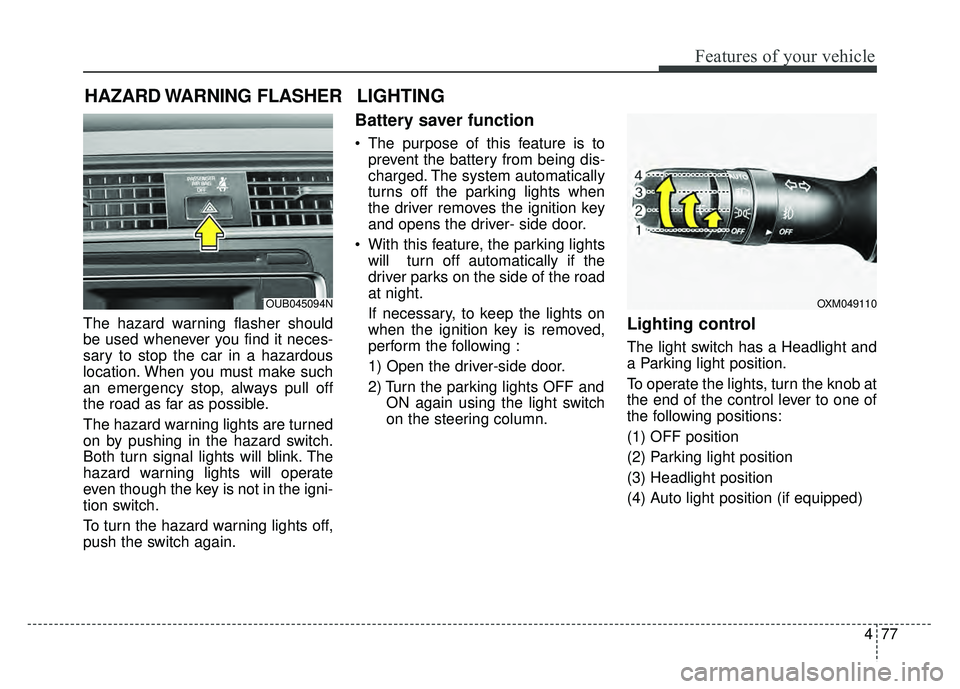
The hazard warning flasher should
be used whenever you find it neces-
sary to stop the car in a hazardous
location. When you must make such
an emergency stop, always pull off
the road as far as possible.
The hazard warning lights are turned
on by pushing in the hazard switch.
Both turn signal lights will blink. The
hazard warning lights will operate
even though the key is not in the igni-
tion switch.
To turn the hazard warning lights off,
push the switch again.
Battery saver function
The purpose of this feature is toprevent the battery from being dis-
charged. The system automatically
turns off the parking lights when
the driver removes the ignition key
and opens the driver- side door.
With this feature, the parking lights will turn off automatically if the
driver parks on the side of the road
at night.
If necessary, to keep the lights on
when the ignition key is removed,
perform the following :
1) Open the driver-side door.
2) Turn the parking lights OFF and ON again using the light switch
on the steering column.
Lighting control
The light switch has a Headlight and
a Parking light position.
To operate the lights, turn the knob at
the end of the control lever to one of
the following positions:
(1) OFF position
(2) Parking light position
(3) Headlight position
(4) Auto light position (if equipped)
HAZARD WARNING FLASHER
OXM049110
LIGHTING
OUB045094N
Page 196 of 477

Features of your vehicle
126
4
Steering wheel audio control
(if equipped)
The steering wheel audio control but-
ton is installed to improve conven-
ience.
Do not operate the audio remote
control buttons simultaneously.
VOLUME (+/-) (1)
Push the lever up to increase vol-
ume.
Push the lever down to decrease volume.
MODE (3)
Press the button to select Radio or
CD (compact disc).
MUTE (4)
Press the MUTE button to cancelthe sound.
Press the MUTE button again to activate the sound.
SEEK/PRESET ( / ) (2)
The SEEK/PRESET button has dif-
ferent functions base on the system
mode. For the following functions the
button should be pressed for 0.8 sec-
ond or more.
RADIO mode
It will function as the AUTO SEEK
select button.
CDP/USB/iPod
®mode
It will function as the FF/REW button.
iPod
®is a registered trademark of
Apple Inc. If the SEEK button is pressed for less
than 0.8 second, it will work as fol-
lows in each mode.
RADIO mode
It will function as the PRESET STA-
TION select buttons.
CDP/USB/iPod
®mode
It will function as the TRACK
UP/DOWN button.
Detailed information for audio control
buttons is described in the following
pages in this section.
Bluetooth®Wireless
Technology
(if equipped)
You can use a compatible phone via
using the
Bluetooth®Wireless
Technology
. Detailed information for
the
Bluetooth® Wireless Technology
is described in the Audio system sec-
tion.
OUB041163
Page 228 of 477

Features of your vehicle
158
4
PHONE
Before using the Bluetooth®Wireless
Technology phone features
Bluetooth®Wireless
Technology phone, you must first
pair and connect the
Bluetooth®
Wireless Technology mobile phone.
connected, it is not possible to
enter Phone mode. Once a phone
is paired or connected, the guid-
ance screen will be displayed.
tion (IGN/ACC ON), the
Bluetooth®
Wireless Technology phone will be
automatically connected. Even if
you are outside, the
Bluetooth®
Wireless Technology phone will be
automatically connected once you
are in the vicinity of the vehicle. If
you do not want automatic
Bluetooth®Wireless Technology
phone connection, set the
Bluetooth®Wireless Technology
power to OFF
Making a call using the
Steering-wheel mount controls
(1) VOLUME button/scroll wheel :
Raises or lowers speaker vol-
ume.
(2) button : Places and transfers calls.
(3) button : Ends calls or cancels functions.
(4) MUTE button : Mutes the micro- phone during a call.
(5) button : Activates voice recognition.
❈ The actual feature in the vehicle
may differ from the illustration.
➀
Shortly press (under 0.8 seconds)
the key on the steering
remote controller.
➁ The call history list will be dis-
played on the screen.
\b Press the key again to con-
nect a call to the selected number.
number
➀ Press and hold (over 0.8 seconds)
the key on the steering
remote controller.
➁ The most recently called number
is redialed.
Page 229 of 477

Features of your vehicle
4159
Bluetooth®Wireless Technology
Pairing a
Bluetooth®Wireless
Technology Device
What is Bluetooth®Wireless
Technology Pairing?
Pairing refers to the process of syn-
chronizing your
Bluetooth®Wireless
Technology phone or device with the
car audio system for connection.
Pairing is necessary to connect and
use the
Bluetooth®Wireless Technology
feature.
The Bluetooth
®word mark and logos
are registered trademarks owned by
Bluetooth SIG, Inc. and any use of
such marks by Kia is under license.
Other trademarks and trade names
are those of their respective owners.
A Bluetooth
®enabled cell phone is
required to use
Bluetooth®Wireless
Technology
Pairing Key / Key
on the Steering Remote
Controller
When No Devices have been Paired
1. Press the key or the key on the steering remote con-
troller. The following screen is dis-
played.PHONE
PHONEWARNING
Driving while distracted can
result in a loss of vehicle control
that may lead to an accident,
severe personal injury, and
death. The driver’s primary
responsibility is in the safe and
legal operation of a vehicle, and
use of any handheld devices,
other equipment, or vehicle sys-
tems which take the driver’s
eyes, attention and focus away
from the safe operation of a vehi-
cle or which are not permissible
by law should never be used dur-
ing operation of the vehicle.

