Page 167 of 513
Features of your vehicle
80
4
Window Open
This warning message illuminates if
you turn off the engine when any
window is open.
Heated Steering Wheel On
(if equipped)
This warning message illuminates if you turn on the heated steering wheel.
For more details, refer to “Heated
Steering Wheel” in this chapter.
Heated Steering Wheel Off (if equipped)
This warning message illuminates if you turn off the heated steering wheel.
For more details, refer to “Heated
Steering Wheel” in this chapter.
OKH043439L
■ Type A■Type B
OKH045430L
■ Type A■Type B
OKH045431L
■Type A■Type B
Page 168 of 513
481
Features of your vehicle
Turn on FUSE SWITCH
This warning message illuminatesif the fuse switch on the fuse box is
OFF.
It means that you should turn the fuse switch on.
For more details, refer to “Fuses” inchapter 7.
Low Tire Pressure (if equipped)
This warning message illuminates if the tire pressure is low with the
Engine Start/Stop button in ONposition.
For more details, refer to "Tire
Pressure Monitoring System (TPMS)"in chapter 6.
Align steering wheel
This warning message illuminates if you start the engine when the
steering wheel is turned to more
than 90 degrees to the left or right.
It means that you should turn the steering wheel and make the angle
of the steering wheel be less than
30 degrees.
OKH043433L
■Type A■Type B
OKH043415L
■Type A■Type B
OKH045435L
■Type A■Type B
Page 173 of 513
Features of your vehicle
86
4
✽✽
NOTICE
If the vehicle is not on level ground or the battery power has been
interrupted, the range function
may not operate correctly.
The range may differ from the actual driving distance as it is an
estimate of the available driving
distance.
The trip computer may not register additional fuel if less than 6 liters
(1.6 gallons) of fuel are added to the
vehicle.
The fuel economy and range may vary significantly based on driving
conditions, driving habits, and con-
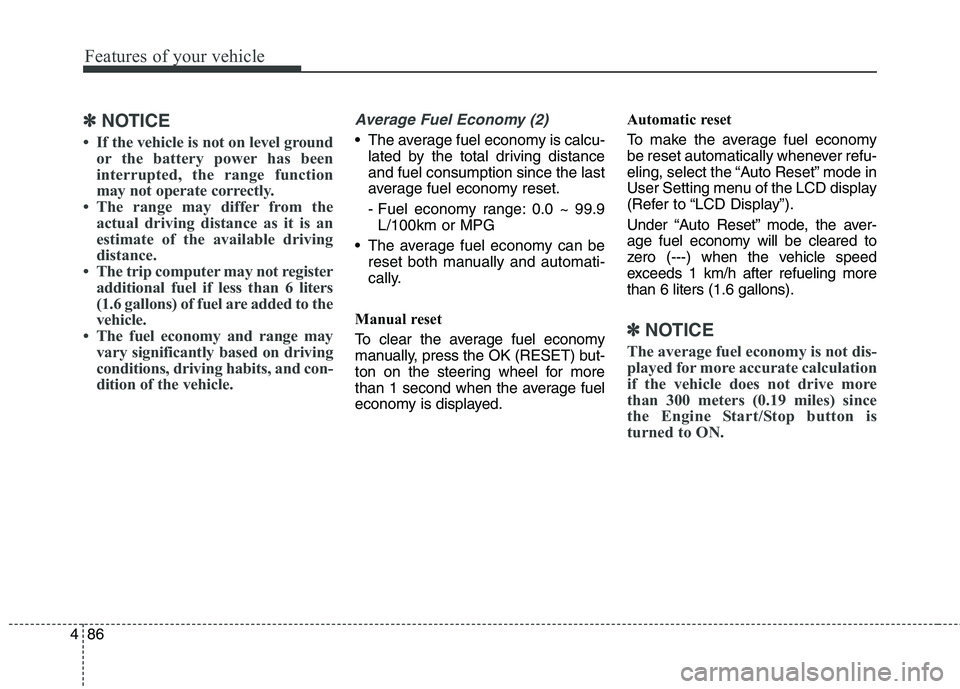
dition of the vehicle.Average Fuel Economy (2)
The average fuel economy is calcu-lated by the total driving distance and fuel consumption since the last
average fuel economy reset.
- Fuel economy range: 0.0 ~ 99.9L/100km or MPG
The average fuel economy can be reset both manually and automati-
cally.
Manual reset
To clear the average fuel economy
manually, press the OK (RESET) but-
ton on the steering wheel for more
than 1 second when the average fuel
economy is displayed. Automatic reset
To make the average fuel economy
be reset automatically whenever refu-
eling, select the “Auto Reset” mode in
User Setting menu of the LCD display
(Refer to “LCD Display”).
Under “Auto Reset” mode, the aver-
age fuel economy will be cleared to
zero (---) when the vehicle speed
exceeds 1 km/h after refueling morethan 6 liters (1.6 gallons).
✽✽
NOTICE
The average fuel economy is not dis-
played for more accurate calculation
if the vehicle does not drive more
than 300 meters (0.19 miles) since
the Engine Start/Stop button is
turned to ON.
Page 174 of 513

487
Features of your vehicle
Instant Fuel Economy (3)
This mode displays the instant fueleconomy during the last few sec-
onds when the vehicle speed ismore than 10 km/h (6.2 MPH).
- Fuel economy range: 0 ~ 30L/100km or 0 ~ 50 MPG Trip A/B
Tripmeter (1)
The tripmeter is the total driving dis-
tance since the last tripmeter reset.
- Distance range: 0.0 ~ 9999.9 km or mi.
To reset the tripmeter, press the OK (RESET) b utton on the steering
wheel for more than 1 second
when the tripmeter is displayed.
Average Vehicle Speed (2)
The average vehicle speed is cal- culated by the total driving dis-
tance and driving time since the
last average vehicle speed reset.
- Speed range: 0 ~ 999 km/h or MPH
To reset the average vehicle speed, press the OK (RESET) button on
the steering wheel for more than 1
second when the average vehicle
speed is displayed.
✽✽ NOTICE
The average vehicle speed is not dis- played if the driving distance is less
than 300 meters (0.19 miles) since
the Engine Start/Stop button is
turned to ON.
Even if the vehicle is not in motion, the average vehicle speed keeps
going while the engine is running.OKH045408L
■Type A■Type B
Page 175 of 513

Features of your vehicle
88
4
Elapsed Time (3)
The elapsed time is the total driv-
ing time since the last elapsed time reset.
- Time range (hh:mm): 00:00 ~ 99:59
To reset the elapsed time, press the OK (RESET) b utton on the steering
wheel for more than 1 second when
the elapsed time is displayed.
✽✽ NOTICE
Even if the vehicle is not in motion,
the elapsed time keeps going while
the engine is running.
One time driving information mode
This display shows trip distance (1),
average fuel economy (2) and the
vehicle can be driven with theremaining fuel (3).
This information is displayed for a
few seconds when you turn off theengine and then goes off automati-
cally. The information provided is cal-
culated according to each trip.
If the estimated distance is below 1km (1 mi.), the distance to empty
(3) will display as "---" and a refuelmessage will appear (4). Drive Mode
By selecting the drive mode screen,
the driver can personalize the drive
mode based on vehicle control pref-
erence and driving style.
For more details, refer to "Drive
Mode Integrated Control System" inChapter 5.
OKH045406
■
Type A■Type B
OKH055149L
■Type A■Type B
Page 200 of 513
4113
Features of your vehicle
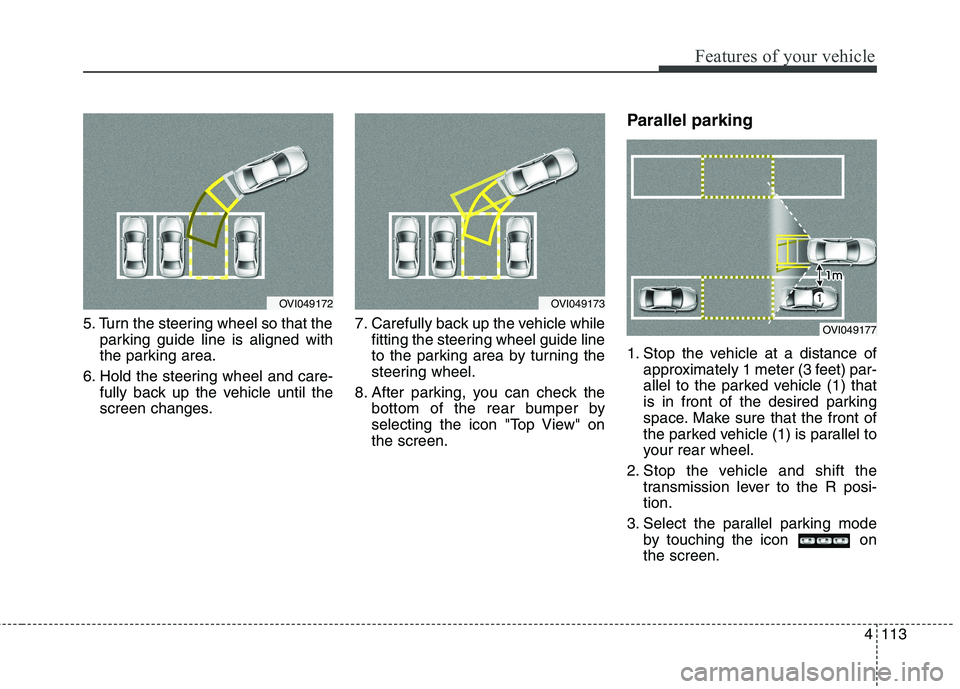
5. Turn the steering wheel so that theparking guide line is aligned with
the parking area.
6. Hold the steering wheel and care- fully back up the vehicle until the
screen changes. 7. Carefully back up the vehicle while
fitting the steering wheel guide line
to the parking area by turning the
steering wheel.
8. After parking, you can check the bottom of the rear bumper by
selecting the icon "Top View" onthe screen. Parallel parking
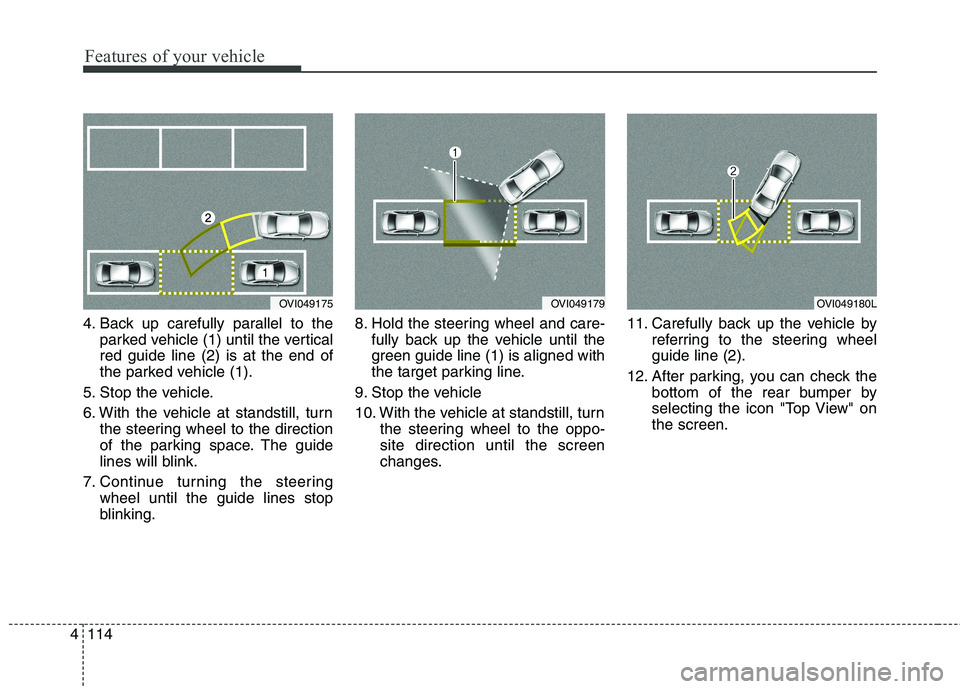
1. Stop the vehicle at a distance of
approximately 1 meter (3 feet) par-
allel to the parked vehicle (1) that
is in front of the desired parking
space. Make sure that the front of
the parked vehicle (1) is parallel to
your rear wheel.
2. Stop the vehicle and shift the transmission lever to the R posi-tion.
3. Select the parallel parking mode by touching the icon onthe screen.
OVI049173OVI049172
OVI049177
Page 201 of 513
Features of your vehicle
114
4
4. Back up carefully parallel to the
parked vehicle (1) until the vertical red guide line (2) is at the end of
the parked vehicle (1).
5. Stop the vehicle.
6. With the vehicle at standstill, turn the steering wheel to the direction
of the parking space. The guide
lines will blink.
7. Continue turning the steering wheel until the guide lines stop
blinking. 8. Hold the steering wheel and care-
fully back up the vehicle until the
green guide line (1) is aligned with
the target parking line.
9. Stop the vehicle
10. With the vehicle at standstill, turn the steering wheel to the oppo- site direction until the screen
changes. 11. Carefully back up the vehicle by
referring to the steering wheelguide line (2).
12. After parking, you can check the bottom of the rear bumper by
selecting the icon "Top View" onthe screen.
OVI049175OVI049179OVI049180L
Page 205 of 513

Features of your vehicle
118
4
Traffic change (for Europe)
Use this function when you visit a
country with opposite traffic direction.
If the traffic change is activated when
you visit a country with opposite traf-fic direction, it will decrease the daz-
zle on oncoming vehicle drivers.
Follow the below procedure.
1. Select “User Settings” by pressing
the mode button ( ) on the steer- ing wheel.
2. Select “Light” by pressing the move button ( ) and select but-
ton ( ) on the steering wheel.
3. Select “Travel Mode” by pressing the move button ( ) and select
button ( ) on the
steering wheel.
4. change function.
Select "Off" to deacticate the traf- fic change function.✽✽ NOTICE
If the engine is turned off with the
traffic change function activated,
and the engine turned on again, a
message "Headlamp beam pattern
set to opposite side range has been
reduced" will appear. It is to notify
the driver the function is activated.Lighting control
The light switch has a Headlight and
a Parking light position.
To operate the lights, turn the knob at
the end of the control lever to one of
the following positions: (1) OFF position
(2) Auto light / AFLS position
(3) Parking light position(4) Headlight position
OKH042189