2016 KIA PICANTO reset
[x] Cancel search: resetPage 135 of 488

Features of your vehicle
60
4
Low tire pressure (if equipped)
This warning message will illuminate
when one or more of your tires is signifi-
cantly underinflated.
In this case, we recommend that you
have the vehicle inspected by an author-
ized Kia dealer as soon as possible. Warnings and indicators
All warning lights are checked by turning
the ignition switch ON (do not start the
engine). If any light is still ON, this indi-cates a situation that needs attention.
After starting the engine, check to make
sure that all warning lights are off. If anyare still on, this indicates a situation that
needs attention. When releasing the
parking brake, the brake system warning
light should go off. The fuel warning light
will stay on if the fuel level is low.
ECO indicator
(if equipped) (Automatic transaxle)
The ECO indicator is a system that
informs you to drive economically.
It is displayed if you drive fuel efficiently
to help you improve fuel efficiency.
The ECO indicator (green) will turn on when you are driving fuel efficiently in
the ECO ON mode.
If you don't want the indicator dis-
played, you can turn the ECO ON
mode to OFF mode by pressing the
RESET button.
As per ECO ON/OFF Mode operation,
refer to the previous page.
The fuel-efficiency can be changed by the driver's driving habit and road con-dition.
It doesn't work at the condition which doesn't meet economical driving such
as P (Park), N (Neutral), R (Reverse).
While the instant fuel consumption mode is displayed on the LCD screen,
the ECO indicator turns off.
OTA045461L
Page 179 of 488
Features of your vehicle
104
4
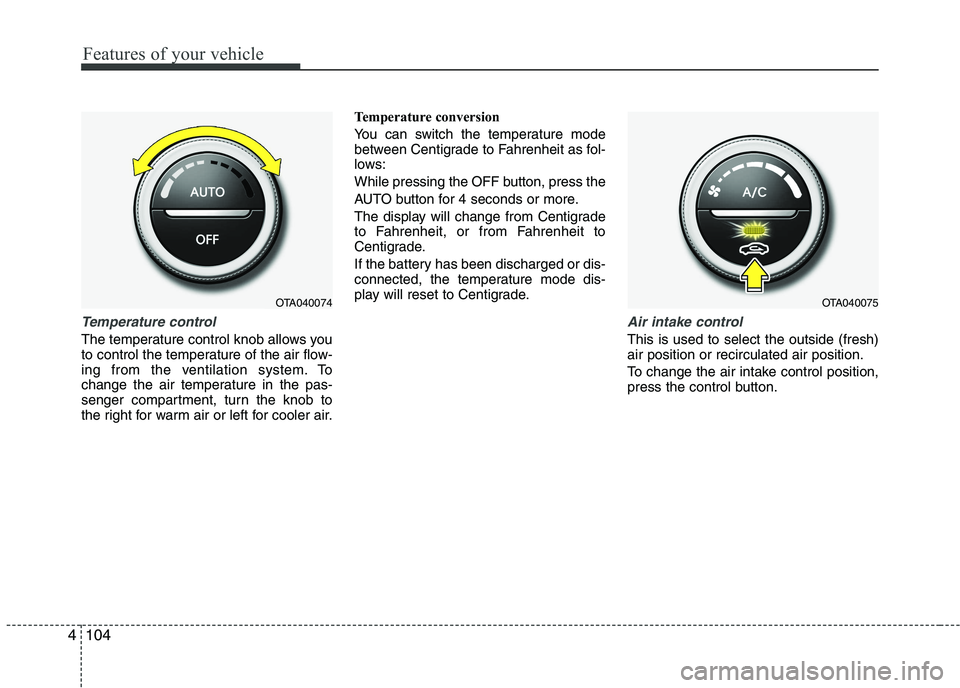
Temperature control
The temperature control knob allows you
to control the temperature of the air flow-
ing from the ventilation system. To
change the air temperature in the pas-
senger compartment, turn the knob to
the right for warm air or left for cooler air. Temperature conversion
You can switch the temperature mode
between Centigrade to Fahrenheit as fol-
lows:
While pressing the OFF button, press the
AUTO button for 4 seconds or more.
The display will change from Centigrade
to Fahrenheit, or from Fahrenheit to
Centigrade.
If the battery has been discharged or dis-
connected, the temperature mode dis-
play will reset to Centigrade.
Air intake control
This is used to select the outside (fresh) air position or recirculated air position.
To change the air intake control position,
press the control button.
OTA040075OTA040074
Page 184 of 488
4109
Features of your vehicle
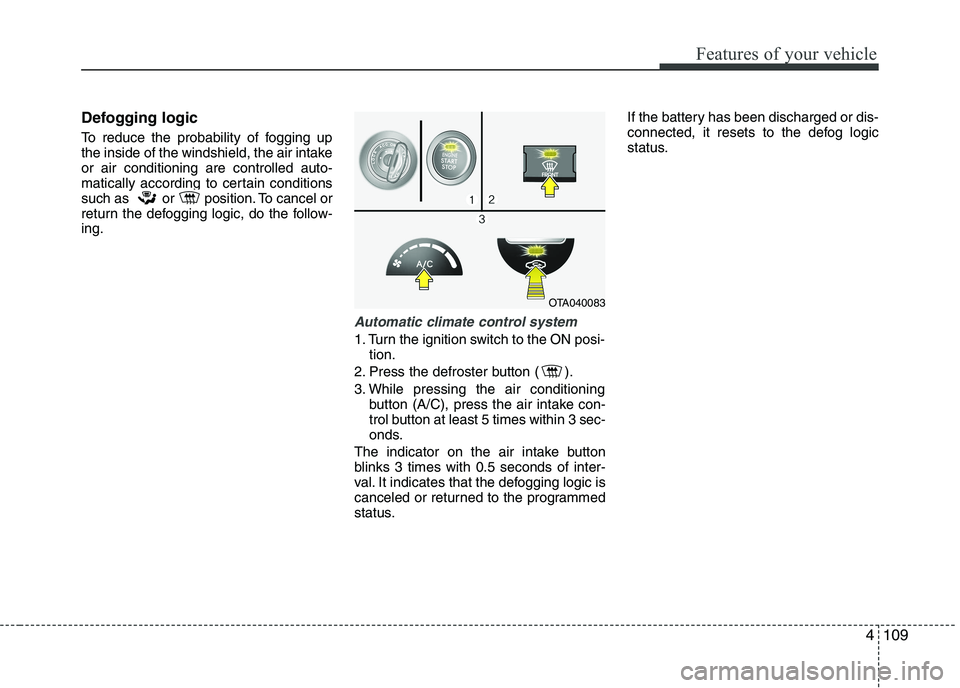
Defogging logic
To reduce the probability of fogging up
the inside of the windshield, the air intakeor air conditioning are controlled auto-
matically according to certain conditions
such as or position. To cancel or
return the defogging logic, do the follow-ing.
Automatic climate control system
1. Turn the ignition switch to the ON posi-tion.
2. Press the defroster button ( ).
3. While pressing the air conditioning button (A/C), press the air intake con-
trol button at least 5 times within 3 sec-
onds.
The indicator on the air intake button
blinks 3 times with 0.5 seconds of inter-
val. It indicates that the defogging logic is
canceled or returned to the programmed
status. If the battery has been discharged or dis-
connected, it resets to the defog logic
status.
OTA040083
Page 191 of 488
Features of your vehicle
116
4
Digital clock
Whenever the battery terminals or relat-
ed fuses are disconnected, you must
reset the time.
When the ignition switch is in the ACC or
ON position, the clock buttons operate as
follows:
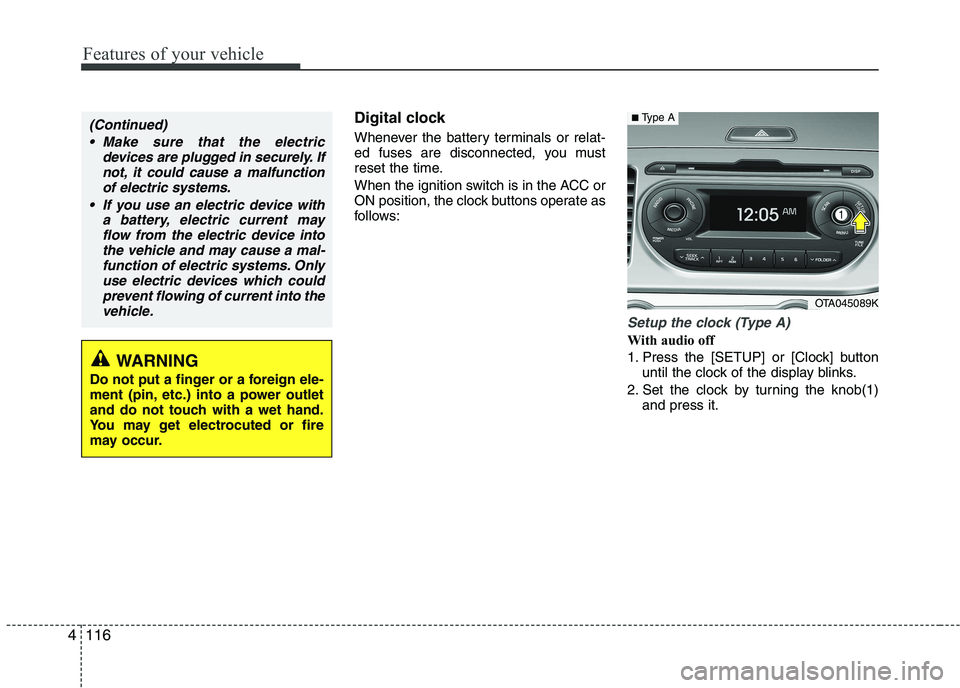
Setup the clock (Type A)
With audio off
1. Press the [SETUP] or [Clock] button
until the clock of the display blinks.
2. Set the clock by turning the knob(1) and press it.
WARNING
Do not put a finger or a foreign ele-
ment (pin, etc.) into a power outlet
and do not touch with a wet hand.
You may get electrocuted or fire
may occur.
(Continued)
Make sure that the electric devices are plugged in securely. Ifnot, it could cause a malfunctionof electric systems.
If you use an electric device with a battery, electric current mayflow from the electric device intothe vehicle and may cause a mal-
function of electric systems. Onlyuse electric devices which couldprevent flowing of current into the vehicle.
OTA045089K
■ Type A
Page 196 of 488
121
Features of your vehicle
SEEK/PRESET ( / ) (3)
The SEEK/PRESET lever has different
functions based on the system mode. For
the following functions the lever should
be pressed for 0.8 seconds or more.
RADIO mode
It will function as the AUTO SEEK select
button.
CD/USB / i Pod®
mode
It will function as the FF/REW button.
If the SEEK/PRESET button is pressed
for less than 0.8 seconds, it will work as
follows in each mode.
RADIO mode
It will function as the PRESET STATION
buttons.
CD/USB / i Pod ®
mode
It will function as TRACK UP/DOWN but- ton.
MUTE ( ) (4, if equipped)
Press the button to mute the sound.
Press the button to turn off the micro- phone during a telephone call.
Detailed information for audio control
buttons are described in the followingpages in this section.
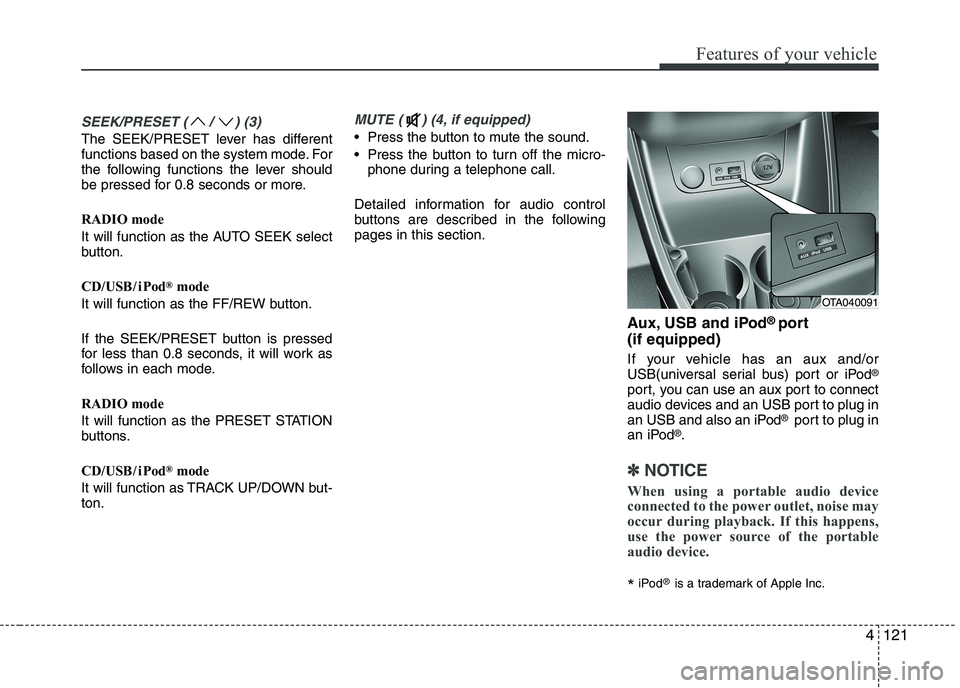
Aux, USB and iPod®
port
(if equipped)
If your vehicle has an aux and/or
USB(universal serial bus) port or iPod ®
port, you can use an aux port to connect
audio devices and an USB port to plug in
an USB and also an iPod ®
port to plug in
an iPod ®
.
✽✽ NOTICE
When using a portable audio device
connected to the power outlet, noise may
occur during playback. If this happens,
use the power source of the portable
audio device.
* iPod
®
is a trademark of Apple Inc.
4
OTA040091
Page 205 of 488

Features of your vehicle
1304
✽✽NOTICE - USING THE iPod ®
DEVICE
Some iPod ®
models may not support
communication protocol and files may
not properly play.
Supported iPod ®
models:
- iPhone 3GS/4
- iPod ®
touch 1st~4th generation
- iPod ®
nano 1st~6th generation
- iPod ®
classic
The order of search or playback of
songs in the iPod ®
can be different
from the order searched in the audio
system.
If the iPod ®
disabled due to its own
malfunction, reset the iPod ®
. (Reset:
Refer to iPod ®
manual)
An iPod ®
may not operate normally
on low battery.
(Continued)(Continued)
Some iPod
®
devices, such as the
iPhone, can be connected through the
Bluetooth ®
Wireless Technology inter-
face. The device must have audio
Bluetooth ®
Wireless Technology capa-
bility (such as for stereo headphone
Bluetooth ®
Wireless Technology ). The
device can play, but it will not be con-
trolled by the audio system.
To use iPod ®
features within the
audio, use the cable provided upon
purchasing an iPod ®
device.
Skipping or improper operation may occur depending on the characteris-
tics of your iPod ®
/iPhone ®
device.
If your iPhone ®
is connected to both
the Bluetooth ®
Wireless Technology
and USB, the sound may not be prop-
erly played. In your iPhone ®
, select
the Dock connector or Bluetooth®
Wireless Technology to change the
sound output (source). (Continued)(Continued)
When connecting iPod
®
with the
iPod ®
Power Cable, insert the connec-
tor to the multimedia socket complete-
ly. If not inserted completely, commu-
nications between iPod ®
and audio
may be interrupted.
When adjusting the sound effects of
the iPod ®
and the audio system, the
sound effects of both devices will over-
lap and might reduce or distort the
quality of the sound.
Deactivate (turn off) the equalizer function of an iPod ®
when adjusting
the audio system’s volume, and turn
off the equalizer of the audio system
when using the equalizer of an iPod ®
.
When not using iPod ®
with car audio,
detach the iPod ®
cable from iPod ®
.
Otherwise, iPod ®
may remain in acces-
sory mode, and may not work properly.
Page 208 of 488

133
Features of your vehicle
6. PRESET Buttons
Press ~ buttons less
than 0.8 seconds to play the station
saved in each button.
Press ~ button more than 0.8 seconds or longer to save the
current station to the respective button
with a beep.
7. Button
Shortly press the key (under 0.8 sec-
onds) : Moves to the Scroll, Media, Audio
setting modes.
Scroll : Scroll (On/Off)
Media : MP3 playing information (Folder/ File, Artist/Title)
Audio : Audio setup control (Bass/Treble/ Fader/Balance) - BASS Control : To increase the BASS,
rotate the knob clockwise, while to
decrease the BASS, rotate the knob
counterclockwise.
- TREBLE Control : To increase the TRE- BLE, rotate the knob clockwise, while to
decrease the TREBLE, rotate the knob
counterclockwise.
- FADER Control : Turn the knob clock- wise to emphasize rear speaker
sound(front speaker sound will be
attenuated). When the control knob is
turned counterclockwise, front speaker
sound will be emphasized(rear speaker
sound will be attenuated).
- BALANCE Control : Rotate the knob clockwise to emphasize right speaker
sound(left speaker sound will be atten-
uated). When the control knob is turned
counter clockwise, left speaker sound
will be emphasized(right speaker sound
will be attenuated).
Press and hold the key (over 0.8 sec-
onds) : Move to the Time setting screen. 8. Knob
Turn this control while listening to a radio
channel to manually adjust frequency.
Turn clockwise to increase frequency
and counterclockwise to decrease fre-
quency.
9. Button
- Press the key (under 0.8 seconds) :
Previews each broadcast for 5 seconds each.
- Press and hold the key (over 0.8 sec- onds) : Previews the broadcasts saved
in Preset ~ for 5 sec-onds each.
❈ Press the key again to contin- ue listening to the currently selectedchannel.
®
mode
- Press the key (under 0.8 seconds) : Previews each song (file) for 10 sec- onds each
❈ Press the key again to contin- ue listening to the current song (file).
10. Button
Displays menus for AST mode.
AST : Turn on auto seek and store the Frequencies.
MENU
SCAN
SCAN
61
SCAN
TUNE
SETUPCLOCK
61
61
4
Page 213 of 488
Features of your vehicle
138
✽✽NOTICE - USING THE iPod ®
DEVICE
Some iPod ®
models may not sup-
port communication protocol and
files may not properly play.
Supported iPod ®
models:
- iPod ®
Mini
- iPod ®
4th (Photo) ~ 6th (Classic)
generation
- iPod ®
Nano 1st~4th generation
- iPod ®
Touch 1st~2nd generation
The order of search or playback of songs in the iPod ®
can be different
from the order searched in the
audio system.
If the iPod ®
disabled due to its
own malfunction, reset the iPod ®
.
(Reset: Refer to iPod ®
manual)
An iPod ®
may not operate nor-
mally on low battery.
To use iPod®
features within the
audio, use the cable provided upon
purchasing an iPod®
device.
Skipping or improper operation may occur depending on the characteris-
tics of your iPod®
/iPhone ®
device.
(Continued) (Continued)
When connecting
iPod®
with the
iPod ®
Power Cable, insert the connec-
tor to the multimedia socket complete-
ly. If not inserted completely, communi-
cations between iPod®
and audio may
be interrupted.
When adjusting the sound effects of the iPod ®
and the audio system, the
sound effects of both devices will over-
lap and might decrease or distort the
quality of the sound.
Deactivate (turn off) the equalizer
function of an iPod®
when adjusting
the audio system’s volume, and turn
off the equalizer of the audio system
when using the equalizer of an iPod®
.
When not using iPod®
with car audio,
detach the iPod®
cable from iPod®
.
Otherwise, iPod®
may remain in
accessory mode, and may not work
properly.
4