2016 KIA Optima ECO mode
[x] Cancel search: ECO modePage 358 of 623

. . . . . . . . . . . . . . . . . . . . . . 6-65
Advanced smart cruise control system (ASCC) . . 6-66
. . . . . . . . . . . . . . . . . . . . . . . . . 6-67
. . . . . . . . 6-71
Advanced Smart Cruise Control . . . . . . . . . . . . . . 6-75
. . . . . . . . . . . . . . 6-76
. . . . . . . . . . . . . . . . . . . . . . 6-76
Drive mode integrated control system . . . . . . . . . 6-82
. . . . . . . . . . . . . . . . . . . . . . . . . . . . . . . . 6-82
Blind spot detection system (BSD) . . . . . . . . . . . . 6-85
LCA (Lane Change Assist) . . . . . . . . . . . . . . . . . . . . 6-86
. . . . . . . . . . . . . . . . . . . . . . . . . 6-91
Lane departure warning system (LDWS) . . . . . . 6-93
. . . . . . . . . . . . . . . . . . . . . . . . . . . . 6-95
. . . 6-95
warnings . . . . . . . . . . . . . . . . . . . . . . . . . . . . . . . . . . . 6-\
96
Economical operation . . . . . . . . . . . . . . . . . . . . . . 6-97
Special driving conditions . . . . . . . . . . . . . . . . . . . 6-99
. . . . . . . . . . . . . . . . . . 6-99
. . . . . . . . . . . . . . . . . . . . . . . . . . . 6-99
. . . . . . . . . . . . . . . . . . . . . . . . . . . 6-100 . . . . . . . . . . . . . . . . . . . . . . . . . . . . . 6-100
. . . . . . . . . . . . . . . . . . . . . . . . . . . 6-101
. . . . . . . . . . . . . . . . . . . . . . 6-102
. . . . . . . . . . . . . . . . . . . . . . . . . . . . . 6-102
. . . . . . . . . . . . . . . . . . . . . . . . . . . . 6-102
Winter driving . . . . . . . . . . . . . . . . . . . . . . . . . . . 6-103
. . . . . . . . . . . . . . . . . . . . . . 6-103
. . . . . . . . . 6-104
. . . . . . . . . . . . . . . . . . . . . 6-104
. . . . . . 6-104
. . . . . . . . . . . . . . . . . . . 6-104
system . . . . . . . . . . . . . . . . . . . . . . . . . . . . . . . . . . . . \
6-104
. . . . . . . . . . . . 6-105
. . . 6-105
. . . . . . . . . . . . . . . . . . 6-105
Vehicle load limit . . . . . . . . . . . . . . . . . . . . . . . . . 6-106
. . . . . . . . . . . . . 6-106
. . . . . . . . . . . . . . . . . . . . . . . . . . . 6-110
Vehicle weight . . . . . . . . . . . . . . . . . . . . . . . . . . . . 6-111
6
JF CAN (ENG) 6.qxp 11/5/2015 6:38 PM Page 2
Page 364 of 623

Driving your vehicle
86
Starting the engine
1.Make sure the parking brake isapplied.
2.Place the transaxle shift lever in P (Park). Depress the brake pedal
fully.
You can also start the engine when
the shift lever is in the N (Neutral)
position. 3.Turn the ignition switch to START
and hold it there until the engine
starts (a maximum of 10 seconds),
then release the key.
It should be started withoutdepressing the accelerator.
4.Do not wait for the engine to warm up while the vehicle remains sta-
tionary.
Start driving at moderate engine
speeds. (Steep accelerating and
decelerating should be avoided.) If the engine stalls while you are in
motion, do not attempt to move the
shift lever to the P (Park) position. If
traffic and road conditions permit,
you may put the shift lever in the N
(Neutral) position while the vehicle is
still moving and turn the ignition
switch to the START position in an
attempt to restart the engine.
CAUTION- Starter
Do not engage the starter for
more than 10 seconds. If theengine stalls or fails to start,wait 5 to 10 seconds before re-engaging the starter. Improperuse of the starter may damageit.
WARNING- Steering
wheel
Never reach for any controls
through the steering wheel
while the vehicle is in motion.
The presence of your hand or
arm in this area could cause a
loss of vehicle control.
WARNING- Proper footwear
Always wear appropriate shoes
when operating your vehicle.
Unsuitable shoes (high heels,
ski boots, sandals, etc.) may
interfere with your ability to use
the brake and accelerator pedal.
JF CAN (ENG) 6.qxp 11/5/2015 6:38 PM Page 8
Page 367 of 623

611
Driving your vehicle
✽
✽
NOTICE
If you leave the ENGINE START/
STOP button in the ACC or ON
position for a long time, the battery
will discharge.
Starting the engine with a
smart key
1.Carry the smart key or place it
inside the vehicle.
2.Make sure the parking brake is firmly applied
3.Place the transaxle shift lever in P (Park). Depress the brake pedal
fully.
You can also start the engine whenthe shift lever is in the N (Neutral)position.
4.Press the ENGINE START/STOP button while depressing the brake
pedal.
It should be started withoutdepressing the accelerator.
5.Do not wait for the engine to warm up while the vehicle remains sta-
tionary.
Start driving at moderate engine
speeds. (Steep accelerating and
decelerating should be avoided.) Even if the smart key is in the vehi-
cle, if it is far away from you, the
engine may not start.
When the ENGINE START/STOP button is in the ACC position or
above, if any door is opened, the
system checks for the smart key. If
the smart key is not in the vehicle,
a message "key is not in the vehi-
cle" will appear on the LCD display.
And if all doors are closed, the
chime will sound for 5 seconds.
The indicator or warning will turn
off while the vehicle is moving.
Always have the smart key with
you.
WARNING- Starting
vehicle
Never press the ENGINE
START/STOP button while the
vehicle is in motion except in an
emergency. This would result in
loss of directional control and
braking function, which could
cause an accident.
JF CAN (ENG) 6.qxp 11/5/2015 6:38 PM Page 11
Page 371 of 623

615
Driving your vehicle
R (Reverse)
Use this position to drive the vehicle
backward.N (Neutral)
The wheels and transaxle are not
engaged. The vehicle will roll freely
even on the slightest incline unless
the parking brake or service brakes
are applied.
D (Drive)
This is the normal forward driving
position. The transaxle will automati-
cally shift through a 6-gear
sequence, providing the best fuel
economy and power.
For extra power when passing anoth-
er vehicle or climbing grades,
depress the accelerator fully, at
which time the transaxle will auto-
matically downshift to the next lower
gear.Manual mode
Whether the vehicle is stationary or
in motion, manual mode is selected
by pushing the shift lever from the D
(Drive) position into the manual gate.
To return to D (Drive) range opera-
tion, push the shift lever back into the
main gate.
CAUTION- Shifting
Always come to a complete stop
before shifting into or out of R(Reverse); you may damage thetransaxle if you shift into R(Reverse) while the vehicle is inmotion, except when “Rockingthe vehicle” explained in thischapter.
OJFA055014
Manual
mode
+ (UP)
- (DOWN)
JF CAN (ENG) 6.qxp 11/5/2015 6:38 PM Page 15
Page 373 of 623

617
Driving your vehicle
Paddle shifter (if equipped)
The paddle shifter is available when
the shift lever is in the D position or
the manual mode.With the shift lever in the D position
The paddle shifter will operate when
the vehicle speed is more than
10km/h (6.2mph).
Pull the [+] or [-] paddle shifter once
to shift up or down one gear and the
system changes from automatic
mode to manual mode.
When the vehicle speed is lower than
10km/h (6.2mph), if you depress the
accelerator pedal for more than 5
seconds or if you shift the shift lever
from D (Drive) to manual mode and
shift it from manual mode to D (Drive)
again, the system changes from
manual mode to automatic mode.
With the shift lever in the manual mode
Pull the [+] or [-] paddle shifter once
to shift up or down one gear.
✽ ✽
NOTICE
If you pull the [+] and [-] paddle
shifters at the same time, you cannot
shift the gear.
OJF055015
JF CAN (ENG) 6.qxp 11/5/2015 6:38 PM Page 17
Page 379 of 623

623
Driving your vehicle
When the clutch is overheated, the
safe protection mode engages. If
the safe protection mode engages,
the gear position indicator on the
cluster blinks with a chime sound.
At this time, a warning message
will appear on the LCD display and
driving may not be smooth.
If you ignore this warning, the driv-
ing condition may become worse.
To return the normal driving condi-
tion, stop the vehicle and apply the
foot brake for a few minutes before
driving off.
Gear shifts may be more notice- able than a conventional automatic
transmission. This is a normal
characteristic of this type of dual
clutch transmission.
An overheated Dual clutch trans- mission may change the gear shift-
ing characteristics, and will illumi-
nate a warning message on the
LCD display if the kickdown mech-
anism is excessively used. Do not use the kickdown mecha-
nism to return to normal driving.
Also, temporarily stop the vehicle
at a safe location, when the warn-
ing message illuminates on the
LCD display.
During the first 1,500km (1,000miles), you may feel that the
vehicle may not be smooth when
accelerating at low speed. During
this break-in period, the shift quali-
ty and performance of your new
vehicle is continuously optimized.
Always come to a complete stop before shifting into D (Drive) or R
(Reverse).
Do not put the shift lever in N (Neutral) while driving. The indicator in the instrument clus-
ter displays the shift lever position
when the ignition switch is in the ON
position.
P (Park)
Always come to a complete stop
before shifting into P (Park).
To shift from P (Park), you must
depress firmly on the brake pedal
and make sure your foot is off the
accelerator pedal.
The shift lever must be in P (Park)
before turning the engine off.
CAUTION
- Holding the Vehicle Using
Accelerator Pedal
Do not attempt to hold yourvehicle on a hill by applying theaccelerator pedal. This cancause your clutch and transmis-sion to be damaged as a resultof overheating.
WARNING
Shifting into P (Park) while the vehicle is in motion may
cause you to lose control of
the vehicle.
After the vehicle has stopped, always make sure the shift
lever is in P (Park), apply the
parking brake, and turn the
engine off.
Do not use the P (Park) position in place of the parking brake.
JF CAN (ENG) 6.qxp 11/5/2015 6:38 PM Page 23
Page 381 of 623

625
Driving your vehicle
D (Drive)
This is the normal driving position.
The transmission will automatically
shift through a seven-gear
sequence, providing the best fuel
economy and power.
For extra power when passing anoth-
er vehicle or driving uphill depress
the accelerator pedal further until
you feel the transmission downshift
to a lower gear.Manual mode
Whether the vehicle is stationary or
in motion, manual mode is selected
by pushing the shift lever from the D
(Drive) position into the manual gate.
To return to D (Drive) range opera-
tion, push the shift lever back into the
main gate.
In manual mode, moving the shift lever
backwards and forwards will allow you
to select the desired range of gears for
the current driving conditions.
+ (Up) : Push the lever forward onceto shift up one gear.
- (Down) : Pull the lever backwards
once to shift down one gear.✽ ✽
NOTICE
• Only the seven forward gears can
be selected. To reverse or park the
vehicle, move the shift lever to the
R (Reverse) or P (Park) position as
required.
• Downshifts are made automatical- ly when the vehicle slows down.
When the vehicle stops, 1st gear is
automatically selected.
• When the engine rpm approaches the red zone the transmission will
upshift automatically.
• If the driver presses the lever to + (Up) or - (Down) position, the trans-
mission may not make the request-
ed gear change if the next gear is
outside of the allowable engine rpm
range. The driver must execute
upshifts in accordance with road
conditions, taking care to keep the
engine rpms below the red zone.
OJFA055014
manual
mode
+ (UP)
- (DOWN)
JF CAN (ENG) 6.qxp 11/5/2015 6:38 PM Page 25
Page 432 of 623
Driving your vehicle
76
6
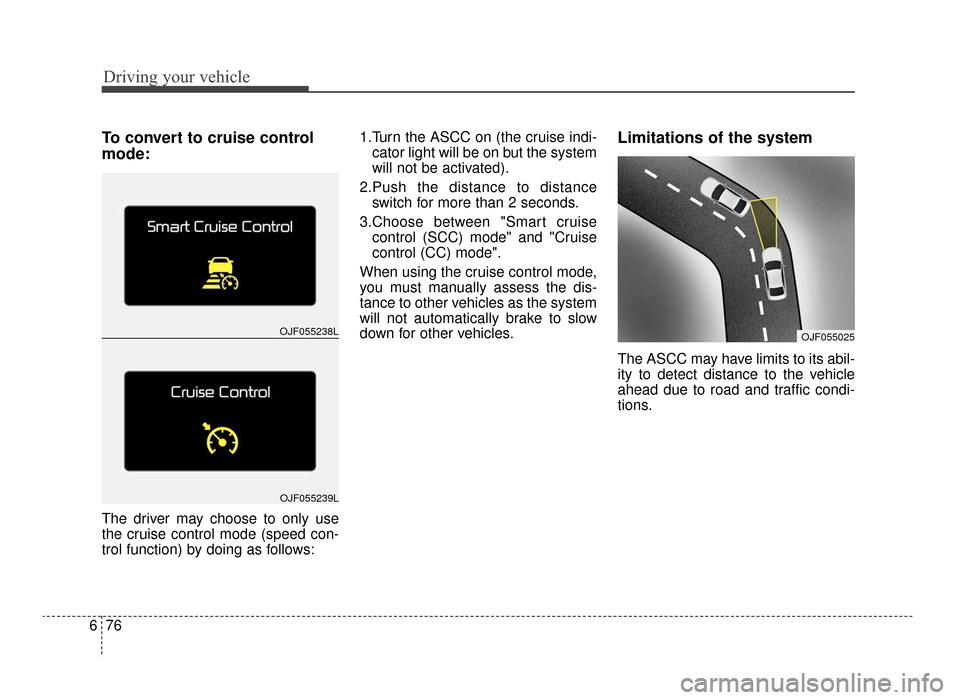
To convert to cruise control
mode:
The driver may choose to only use
the cruise control mode (speed con-
trol function) by doing as follows: 1.Turn the ASCC on (the cruise indi-
cator light will be on but the system
will not be activated).
2.Push the distance to distance switch for more than 2 seconds.
3.Choose between "Smart cruise control (SCC) mode" and "Cruise
control (CC) mode".
When using the cruise control mode,
you must manually assess the dis-
tance to other vehicles as the system
will not automatically brake to slow
down for other vehicles.
Limitations of the system
The ASCC may have limits to its abil-
ity to detect distance to the vehicle
ahead due to road and traffic condi-
tions.
OJF055238L
OJF055239L
OJF055025
JF CAN (ENG) 6.qxp 11/5/2015 6:39 PM Page 76