Page 426 of 623

Driving your vehicle
70
6
To resume cruise control set
speed:
If any method other than the
CRUISE button was used to cancel
cruising speed and the system is still
activated, the cruising speed will
automatically resume when you
move the lever up/down (to RES+ or
SET-).
If you move the lever up (to RES+),
the speed will resume to the recently
set speed. It will not resume if the
vehicle speed has dropped below
approximately 30 km/h (20 mph).
OJF055235L
WARNING - Following Distance
To avoid collisions, always be aware of the selected speed
and vehicle to vehicle dis-
tance settings when activat-
ing your smart cruise control
system.
Always maintain sufficient braking distance and deceler-
ate your vehicle by applying
the brakes if necessary.
OJF055044CAUTION
If the system is automaticallycancelled, the warning chimewill sound and a message willappear for a few seconds.
You must adjust the vehiclespeed by depressing the accel-erator or brake pedal accordingto the road condition ahead anddriving condition.
Always check the road condi-tions. Do not rely on the warn-ing chime.
JF CAN (ENG) 6.qxp 11/5/2015 6:39 PM Page 70
Page 428 of 623
Driving your vehicle
72
6
For example, if you drive at 90 km/h
(56 mph), the distance is maintained
as follows;
Distance 4 - approximately 52.5 m
(172 feet )
Distance 3 - approximately 40 m (130 feet )
Distance 2 - approximately 32.5 m (106 feet )
Distance 1 - approximately 25 m (82 feet )
✽ ✽NOTICE
The advanced smart cruise control
system remember the last vehicle to
vehicle distance which the driver
used in the vehicle with AEB.
The vehicle will maintain the set speed, when the lane ahead is clear.
The vehicle will slow down or speed up within selected speed to maintain
the selected distance, when there is a vehicle ahead of you in the lane. (A
vehicle will appear in front of your vehicle in the LCD display only when
there is an actual vehicle in front of you)
OJF055094
OJF055095
OJF055096
OJF055093
Distance 4
Distance 2
Distance 3
Distance 1
JF CAN (ENG) 6.qxp 11/5/2015 6:39 PM Page 72
Page 430 of 623
Driving your vehicle
74
6
Radar to detect distance to the
vehicle ahead
The sensor detects distance to the
vehicle ahead.
If the sensor is covered with dirt or
other foreign matter, the vehicle to
vehicle distance control may not
operate correctly.
Always keep the sensor clean. Radar check message
If the radar or cover is dirty or
obscured with foreign matter such as
snow, this message will appear and it
will disappear after for a while. In this
case, the system may not function
temporarily, but it does not indicate a
malfunction of the Advanced Smart
Cruise Control System. Clean the
radar or cover by using a soft cloth
and it will operate normally.ASCC (Advanced Smart Cruise
Control) malfunction message
The message will appear when the
vehicle to vehicle distance control
system is not functioning normally.
Take your vehicle to an authorized
Kia dealer and have the system
checked.
OJFA055221
OJF055188L
OJF055237L
JF CAN (ENG) 6.qxp 11/5/2015 6:39 PM Page 74
Page 431 of 623

675
Driving your vehicle
Always keep the sensor andbumper clean.
Use only a genuine Kia sensor cover for your vehicle.
Do not install accessories around the sensor and do not replace the
bumper by yourself. It may interfere
with the sensor performance.
Impact damage to the sensor or sensor area may cause the sensor
to move slightly off position and
result in the ASCC not operating
correctly without any warning or
indicator from the cluster. If this
occurs, have your vehicle checked
by an authorized Kia dealer as
soon as possible.To adjust the sensitivity of
Advanced Smart Cruise Control
The sensitivity of vehicle speed when
following the front vehicle to maintain
the set distance can be adjusted. Go
to the User Settings Mode (Driving
Assist) and select SCC (Smart
Cruise Control). You may select one
of the three stages you prefer.
Slow:
Vehicle speed following the front
vehicle to maintain the set distance
is slower than normal speed. Normal:
Vehicle speed following the front
vehicle to maintain the set distance
is normal
Fast: Vehicle speed following the front
vehicle to maintain the set distance
is faster than normal speed.
✽ ✽ NOTICE
The system remembers the last
selected mode.
CAUTION - Sensor
Damage
To prevent sensor cover dam-age from occurring, wash thecar with a soft cloth.
OJF055101L
JF CAN (ENG) 6.qxp 11/5/2015 6:39 PM Page 75
Page 432 of 623
Driving your vehicle
76
6
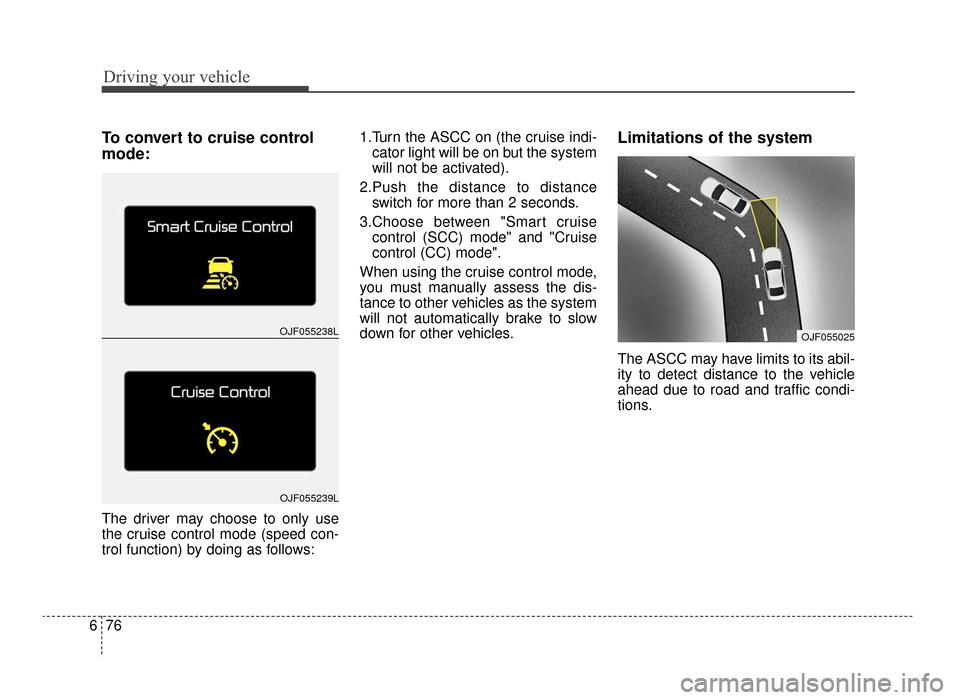
To convert to cruise control
mode:
The driver may choose to only use
the cruise control mode (speed con-
trol function) by doing as follows: 1.Turn the ASCC on (the cruise indi-
cator light will be on but the system
will not be activated).
2.Push the distance to distance switch for more than 2 seconds.
3.Choose between "Smart cruise control (SCC) mode" and "Cruise
control (CC) mode".
When using the cruise control mode,
you must manually assess the dis-
tance to other vehicles as the system
will not automatically brake to slow
down for other vehicles.
Limitations of the system
The ASCC may have limits to its abil-
ity to detect distance to the vehicle
ahead due to road and traffic condi-
tions.
OJF055238L
OJF055239L
OJF055025
JF CAN (ENG) 6.qxp 11/5/2015 6:39 PM Page 76
Page 437 of 623

681
Driving your vehicle
- After an engine start, please stopfor several seconds. If system ini-
tialization is not completed, the
ASCC does not normally operate.
- After an engine start, if any objects are not detected or the sensor
cover is obscured with foreign sub-
stances, there is a possibility that
the ASCC system may not work.
- The following conditions may cause a malfunction: over-loading
the trunk, suspension modification,
tire replacement with unauthorized
tires or tires with different tread
wear and pressure levels. This device complies with
Industry Canada licence-exempt
RSS standard(s).
Operation is subject to the following
three conditions:
(1) This device may not cause inter-
ference, and
(2) This device must accept any
interference, including interfer-
ence that may cause undesired
operation of the device.
(3) Changes or modifications not
expressly approved by the party
responsible for compliance could
void the user’s authority to oper-
ate the device.
WARNING - Inclines &
Towing
Do not use ASCC on steep
inclines or when towing another
vehicle or trailer since such
extreme loading can interfere
with your vehicle's ability to
maintain the selected speed.
JF CAN (ENG) 6.qxp 11/5/2015 6:39 PM Page 81
Page 438 of 623
Driving your vehicle
82
6
DRIVE mode
The drive mode may be selected
according to the driver’s preference
or road condition. The mode changes whenever the
DRIVE MODE button is pressed.
\b
When normal mode is selected, it
is not displayed on the cluster.
DRIVE MODE INTEGRATED CONTROL SYSTEM (IF EQUIPPED)
NORMAL
SPORT ECO
OJFA055054
■Type A
■Type B
OJFA055055
OJFA055053
■Type C
JF CAN (ENG) 6.qxp 11/5/2015 6:39 PM Page 82
Page 439 of 623

683
Driving your vehicle
ECO mode (Active ECO)
Active ECO helps improve
fuel efficiency by control-
ling certain engine and
transaxle system operat-
ing parameters. Fuel effi-
ciency depends on the
driver's driving habit and
road condition.
button is pressed and
the ECO mode is select-
ed, the ECO indicator
(green) will illuminate to
show that the Active
ECO is operating.
activated, it does not
turn off even though the
engine is restarted
again. To turn off the
system, press the
DRIVE MODE button
again. When Active ECO is activated:
The acceleration may slightly be
reduced even though you depress
the accelerator fully.
The air conditioner performance may be limited
The shift pattern of the automatic transaxle may change.
The engine noise may get louder.
The above situations are normal
conditions when the Active Eco
System is activated to improve fuel
efficiency. Limitation of Active ECO opera-
tion:
If the following conditions occur while
Active ECO is operating, the system
operation is limited even though
there is no change in the ECO indi-
cator.
When the coolant temperature is
low:
The system will be limited until
engine performance becomes nor-
mal.
When driving up a hill: The system will be limited to gain
power when driving uphill because
the engine torque is restricted.
When using manual mode: The system will be limited accord-
ing to the shift location.
When the accelerator pedal is deeply depressed for a few sec-
onds:
The system will be limited, judging
that the driver wants to speed up.
ECO
JF CAN (ENG) 6.qxp 11/5/2015 6:39 PM Page 83