Page 246 of 623
Audio system
45
RADIO mode
It will function as the PRESET STA-
TION buttons.
CD/USB/ iPod
®mode
It will function as TRACK UP/DOWN
button.
MODE (3)
Press the button to change audio
source.
FM(1~2)
➟ AM ➟ SAT(1~3) ➟ CD ➟
USB (iPod®) ➟AUX ➟ MY MUSIC ➟
BT Audio ➟ FM...
In addition to mode change, Power
on/off can be made by pressing this
button when the ignition switch is on
ACC or ON.
- Power ON: Press the button when the audio is off
- Power OFF: Press the button for more than 0.8 seconds when the
audio is on.
MUTE (4, if equipped)
Press the button to mute the sound.
Press the button to turn off the microphone during a telephone
call.
Detailed information for audio control
buttons are described in the following
pages in this section.
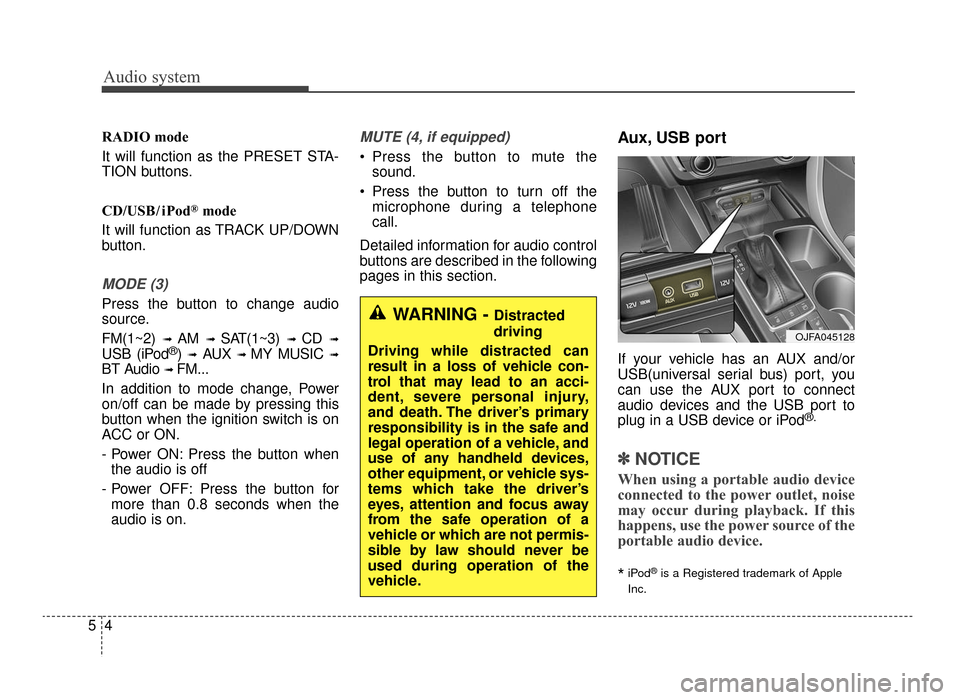
Aux, USB port
If your vehicle has an AUX and/or
USB(universal serial bus) port, you
can use the AUX port to connect
audio devices and the USB port to
plug in a USB device or iPod
®.
✽ ✽ NOTICE
When using a portable audio device
connected to the power outlet, noise
may occur during playback. If this
happens, use the power source of the
portable audio device.
*iPod®is a Registered trademark of Apple
Inc.
OJFA045128
WARNING - Distracted
driving
Driving while distracted can
result in a loss of vehicle con-
trol that may lead to an acci-
dent, severe personal injury,
and death. The driver’s primary
responsibility is in the safe and
legal operation of a vehicle, and
use of any handheld devices,
other equipment, or vehicle sys-
tems which take the driver’s
eyes, attention and focus away
from the safe operation of a
vehicle or which are not permis-
sible by law should never be
used during operation of the
vehicle.
JF CAN (ENG) 5 (Audio).qxp 9/23/2015 7:24 PM Page 4
Page 247 of 623

Audio system
55
How Vehicle Eadio Works
FM reception
AM and FM radio signals are broad-
cast from transmitter towers located
around your city. They are intercept-
ed by the radio antenna on your vehi-
cle. This signal is then processed by
the radio and sent to your vehicle
speakers.
However, in some cases the signal
coming to your vehicle may not be
strong and clear.This can be due to factors, such as
the distance from the radio station,
closeness of other strong radio sta-
tions or the presence of buildings,
bridges or other large obstructions in
the area.
AM reception
AM broadcasts can be received at
greater distances than FM broad-
casts. This is because AM radio
waves are transmitted at low fre-
quencies. These long distance,low
frequency radio waves can follow the
curvature of the earth rather than
travelling straight. In addition, they
curve around obstructions resulting
in better signal coverage.OJF045308L
OJF045309L
JF CAN (ENG) 5 (Audio).qxp 9/23/2015 7:24 PM Page 5
Page 248 of 623

Audio system
65
FM radio station
FM broadcasts are transmitted at
high frequencies and do not bend to
follow the earth's surface. Because
of this, FM broadcasts generally
begin to fade within short distances
from the station. Also, FM signals are
easily affected by buildings, moun-
tains, and obstructions. This can lead
to undesirable or unpleasant listen-
ing conditions which might lead you
to believe a problem exists with your
radio. The following conditions are
normal and do not indicate radio
trouble: Fading - As your vehicle moves
away from the radio station, the
signal will weaken and sound will
begin to fade. When this occurs,
we suggest that you select another
station with a stronger signal.
Flutter/Static - Weak FM signals or large obstructions between the
transmitter and your radio can dis-
turb the signal causing static or
fluttering noises to occur. Reducing
the treble level may lessen this
effect until the disturbance clears. Station Swapping - As an FM sig-
nal weakens, another more power-
ful signal near the same frequency
may begin to play. This is because
your radio is designed to lock onto
the clearest signal. If this occurs,
select another station with a
stronger signal.
Multi-Path Cancellation - Radio sig- nals being received from several
directions can cause distortion or
fluttering. This can be caused by a
direct and reflected signal from the
same station, or by signals from
two stations with close frequencies.
If this occurs, select another station
until the condition has passed.
¢¢¢
JBM004
OJF045310L
OJF045311L
JF CAN (ENG) 5 (Audio).qxp 9/23/2015 7:24 PM Page 6
Page 249 of 623
Audio system
57
Using a cellular phone or a two-way radio
When a cellular phone is used inside
the vehicle, noise may be produced
from the audio system. This does not
mean that something is wrong with
the audio equipment. In such a case,
try to operate mobile devices as far
from the audio equipment as possible.
When using a communication sys-
tem such as a cellular phone or a
radio set inside the vehicle, a sepa-
rate external antenna must be fitted.
When a cellular phone or a radio set
is used with an internal antenna
alone, it may interfere with the vehi-
cle's electrical system and adversely
affect safe operation of the vehicle.
WARNING- Cell phone use
Do not use a cellular phone
while driving. Stop at a safe and
legal location to use a cellular
phone.
JF CAN (ENG) 5 (Audio).qxp 9/23/2015 7:24 PM Page 7
Page 250 of 623
Audio system
85
AUDIO (Without Touch Screen)
JFaA50000C
JF CAN (ENG) 5 (Audio).qxp 9/23/2015 7:24 PM Page 8
Page 251 of 623

Audio system
59
Features of Your Audio
(1) EJECT
Ejects the disc. (2)
RADIO
Changes to FM/AM/SiriusXM mode.
Each time the button is pressed, the mode is changed in order of
FM1
➟ FM2 ➟AM ➟SAT1 ➟SAT2
➟SAT3.
In Setup>Display, the radio pop up screen will be displayed when
[Mode Pop up] is turned [On].
When the pop up screen is dis-
played, use the TUNE knob or
Preset buttons to select the
desired mode.
(3) MEDIA
Changes to CD, USB(iPod
®), AUX,
My Music, BT Audio mode.
Each time button is pressed, the mode is changed in order of CD,
USB(iPod
®), AUX, My Music, BT
(Bluetooth®) Audio.
In Setup>Display, the media pop up screen will be displayed when
[Mode Pop up] is turned [On].
When the pop up screen is dis-
played, use the TUNE knob or
Preset buttons to select the
desired mode. (4)
PHONE
Operates Phone Screen.
When a phone is not connected, the connection screen is displayed.
(5) SEEK TRACK
Radio mode : Automatically search- es for broadcast frequencies.
CD, USB, iPod
®, My Music mode
- Shortly press the button : Moves to next or previous song (file).
- Press and hold the button : Rewinds or fast-forwards the cur-
rent song.
Bluetooth
®Audio mode : Moves to
next or previous song(file).
- The Play/Pause feature may operate differently depending on
the mobile phone.
(6) POWER/VOL knob
Power knob : Turns power On/Off by pressing the knob.
Volume knob : Sets volume by turning the knob left/right.
JF CAN (ENG) 5 (Audio).qxp 9/23/2015 7:24 PM Page 9
Page 252 of 623
![KIA Optima 2016 4.G Owners Manual Audio system
10
5 (7)
[1] ~ [6] (Preset)
Radio mode: Saves frequencies (channels) or receives saved fre-
quencies (channels).
CD, USB, iPod
®, My Music mode
- [RPT] : Repeat
- [RDM] : Random
In th](/manual-img/2/2973/w960_2973-251.png "KIA Optima 2016 4.G Owners Manual Audio system
10
5 (7)
[1] ~ [6] (Preset)
Radio mode: Saves frequencies (channels) or receives saved fre-
quencies (channels).
CD, USB, iPod
®, My Music mode
- [RPT] : Repeat
- [RDM] : Random
In th")
Audio system
10
5 (7)
[1] ~ [6] (Preset)
Radio mode: Saves frequencies (channels) or receives saved fre-
quencies (channels).
CD, USB, iPod
®, My Music mode
- [RPT] : Repeat
- [RDM] : Random
In the Radio, Media, Setup, and
Menu pop up screen, the number
menu is selected. (8)
DISP
Each time the button is shortly pressed, sets the Screen Off
➟
Screen On ➟Screen Off.
Audio operation is maintained and only the Screen will be turned Off.
In the Screen Off state, press any button to turn the Screen On again. (9)
SCAN
Radio mode - Shortly press the button :Previews each broadcast for 5
seconds each.
- Press and hold the button : Previews the broadcasts saved
in Preset [1] ~ [6] for 5 seconds
each.
- Press the [SCAN] button again
to continue listening to the cur-
rent frequency.
- SAT Radio does not support the Preset scan feature.
CD, USB, My Music mode - Shortly press the button :Previews each song (file) for 10
seconds each.
- Press the [SCAN] button again
to continue listening to the cur-
rent song (file).
(10) SETUP/CLOCK
Moves to the Display, Sound, Clock, Phone, System setting
modes.
JF CAN (ENG) 5 (Audio).qxp 9/23/2015 7:24 PM Page 10
Page 253 of 623
Audio system
511
(11)
MENU
Displays menus for the current mode.
®List : Move to parent catego-
ry.
(12) CAT/FOLDER
Radio mode - SiriusXM RADIO : CategorySearch.
MP3 CD, USB mode - Folder Search
(13) TUNE knob
Radio mode : Changes frequency by turning the knob left/right.
CD, USB, iPod
®, My Music mode :
Searches songs (files) by turning
the knob left/right.
When the desired song is dis-
played, press the knob to play the
song.
Moves focus in all selection menus and selects menus.
JF CAN (ENG) 5 (Audio).qxp 9/23/2015 7:24 PM Page 11


