Page 432 of 623
Driving your vehicle
76
6
To convert to cruise control
mode:
The driver may choose to only use
the cruise control mode (speed con-
trol function) by doing as follows: 1.Turn the ASCC on (the cruise indi-
cator light will be on but the system
will not be activated).
2.Push the distance to distance switch for more than 2 seconds.
3.Choose between "Smart cruise control (SCC) mode" and "Cruise
control (CC) mode".
When using the cruise control mode,
you must manually assess the dis-
tance to other vehicles as the system
will not automatically brake to slow
down for other vehicles.
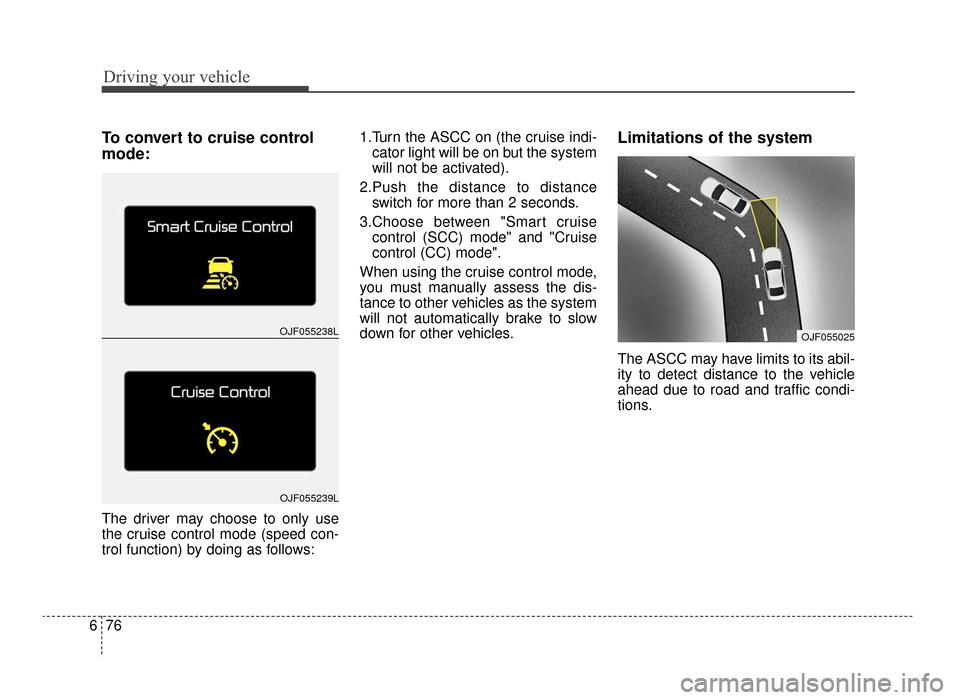
Limitations of the system
The ASCC may have limits to its abil-
ity to detect distance to the vehicle
ahead due to road and traffic condi-
tions.
OJF055238L
OJF055239L
OJF055025
JF CAN (ENG) 6.qxp 11/5/2015 6:39 PM Page 76
Page 439 of 623

683
Driving your vehicle
ECO mode (Active ECO)
Active ECO helps improve
fuel efficiency by control-
ling certain engine and
transaxle system operat-
ing parameters. Fuel effi-
ciency depends on the
driver's driving habit and
road condition.
button is pressed and
the ECO mode is select-
ed, the ECO indicator
(green) will illuminate to
show that the Active
ECO is operating.
activated, it does not
turn off even though the
engine is restarted
again. To turn off the
system, press the
DRIVE MODE button
again. When Active ECO is activated:
The acceleration may slightly be
reduced even though you depress
the accelerator fully.
The air conditioner performance may be limited
The shift pattern of the automatic transaxle may change.
The engine noise may get louder.
The above situations are normal
conditions when the Active Eco
System is activated to improve fuel
efficiency. Limitation of Active ECO opera-
tion:
If the following conditions occur while
Active ECO is operating, the system
operation is limited even though
there is no change in the ECO indi-
cator.
When the coolant temperature is
low:
The system will be limited until
engine performance becomes nor-
mal.
When driving up a hill: The system will be limited to gain
power when driving uphill because
the engine torque is restricted.
When using manual mode: The system will be limited accord-
ing to the shift location.
When the accelerator pedal is deeply depressed for a few sec-
onds:
The system will be limited, judging
that the driver wants to speed up.
ECO
JF CAN (ENG) 6.qxp 11/5/2015 6:39 PM Page 83
Page 442 of 623

Driving your vehicle
86
6
BSD (Blind Spot Detection) /
LCA (Lane Change Assist)
Operating conditions
The indicator on the switch will illumi-
nate when the Blind Spot Detection
System (BSD) switch is pressed with
the Engine Start/Stop Button ON.
If vehicle speed exceeds 30 km/h
(18.6 mph), the system will activate.
If you press the switch again, the
switch indicator and system will be
turned off.
If the vehicle is turned off, the system
will remember the last settings upon
restart. When the system is not used turn the
system off by turning off the switch.
When the system is turned on the
warning light will illuminate for 3 sec-
onds on the outside rearview mirror.
Warning type
The system will activate when:
1. The system is on.
2. Vehicle speed is above 30 km/h
(18.6 mph).
3. Other vehicles are detected in the rear side.
WARNING
The Blind Spot Detection
System with Lane Change
Assist and Rear Cross Traffic
Alert is not a substitute for
proper and safe lane changing
procedures. Always drive safely
and use caution when changing
lanes. The Blind Spot Detection
System may not detect every
object alongside the vehicle.
OJF055098
JF CAN (ENG) 6.qxp 11/5/2015 6:39 PM Page 86
Page 443 of 623

687
Driving your vehicle
If a vehicle is detected within the
boundary of the system, a warning
light will illuminate on the outside
rearview mirror.
If the detected vehicle is not in
detecting range, the warning will turn
off.The second stage alarm will activate
when:
1.The first stage alert is on
2.The turn signal is on to change a
lane
When the second stage alert is acti-
vated, a warning light will blink on the
outside rearview mirror and an alarm
will sound.
If you move the turn signal switch to
the original position, the second
stage alert will be deactivated. - The second stage alarm may be
deactivated.
To activate the alarm: Go to the User Settings Mode →
Sound and select "BSD" on the
LCD display.
To deactivate the alarm: Go to the User Settings Mode →
Sound and deselect "BSD" on the
LCD display.✽ ✽
NOTICE
The alarm function helps alert the
driver. Deactivate this function only
when it is necessary
OUM054029
2nd stage
OUM054028
1st stage
JF CAN (ENG) 6.qxp 11/5/2015 6:39 PM Page 87
Page 444 of 623
Driving your vehicle
88
6
Detecting sensor
The sensors are located inside of the
rear bumper.
Always keep the rear bumper clean
for the system to work properly.
Warning message
The message will appear to notify
the driver if there are foreign sub-
stances on the surface or inside the
rear bumper or it is hot near the rear
bumper. The light on the switch and
the system will turn off automatically.
Remove the foreign substance on
the rear bumper.
After the foreign substance is
removed, if you drive for approxi-
mately 10 minutes, the system will
work normally. If the system does not work normally
even though the foreign substance is
removed, take your vehicle to an
authorized Kia dealer and have the
system checked.
OJF055150OJF055091L
JF CAN (ENG) 6.qxp 11/5/2015 6:39 PM Page 88
Page 445 of 623
689
Driving your vehicle
If the system does not work properly,
a warning message will appear and
the light on the switch will turn off.
The system will turn off automatical-
ly.
Have your vehicle inspected by an
authorized Kia dealer.
RCTA (Rear Cross Traffic Alert)
When your vehicle moves backwards
from a parking position, the sensor
detects approaching vehicles to the
left or right side direction and gives
information to the driver.
Operating conditions
Select RCTA (Rear Cross TrafficAlert) in "User Settings" under
"Driving Assist" on the instrument
cluster. The system will turn on and
standby to activate.
Select RCTA again, to turn the sys- tem off.
If the vehicle is turned off, the RCTA system will remember the
last settings upon restart. Always
turn the RCTA system off when not
in use.
OJF055247L
OYP054026KOJFA055279
JF CAN (ENG) 6.qxp 11/5/2015 6:39 PM Page 89
Page 446 of 623

Driving your vehicle
90
6
The system operates when the
vehicle speed is below 10 km/h
(6.2 mph) with the shift lever in R
(Reverse).
The RCTA (Rear Cross Traffic Alert) detecting range is 1.6 feet ~
65 feet based on the side direction.
If the approaching vehicle speed is
4 km/h (2.5 mph) ~ 36 km/h (22
mph) within sensing range, it is
detected. However, the system
sensing range can vary based on
conditions. Always pay attention to
your surroundings.Warning type If the vehicle detected by sensorsapproaches your vehicle, the warn-
ing chime will sound and the warn-
ing light will blink on the outside
rearview mirror.
If the detected object is not in your way, move the vehicle away from
the detected object slowly; and the
warning will cancel once the object
has been safely cleared.
The system may not operate prop- erly due to other factors or circum-
stances. Always pay attention to
your surroundings.
\b If your vehicle's left or right side
bumper is blinded by a barrier or
vehicles, the system sensing abili-
ty may be deteriorated.
OJF055105L
OJF055196L
OJF055106L
JF CAN (ENG) 6.qxp 11/5/2015 6:39 PM Page 90
Page 449 of 623

693
Driving your vehicle
LANE DEPARTURE WARNING SYSTEM (LDWS) (IF EQUIPPED)
This system detects the lane with a
sensor at the front windshield and
notifies you if it detects that your
vehicle leaves the lane. The LDWS does not make the
vehicle change lanes. It is the dri-
ver's responsibility to always check
the road conditions.
If the sensor cannot detect the lane or if the vehicle speed does not
exceed 60 km/h (37 mph), the
LDWS will not be able to notify you
if the vehicle leaves the lane.
If your vehicle has window tint or other types of coating on the front
windshield, the LDWS may not
work properly.
Prevent damage to the LDWS sen- sor from water or any liquid.
Do not remove the LDWS parts and avoid damaging the sensor by
avoiding a strong impacts.
Do not put objects that reflect light on the dash board.
The operation of the LDWS can be affected by several factors (includ-
ing environmental conditions). It is
the responsibility of the driver to
pay attention to the roadway and to
maintain the vehicle in it's lane at
all times.
WARNING - LDWS Alert
The LDWS is only intended to
provide you with information
regarding your vehicle's posi-
tion on the roadway. Upon
receiving an LDWS alert, you
must take the necessary steps
to maintain control of your vehi-
cle. The LDWS does not provide
any steering inputs into the
vehicle for you. It can be dan-
gerous to make a large sudden
steering input in response to an
alert, since that could result in
loss of control.
OJFA055051
OUM054149
OJF055163
JF CAN (ENG) 6.qxp 11/5/2015 6:39 PM Page 93