2016 KIA Optima Hybrid warning
[x] Cancel search: warningPage 67 of 466

349
Safety features of your vehicle
Side air bag
❈The actual air bags in the vehicle may differ
from the illustration.
Your vehicle is equipped with a side
air bag in each front seat. The purpose of the air bag is to pro-
vide the vehicle's driver and/or the
front passenger with additional pro-
tection than that offered by the seat
belt alone.
The side air bags are designed to
deploy only during certain side-
impact collisions, depending on the
crash severity, angle, speed and
point of impact. The side air bags are
not designed to deploy in all side
impact situations.
The side air bag is supplemental to
the driver's and the passenger's seat
belt systems and is not a substitute
for them. Therefore your seat belts
must be worn at all times while the
vehicle is in operation.
For best protection from the side air
bag system and to avoid being
injured by the deploying side air bag,
both front seat occupants should sit
in an upright position with the seat
belt properly fastened. The driver's
hands should be placed on the steer-
ing wheel at the 9:00 and 3:00 posi-
tions. The passenger's arms and
hands should be placed on their laps.
WARNING - Unexpected
deployment
Avoid impact to the side air bag
sensor when the ignition switch
is ON to prevent unexpected
deployment of the side air bag.
OTD030035
OTD030036
Front
WARNING - Deployment
Do not install any accessories
including seat covers, on the
side or near the side air bag as
this may affect the deployment
of the side air bags.
Page 68 of 466
Safety features of your vehicle
50
3
If seat or seat cover is damaged,
have the vehicle checked and
repaired by an authorized Kia dealer.
Inform that your vehicle is equipped
with side air bags and an occupant
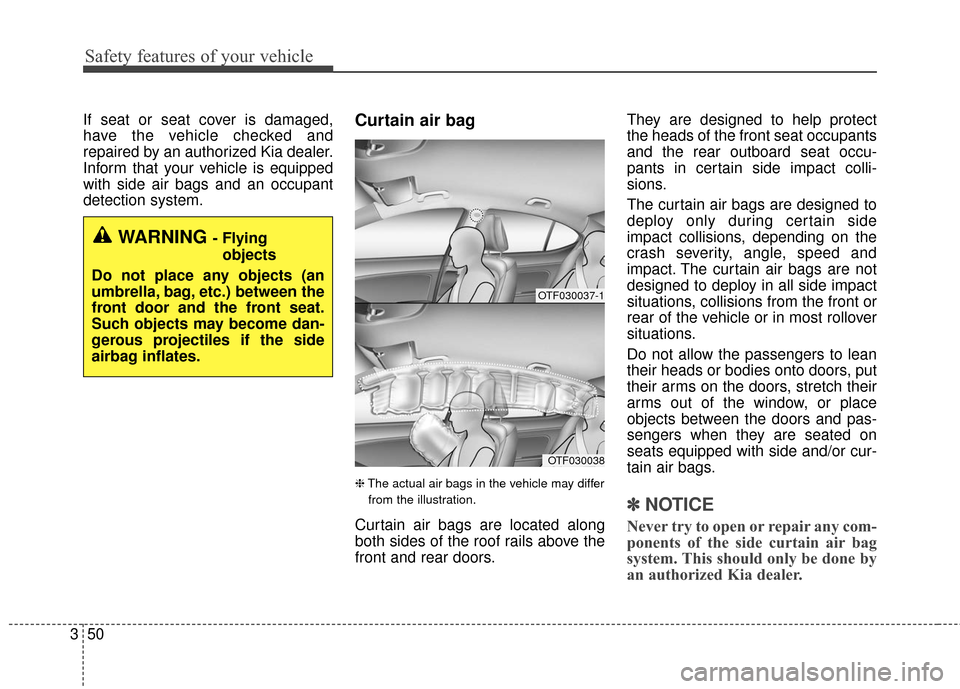
detection system.Curtain air bag
❈ The actual air bags in the vehicle may differ
from the illustration.
Curtain air bags are located along
both sides of the roof rails above the
front and rear doors. They are designed to help protect
the heads of the front seat occupants
and the rear outboard seat occu-
pants in certain side impact colli-
sions.
The curtain air bags are designed to
deploy only during certain side
impact collisions, depending on the
crash severity, angle, speed and
impact. The curtain air bags are not
designed to deploy in all side impact
situations, collisions from the front or
rear of the vehicle or in most rollover
situations.
Do not allow the passengers to lean
their heads or bodies onto doors, put
their arms on the doors, stretch their
arms out of the window, or place
objects between the doors and pas-
sengers when they are seated on
seats equipped with side and/or cur-
tain air bags.
✽ ✽
NOTICE
Never try to open or repair any com-
ponents of the side curtain air bag
system. This should only be done by
an authorized Kia dealer.
WARNING - Flying
objects
Do not place any objects (an
umbrella, bag, etc.) between the
front door and the front seat.
Such objects may become dan-
gerous projectiles if the side
airbag inflates.
OTF030037-1
OTF030038
Page 70 of 466

Safety features of your vehicle
52
3
Problems may arise if the sensor
installation angles are changed due
to the deformation of the front
bumper, body or B pillar where side
collision sensors are installed. Have
the vehicle checked and repaired by
an authorized Kia dealer.
Installing aftermarket bumper guards
or replacing a bumper with non-gen-
uine parts may adversely affect your
vehicle’s collision and air bag deploy-
ment performance.Air bag inflation conditions
Front air bags
Front air bags are designed to inflate
in a frontal collision depending on
the intensity, speed or angles of
impact of the front collision.
WARNING - Air bag
sensors
Do not hit or allow any objects to impact the locations where
air bag or sensors are installed.
This may cause unexpected
air bag deployment, which
could result in serious per-
sonal injury or death.
If the installation location or angle of the sensors is altered
in any way, the air bags may
deploy when they should not
or they may not deploy when
they should.
Therefore, do not try to per-
form maintenance on or
around the air bag sensors.
Have the vehicle checked and
repaired by an authorized Kia
dealer.
1JBA3513
Page 74 of 466
Safety features of your vehicle
56
3
SRS Care
The SRS is virtually maintenance-free
and there are no parts you can safely
service by yourself. If the SRS air bag
warning light does not illuminate, or
continuously remains on, have your
vehicle immediately inspected by an
authorized Kia dealer.
Any work on the SRS system, such
as removing, installing, repairing, or
any work on the steering wheel must
be performed by an authorized Kia
dealer. Improper handling of the SRS
system may result in serious person-
al injury.
For cleaning the air bag pad covers,
use only a soft, dry cloth or one
which has been moistened with plain
water. Solvents or cleaners could
adversely affect the air bag covers
and proper deployment of the sys-
tem. If components of the air bag system
must be discarded, or if the vehicle
must be scrapped, certain safety
precautions must be observed. An
authorized Kia dealer knows these
precautions and can give you the
necessary information. Failure to fol-
low these precautions and proce-
dures could increase the risk of per-
sonal injury.
Adding equipment to or modi-
fying your air bag-equipped
vehicle
If you modify your vehicle by chang-
ing your vehicle's frame, bumper sys-
tem, front end or side sheet metal or
ride height, this may affect the opera-
tion of your vehicle's air bag system.
WARNING - Tampering
with SRS
Do not tamper with or discon-
nect SRS wiring, or other com-
ponents of the SRS system.
Doing so could result in the
accidental inflation of the air
bags or by rendering the SRS
inoperative.
Page 75 of 466
357
Safety features of your vehicle
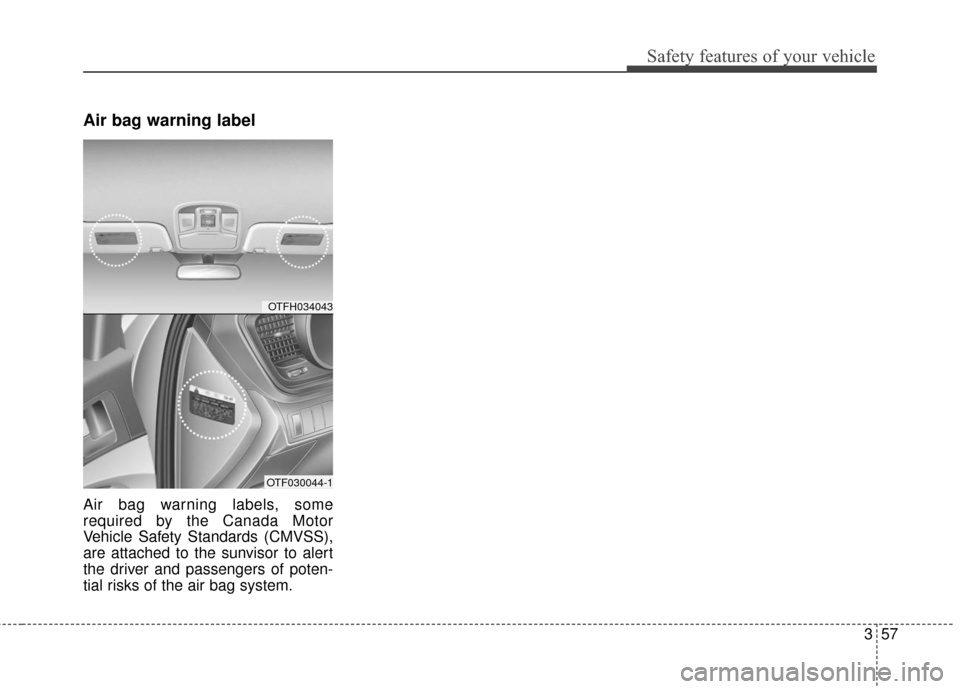
Air bag warning label
Air bag warning labels, some
required by the Canada Motor
Vehicle Safety Standards (CMVSS),
are attached to the sunvisor to alert
the driver and passengers of poten-
tial risks of the air bag system.
OTFH034043
OTF030044-1
Page 77 of 466
Instrument cluster . . . . . . . . . . . . . . . . . . . . . . . . . 4-45
. . . . . . . . . . . . . . . . . . . . 4-46
. . . . . . . . . . . . . . . . . . . . . . . . . 4-46
. . . . . . . . . . . . . . . . . . . . . . . . . . . . . . . . . . . . \
. 4-47
. . . . . . . . . . . . . . . . . . . . . . 4-50
LCD Display . . . . . . . . . . . . . . . . . . . . . . . . . . . . . . 4-51
. . . . . . . . . . . . . . . . . . . . . . . . . . . . . . . . . 4-51
. . . . . . . . . . . . . . . . . . . . . 4-52
. . . . . . . . . . . . . . . . . . . . . . . . . . . . . . . . 4-55
. . . . . . . . . . . . . . . . . . . . . . . . . . . 4-56
. . . . . . . . . . . . . . . . . . . . . . . . . . . . 4-59
Trip computer . . . . . . . . . . . . . . . . . . . . . . . . . . . . . 4-67
. . . . . . . . . . . . . . . . . . . . . . . . . . . . . . . 4-67
. . . . . . . . . . . . . . . . . . . . . . . . . . . . . . . . . . . . \
4-69
. . . . . . . . . . . . . 4-70
Warning and indicator lights . . . . . . . . . . . . . . . . 4-71
. . . . . . . . . . . . . . . . . . . . . . . . . . . . . . . 4-71
. . . . . . . . . . . . . . . . . . . . . . . . . . . . . . 4-77
Back-Up Warning System . . . . . . . . . . . . . . . . . . . 4-81
. . . . . . . 4-81
System. . . . . . . . . . . . . . . . . . . . . . . . . . . . . . . . . . . . \
. 4-82
. . . . . . . . . . . 4-82
. . . . . . . . . . . . . . . . . . . . . . . . . . . . . . . . 4-83
Rear Camera Display. . . . . . . . . . . . . . . . . . . . . . . 4-84
Welcome system . . . . . . . . . . . . . . . . . . . . . . . . . . . 4-85
positon light). . . . . . . . . 4-85
. . . . . . . . . . . . . . . . . . 4-85
. . . . . . . . . . . . . . . . . . . . . . . . . . . . . . . . 4-85
Lighting . . . . . . . . . . . . . . . . . . . . . . . . . . . . . . . . . . 4-86\
. . . . . . . . . . . . . . . . . . . . . . 4-86
. . . . . . . . . . . . . . . . . . . . . . . . . 4-87
. . . . . . . . . . . . . . . . . . . . . . . . . . . . . . 4-87
. . . . . . . . . . . . 4-90
. . . . . . . . . . . . . . . . . . . . . . . . . . . . . . . 4-91
Wipers and washers . . . . . . . . . . . . . . . . . . . . . . . . 4-92
. . . . . . . . . . . . . . . . . . . . . . . . . . . . 4-92
Interior light . . . . . . . . . . . . . . . . . . . . . . . . . . . . . . 4-95
. . . . . . . . . . . . . . . . . . . . 4-95
. . . . . . . . . . . . . . . . . . . . . . . . . . . . . . . . . . . 4-\
95
. . . . . . . . . . . . . . . . . . . . . . . . . . . . . . . . . . 4-96\
. . . . . . . . . . . . . . . . . . . . . . . . . . . . 4-97
. . . . . . . . . . . . . . . . . . . . . . . . . . . . . . 4-98
. . . . . . . . . . . . . . . . . . . . . . . . . . . 4-98
4
Page 80 of 466

45
Features of your vehicle
Locking
Pressing the button of the front out-
side door handles with all doors
closed and any door unlocked, locks
all the doors. The hazard warning
lights will blink and the chime will
sound once to indicate that all doors
are locked. The button will only oper-
ate when the smart key is within
0.7~1 m (28~40 in.) from the outside
door handle. If you want to make
sure that a door has locked or not,
you should check the door lock but-
ton inside the vehicle or pull the out-
side door handle.Even though you press the button,
the doors will not lock and the chime
will sound for 3 seconds if any of the
following occurs:
• The smart key is in the vehicle.
The ignition switch is in the ACC or
ON position.
Any door except the trunk is opened.
Unlocking
Pressing the button of the driver's out-
side door handle with all doors closed
and locked, unlocks the driver's door.
The hazard warning lights will blink
and the chime will sound twice to indi-
cate that the driver's door is unlocked.
Pressing the button in the front pas-
senger's outside door handle with all
doors closed and locked, unlocks all
the doors. The hazard warning lights
will blink and the chime will sound
twice to indicate that all doors are
unlocked. The button will only oper-
ate when the smart key is within
0.7~1 m (28~40 in.) from the outside
door handle.
Start-up
You can start the engine without
inserting the key. For detailed infor-
mation refer to "Starting the engine
with a smart key" in chapter 5.
OTF040008
Page 81 of 466

Features of your vehicle
64
Key operations
To remove the mechanical key, press
and hold the release button (1) and
remove the mechanical key (2).
To reinstall the mechanical key, put
the key into the hole and push it until
a click sound is heard.
Remote keyless entry system
operations
Lock (1)
All doors are locked if the lock button
is pressed. If all doors (and trunk) are
closed, the hazard warning lights will
blink once to indicate that all doors
(and trunk) are locked.
Also, if the lock button is pressed
once more within 4 seconds, the
hazard warning lights will blink and
the chime will sound once to confirm
that the door is locked.
OYDDCO2002
OYDDCO2004
WARNING- Ignition key(Smart key)
Never leave the keys in your
vehicle with unsupervised chil-
dren. Leaving children unat-
tended in a vehicle with a man-
ual ignition key or a smart key
is dangerous.
Children copy adults and they
could place the key in the igni-
tion switch or press the start
button. The key would enable
children to operate power win-
dows or other controls, or even
make the vehicle move, which
could result in serious bodily
injury or death.