Page 337 of 466
What to do in an emergency
24
6
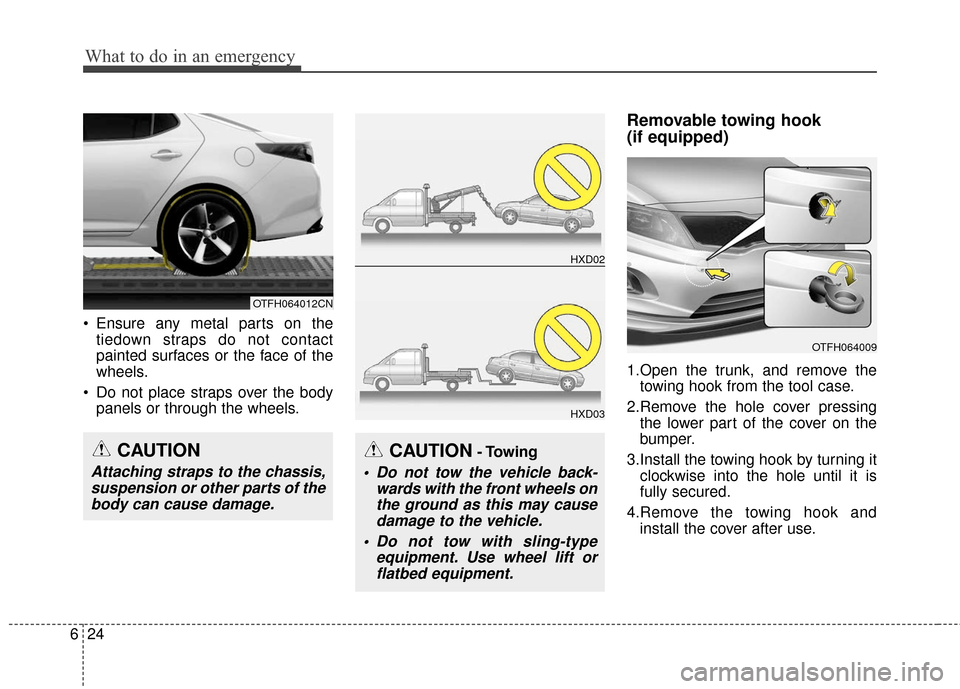
Ensure any metal parts on the
tiedown straps do not contact
painted surfaces or the face of the
wheels.
Do not place straps over the body panels or through the wheels.
Removable towing hook
(if equipped)
1.Open the trunk, and remove thetowing hook from the tool case.
2.Remove the hole cover pressing the lower part of the cover on the
bumper.
3.Install the towing hook by turning it clockwise into the hole until it is
fully secured.
4.Remove the towing hook and install the cover after use.
CAUTION- Towing
Do not tow the vehicle back- wards with the front wheels onthe ground as this may causedamage to the vehicle.
Do not tow with sling-type equipment. Use wheel lift orflatbed equipment.
HXD02
HXD03
OTFH064009
CAUTION
Attaching straps to the chassis,suspension or other parts of thebody can cause damage.
OTFH064012CN
Page 338 of 466
625
What to do in an emergency
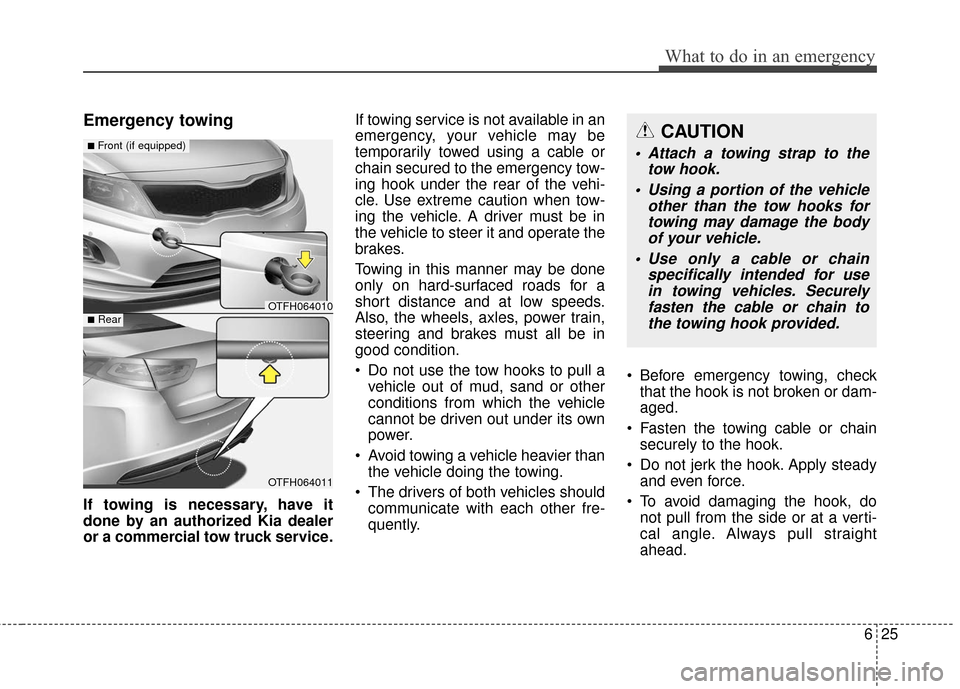
Emergency towing
If towing is necessary, have it
done by an authorized Kia dealer
or a commercial tow truck service.If towing service is not available in an
emergency, your vehicle may be
temporarily towed using a cable or
chain secured to the emergency tow-
ing hook under the rear of the vehi-
cle. Use extreme caution when tow-
ing the vehicle. A driver must be in
the vehicle to steer it and operate the
brakes.
Towing in this manner may be done
only on hard-surfaced roads for a
short distance and at low speeds.
Also, the wheels, axles, power train,
steering and brakes must all be in
good condition.
Do not use the tow hooks to pull a
vehicle out of mud, sand or other
conditions from which the vehicle
cannot be driven out under its own
power.
Avoid towing a vehicle heavier than the vehicle doing the towing.
The drivers of both vehicles should communicate with each other fre-
quently. Before emergency towing, check
that the hook is not broken or dam-
aged.
Fasten the towing cable or chain securely to the hook.
Do not jerk the hook. Apply steady and even force.
To avoid damaging the hook, do not pull from the side or at a verti-
cal angle. Always pull straight
ahead.
OTFH064010
OTFH064011
■Front (if equipped)
■Rear
CAUTION
Attach a towing strap to the tow hook.
Using a portion of the vehicle other than the tow hooks fortowing may damage the bodyof your vehicle.
Use only a cable or chain specifically intended for usein towing vehicles. Securelyfasten the cable or chain tothe towing hook provided.
Page 362 of 466

Maintenance
22
7
Vacuum crankcase ventilation
hoses
Inspect the surface of hoses for evi-
dence of heat and/or mechanical
damage. Hard and brittle rubber,
cracking, tears, cuts, abrasions, and
excessive swelling indicate deterio-
ration. Particular attention should be
paid to examine those hose surfaces
nearest to high heat sources, such
as the exhaust manifold.
Inspect the hose routing to assure
that the hoses do not come in con-
tact with any heat source, sharp
edges or moving component which
might cause heat damage or
mechanical wear. Inspect all hose
connections, such as clamps and
couplings, to make sure they are
secure, and that no leaks are pres-
ent. Hoses should be replaced
immediately if there is any evidence
of deterioration or damage.
Air cleaner filter
A Genuine Kia air cleaner filter is
recommended when the filter is
replaced.
Spark plugs
Make sure to install new spark plugs
of the correct heat range.
Valve clearance
Inspect excessive valve noise and/or
engine vibration and adjust if neces-
sary. An authorized Kia dealer
should perform the operation.
Cooling system
Check cooling system components,
such as radiator, coolant reservoir,
hoses and connections for leakage
and damage. Replace any damaged
parts.
Coolant
The engine and inverter coolant
should be changed at the intervals
specified in the maintenance sched-
ule.
Page 373 of 466
733
Maintenance
PARKING BRAKE
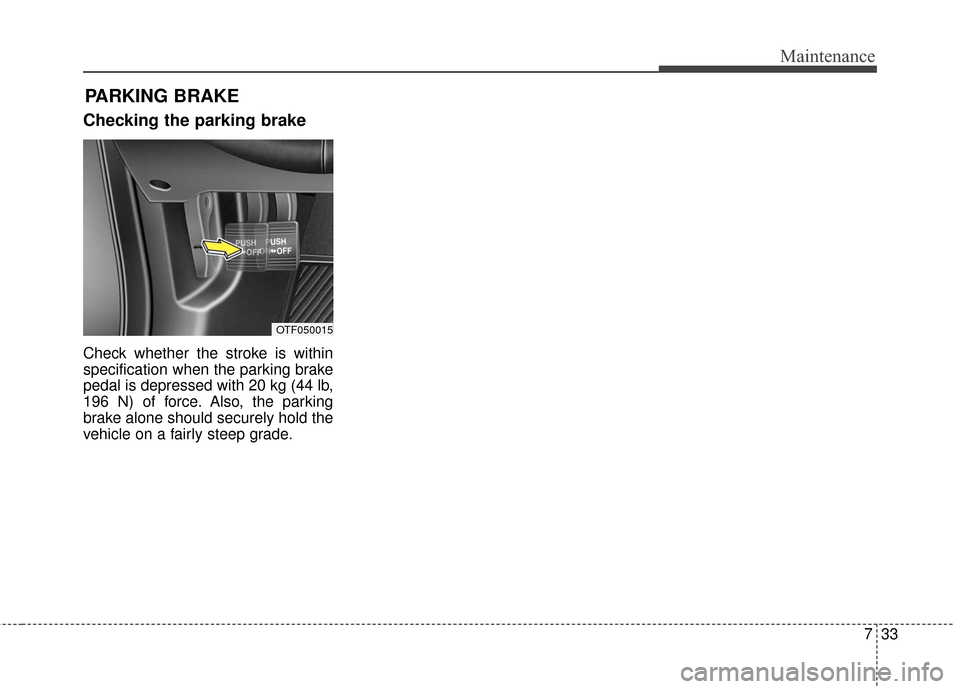
Checking the parking brake
Check whether the stroke is within
specification when the parking brake
pedal is depressed with 20 kg (44 lb,
196 N) of force. Also, the parking
brake alone should securely hold the
vehicle on a fairly steep grade.
OTF050015
Page 380 of 466
Maintenance
40
7
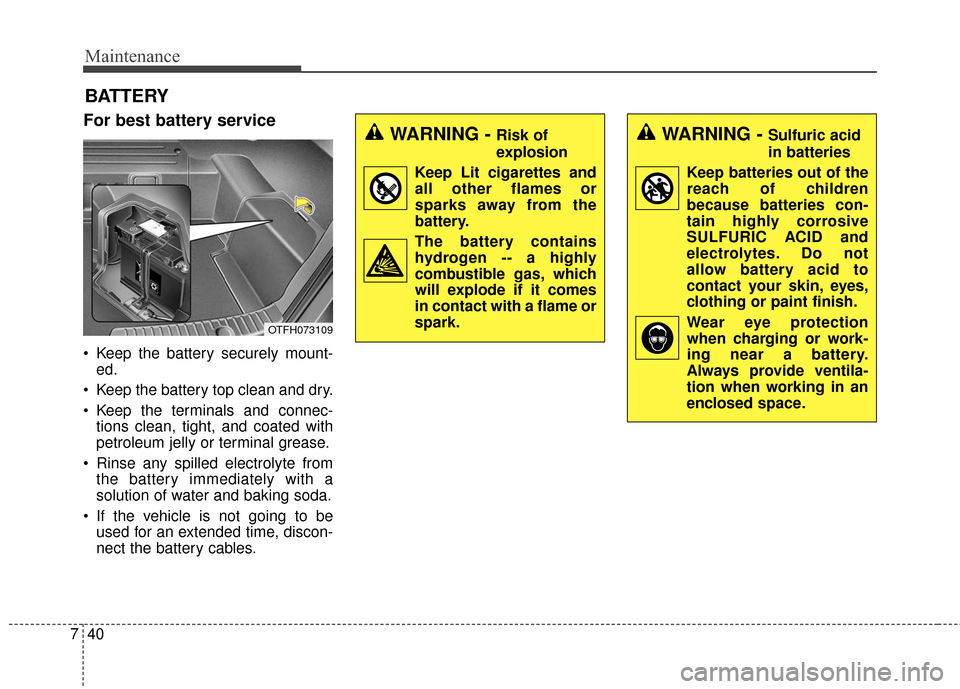
BATTERY
For best battery service
Keep the battery securely mount-
ed.
Keep the battery top clean and dry.
Keep the terminals and connec- tions clean, tight, and coated with
petroleum jelly or terminal grease.
Rinse any spilled electrolyte from the battery immediately with a
solution of water and baking soda.
If the vehicle is not going to be used for an extended time, discon-
nect the battery cables.
WARNING - Risk of
explosion
Keep Lit cigarettes and all other flames or
sparks away from the
battery.
The battery contains hydrogen -- a highly
combustible gas, which
will explode if it comes
in contact with a flame or
spark.WARNING - Sulfuric acid
in batteries
Keep batteries out of the reach of children
because batteries con-
tain highly corrosive
SULFURIC ACID and
electrolytes. Do not
allow battery acid to
contact your skin, eyes,
clothing or paint finish.
Wear eye protection when charging or work-
ing near a battery.
Always provide ventila-
tion when working in an
enclosed space.
OTFH073109
Page 398 of 466
Maintenance
58
7
✽
✽
NOTICE
The actual fuse/relay panel label
may differ depending on equip-
ment/options.
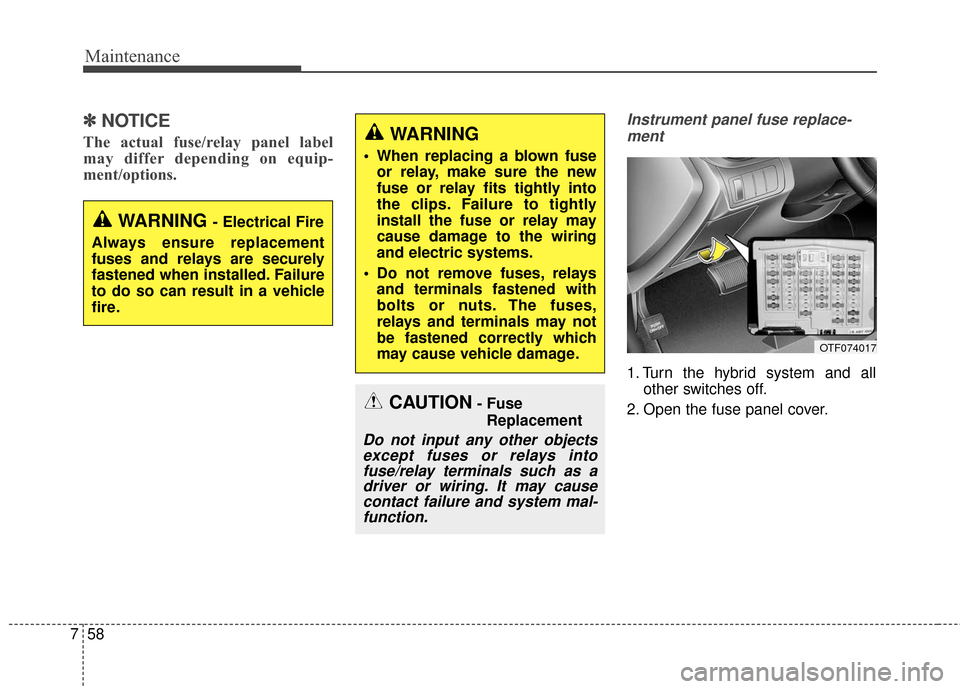
Instrument panel fuse replace-
ment
1. Turn the hybrid system and all other switches off.
2. Open the fuse panel cover.
OTF074017
CAUTION- Fuse Replacement
Do not input any other objectsexcept fuses or relays intofuse/relay terminals such as adriver or wiring. It may causecontact failure and system mal-function.
WARNING - Electrical Fire
Always ensure replacement
fuses and relays are securely
fastened when installed. Failure
to do so can result in a vehicle
fire.
WARNING
When replacing a blown fuse or relay, make sure the new
fuse or relay fits tightly into
the clips. Failure to tightly
install the fuse or relay may
cause damage to the wiring
and electric systems.
Do not remove fuses, relays and terminals fastened with
bolts or nuts. The fuses,
relays and terminals may not
be fastened correctly which
may cause vehicle damage.
Page 400 of 466

Maintenance
60
7
Always place the transportation
fuse switch in the ON position
while driving the vehicle.
Do not move the transportation fuse switch repeatedly. The fuse
switch may be worn out.
✽ ✽ NOTICE
If you need to park your vehicle for
prolonged periods more than 1
month, move the transportation fuse
switch to the OFF position to pre-
vent the battery being discharged.
Engine compartment panel fuse
replacement
1. Turn the hybrid system and all other switches off.
2. Remove the fuse panel cover by pressing the tab and pulling the
cover up. When the blade type
fuse is disconnected, remove it by
using the clip designed for chang-
ing fuses located in the engine
room fuse box. Upon removal,
securely insert reserve fuse of
equal quantity. 3. Check the removed fuse; replace it
if it is blown. To remove or insert
the fuse, use the fuse puller in the
engine compartment fuse panel.
4. Push in a new fuse of the same rating, and make sure it fits tightly
in the clips. If it fits loosely, consult
an authorized Kia dealer.
OTF074020N
CAUTION - Fuse panel
covers
After checking the fuse panel inthe engine compartment,securely install the fuse panelcover to prevent electrical fail-ures which may occur fromwater leaking in.
Page 401 of 466
761
Maintenance
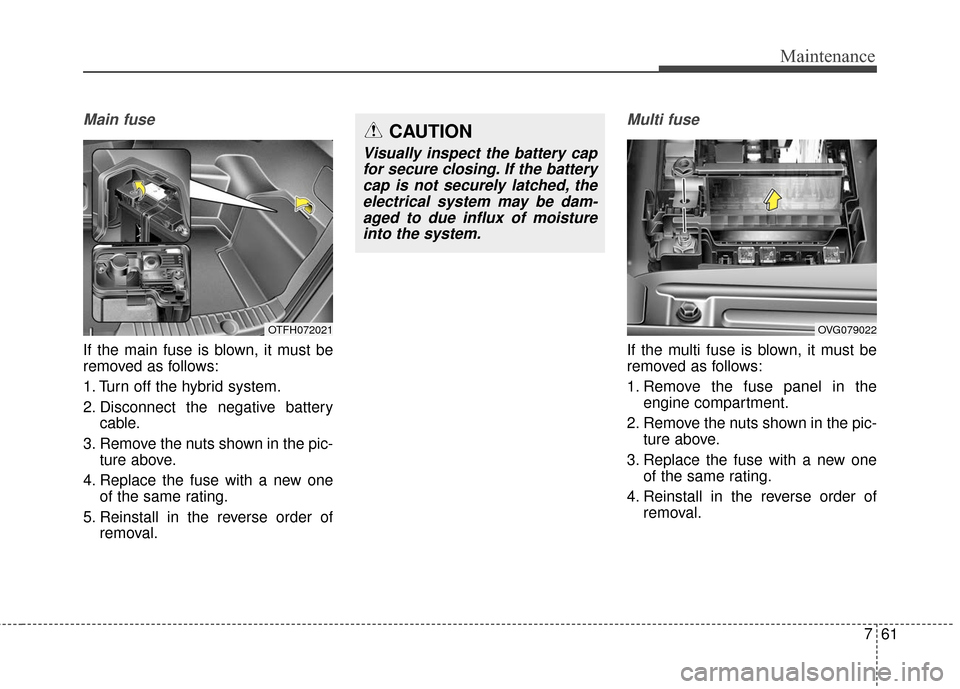
Main fuse
If the main fuse is blown, it must be
removed as follows:
1. Turn off the hybrid system.
2. Disconnect the negative batterycable.
3. Remove the nuts shown in the pic- ture above.
4. Replace the fuse with a new one of the same rating.
5. Reinstall in the reverse order of removal.
Multi fuse
If the multi fuse is blown, it must be
removed as follows:
1. Remove the fuse panel in theengine compartment.
2. Remove the nuts shown in the pic- ture above.
3. Replace the fuse with a new one of the same rating.
4. Reinstall in the reverse order of removal.
OTFH072021OVG079022
CAUTION
Visually inspect the battery capfor secure closing. If the batterycap is not securely latched, theelectrical system may be dam-aged to due influx of moistureinto the system.