2016 KIA Optima Hybrid brake light
[x] Cancel search: brake lightPage 281 of 466

525
Driving your vehicle
ESC operation off
ESC OFF stateThis car has 2 kinds of ESC
off states.
If the engine stops when
ESC is off, ESC remains off.
Upon restarting the engine,
the ESC will automatically
turn on again.
ESC off state 1
To cancel ESC operation, press the
ESC OFF button (ESC OFF )
shortly (ESC OFF indicator light
(ESC OFF ) illuminates). At this
state, the engine control function
does not operate. It means the trac-
tion control function does not oper-
ate. Brake control function only oper-
ates.
ESC off state 2
To cancel ESC operation, press the
ESC OFF button (ESC OFF ) for
more than 3 seconds. ESC OFF indi-
cator light (ESC OFF ) illuminates
and ESC OFF warning chime will
sound. At this state, the engine con-
trol function and brake control func-
tion do not operate. It means the car
stability control function does not
operate any more.
OTFH054111NOTFH054110N
Page 283 of 466
527
Driving your vehicle
Hill-start assist control (HAC)
Hill start Assist Control is a comfort
function. The main intent is to pre-
vent the vehicle from rolling back-
wards while driving uphill on an
inclined surface. HAC holds the brak-
ing pressure builtup by driver during
stopping procedure for 2 seconds
after releasing brake pedal.
During the pressure-hold period, the
driver has enough time to press the
accelerator pedal to drive off.
The braking pressure is reduced as
soon as the system detects the dri-
ver’s intention to drive off. The HAC does not operate when
the transaxle shift lever is in the P
(Park) or N (Neutral) position.
The HAC activates even though the ESC is off but it does not acti-
vate when the ESC has malfunc-
tioned.
Vehicle stability management
(VSM)
This system provides further
enhancements to vehicle stability
and steering responses when a vehi-
cle is driving on a slippery road or a
vehicle detected changes in coeffi-
cient of friction between right wheels
and left wheels when braking.
VSM operation
When the vehicle stability manage-
ment is operating properly, you can
feel a slight pulsation in the vehicle.
This is only the effect of brake control
and indicates nothing unusual.
WARNING - Activating
HAC
Drivers should pay close atten-
tion when activating the HAC.
The vehicle may roll backward
causing an accident due to
insufficient brake hold pres-
sure.
WARNING - Maintaining
Brake Pressure on Incline
HAC does not replace the need
to apply brakes while stopped on
an incline. While stopped, make
sure you maintain brake pres-
sure sufficient to prevent your
vehicle from rolling backward
and causing an accident. Don’t
release the brake pedal until you
are ready to accelerate forward.
Page 285 of 466

529
Driving your vehicle
✽
✽NOTICE
When replacing tires and wheels,
make sure they are the same size as
the original tires and wheels
installed. Driving with varying tire
or wheel sizes may diminish any
supplemental safety benefits of the
VSM system.
Good braking practices
Check to be sure the parking brake
is not engaged and that the park-
ing brake indicator light is out
before driving away.
Driving through water may get the brakes wet. They can also get wet
when the vehicle is washed. Wet
brakes can be dangerous! Your
vehicle will not stop as quickly if the
brakes are wet. Wet brakes may
cause the vehicle to pull to one side.
To dry the brakes, apply the brakes
lightly until the braking action
returns to normal, taking care to
keep the vehicle under control at all
times. If the braking action does not
return to normal, stop as soon as it
is safe to do so and call an author-
ized Kia dealer for assistance.
Don't coast down hills with the vehicle out of gear. This is extreme-
ly hazardous. Keep the vehicle in
gear at all times, use the brakes to
slow down, then shift to a lower
gear so that engine braking will
help you maintain a safe speed. Don't "ride" the brake pedal.
Resting your foot on the brake
pedal while driving can be danger-
ous because the brakes might
overheat and lose their effective-
ness. It also increases the wear of
the brake components.
If a tire goes flat while you are driv- ing, apply the brakes gently and
keep the vehicle pointed straight
ahead while you slow down. When
you are moving slowly enough for it
to be safe to do so, pull off the road
and stop in a safe place.
If your vehicle is equipped with an automatic transaxle, don't let your
vehicle creep forward. To avoid
creeping forward, keep your foot
firmly on the brake pedal when the
vehicle is stopped.
Be cautious when parking on a hill. Firmly engage the parking brake
and place the shift lever in P (auto-
matic transaxle). If your vehicle is
facing downhill, turn the front
wheels into the curb to help keep
the vehicle from rolling.
Page 287 of 466

531
Driving your vehicle
The cruise control system allows you
to program the vehicle to maintain a
constant speed without depressing
the accelerator pedal.
This system is designed to function
above approximately 40 km/h (25
mph).
If the cruise control is left on,
(CRUISE indicator light in the instru-
ment cluster illuminated) the cruise
control can be switched on acciden-
tally. Keep the cruise control system
off (CRUISE indicator light OFF)
when the cruise control is not in use,
to avoid inadvertently setting a
speed.
Use the cruise control system only
when traveling on open highways in
good weather.
Do not use the cruise control when
driving in heavy or varying traffic, or
on slippery (rainy, icy or snow-cov-
ered) or winding roads or over 6%
up-hill or down-hill roads.✽ ✽NOTICE
• During normal cruise control
operation, when the SET switch is
activated or reactivated after
applying the brakes, the cruise
control will energize after approx-
imately 3 seconds. This delay is
normal.
• To activate cruise control, depress the brake pedal at least once after
turning the ignition switch to the
ON position or starting the engine.
This is to check if the brake switch
which is important part to cancel
cruise control is in normal condi-
tion.
To set cruise control speed:
1.Press the CRUISE button on the
steering wheel to turn the system
on. The CRUISE indicator light in
the instrument cluster will illumi-
nate.
2.Accelerate to the desired speed, which must be more than 40 km/h
(25 mph).
CRUISE CONTROL SYSTEM (IF EQUIPPED)
OTFH054020
WARNING - Misuse of
Cruise
Control
Do not use cruise control if the
traffic situation does not allow
you to drive safely at a constant
speed and with sufficient dis-
tance to the vehicle in front.
Page 289 of 466
533
Driving your vehicle
To temporarily accelerate with
the cruise control on:
If you want to speed up temporarily
when the cruise control is on,
depress the accelerator pedal.
Increased speed will not interfere
with the cruise control operation or
change the set speed.
To return to the set speed, take your
foot off the accelerator.
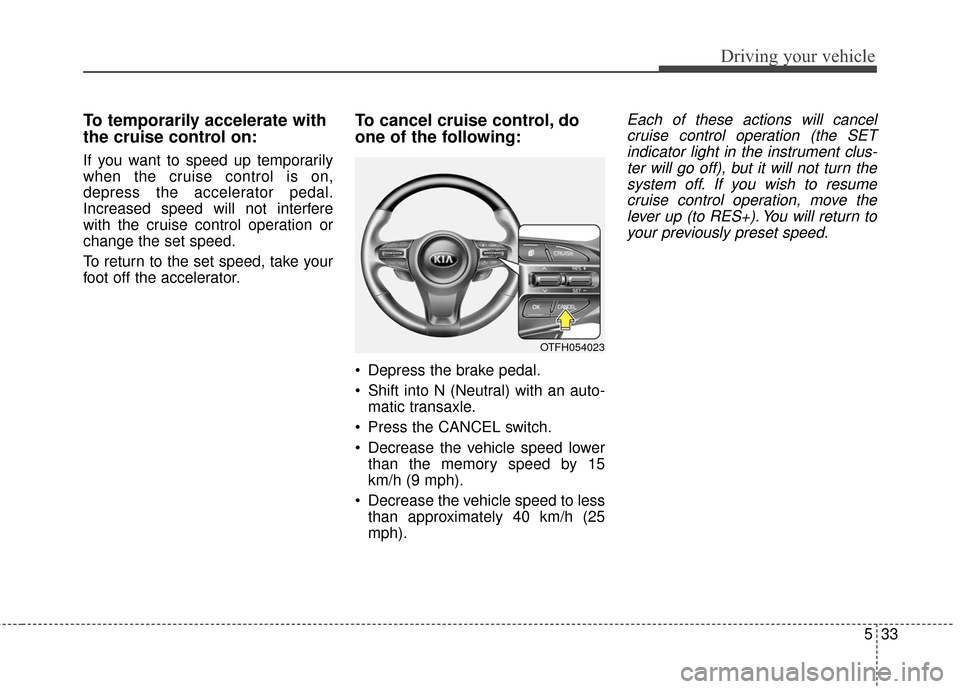
To cancel cruise control, do
one of the following:
Depress the brake pedal.
Shift into N (Neutral) with an auto-matic transaxle.
Press the CANCEL switch.
Decrease the vehicle speed lower than the memory speed by 15
km/h (9 mph).
Decrease the vehicle speed to less than approximately 40 km/h (25
mph).
Each of these actions will cancelcruise control operation (the SETindicator light in the instrument clus-ter will go off), but it will not turn thesystem off. If you wish to resumecruise control operation, move thelever up (to RES+). You will return toyour previously preset speed.
OTFH054023
Page 299 of 466

543
Driving your vehicle
ECONOMICAL OPERATION
Your vehicle's fuel economy depends
mainly on your style of driving, where
you drive and when you drive.
Each of these factors affects how
many miles (kilometers) you can get
from a gallon (liter) of fuel. To operate
your vehicle as economically as pos-
sible, use the following driving sug-
gestions to help save money in both
fuel and repairs:
Drive smoothly. Accelerate at amoderate rate. Don't make "jack-
rabbit" starts or full-throttle shifts
and maintain a steady cruising
speed. Don't race between stop-
lights. Try to adjust your speed to
the traffic so you don't have to
change speeds unnecessarily.
Avoid heavy traffic whenever pos-
sible. Always maintain a safe dis-
tance from other vehicles so you
can avoid unnecessary braking.
This also reduces brake wear.
Drive at a moderate speed. The faster you drive, the more fuel your
vehicle uses. Driving at a moderate
speed, especially on the highway,
is one of the most effective ways to
reduce fuel consumption. Don't "ride" the brake pedal. This
can increase fuel consumption and
also increase wear on these com-
ponents. In addition, driving with
your foot resting on the brake pedal
may cause the brakes to overheat,
which reduces their effectiveness
and may lead to more serious con-
sequences.
Take care of your tires. Keep them inflated to the recommended pres-
sure. Incorrect inflation, either too
much or too little, results in unnec-
essary tire wear. Check the tire
pressures at least once a month.
Be sure that the wheels are aligned correctly. Improper align-
ment can result from hitting curbs
or driving too fast over irregular
surfaces. Poor alignment causes
faster tire wear and may also result
in other problems as well as
greater fuel consumption. Keep your vehicle in good condi-
tion. For better fuel economy and
reduced maintenance costs, main-
tain your vehicle in accordance
with the maintenance schedule in
chapter 7. If you drive your vehicle
in severe conditions, more frequent
maintenance is required (see
chapter 7 for details).
Keep your vehicle clean. For maxi- mum service, your vehicle should
be kept clean and free of corrosive
materials. It is especially important
that mud, dirt, ice, etc. not be
allowed to accumulate on the
underside of the vehicle. This extra
weight can result in increased fuel
consumption and also contribute to
corrosion.
Travel lightly. Don't carry unneces- sary weight in your vehicle. Weight
reduces fuel economy.
Don't let the engine idle longer than necessary. If you are waiting
(and not in traffic), turn off your
engine and restart only when
you're ready to go.
Page 300 of 466
Driving your vehicle
44
5
Remember, your vehicle does not
require extended warm-up. After
the engine has started, allow the
engine to run for 10 to 20 seconds
prior to placing the vehicle in gear.
In very cold weather, however, give
your engine a slightly longer warm-
up period.
Don't "lug" or "over-rev" the engine. Lugging is driving too slowly in a
very high gear resulting in engine
bucking. If this happens, shift to a
lower gear. Over-revving is racing
the engine beyond its safe limit.
This can be avoided by shifting at
the recommended speed. Use your air conditioning sparingly.
The air conditioning system is
operated by engine power so your
fuel economy is reduced when you
use it.
Open windows at high speeds can reduce fuel economy.
Fuel economy is reduced by cross- winds and headwinds. To help off-
set some of this loss, slow down
when driving in these conditions.
Keeping a vehicle in good operating
condition is important both for econ-
omy and safety. Therefore, have an
authorized Kia dealer perform
scheduled inspections and mainte-
nance.
WARNING - Engine off during
motion
Never turn the engine off to
coast down hills or anytime the
vehicle is in motion. The power
steering and power brakes will
not function properly without
the engine running. In addition,
turning off the ignition while
driving could engage the steer-
ing wheel lock resulting in loss
of vehicle steering. Keep the
engine on and downshift to an
appropriate gear for engine
braking effect.
Page 301 of 466
545
Driving your vehicle
Hazardous driving conditions
When hazardous driving conditions
are encountered such as water,
snow, ice, mud, sand, or similar haz-
ards, follow these suggestions:
Drive cautiously and allow extradistance for braking.
Avoid sudden braking or steering.
When braking with non-ABS brakes pump the brake pedal with
a light up-and-down motion until
the vehicle is stopped. Do not pump the brake pedal on a
vehicle equipped with ABS.
If stalled in snow, mud, or sand,
use second gear. Accelerate slow-
ly to avoid spinning the drive
wheels.
Use sand, rock salt, or other non- slip material under the drive
wheels to provide traction when
stalled in ice, snow, or mud.
Rocking the vehicle
If it is necessary to rock the vehicle
to free it from snow, sand, or mud,
first turn the steering wheel right and
left to clear the area around your
front wheels. Then, shift back and
forth between R (Reverse) and any
forward gear in vehicles equipped
with an automatic transaxle. Do not
race the engine, and spin the wheels
as little as possible. If you are still
stuck after a few tries, have the vehi-
cle pulled out by a tow vehicle to
avoid engine overheating and possi-
ble damage to the transaxle.
The ESC system should be turned
OFF prior to rocking the vehicle.
SPECIAL DRIVING CONDITIONS
WARNING - Downshifting
Do not downshift with an auto-
matic transaxle while driving on
slippery surfaces. The sudden
change in tire speed could
cause the tires to skid and
result in an accident.
CAUTION - Vehicle rocking
Prolonged rocking may cause engine overheating, transaxledamage or failure, and tire dam-age.